After MSI install "More Data is Available" when running any exe
Hey All,
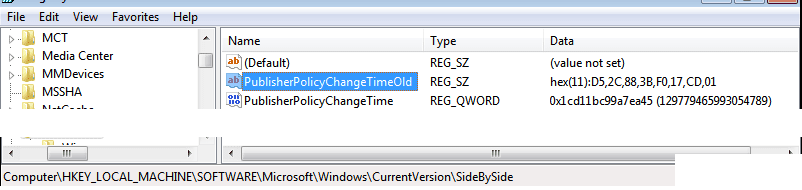
I'm working with the repackaging tool that comes with Admin Studio, to create msi's for imaging. I'm repackaging inside a VM that has windows 7 enterprise 64-bit installed in it, when using the snapshot method, everything seems to be fine, the msi is created. But when I run the msi from the command line to test it (msiexec /i myProgram.msi /passive) it briefly starts the install than stops. After this happens if i try to run any .exe on the system (regedit, notepad, eventviewer, ect) i receive an error message containing the path of the exe i'm trying to run and a message "More Data is Available"(screen shot below). I can't open event viewer or any log files because i keep getting the same errors. I started looking to see what else was causing this error and even trying to modify user permissions on random files also kicks this error. Also if i restart the VM, i get a BSOD and the VM restarts.
I have been doing this for the last 3 summers for a university that leases students laptops with all there course software preloaded. Each year we have used the admin studio repackaging tool with no problems. Now we did switch versions this year, LANDesk included a free version of the tool. Also I have tried the trial version that comes with Admin Studio 11 Enterprise edition and am receiving the same error.
Anyone experienced this before?
Thank You in advance
Hey All,
I'm working with the repackaging tool that comes with Admin Studio, to create msi's for imaging. I'm repackaging inside a VM that has windows 7 enterprise 64-bit installed in it, when using the snapshot method, everything seems to be fine, the msi is created. But when I run the msi from the command line to test it (msiexec /i myProgram.msi /passive) it briefly starts the install than stops. After this happens if i try to run any .exe on the system (regedit, notepad, eventviewer, ect) i receive an error message containing the path of the exe i'm trying to run and a message "More Data is Available"(screen shot below). I can't open event viewer or any log files because i keep getting the same errors. I started looking to see what else was causing this error and even trying to modify user permissions on random files also kicks this error. Also if i restart the VM, i get a BSOD and the VM restarts.
I have been doing this for the last 3 summers for a university that leases students laptops with all there course software preloaded. Each year we have used the admin studio repackaging tool with no problems. Now we did switch versions this year, LANDesk included a free version of the tool. Also I have tried the trial version that comes with Admin Studio 11 Enterprise edition and am receiving the same error.
Anyone experienced this before?
Thank You in advance
Attachments

My Computer
At a glance
win 7 enterprise 64-biti7 - 2620 2.70 GHz
- OS
- win 7 enterprise 64-bit
- CPU
- i7 - 2620 2.70 GHz