After update need to System Restore

MG312

New member
Local time
4:34 PM
Messages
28
Hi

For the past week or so I turn my pc on in the morning, and after 5 minutes I see a window telling me the computer failed to start. I have the option to continue or apply system restore. I have taken the second option each day hoping that MS will be doing something about it and it will one day boot into Windows ok. :sarc:

It boots fine after the system restore, but I would prefer not to do this every day. I realise updates are there for a reason and want to find a fix.

I have attached below a screenshot of the recent updates history. The ones that seem to causing the issue are:

KB4093118
KB982018
KB2952664

Does anyone have any suggestions as to what to try, please? I'm ok with computers generally but certainly not that great at technical stuff. I definitely don't have loads of time free to spend, as this is a pc at my business on a customer facing desk.

Any help would be gratefully appreciated.

Many thanks,

Mark
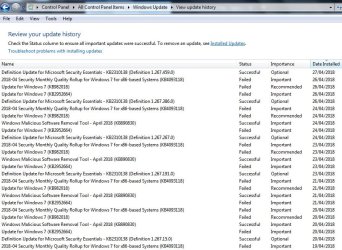
Windows 7 Updates.jpg

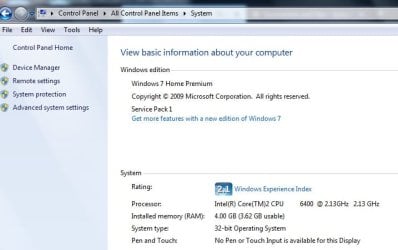
Disp desk pc info.jpg
 

My Computer

Computer type
PC/Desktop
OS
Windows 7 Professional
Hi MG312,

Firstly, have you tried going back to a previous restore point (before each of the updates were installed)?

If you have and the computer was working OK before these updates were installed then you could uninstall each of them in the order below by doing the following:

KB982018: Update for Windows 7 for x64-based Systems (KB982018) - 11-Jul-2011. (Not sure why you have got this update now???)

KB2952664: Update for Windows 7 for x64-based Systems (KB2952664) - 8-Apr-2018.
KB4093118: April 10, 2018—KB4093118 (Monthly Rollup) - 23-Apr-2018.

[1] Click Start and type CMD in the search box.
[2] Right-Click the Command Prompt option and select Run as administrator.
[3] type in: wusa /uninstall /KB:982018 and press Enter.
[4] type in: wusa /uninstall /KB:2952664 and press Enter.
[5] type in: wusa /uninstall /KB:4093118 and press Enter.

Do a restart after each one to see if it boots correctly into the OS.

I hope this helps!
 
Last edited:

My Computer

Computer type
Laptop
Computer Manufacturer/Model Number
Fujitsu LIFEBOOK
OS
Win 7 HP SP1 64-bit Vista HB SP2 32-bit Linux Mint 18.3
CPU
Intel(R) Pentium(R) CPU P6200 @ 2.13GHz
Motherboard
FUJITSU FJNBB06
Memory
4.00 GB
Graphics Card(s)
Intel(R) Graphics Media Accelerator HD
Sound Card
[1] Realtek High Definition Audio [2] Intel(R) Display Audio
Screen Resolution
1366 x 768 x 32 bits (4294967296 colors) @ 59 Hz
Hard Drives
TOSHIBA MK5076GSX
Antivirus
AVG FREE
Thanks, Paul

I'll try that.

I guess I'll then have to disable automatic updates? If I do will it leave my pc vulnerable to attack?
 

My Computer

Computer type
PC/Desktop
OS
Windows 7 Professional
Hi MG312,

I have not seen anyone else having the same problems as you after the installation of updates KB2952664 and KB4093118.

At a guess I would think it may well be KB982018: Update for Windows 7 for x64-based Systems (KB982018) - 11-Jul-2011. Perhaps you have changed or downloaded something that has triggered this update, but I doubt that very much, because I am sure that update would have been updated since 2011 and either re-released or included in another update since then.

What you could do of course is uninstall them one by one with a restart after each and see if that corrects the problem.

Then you could install KB2952664 and restart, then install KB4093118 and restart.

I hope this helps.
 

My Computer

Computer type
Laptop
Computer Manufacturer/Model Number
Fujitsu LIFEBOOK
OS
Win 7 HP SP1 64-bit Vista HB SP2 32-bit Linux Mint 18.3
CPU
Intel(R) Pentium(R) CPU P6200 @ 2.13GHz
Motherboard
FUJITSU FJNBB06
Memory
4.00 GB
Graphics Card(s)
Intel(R) Graphics Media Accelerator HD
Sound Card
[1] Realtek High Definition Audio [2] Intel(R) Display Audio
Screen Resolution
1366 x 768 x 32 bits (4294967296 colors) @ 59 Hz
Hard Drives
TOSHIBA MK5076GSX
Antivirus
AVG FREE
MG312.It would also be a good idea to run a File check on your computer. To do that follow this Forum Tutorial.

SFC /SCANNOW : Run in Command Prompt at Boot - Windows 7 Help Forums

If you have installed the 2018-04 Preview of Monthly Roll Up KB 4093113, then KB 4093118 will not install & continually show up waiting for installation. Most people have just been hiding KB 4093118 to stop this.
 

My Computer

Computer type
PC/Desktop
Computer Manufacturer/Model Number
Self built using existing case
OS
Windows 7 Home Premium 64 bit sp1
CPU
Intel i5 3570 3.4Ghz Ivy Bridge SKT 1155 quad core
Motherboard
Gigabyte Z77-HD3 SKT 1155 2xSata 3, 4x USB 3.0
Memory
G-Skill Rip Jaws 16Gb (8x2) DDR3 -1600 PC3 12800 CL 10 red
Graphics Card(s)
Gigabyte NVIDIA GT610 1Gb DDR3 810/1200 PCI-E 2.0 Silent
Sound Card
NVIDIA High Definition & Realtech High Definition Audio
Monitor(s) Displays
2 x Philips 226V4L 16:9 aspect ratio
Screen Resolution
1920 x 1080 HD
Hard Drives
Samsung 840 Pro 256gb SSD, SATA 3.
Hitachi Touro Portable 1tb, USB 3.0 HDD used for image b/ups.
PSU
Corsair VS450
Case
Codeng
Cooling
PSU fan & CPU fan
Keyboard
Logitech
Mouse
Logitech Wireless trackball M570
Internet Speed
Wireless 3G. 3mg down & 550kb up.
Antivirus
Bitdefender Internet Security 2020
Browser
Opera (Current Version) & Firefox
Other Info
MS Office 2013 Pro. Davis weather station software. MGE Nova 600 avr UPS.
Back
Top