After updating BIOS, Windows 7 won't start up !?

UserInTrouble

New member
Local time
5:56 PM
Messages
42
Please, I need urgent help.
On my brand new ASUS laptop, the automatic ASUS update downloaded and installed the latest BIOS version for Windows. During the process the pop-up windows appeared saying something like "Don't forget to load the default BIOS setting after reboot..."

After reboot, all I got was black screen with a blanking line like in DOS program.
I rebooted again, used ESC, entered BIOS but theres no such option there as load defualt BIOS..
I saved and exited BIOS and still WIndows won't load up.
Please, what should I do ???
 

My Computer My Computer

At a glance

(none)
OS
(none)
entered BIOS but theres no such option there as load defualt BIOS..

Did you use the option?
 

My Computer My Computer

At a glance

ME/XP/Vista/Win7
OS
ME/XP/Vista/Win7
I couldn't find any such option..
Am I doing the right thing, pressing esc after reboot and then enter setup.. but there is no Load Default Bios anywhere..
 

My Computer My Computer

At a glance

(none)
OS
(none)
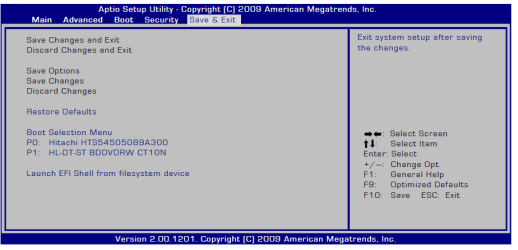
Check for F9 option, this is not your BIOS below.

Asus bios.PNG
 

My Computer My Computer

At a glance

ME/XP/Vista/Win7
OS
ME/XP/Vista/Win7
I thought that was BIOS..
Many thanks theog, I'll try with F9 and report right back..
 

My Computer My Computer

At a glance

(none)
OS
(none)
tried F9 but it only shows black screen & ASUS brand screen loads again with no Windows loading after that..
tried F2 as well, but that brings me back to that screen which You said is not BIOS
 

My Computer My Computer

At a glance

(none)
OS
(none)
What is the exact model laptop?
 

My Computer My Computer

At a glance

Windows 7 x64 pro/ Windows 7 x86 Pro/ XP SP3 x86
Computer Manufacturer/Model Number
Too many to describe...
OS
Windows 7 x64 pro/ Windows 7 x86 Pro/ XP SP3 x86
6、Please reboot the system.Assuming that you have successfully flashed the BIOS file, press DEL
to enter BIOS setup page when ASUS white logo appears during system Boot-up procedure.
7、After entering BIOS setup page, please go to Exit sub-menu and choose "Load Optimal Defaults".
Then click "Save and Exit" and reboot system again. The BIOS flash procedure is no complete.

I tried pressing Delete button, tried with both Delete buttons (theres 1 Delete on numeric part of the keyboard as well..)
BIOS still won't open : ( Any ideas ?
 

My Computer My Computer

At a glance

(none)
OS
(none)
Try F2. Doesnt it say how at the bottom of the screen at post?
 

My Computer My Computer

At a glance

Windows 7 x64 pro/ Windows 7 x86 Pro/ XP SP3 x86
Computer Manufacturer/Model Number
Too many to describe...
OS
Windows 7 x64 pro/ Windows 7 x86 Pro/ XP SP3 x86
I rebooted again, used ESC, entered BIOS but theres no such option there as load defualt BIOS..
I saved and exited BIOS

Use ESC.
 

My Computer My Computer

At a glance

ME/XP/Vista/Win7
OS
ME/XP/Vista/Win7
There has to be. Get yourself a coffee and comb carefully through each option. Otherwise contact Asus.
 

My Computer My Computer

At a glance

Windows 7 x64 pro/ Windows 7 x86 Pro/ XP SP3 x86
Computer Manufacturer/Model Number
Too many to describe...
OS
Windows 7 x64 pro/ Windows 7 x86 Pro/ XP SP3 x86
This is what I found on Asus Service website.
Troubleshooting

In this page:

Restart your computer, enter the BIOS by pressing F2 when ASUS logo appears. Switch to Exit menu and select Load Manufacture Default. Press F10 save and exit.

Hope this will help you...
 

My Computer My Computer

At a glance

MS Windows 7 Ultimate 64-bit SP1i5-2410M 2.3GHz (2.9GHz Turbo-Boost) Sandy Br...4GB+4GB Samsung DDR3 PC3-10700 (1333 MHz)Video Intel(R) HD Graphics Family, 1696MB ava...
Computer Manufacturer/Model Number
Toshiba Satellite P775-S7232
OS
MS Windows 7 Ultimate 64-bit SP1
CPU
i5-2410M 2.3GHz (2.9GHz Turbo-Boost) Sandy Bridge 32nm
Motherboard
Toshiba PHRAA ver. PSBY1U-00F003
Memory
4GB+4GB Samsung DDR3 PC3-10700 (1333 MHz)
Graphics Card(s)
Video Intel(R) HD Graphics Family, 1696MB available memory
Sound Card
Realtek High Definition Audio version=6.0.1.6323
Monitor(s) Displays
17.3 " Trubrite TFT LCD, LED Backlit
Screen Resolution
1600x900 32 bit, Native support for 720P content
Hard Drives
TOSHIBA MK6476GSXN
580.614 [GB] partitioned C: 80GB and D: 500GB with hidden recovery partitons.

Spare bay for 2nd HDD but no SATA connector :-(
PSU
Toshiba AC/DC Adapter
Case
Notebook
Cooling
Built-in Fan
Keyboard
Premium Raised Tile keyboard
Mouse
Logitech M215 wireless mouse
Internet Speed
Not fast enough
Other Info
Built-in Harman Kardon speakers with Dolby Advanced Audio, Waves MaxxAudio® 3. HDMI, 1xUSB3+3xUSB2 ports, WebCam, Battery life 4hrs 11mins, 4GB Readyboost SDHC card, WD My Book Essential Ext HDDs 2 TB, 2x1TB, My Passport SE 1TB and WDTV 1st Gen for Multimedia playing on a Sony Wega 32" LCD.
Recent addition to my toys are Asus Transformer Pad TF300T with 32GB onboard sd card + 32GB microsd card.
I pressed F2, entered that screen that turns out to be BIOS after all, went to EXIT submenu, LOADED OPTIMAL DEFAULTS, saved & exit... did everything and Windows 7 still won't load ! Blank screen again with that blinking thing like in DOS.

I feel doomed, I should never should have accepted automatic Bios update by Asus.
I'm afraid now my perfectly new laptop is dead.
 

My Computer My Computer

At a glance

(none)
OS
(none)
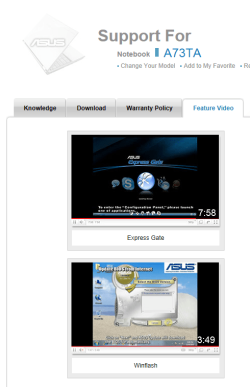
Did you follow the video?
 

My Computer My Computer

At a glance

ME/XP/Vista/Win7
OS
ME/XP/Vista/Win7
This is a brand new laptop, you shouldn't have to struggle so much. While we can all start telling you to run memory diags, hard disk diags etc., I think you should contact Asus and get them to set it right for you. And its really moronic of OEMs to push bios updates like any regular run of the mill update.
 

My Computer My Computer

At a glance

Windows 7 x64 pro/ Windows 7 x86 Pro/ XP SP3 x86
Computer Manufacturer/Model Number
Too many to describe...
OS
Windows 7 x64 pro/ Windows 7 x86 Pro/ XP SP3 x86
Back
Top