

Hello,
I recently bought a new laptop LENOVO Z500 that came with a Windows 8 64-bit OS. I clean installed Windows 7 Pro 32-bit coz our company program needs this partiular OS. Now i've successfully installed all drivers that had an exclaimation mark from the device driver window. But the problem is that I cant find the turbo boost option from the services.msc menu. does that mean that turbo boost won't kick in anymore? how can i fix this?
I checked from the download site of lenovo where i got all the drivers but there wasnt any TURBO BOOST DRIVER download present.
Please help out. I'm sensing from a couple of autocad work that I did theres some kind of lag going on. so it got me thinking that the TURBO BOOST aint working anymore.
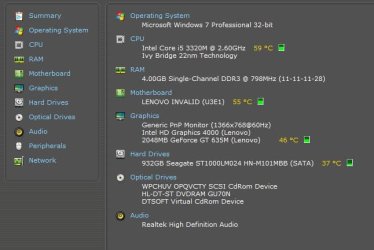
here's the unit specs:
Operating System
Microsoft Windows 7 Professional 32-bit
CPU
Intel Core i5 3320M @ 2.60GHz 62 °C
Ivy Bridge 22nm Technology
RAM
4.00GB Single-Channel DDR3 @ 798MHz (11-11-11-28)
Motherboard
LENOVO INVALID (U3E1) 59 °C
Graphics
Generic PnP Monitor (1366x768@60Hz)
Intel HD Graphics 4000 (Lenovo)
2048MB GeForce GT 635M (Lenovo) 51 °C
Hard Drives
932GB Seagate ST1000LM024 HN-M101MBB (SATA) 38 °C
Optical Drives
HL-DT-ST DVDRAM GU70N
WPCHUV OPQVCTY SCSI CdRom Device
DTSOFT Virtual CdRom Device
Audio
Realtek High Definition Audio
I recently bought a new laptop LENOVO Z500 that came with a Windows 8 64-bit OS. I clean installed Windows 7 Pro 32-bit coz our company program needs this partiular OS. Now i've successfully installed all drivers that had an exclaimation mark from the device driver window. But the problem is that I cant find the turbo boost option from the services.msc menu. does that mean that turbo boost won't kick in anymore? how can i fix this?
I checked from the download site of lenovo where i got all the drivers but there wasnt any TURBO BOOST DRIVER download present.
Please help out. I'm sensing from a couple of autocad work that I did theres some kind of lag going on. so it got me thinking that the TURBO BOOST aint working anymore.
here's the unit specs:
Operating System
Microsoft Windows 7 Professional 32-bit
CPU
Intel Core i5 3320M @ 2.60GHz 62 °C
Ivy Bridge 22nm Technology
RAM
4.00GB Single-Channel DDR3 @ 798MHz (11-11-11-28)
Motherboard
LENOVO INVALID (U3E1) 59 °C
Graphics
Generic PnP Monitor (1366x768@60Hz)
Intel HD Graphics 4000 (Lenovo)
2048MB GeForce GT 635M (Lenovo) 51 °C
Hard Drives
932GB Seagate ST1000LM024 HN-M101MBB (SATA) 38 °C
Optical Drives
HL-DT-ST DVDRAM GU70N
WPCHUV OPQVCTY SCSI CdRom Device
DTSOFT Virtual CdRom Device
Audio
Realtek High Definition Audio
Attachments
My Computer
- Computer Manufacturer/Model Number
- Samsung Electronics - NP-R580-JS01SA
- OS
- Windows 7 Home Premium 32bit
- CPU
- Intel(R) Core(TM) i5 M 520 @ 2.40Ghz
- Motherboard
- SAMSUNG ELECTRONICS CO. R580
- Memory
- 4GB DDR3 RAM
- Graphics Card(s)
- 1 GB NVidia Geforce GT 330M
- Sound Card
- Realtek High Definition V. 6.6
- Monitor(s) Displays
- Generic PnP monitor
- Screen Resolution
- 1366 x 768
- Hard Drives
- 500 GB IDE/SATA


