
How to Enable HIPM and DIPM for your SSD and HDD in Windows 7 and Windows 8
Information
AHCI Link Power Management is a technique where the SATA AHCI controller puts the SATA link to the internal HDD and/or SSD disk into a very low power mode when there's no IO (input/output) activity for awhile. The controller automatically puts the link back into active power state when there's real work to be done. This is done to save power consumption by the HDD and/or SSD disk.
This tutorial will show you how to add the AHCI Link Power Management - HIPM/DIPM and AHCI Link Power Management - Adaptive options under Hard disk in the advanced power plan settings to be able to enable or disable HIPM or HIPM+DIPM to manage the power usage of your internal SATA HDD and SSD drives in Windows 7 and Windows 8.
You must be logged in as an administrator to be able to do this tutorial.
This tutorial will show you how to add the AHCI Link Power Management - HIPM/DIPM and AHCI Link Power Management - Adaptive options under Hard disk in the advanced power plan settings to be able to enable or disable HIPM or HIPM+DIPM to manage the power usage of your internal SATA HDD and SSD drives in Windows 7 and Windows 8.
You must be logged in as an administrator to be able to do this tutorial.
Note
HIPM = Host Initiated Link Power Management
DIPM = Device Initiated Link Power Management
For more detailed information, see: Designing Energy Efficient SATA Devices: 2011-2013 Platforms
Warning
Your SSD and HDD drives must support HIPM and DIPM, and must have a SATA connection with AHCI mode enabled in the BIOS for them to be able to have their power usage managed.
AHCI is is usually enabled in the BIOS by you before installing Windows 7. If you didn't, then you will need to enable AHCI after the installation Windows 7 before doing this tutorial.
AHCI is is usually enabled in the BIOS by you before installing Windows 7. If you didn't, then you will need to enable AHCI after the installation Windows 7 before doing this tutorial.
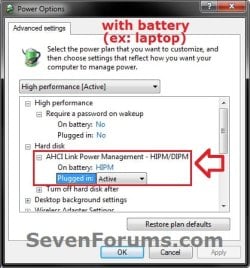
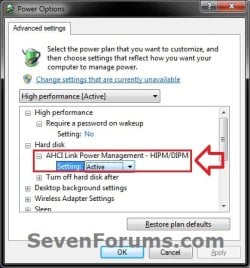
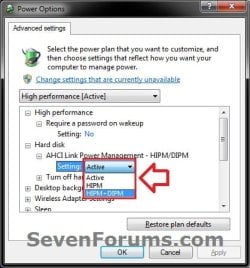
EXAMPLE: "AHCI Link Power Management - HIPM/DIPM" Added
NOTE: This will let you set to use HIPM, HIPM+DIPM, or Active while "on battery" or "plugged in". The Active setting means do not have HIPM or DIPM enabled.
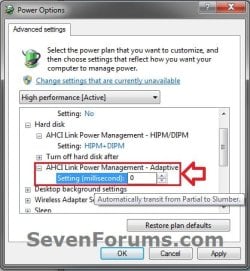
EXAMPLE: "AHCI Link Power Management - Adaptive" Added
NOTE: This will let you set the period of AHCI link idle time before the link is put into a slumber state when you have HIPM or HIPM+DIPM set above. You can set this to be from 0 to 300,000 (5 minutes) milliseconds. If you have Active set above, then this will have no affect.
Here's How:
1. Check the red warning box above to make sure you meet the requirements to use HIPM and DIPM.
2. Add "AHCI Link Power Management-HIPM/DIPM" to Advanced Power Settings
A) Click on the Download button below to download the file below.
Add_AHCI_Link_Power_Management_HIPM-DIPM.reg
Download
B) Go to step 4.
3. Remove "AHCI Link Power Management-HIPM/DIPM" from Advanced Power Settings
NOTE: This is the default setting.
A) Click on the Download button below to download the file below.
Remove_AHCI_Link_Power_Management_HIPM-DIPM.reg
Download
4. Save the .reg file to the desktop.
5. Right click on the downloaded .reg file, and click on Merge.
6. When prompted, click on Run, Yes, Yes and OK.
7. You can now delete the downloaded .reg file if you like.
8. If added, you will now be able to set HIPM and DIPM settings for your internal HDD and SSD drives in the AHCI Link Power Management - HIPM/DIPM and AHCI Link Power Management - Adaptive option under Hard disk in the advanced power plan settings.
That's it,
Shawn
Related Tutorials
- How to Enable AHCI in Vista and Windows 7 after Installation
- How to Enable AHCI in Windows 8 and Windows 10 after Installation
- How to Change the Power Plan Settings in Windows 7
- How to Change Power Plan Settings in Windows 8
- How to Turn Off Hard Disk After so many Minutes of being Idle or Never
- How to Turn On or Off "USB Selective Suspend" for Idle USB Devices
- How to Create a "Advanced Power Options" Shortcut in Windows 7
- How to Add or Remove "Enable forced button/lid shutdown" in Power Options
- How to Add or Remove "Hard disk burst ignore time" in Power Options
- How to Add or Remove "System unattended sleep timeout" in Power Options
Attachments
Last edited:

