setting up new 850 EVO SSD-AHCI and cloning questions

Ahci

New member
Local time
1:03 PM
Messages
3
I'm installing a 500gb samsung 850 Evo SSD and want to clone my current setup on my 500gb platter hard drive to it. I have an asus M4A77TD mobo with Windows 7 64-bit and I'm not sure if I have AHCI set up properly. I think the current platter drive is running in IDE mode looking at the bios (it is not set to AHCI, but IDE controller setting) and device manager. I'd like to avoid reinstalling windows and read that you can make registry edits to enable AHCI after win7 installation. I read you need to make 2 changes in registry, restart into bios and switch controller setting to ACHI. this is what my current registry values are: msahci start value reads 0 already - does this mean I have AHCI enabled and my current drive is just running in IDE mode? Pcide still says 0 though. so does that mean that AHCI is not installed or enabled then? is there a way to check this without having a drive using AHCI currently?

Now about cloning: I plan on using Macrium Reflect to clone my drive to the new SSD. I'm unsure of the steps to do this and how to keep the SSD drive letter as C: during the process. I will plug in both drives to the mobo with sata cables (not usb) and reboot using Macrium Reflect CD software to clone the process outside of windows (is this necessary or can I do this in windows from my current drive?). I don't understand if the drive letters matter - since I'm making an exact clone of my current install, it must remain C: I assume to keep shortcuts and locations in tact etc. Assuming that Macrium Reflect assigns a different letter to the new SSD (not C:\ ), will it automatically be designated as C:\ on reboot after removing my current (then old) hard drive and setting the new SSD to the primary boot HD in bios? Thanks.
 

My Computer My Computer

At a glance

Win 7 64bit
Computer type
PC/Desktop
OS
Win 7 64bit
Hi Ahci,

after searching a bit I found this:
http://www.sevenforums.com/tutorials/61869-ahci-enable-windows-7-vista.html?ltr=A

And you don't need to use Macrium Reflect, you can use the Samsung Data Migration Software that comes with the Samsung 850 Evo SSD:
Samsung SSD Downloads | Samsung SSD
It will take care of assigning the drive letter and yeah it will remove the old HDD as the active drive though I would still recommend going into the BIOS and checking the boot order, because honestly no one wants to wait for Windows to boot.

/Boris :)
 

My Computer My Computer

At a glance

Windows 7 Home Premiumi5-3570k16 GB DDR3 G Skill SniperGIGABYTE GeForce GTX 970 GV-N970WF3OC-4GD
Computer type
PC/Desktop
Computer Manufacturer/Model Number
Custom build
OS
Windows 7 Home Premium
CPU
i5-3570k
Motherboard
ASUS Sabertooth z77
Memory
16 GB DDR3 G Skill Sniper
Graphics Card(s)
GIGABYTE GeForce GTX 970 GV-N970WF3OC-4GD
Monitor(s) Displays
ASUS ROG PG278Q
Screen Resolution
2560x1440@60Hz/120Hz/144Hz
Hard Drives
56GB KINGSTON SVP200S37A60G
512GB Crucial MX100
1863GB Seagate ST2000DM001-1CH164
2795GB Seagate ST3000DM001-9YN166
PSU
Corsair GS800
Case
Storm Trooper Stryker White
Keyboard
Logitech G910 Orion Spark
Mouse
Logitech G502
Antivirus
MSE
Browser
Firefox/Chrome
Other Info
Logitech G633
Logitech Mouse Matt
Thanks for the response. I am already familiar with the tutorial showing how to make the reg edits, but the more I'm reading about it, the more confused I'm getting because different sets of instructions say to change different things to different values.

One youtube video states to change msahci start value to 0, and the one in pciide to 3, while another says to change pciide to 0 (same as msahci start value). Now this tutorial you link to does not mention pciide, but states to change an additional value under iaStorV, which the other two sets of instructions don't even mention....so which is it?? what's the correct procedure???

Also..I just thought of this - can I just make the change to AHCI now with my current platter drive installed (the SSD is not installed yet)? I think my mobo supports it and the current HDD is a sata capable drive I believe. If that's the case, can I: 1) enable AHCI through regedit and reboot in bios now and continue to use the platter drive, 2) install the SSD later with AHCI already set and clone my platter drive to the SSD? is this okay?

As far as cloning, a lot of reviewers on websites say that using Samsung's data migration is a bad idea. My previous experience with Samsung software has been all bad and I will avoid using their software. I think I saw a video where someone did it through Macrium Reflect even in windows and it seemed to work (Though he had the SSD plugged in through USB - don't know if that makes a difference, I will have mine in the desktop plugged into the motherboard with the current HDD), so I guess the drive letter will be assigned as C:\ to the SSD on reboot...I hope.

Thanks again for any help.
 
Last edited:

My Computer My Computer

At a glance

Win 7 64bit
Computer type
PC/Desktop
OS
Win 7 64bit
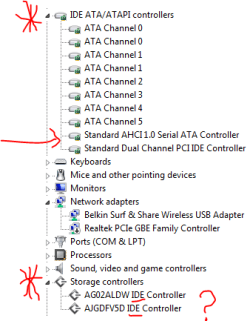
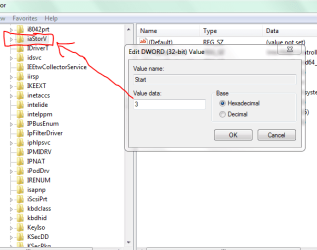
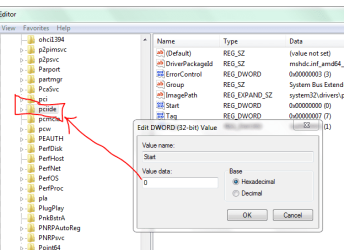
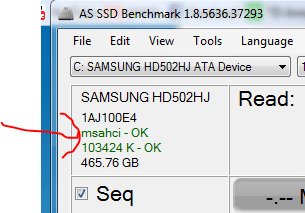
I actually just decided to try changing the setting in bios and windows booted and AS SSD benchmark program shows that msahci is 'OK'. The thing is I didn't install a driver or change the registry ( I may have installed a driver long ago but didn't remember). My registry values are not what they are supposed to be according to tutorials I've read - msahci start is '0', but iaStorV is at '3' (should be '0') and pciide start value is '0' as well (should be '3'). Yet i do not see any problems right now. Should I leave everything alone?

I guess I don't really have confidence that my AHCI is set up properly: here are pics of my device manager and registry - could you guys let me know if these look ok?
 

Attachments

  • device manager.PNG
    device manager.PNG
    8.9 KB · Views: 11
  • iastorvreg.PNG
    iastorvreg.PNG
    19.5 KB · Views: 11
  • pciidereg.PNG
    pciidereg.PNG
    20.8 KB · Views: 11
  • assd.PNG
    assd.PNG
    8.5 KB · Views: 11

My Computer My Computer

At a glance

Win 7 64bit
Computer type
PC/Desktop
OS
Win 7 64bit
Back
Top