Album Info Not Displaying in Explorer

TechN9Ne1730

New member
Member
Local time
12:08 PM
Messages
44
How does win 7 go about getting the info to display artist,album,track number, and bitrate? The reason I ask is because none of this info displays for me in Win 7 when browsing folders with MP3s even though the I can browse the music in Winamp and see the Basic Info, ID3V1 and ID3V2 profiles are filled out. How can I fix this?
 

My Computer My Computer

At a glance

Windows 7 Ultimate x64 RTMIntel Core i7 8602x2GB G.Skill RipjawsSapphire Raedon HD 4890
OS
Windows 7 Ultimate x64 RTM
CPU
Intel Core i7 860
Motherboard
MSI P55-GD64
Memory
2x2GB G.Skill Ripjaws
Graphics Card(s)
Sapphire Raedon HD 4890
Monitor(s) Displays
Dell 2208 WFP
Screen Resolution
1680x1050
Hard Drives
2x80 GB Intel X25M G2 SSDs RAID0
1x1 TB WD Caviar Black
1x1 TB WD Caviar Green
1x2 TB Caviar Black
1x2 TB Caviar Green
PSU
Corsair HX520
Case
Thermaltake Mozart TX
Keyboard
Saitek Cyborg
Mouse
Razer Copperhead
Internet Speed
6 Mb/s
My Album info is shown through dbpoweramp so I'm not sure if explorer is supposed to show anything (means I don't recall if there was Info shown in explorer before I installed dbpoweramp). Usually Win 7 shows the necessary info in WMP or in the media library.
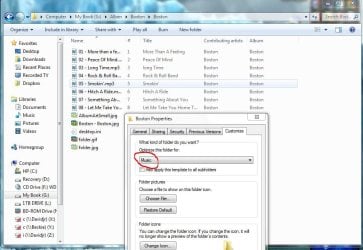
But you could try if the folders in question are set to the right format:
Capture.JPG


Hope it helps

-DG
 

My Computer My Computer

At a glance

Windows 7 Ultimate x86DualCore AMD Athlon 64 X2, 2600 MHz 5200+Samsung 2GB DDR2Onboard NVIDIA GeForce 6150SE nForce 430
Computer Manufacturer/Model Number
HP m8000n
OS
Windows 7 Ultimate x86
CPU
DualCore AMD Athlon 64 X2, 2600 MHz 5200+
Motherboard
Asus M2N68-LA (Narra)
Memory
Samsung 2GB DDR2
Graphics Card(s)
Onboard NVIDIA GeForce 6150SE nForce 430
Sound Card
Onboard nVIDIA nForce 6100-430 (MCP61P)
Monitor(s) Displays
Westinghouse 19" LED
Screen Resolution
1280x1024
Hard Drives
SATA II Seagate Barracuda 500GB
USB II WD Elements 500GB
USB II WD My Book 1TB
USB II WD My Book 2TB
PSU
Stock (HP)
Case
Stock (HP)
Cooling
Stock
Keyboard
Logitech Classic KB 200
Mouse
Standard HP opticle USB mouse
I tried the solution you posted in the screen shot and it failed. Thanks for the screen shot of dbpoweramp. Didnt realize it integrated in to explorer like that. I may try it but I also found a freeware app called AudioShell that looks to do the same thing and dbpoweramp looks like it is a piad amp unless I missed something.
 

My Computer My Computer

At a glance

Windows 7 Ultimate x64 RTMIntel Core i7 8602x2GB G.Skill RipjawsSapphire Raedon HD 4890
OS
Windows 7 Ultimate x64 RTM
CPU
Intel Core i7 860
Motherboard
MSI P55-GD64
Memory
2x2GB G.Skill Ripjaws
Graphics Card(s)
Sapphire Raedon HD 4890
Monitor(s) Displays
Dell 2208 WFP
Screen Resolution
1680x1050
Hard Drives
2x80 GB Intel X25M G2 SSDs RAID0
1x1 TB WD Caviar Black
1x1 TB WD Caviar Green
1x2 TB Caviar Black
1x2 TB Caviar Green
PSU
Corsair HX520
Case
Thermaltake Mozart TX
Keyboard
Saitek Cyborg
Mouse
Razer Copperhead
Internet Speed
6 Mb/s

My Computer My Computer

At a glance

Windows 7 Ultimate x86DualCore AMD Athlon 64 X2, 2600 MHz 5200+Samsung 2GB DDR2Onboard NVIDIA GeForce 6150SE nForce 430
Computer Manufacturer/Model Number
HP m8000n
OS
Windows 7 Ultimate x86
CPU
DualCore AMD Athlon 64 X2, 2600 MHz 5200+
Motherboard
Asus M2N68-LA (Narra)
Memory
Samsung 2GB DDR2
Graphics Card(s)
Onboard NVIDIA GeForce 6150SE nForce 430
Sound Card
Onboard nVIDIA nForce 6100-430 (MCP61P)
Monitor(s) Displays
Westinghouse 19" LED
Screen Resolution
1280x1024
Hard Drives
SATA II Seagate Barracuda 500GB
USB II WD Elements 500GB
USB II WD My Book 1TB
USB II WD My Book 2TB
PSU
Stock (HP)
Case
Stock (HP)
Cooling
Stock
Keyboard
Logitech Classic KB 200
Mouse
Standard HP opticle USB mouse
Back
Top