All browsers suddenly slow

Splatticus

New member
Local time
11:50 PM
Messages
1
For some reason, only half the number of images load on facebook, youtube videos are slow to load and all the browsers I have tried (default Chrome) are very slow. Usually however my browser speed is fast for 2 minutes after resetting the PC. I have tried clearing history, cache, and my internet speed is fine as I play League of Legends and Skype is fine too. I have also tried resintalling chrome, adobe flash and have deleted latest windows updates. Would resetting the modem possibly help? What else could it be? Thanks, Ashley ~x~
 

My Computer

Computer type
PC/Desktop
Computer Manufacturer/Model Number
Custom build
OS
Windows 8 64bit
CPU
blabla
Antivirus
McAf
Browser
Chrome
Resetting your router/modem would be the first thing I would do.
Have you run a speed test to what your actual upload/download is ?
 

My Computer

Computer type
PC/Desktop
Computer Manufacturer/Model Number
Pauly Special
OS
Win7 Ultimate X64
CPU
Intel i5 3570K
Motherboard
Gigabyte Z77X-DS3H
Memory
8GB DDR3 1600
Graphics Card(s)
Onboard
Sound Card
Onboard
Screen Resolution
1280x1024
Hard Drives
Samsung 840 Evo SSD (OS)
1TB Spinner (Data)
PSU
800W Arctic
Case
Cooler Master
Cooling
3x120mm Fans
Keyboard
MS Wireless
Mouse
MS Wireless
Internet Speed
20M
Well, this is a W7 forum and you're running W8, but does Task Manager show heavy usage by one or more processes when this slowness is occurring? I've seen this before as a result of a browser hijack.
 

My Computer

Computer type
PC/Desktop
Computer Manufacturer/Model Number
ASUS
OS
Windows 7 Home Premium 64 bit SP1
CPU
i5-2320 @3.00 GHz
Memory
6GB
Graphics Card(s)
NVIDIA GeForce 7300 LE
Monitor(s) Displays
Acer S200HQL 19.5 LED
Screen Resolution
1280 x 800 (1900 x 900 max)
Hard Drives
Drive 1: 1 TB SATA internal: C drive
Drive 2: 250 GB SATA internal: User Data Backup
Drive 3: 500 GB SATA USB: Full System Backup 1, Father
Drive 4: 500 GB SATA USB: Full System Backup 2, Son
Drive 5: 40 GB IDE USB: Kindle, ASUS Tabl
Keyboard
ASUS KB34211
Mouse
Logitech m325 cordless
Internet Speed
27Mb down, 3 Mb up cable modem w/Netgear R6400 WiFi
Antivirus
NIS, Spybot S&D, CCleaner, Malwarebytes, MSERT, MRT
Browser
FF v44.0.2;IE11 v11.0.9600.18015,uv11.0.23;Chrome v44.0.2403
Other Info
FF has AdBlockPlus and Ghostery plugins,
I have noticed that anything off of the main home page of Huffington Post (i.e. the articles themselves) now cause my CPU fan to rev up and spin loudly. Interestingly, I notice that the font used on these article pages has also changed.

I am using "hardware acceleration" in Firefox, but the problem does appear to be Flash19.0.

When I go into Resource Manager (or Security Task Manager) and sort on CPU, it turns out Flash 19.0 is using 65% of the CPU when I'm on these off-home HuffPost pages.

In contrast, on THIS site (SevenForums) which does not use Flash, everything is quiet and CPU usage is minimal.

So it seems more to be site-design, font used, ads present (or suppressed by AdBlock Plus, etc.), imbedded video links, etc., in other words anything that involves Flash seems to suddenly be burning up the CPU which in turn makes things appear to be very slow. Page scrolling is slow, going to imbedded other links is slow... and I'm sure it's all caused by Flash 19.0.

I wonder if Adobe will fix this, or if we're somehow now doomed. This was not a problem until recently.
 

My Computer

Computer type
PC/Desktop
Computer Manufacturer/Model Number
Home-built, two systems (1) and (2)
OS
Windows 7 Pro x64 (1), Win7 Pro X64 (2)
CPU
i5-3350p 3.1Ghz/6MB-cache (1); E8400 3.0Ghz/6MB-cache (2)
Motherboard
ASUS P8Z77-V Pro (1); ASUS P5Q3 (2)
Memory
8GB PC3-12800 DDR3 (1); 4GB PC3-10600 DDR3 (2)
Graphics Card(s)
ATI HD7750 (1), (see TV cards); ATI R7 250 (2)
Sound Card
Realtek ALC892 HD Audio (1); Realtek ALC1200 HD Audio (2)
Monitor(s) Displays
Eizo HD2441W LCD, Eizo S2433W (1); Eizo 24" S2433W (2)
Screen Resolution
1920x1200, 1920x1200 (1); 1920x1200 (2)
Hard Drives
(1) 1TB SATA-II (7200RPM), 2x2TB SATA-III (7200RPM), 250GB SATA-III (10000RPM) for OS; 2x2TB external USB 3.0

(2) 320GB SATA-II (7200RPM), 750GB SATA-II (7200RPM), 150GB SATA-II (10000RPM) for OS; 2TB external USB 3.0
PSU
Nesteq ECS-6001 600W (1); Nesteq ECS-5001 500W (2)
Case
Acousti-Case 360 (1) and (2)
Cooling
Noctua NH-U12P SE2 for CPU, 2x120mm case fans (1) and (2)
Keyboard
IBM PS/2 (1) and (2)
Mouse
Logitech MX Revolution wireless (1); Microsoft wired (2)
Internet Speed
100mbps down / 10mbps up
Antivirus
Microsoft Security Essentials; Malwarebyte Anti-Malware Pro
Browser
Firefox
Other Info
Ceton InfiniTV 4-tuner cablecard-enabled TV card as well as Hauppauge HVR-2250 OTA/ATSC 2-tuner TV card in (1), running under Win7 WMC
dsperber: I went to Huffington Post and opened a few stories. Very short burst of CPU usage by FF v42.0 with Flash v19.0 and no hardware acceleration, up to 3% of CPU when the off home page story is opened and then it settles down to normal. Didn't turn AdBlockPlus and Ghostery off though.
 

My Computer

Computer type
PC/Desktop
Computer Manufacturer/Model Number
ASUS
OS
Windows 7 Home Premium 64 bit SP1
CPU
i5-2320 @3.00 GHz
Memory
6GB
Graphics Card(s)
NVIDIA GeForce 7300 LE
Monitor(s) Displays
Acer S200HQL 19.5 LED
Screen Resolution
1280 x 800 (1900 x 900 max)
Hard Drives
Drive 1: 1 TB SATA internal: C drive
Drive 2: 250 GB SATA internal: User Data Backup
Drive 3: 500 GB SATA USB: Full System Backup 1, Father
Drive 4: 500 GB SATA USB: Full System Backup 2, Son
Drive 5: 40 GB IDE USB: Kindle, ASUS Tabl
Keyboard
ASUS KB34211
Mouse
Logitech m325 cordless
Internet Speed
27Mb down, 3 Mb up cable modem w/Netgear R6400 WiFi
Antivirus
NIS, Spybot S&D, CCleaner, Malwarebytes, MSERT, MRT
Browser
FF v44.0.2;IE11 v11.0.9600.18015,uv11.0.23;Chrome v44.0.2403
Other Info
FF has AdBlockPlus and Ghostery plugins,
I have noticed that anything off of the main home page of Huffington Post (i.e. the articles themselves) now cause my CPU fan to rev up and spin loudly. Interestingly, I notice that the font used on these article pages has also changed.

I am using "hardware acceleration" in Firefox, but the problem does appear to be Flash19.0.

When I go into Resource Manager (or Security Task Manager) and sort on CPU, it turns out Flash 19.0 is using 65% of the CPU when I'm on these off-home HuffPost pages.

In contrast, on THIS site (SevenForums) which does not use Flash, everything is quiet and CPU usage is minimal.

So it seems more to be site-design, font used, ads present (or suppressed by AdBlock Plus, etc.), imbedded video links, etc., in other words anything that involves Flash seems to suddenly be burning up the CPU which in turn makes things appear to be very slow. Page scrolling is slow, going to imbedded other links is slow... and I'm sure it's all caused by Flash 19.0.

I wonder if Adobe will fix this, or if we're somehow now doomed. This was not a problem until recently.

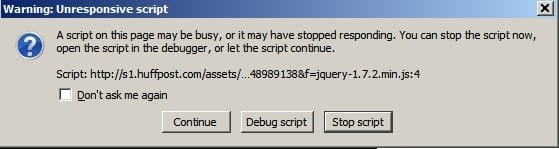
I get problems with the site. Unresponsive script and numerous certificate changes. It's heavy with trackers and there are video platforms that use flash.
The Huffington Post United Kingdom 4 - Cyberfox.jpg

I have an add on "plugins click to play per element" that only loads flash content for an element when it is clicked on rather than allowing flash content for the whole page and all the domains.
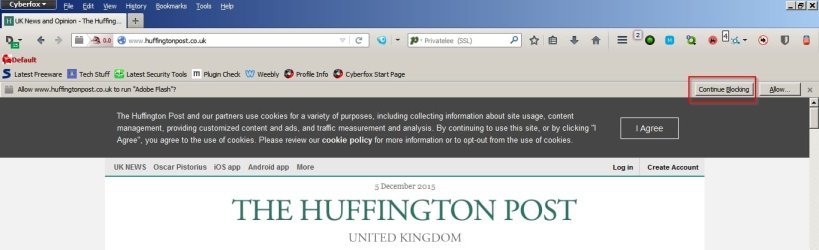
The Huffington Post United Kingdom - Cyberfox.jpg

If flash is blocked completely then the site works okay but obviously no flash content will display.

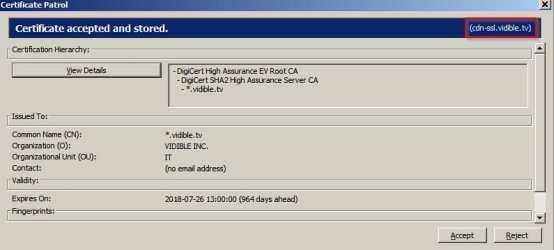
I had to accept numerous certificates. Here's one example.
The Huffington Post United Kingdom 2 - Cyberfox.jpg

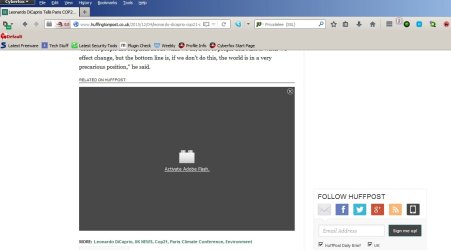
With click to play per element activated:
The Huffington Post United Kingdom 3 - Cyberfox.jpg

These settings are specifically used in my browser but yours will be different.
In about:config "plugins.click_to_play" must be "true".
On about:addons (plugins page) required plugin must be "Ask to activate" if I want to enable the plugin on the page and not the whole website by clicking the "Allow Now" button
in about:config "plugin.sessionPermissionNow.intervalInMinutes" is set to 0 (zero)

Now the interesting part is that the site works without any problem only if:

HOSTS file is the default one.
Any ad blocking is disabled.
Flash plugin detection - when asked choose "Allow Now and Remember" - if I just choose "Allow Now" I get another prompt within seconds.

There are many domains that must not be blocked for the site to work properly.

I don't believe there's a problem with Adobe Flash Player as I can get the website to work by disabling a whole lot of things that block scripts, ads, trackers etc.

 

My Computer

Computer type
Laptop
Computer Manufacturer/Model Number
ASUS
OS
Microsoft Windows 7 Home Premium 64-bit 7601 Multiprocessor Free Service Pack 1
CPU
AMD C-60 APU with Radeon(tm) HD Graphics
Motherboard
ASUSTeK COMPUTER INC. X501U
Memory
4.00 GB
Graphics Card(s)
AMD Radeon HD 6290 Graphics
Sound Card
(1) AMD High Definition Audio Device (2) Realtek High Defi
Screen Resolution
1366 x 768 x 32 bits (4294967296 colors) @ 60 Hz
Hard Drives
Hitachi HTS545050A7E380 SATA Disk Device
Antivirus
Comodo CIS & FW, SecureAplus App Whitelisting, Threatfire
Browser
Cyberfox 64bit, Opera 64bit, Airfox
Other Info
Spy-The-Spy, HitmanPro.Alert, Norton Connect Safe, MJRegWatcher, BitDefender TrafficLight, Voodoo Shield, Zemana AntiMalware
Back
Top