All in Wonder 2006 / Catalyst

crossgar

New member
Local time
1:26 AM
Messages
5
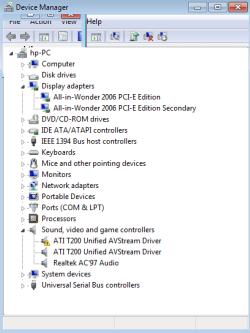
I have an x1300 All in wonder 2006. I just installed Windows 7. I had a black screen so I had to unplug my second monitor (DVI to Infocus Projector).

How do I get back dual monitors?

Will I be able to use the TV tuner in AIW 2006?

I tried installing Catalyst 8.1 but right at the end of install I get:

"this driver is intended to run only on windows xp/2000 "

and the install fails. Any ideas?
 
Last edited by a moderator:

My Computer My Computer

OS
w 7
crossgar

Hi and welcome to sevenforums. i have the same card. On way to get around that error message is to install the driver in xp compatibility mode. On the installer right-click go to properties and compatibilty tab. check run in xp compat mode and see if it works. BTW you probably have started a new thread because this one was old and solved so not many ppl would come and look. I just happened to check on what I did last time. anyhow try that and let me know if it doesnt work. If it doesnt PM me
Ken
 

My Computer My Computer

Computer Manufacturer/Model Number
HP Pavillion dv-7 1005 Tx
OS
Win 8 Release candidate 8400
CPU
[email protected]
Memory
4 gigs
Graphics Card(s)
Nvidia 9600M
Sound Card
HD built-in
Monitor(s) Displays
17" Wxga
Screen Resolution
1440x900
Cooling
none
Internet Speed
45Mb down 5Mb up

My Computer My Computer

OS
w 7

My Computer My Computer

Computer type
PC/Desktop
Computer Manufacturer/Model Number
Dwarf Dwf/11/2012 r09/2013
OS
Windows 8.1 Pro RTM x64
CPU
Intel Core-i5-3570K 4-core @ 3.4GHz (Ivy Bridge) (OC 4.4GHz)
Motherboard
ASRock Z77 Extreme4-M
Memory
4 x 4GB DDR3-1600 Corsair Vengeance CMZ8GX3M2A1600C9B (16GB)
Graphics Card(s)
MSI GeForce GTX770 Gaming OC 2GB
Sound Card
Realtek High Definition on board solution (ALC 898)
Monitor(s) Displays
ViewSonic VA1912w Widescreen (VGA)
Screen Resolution
1440x900
Hard Drives
OCZ Agility 3 SSD 120GB SATA III x2 (RAID 0)
Samsung HD501LJ 500GB SATA II x2
Hitachi HDS721010CLA332 1TB SATA II
Iomega 1.5TB Ext USB 2.0
WD 2.0TB Ext USB 3.0
PSU
XFX Pro Series 850W Semi-Modular
Case
Gigabyte IF233
Cooling
1 x 120mm Front Inlet 1 x 120mm Rear Exhaust
Keyboard
Microsoft Comfort Curve Keyboard 3000 (USB)
Mouse
Microsoft Comfort Mouse 3000 for Business (USB)
Internet Speed
NetGear DG834Gv3 ADSL Modem/Router (Ethernet) ~4.0 Mb/s (O2)
Antivirus
Avast! 8.0.1497
Browser
IE 11
Other Info
Optical Drive: HL-DT-ST BD-RE BH10LS30 SATA Bluray
Lexmark S305 Printer/Scanner/Copier (USB)
WEI Score: 8.1/8.1/8.5/8.5/8.25
Asus Eee PC 1011PX Netbook (Windows 7 x86 Starter)
png.gif
wdm.PNG

DeviceMan.PNG

aiw1.PNG

aiw2.PNG

x13002.png


Discovered snipping tool.
Thanks ZigZag3143
 

My Computer My Computer

OS
w 7
crossgar

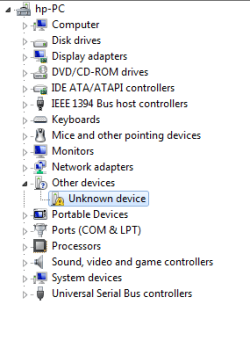
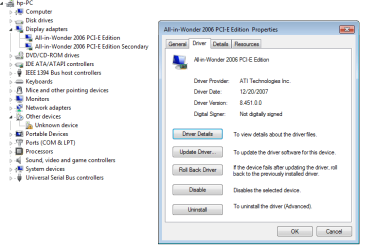
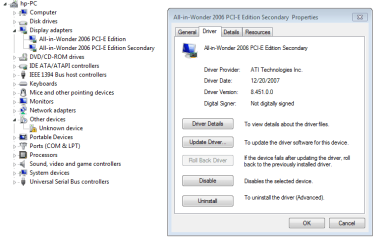
Now this may make it worse, but try sidabling the unkown on ati, and try it. If not disable the secondary ati and try it.

Hope it works

Ken
 

My Computer My Computer

Computer Manufacturer/Model Number
HP Pavillion dv-7 1005 Tx
OS
Win 8 Release candidate 8400
CPU
[email protected]
Memory
4 gigs
Graphics Card(s)
Nvidia 9600M
Sound Card
HD built-in
Monitor(s) Displays
17" Wxga
Screen Resolution
1440x900
Cooling
none
Internet Speed
45Mb down 5Mb up
Sorry i am a bit slow
 
Last edited:

My Computer My Computer

OS
w 7
Thanks to ZigZag3143 I was able to install Catalyst 8.1. Now to get the TV Tuner working.

I open media center and click on setup live tv. No tv source is found.

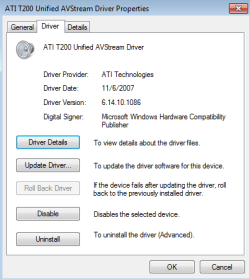
In device manager I click action then add legacy hardware. A list is populated with one ATI listed. I see two ATI T200 Unified AVStream Driver listed in device manager / sound video and game controlllers. I right click and update driver info. I navigate to ATI/support/8.1 xp32/driver/bin/wdm all. One works:
t2002.PNG

and one doesn't

t200.PNGwmc.PNG
png.gif

I go back to Media center and click on setup live tv and it starts the install. It asks for my zip and downloads program info. Then examining TV signals. This process may take several minutes. This is where it hangs.
Any ideas?
 

Attachments

  • t2002.PNG
    t2002.PNG
    9.8 KB · Views: 122
  • t200.PNG
    t200.PNG
    24.1 KB · Views: 41
  • dm.PNG
    dm.PNG
    13.3 KB · Views: 22
  • wmc.PNG
    wmc.PNG
    62.6 KB · Views: 56

My Computer My Computer

OS
w 7
Mine won't work :(

I have a Ati All in wonder 2006 video card and I can't seen to get the av stream to work.
Windows recognized the card as a X1300 and installed working drives but it doesn't recognize the tv tuner. I have seen people with this card configured correctly and working with 7. I have tried installing the legacy drivers from ati but they also installed drivers for an X1300. I'm out of options anyone have any ideas?
 

My Computer My Computer

OS
Windows 7 ultimate 64-bit
CPU
AMD athlon 3800+ (single core)
Memory
(2) 512mb pc3200 ddr
Graphics Card(s)
ati all in wonder 2006 edition
Back
Top