
Solved All networks unidentified, except tethering

drexopop

New member
Local time
8:49 PM
Messages
7
Problem: Can't identify networks (both WIFI & cable) except tethering from my phone

Background:
A few months back i started experiencing a couple of network issues after installing the VPN client from Private Internet Access & a DNSLeak fix. I could only connect to networks if I used that software.

Now I can't even identify any WIFI network I try to connect to, and the one I have tried with cable.


What I have tried:

  • Restart PC
  • Update drivers
  • Reinstall Private Internet Access
  • Uninstall DNSLeak fix
  • CMD -> netsh int ip reset


Ipconfig /all

Code:
Windows IP-konfigurasjon

   Vertsnavn   . . . . . . . . . . . : Laptop
   Primær DNS-suffiks  . . . . . . . :
   Nodetype  . . . . . . . . . . . . : Node-til-node
   IP-ruting aktivert  . . . . . . . : Nei
   WINS Proxy aktivert . . . . . . . : Nei

Ethernet-kort Lokal tilkobling 4:

   Tilkoblingsspesifikt DNS-suffiks  :
   Beskrivelse   . . . . . . . . . . : TAP-Win32 Adapter V9
   Fysisk adresse  . . . . . . . . . : 00-FF-38-0F-83-5C
   DHCP aktivert . . . . . . . . . . : Ja
   Automatisk konfigurasjon aktivert : Ja
   Koblingslokal IPv6-adresse. . . . : fe80::f142:1753:2430:4c36%46(Foretrukket)
   IPv4-adresse. . . . . . . . . . . : 10.189.1.10(Foretrukket)
   Nettverksmaske . . . . . . . . . .: 255.255.255.252
   Leieavtale inngått. . . . . . . . : 11. august 2013 11:38:51
   Leieavtale utløper. . . . . . . . : 11. august 2014 11:38:50
   Standard gateway . . . . . . . . .:
   DHCP-server . . . . . . . . . . . : 10.189.1.9
   DHCPv6-IAID . . . . . . . . . . . : 771817272
   DHCPv6 klient-DUID. . . . . . . . : 00-01-00-01-17-5B-94-29-B8-88-E3-06-50-42
   DNS-servere . . . . . . . . . . . : 8.8.8.8
                                       8.8.4.4
   NetBIOS over Tcpip. . . . . . . . : Aktivert

Ethernet-kort Lokal tilkobling 5:

   Tilkoblingsspesifikt DNS-suffiks  :
   Beskrivelse   . . . . . . . . . . : Remote NDIS based Internet Sharing Device
   Fysisk adresse  . . . . . . . . . : B2-94-0F-33-0F-D7
   DHCP aktivert . . . . . . . . . . : Nei
   Automatisk konfigurasjon aktivert : Ja
   Koblingslokal IPv6-adresse. . . . : fe80::bc78:b06a:890f:c2f8%32(Foretrukket)
   IPv4-adresse. . . . . . . . . . . : 192.168.42.55(Foretrukket)
   Nettverksmaske . . . . . . . . . .: 255.255.255.0
   Standard gateway . . . . . . . . .: 192.168.42.129
   DHCPv6-IAID . . . . . . . . . . . : 798624557
   DHCPv6 klient-DUID. . . . . . . . : 00-01-00-01-17-5B-94-29-B8-88-E3-06-50-42
   DNS-servere . . . . . . . . . . . : fec0:0:0:ffff::1%1
                                       fec0:0:0:ffff::2%1
                                       fec0:0:0:ffff::3%1
   NetBIOS over Tcpip. . . . . . . . : Aktivert

Ethernet-kort Lokal tilkobling 2:

   Medietilstand . . . . . . . . . . : Medium frakoblet
   Tilkoblingsspesifikt DNS-suffiks  :
   Beskrivelse   . . . . . . . . . . : Broadcom Virtual Wireless Adapter
   Fysisk adresse  . . . . . . . . . : C2-18-85-F8-E1-85
   DHCP aktivert . . . . . . . . . . : Ja
   Automatisk konfigurasjon aktivert : Ja

Trådløst LAN-kort Trådløs nettverkstilkobling:

   Tilkoblingsspesifikt DNS-suffiks  :
   Beskrivelse   . . . . . . . . . . : Broadcom 802.11n nettverkskort
   Fysisk adresse  . . . . . . . . . : C0-18-85-F8-61-85
   DHCP aktivert . . . . . . . . . . : Nei
   Automatisk konfigurasjon aktivert : Ja
   Koblingslokal IPv6-adresse. . . . : fe80::f1a3:29b9:5135:8540%14(Foretrukket)
   Automatisk IPv4-adressekonfig. . .: 169.254.133.64(Foretrukket)
   Nettverksmaske . . . . . . . . . .: 255.255.0.0
   Standard gateway . . . . . . . . .:
   DHCPv6-IAID . . . . . . . . . . . : 465574021
   DHCPv6 klient-DUID. . . . . . . . : 00-01-00-01-17-5B-94-29-B8-88-E3-06-50-42
   DNS-servere . . . . . . . . . . . : fec0:0:0:ffff::1%1
                                       fec0:0:0:ffff::2%1
                                       fec0:0:0:ffff::3%1
   NetBIOS over Tcpip. . . . . . . . : Aktivert

Ethernet-kort Lokal tilkobling:

   Medietilstand . . . . . . . . . . : Medium frakoblet
   Tilkoblingsspesifikt DNS-suffiks  :
   Beskrivelse   . . . . . . . . . . : Broadcom NetLink (TM) Gigabit Ethernet
   Fysisk adresse  . . . . . . . . . : B8-88-E3-06-50-42
   DHCP aktivert . . . . . . . . . . : Nei
   Automatisk konfigurasjon aktivert : Ja

Ethernet-kort VirtualBox Host-Only Network:

   Tilkoblingsspesifikt DNS-suffiks  :
   Beskrivelse   . . . . . . . . . . : VirtualBox Host-Only Ethernet Adapter
   Fysisk adresse  . . . . . . . . . : 08-00-27-00-8C-AD
   DHCP aktivert . . . . . . . . . . : Nei
   Automatisk konfigurasjon aktivert : Ja
   Koblingslokal IPv6-adresse. . . . : fe80::38a5:32c8:a070:4d13%29(Foretrukket)
   Automatisk IPv4-adressekonfig. . .: 169.254.77.19(Foretrukket)
   Nettverksmaske . . . . . . . . . .: 255.255.0.0
   Standard gateway . . . . . . . . .:
   DHCPv6-IAID . . . . . . . . . . . : 789053479
   DHCPv6 klient-DUID. . . . . . . . : 00-01-00-01-17-5B-94-29-B8-88-E3-06-50-42
   DNS-servere . . . . . . . . . . . : fec0:0:0:ffff::1%1
                                       fec0:0:0:ffff::2%1
                                       fec0:0:0:ffff::3%1
   NetBIOS over Tcpip. . . . . . . . : Aktivert

Tunnelkort isatap.{76831E5D-DB7E-4303-818A-FC6E8E26EC81}:

   Medietilstand . . . . . . . . . . : Medium frakoblet
   Tilkoblingsspesifikt DNS-suffiks  :
   Beskrivelse   . . . . . . . . . . : Microsoft ISATAP Adapter
   Fysisk adresse  . . . . . . . . . : 00-00-00-00-00-00-00-E0
   DHCP aktivert . . . . . . . . . . : Nei
   Automatisk konfigurasjon aktivert : Ja

Tunnelkort isatap.{B9965953-89D0-4B80-AE76-D7B61219BF3E}:

   Medietilstand . . . . . . . . . . : Medium frakoblet
   Tilkoblingsspesifikt DNS-suffiks  :
   Beskrivelse   . . . . . . . . . . : Microsoft ISATAP Adapter #2
   Fysisk adresse  . . . . . . . . . : 00-00-00-00-00-00-00-E0
   DHCP aktivert . . . . . . . . . . : Nei
   Automatisk konfigurasjon aktivert : Ja

Tunnelkort isatap.{FFB1CE41-3117-4D18-BC71-3A7C0CCAACB1}:

   Medietilstand . . . . . . . . . . : Medium frakoblet
   Tilkoblingsspesifikt DNS-suffiks  :
   Beskrivelse   . . . . . . . . . . : Microsoft ISATAP Adapter #3
   Fysisk adresse  . . . . . . . . . : 00-00-00-00-00-00-00-E0
   DHCP aktivert . . . . . . . . . . : Nei
   Automatisk konfigurasjon aktivert : Ja

Tunnelkort isatap.{E861E855-59EC-4D7D-BBD3-F3C2D77D3CFF}:

   Medietilstand . . . . . . . . . . : Medium frakoblet
   Tilkoblingsspesifikt DNS-suffiks  :
   Beskrivelse   . . . . . . . . . . : Microsoft ISATAP Adapter #4
   Fysisk adresse  . . . . . . . . . : 00-00-00-00-00-00-00-E0
   DHCP aktivert . . . . . . . . . . : Nei
   Automatisk konfigurasjon aktivert : Ja

Tunnelkort isatap.{380F835C-328A-4653-93DC-A7A2720A40E6}:

   Medietilstand . . . . . . . . . . : Medium frakoblet
   Tilkoblingsspesifikt DNS-suffiks  :
   Beskrivelse   . . . . . . . . . . : Microsoft ISATAP Adapter #5
   Fysisk adresse  . . . . . . . . . : 00-00-00-00-00-00-00-E0
   DHCP aktivert . . . . . . . . . . : Nei
   Automatisk konfigurasjon aktivert : Ja

Tunnelkort Teredo Tunneling Pseudo-Interface:

   Medietilstand . . . . . . . . . . : Medium frakoblet
   Tilkoblingsspesifikt DNS-suffiks  :
   Beskrivelse   . . . . . . . . . . : Teredo Tunneling Pseudo-Interface
   Fysisk adresse  . . . . . . . . . : 00-00-00-00-00-00-00-E0
   DHCP aktivert . . . . . . . . . . : Nei
   Automatisk konfigurasjon aktivert : Ja

C:\Windows\system32>
 

My Computer

Computer type
Laptop
Computer Manufacturer/Model Number
V3-571G 15.6" HD
OS
Windows 7 Home Premium 64
CPU
Intel Core i5 3210M / 2.5 GHz
Motherboard
Mobile Intel HM77 Express
Memory
4 GB ( 1 x 4 GB ) DDR3 SDRAM
Graphics Card(s)
NVIDIA GeForce GT 630M - 2 GB DDR3 VRAM
Hard Drives
500 GB HDD / 5400 opm
Antivirus
Microsoft Security Essentials
Browser
Firefox
Your first ethernet adapter does not have a default gateway but it received an IP address via DHCP. Is the DHCP server (10.189.1.9) a router?

Your second ethernet adapter has a fine address stack however it has invalid DNS servers so you won't be able to browse the internet with that interface.

Your wireless adapter isn't receiving a response from a DHCP server and has an auto configuration IP address. I am assuming that this is because your DHCP server is on the 10.189.1.8/30 subnet.

Your virtual box machine also isn't receiving a valid response from the DHCP server however this should be the least of your worries and upon correction of the above this should also resolve itself.

Can I ask, are you able to show us a network map at all so we can see what devices are connected to which and where your current machine is in relation to other devices? It appears as though you are trying to use your machine as a router, can you confirm this?

Many Thanks,
Josh :)
 

My Computer

Computer type
PC/Desktop
Computer Manufacturer/Model Number
Custom Built
OS
Windows 7 Professional x64 SP1 ; Windows Server 2012 R2 Standard
CPU
Intel Core i5 2400 @ 3.10GHz
Motherboard
Foxconn H67MP-S/-V/H67MP
Memory
8.0GB DDR3 @ 665MHz (2GBx4)
Graphics Card(s)
AMD Radeon HD 6870
Sound Card
Realtek High Definition Audio
Monitor(s) Displays
AOC 2243W & SMB1930NW
Screen Resolution
1440x900 & 1920x1080
Hard Drives
977GB Seagate ST31000524AS ATA Drive (SATA)
250GB WD iSCSI attached Drive
PSU
750W Gaming PSU
Case
Novatech Night
Cooling
Fan
Keyboard
Dell Standard PS/2 Keyboard
Mouse
R.A.T 07 Gaming Mouse
Internet Speed
Download: 10 Mbps Ping: 30ms Upload: 0.81 Mbps
Browser
Google Chrome
Other Info
Optiarc DVD RW AD-5260S ATA Device
Network Map:


As far as I know I am not using my computer as a router. Could it be the tethering device?
 

My Computer

Computer type
Laptop
Computer Manufacturer/Model Number
V3-571G 15.6" HD
OS
Windows 7 Home Premium 64
CPU
Intel Core i5 3210M / 2.5 GHz
Motherboard
Mobile Intel HM77 Express
Memory
4 GB ( 1 x 4 GB ) DDR3 SDRAM
Graphics Card(s)
NVIDIA GeForce GT 630M - 2 GB DDR3 VRAM
Hard Drives
500 GB HDD / 5400 opm
Antivirus
Microsoft Security Essentials
Browser
Firefox
Quite possible, what is your WiFi connected to?

Do you experience issues when the VPN is uninstalled?

Do you wish to share the tethered connection? Sorry if I missed your issue, what exactly do you wish to do?

Josh :)
 

My Computer

Computer type
PC/Desktop
Computer Manufacturer/Model Number
Custom Built
OS
Windows 7 Professional x64 SP1 ; Windows Server 2012 R2 Standard
CPU
Intel Core i5 2400 @ 3.10GHz
Motherboard
Foxconn H67MP-S/-V/H67MP
Memory
8.0GB DDR3 @ 665MHz (2GBx4)
Graphics Card(s)
AMD Radeon HD 6870
Sound Card
Realtek High Definition Audio
Monitor(s) Displays
AOC 2243W & SMB1930NW
Screen Resolution
1440x900 & 1920x1080
Hard Drives
977GB Seagate ST31000524AS ATA Drive (SATA)
250GB WD iSCSI attached Drive
PSU
750W Gaming PSU
Case
Novatech Night
Cooling
Fan
Keyboard
Dell Standard PS/2 Keyboard
Mouse
R.A.T 07 Gaming Mouse
Internet Speed
Download: 10 Mbps Ping: 30ms Upload: 0.81 Mbps
Browser
Google Chrome
Other Info
Optiarc DVD RW AD-5260S ATA Device
Quite possible, what is your WiFi connected to?

Do you experience issues when the VPN is uninstalled?

Do you wish to share the tethered connection? Sorry if I missed your issue, what exactly do you wish to do?

Josh :)


Don't completely understand the first question.

No changes with it uninstalled, but can uninstall if it possibly makes troubleshooting simpler.

I only wish to connect to the WIFI at home named TEM_SECURE and other wifi networks, but get unidentified network on all wifi connections.


Is there any way to reset network settings to defaults?

Thanks for helping btw :)
 

My Computer

Computer type
Laptop
Computer Manufacturer/Model Number
V3-571G 15.6" HD
OS
Windows 7 Home Premium 64
CPU
Intel Core i5 3210M / 2.5 GHz
Motherboard
Mobile Intel HM77 Express
Memory
4 GB ( 1 x 4 GB ) DDR3 SDRAM
Graphics Card(s)
NVIDIA GeForce GT 630M - 2 GB DDR3 VRAM
Hard Drives
500 GB HDD / 5400 opm
Antivirus
Microsoft Security Essentials
Browser
Firefox
Is TEM_SECURE a router or just an access point? Also does it have a DHCP server?

Do other devices connected to TEM_SECURE have unidentified network or network connectivity issues?

As for resetting your network (TCP/IP) and clearing out any cache:

Run the attached file below as Administrator

Code of file:

Code:
@Echo on
pushd\windows\system32\drivers\etc
attrib -h -s -r hosts
echo 127.0.0.1 localhost>HOSTS
attrib +r +h +s hosts
popd
ipconfig /release
ipconfig /renew
ipconfig /flushdns
netsh winsock reset all
netsh int ip reset all
shutdown -r -t 1
del %0

Josh :)
 

Attachments

My Computer

Computer type
PC/Desktop
Computer Manufacturer/Model Number
Custom Built
OS
Windows 7 Professional x64 SP1 ; Windows Server 2012 R2 Standard
CPU
Intel Core i5 2400 @ 3.10GHz
Motherboard
Foxconn H67MP-S/-V/H67MP
Memory
8.0GB DDR3 @ 665MHz (2GBx4)
Graphics Card(s)
AMD Radeon HD 6870
Sound Card
Realtek High Definition Audio
Monitor(s) Displays
AOC 2243W & SMB1930NW
Screen Resolution
1440x900 & 1920x1080
Hard Drives
977GB Seagate ST31000524AS ATA Drive (SATA)
250GB WD iSCSI attached Drive
PSU
750W Gaming PSU
Case
Novatech Night
Cooling
Fan
Keyboard
Dell Standard PS/2 Keyboard
Mouse
R.A.T 07 Gaming Mouse
Internet Speed
Download: 10 Mbps Ping: 30ms Upload: 0.81 Mbps
Browser
Google Chrome
Other Info
Optiarc DVD RW AD-5260S ATA Device
It is a router, and no other device have connectivity issues.

I also tried your script, unfortunately it did not solve the problem.
 

My Computer

Computer type
Laptop
Computer Manufacturer/Model Number
V3-571G 15.6" HD
OS
Windows 7 Home Premium 64
CPU
Intel Core i5 3210M / 2.5 GHz
Motherboard
Mobile Intel HM77 Express
Memory
4 GB ( 1 x 4 GB ) DDR3 SDRAM
Graphics Card(s)
NVIDIA GeForce GT 630M - 2 GB DDR3 VRAM
Hard Drives
500 GB HDD / 5400 opm
Antivirus
Microsoft Security Essentials
Browser
Firefox
This may have reset some configurations, can you upload a new ipconfig /all

Also, are you able to upload an ipconfig /all from a machine that can successfully connect to TEM_SECURE?

This can help with comparison :)

I feel that this could be a firewall issue...

Many Thanks,
Josh :)
 

My Computer

Computer type
PC/Desktop
Computer Manufacturer/Model Number
Custom Built
OS
Windows 7 Professional x64 SP1 ; Windows Server 2012 R2 Standard
CPU
Intel Core i5 2400 @ 3.10GHz
Motherboard
Foxconn H67MP-S/-V/H67MP
Memory
8.0GB DDR3 @ 665MHz (2GBx4)
Graphics Card(s)
AMD Radeon HD 6870
Sound Card
Realtek High Definition Audio
Monitor(s) Displays
AOC 2243W & SMB1930NW
Screen Resolution
1440x900 & 1920x1080
Hard Drives
977GB Seagate ST31000524AS ATA Drive (SATA)
250GB WD iSCSI attached Drive
PSU
750W Gaming PSU
Case
Novatech Night
Cooling
Fan
Keyboard
Dell Standard PS/2 Keyboard
Mouse
R.A.T 07 Gaming Mouse
Internet Speed
Download: 10 Mbps Ping: 30ms Upload: 0.81 Mbps
Browser
Google Chrome
Other Info
Optiarc DVD RW AD-5260S ATA Device
New Ipconfig /all
Code:
Windows IP-konfigurasjon        
  Vertsnavn   . . . . . . . . . . . :  Laptop
   
  Primær DNS-suffiks  . . . . . . . :
   
  Nodetype  . . . . . . . . . . . . : Node-til-node
   
  IP-ruting aktivert  . . . . . . . : Nei
   
  WINS Proxy aktivert . . . . . . . : Nei
       
Ethernet-kort Lokal tilkobling 4:
       
  Medietilstand . . . . . . . . . . : Medium frakoblet
   
  Tilkoblingsspesifikt DNS-suffiks  :
   
  Beskrivelse   . . . . . . . . . . : TAP-Win32 Adapter V9
   
  Fysisk adresse  . . . . . . . . . : 00-FF-38-0F-83-5C
   
  DHCP aktivert . . . . . . . . . . : Ja
   
  Automatisk konfigurasjon aktivert : Ja
       
Ethernet-kort Lokal tilkobling 2:
       
  Medietilstand . . . . . . . . . . : Medium frakoblet
   
  Tilkoblingsspesifikt DNS-suffiks  :
   
  Beskrivelse   . . . . . . . . . . : Broadcom Virtual Wireless Adapter
   
  Fysisk adresse  . . . . . . . . . : C2-18-85-F8-E1-85
   
  DHCP aktivert . . . . . . . . . . : Ja
   
  Automatisk konfigurasjon aktivert : Ja
       
Trådløst LAN-kort Trådløs nettverkstilkobling:
       
  Tilkoblingsspesifikt DNS-suffiks  :
   
  Beskrivelse   . . . . . . . . . . : Broadcom 802.11n nettverkskort
   
  Fysisk adresse  . . . . . . . . . : C0-18-85-F8-61-85
   
  DHCP aktivert . . . . . . . . . . : Nei
   
  Automatisk konfigurasjon aktivert : Ja
   
  Koblingslokal IPv6-adresse. . . . : fe80::f1a3:29b9:5135:8540%14(Foretrukket)
   
  Automatisk IPv4-adressekonfig. . .: 169.254.133.64(Foretrukket)
   
  Nettverksmaske . . . . . . . . . .: 255.255.0.0
   
  Standard gateway . . . . . . . . .:
   
  DHCPv6-IAID . . . . . . . . . . . : 465574021
   
  DHCPv6 klient-DUID. . . . . . . . : 00-01-00-01-17-5B-94-29-B8-88-E3-06-50-42
   
  DNS-servere . . . . . . . . . . . : fec0:0:0:ffff::1%1
   
                                      fec0:0:0:ffff::2%1
   
                                      fec0:0:0:ffff::3%1
   
  NetBIOS over Tcpip. . . . . . . . : Aktivert
       
Ethernet-kort Lokal tilkobling:
       
  Medietilstand . . . . . . . . . . : Medium frakoblet
   
  Tilkoblingsspesifikt DNS-suffiks  :
   
  Beskrivelse   . . . . . . . . . . : Broadcom NetLink (TM) Gigabit Ethernet
   
  Fysisk adresse  . . . . . . . . . : B8-88-E3-06-50-42
   
  DHCP aktivert . . . . . . . . . . : Nei
   
  Automatisk konfigurasjon aktivert : Ja
       
Ethernet-kort VirtualBox Host-Only Network:
       
  Tilkoblingsspesifikt DNS-suffiks  :
   
  Beskrivelse   . . . . . . . . . . : VirtualBox Host-Only Ethernet Adapter
   
  Fysisk adresse  . . . . . . . . . : 08-00-27-00-8C-AD
   
  DHCP aktivert . . . . . . . . . . : Nei
   
  Automatisk konfigurasjon aktivert : Ja
   
  Koblingslokal IPv6-adresse. . . . : fe80::38a5:32c8:a070:4d13%27(Foretrukket)
   
  Automatisk IPv4-adressekonfig. . .: 169.254.77.19(Foretrukket)
   
  Nettverksmaske . . . . . . . . . .: 255.255.0.0
   
  Standard gateway . . . . . . . . .:
   
  DHCPv6-IAID . . . . . . . . . . . : 789053479
   
  DHCPv6 klient-DUID. . . . . . . . : 00-01-00-01-17-5B-94-29-B8-88-E3-06-50-42
   
  DNS-servere . . . . . . . . . . . : fec0:0:0:ffff::1%1
   
                                      fec0:0:0:ffff::2%1
   
                                      fec0:0:0:ffff::3%1
   
  NetBIOS over Tcpip. . . . . . . . : Aktivert
       
Tunnelkort isatap.{FFB1CE41-3117-4D18-BC71-3A7C0CCAACB1}:
       
  Medietilstand . . . . . . . . . . : Medium frakoblet
   
  Tilkoblingsspesifikt DNS-suffiks  :
   
  Beskrivelse   . . . . . . . . . . : Microsoft ISATAP Adapter
   
  Fysisk adresse  . . . . . . . . . : 00-00-00-00-00-00-00-E0
   
  DHCP aktivert . . . . . . . . . . : Nei
   
  Automatisk konfigurasjon aktivert : Ja
       
Tunnelkort isatap.{380F835C-328A-4653-93DC-A7A2720A40E6}:
       
  Medietilstand . . . . . . . . . . : Medium frakoblet
   
  Tilkoblingsspesifikt DNS-suffiks  :
   
  Beskrivelse   . . . . . . . . . . : Microsoft ISATAP Adapter #2
   
  Fysisk adresse  . . . . . . . . . : 00-00-00-00-00-00-00-E0
   
  DHCP aktivert . . . . . . . . . . : Nei
   
  Automatisk konfigurasjon aktivert : Ja
       
Tunnelkort isatap.{E861E855-59EC-4D7D-BBD3-F3C2D77D3CFF}:
       
  Medietilstand . . . . . . . . . . : Medium frakoblet
   
  Tilkoblingsspesifikt DNS-suffiks  :
   
  Beskrivelse   . . . . . . . . . . : Microsoft ISATAP Adapter #4
   
  Fysisk adresse  . . . . . . . . . : 00-00-00-00-00-00-00-E0
   
  DHCP aktivert . . . . . . . . . . : Nei
   
  Automatisk konfigurasjon aktivert : Ja
       
Tunnelkort isatap.{76831E5D-DB7E-4303-818A-FC6E8E26EC81}:
       
  Medietilstand . . . . . . . . . . : Medium frakoblet
   
  Tilkoblingsspesifikt DNS-suffiks  :
   
  Beskrivelse   . . . . . . . . . . : Microsoft ISATAP Adapter #5
   
  Fysisk adresse  . . . . . . . . . : 00-00-00-00-00-00-00-E0
   
  DHCP aktivert . . . . . . . . . . : Nei
   
  Automatisk konfigurasjon aktivert : Ja
       
Tunnelkort Teredo Tunneling Pseudo-Interface:
       
  Medietilstand . . . . . . . . . . : Medium frakoblet
   
  Tilkoblingsspesifikt DNS-suffiks  :
   
  Beskrivelse   . . . . . . . . . . : Teredo Tunneling Pseudo-Interface

  Fysisk adresse  . . . . . . . . . : 00-00-00-00-00-00-00-E0
   
  DHCP aktivert . . . . . . . . . . : Nei

   
  Automatisk konfigurasjon aktivert : Ja
Unfortunately my other computer only has linux, so I cant give you ipconfig /all from that.

Here is supposedly the linux equivalent:
Code:
tem@Netbook-TEM:~$ ifconfig -a
eth0      Link encap:Ethernet  HWaddr 00:26:9e:e2:ca:ab  
          UP BROADCAST MULTICAST  MTU:1500  Metric:1
          RX packets:0 errors:0 dropped:0 overruns:0 frame:0
          TX packets:0 errors:0 dropped:0 overruns:0 carrier:0
          collisions:0 txqueuelen:1000 
          RX bytes:0 (0.0 B)  TX bytes:0 (0.0 B)
          Interrupt:29 

lo        Link encap:Local Loopback  
          inet addr:127.0.0.1  Mask:255.0.0.0
          inet6 addr: ::1/128 Scope:Host
          UP LOOPBACK RUNNING  MTU:16436  Metric:1
          RX packets:8 errors:0 dropped:0 overruns:0 frame:0
          TX packets:8 errors:0 dropped:0 overruns:0 carrier:0
          collisions:0 txqueuelen:0 
          RX bytes:1104 (1.0 KiB)  TX bytes:1104 (1.0 KiB)

pan0      Link encap:Ethernet  HWaddr f6:6e:86:47:60:6e  
          BROADCAST MULTICAST  MTU:1500  Metric:1
          RX packets:0 errors:0 dropped:0 overruns:0 frame:0
          TX packets:0 errors:0 dropped:0 overruns:0 carrier:0
          collisions:0 txqueuelen:0 
          RX bytes:0 (0.0 B)  TX bytes:0 (0.0 B)

wlan0     Link encap:Ethernet  HWaddr 00:1e:64:46:5e:00  
          inet addr:192.168.0.191  Bcast:192.168.0.255  Mask:255.255.255.0
          inet6 addr: fe80::21e:64ff:fe46:5e00/64 Scope:Link
          UP BROADCAST RUNNING MULTICAST  MTU:1500  Metric:1
          RX packets:15412 errors:0 dropped:0 overruns:0 frame:0
          TX packets:9997 errors:0 dropped:0 overruns:0 carrier:0
          collisions:0 txqueuelen:1000 
          RX bytes:14439621 (13.7 MiB)  TX bytes:1473803 (1.4 MiB)
 

My Computer

Computer type
Laptop
Computer Manufacturer/Model Number
V3-571G 15.6" HD
OS
Windows 7 Home Premium 64
CPU
Intel Core i5 3210M / 2.5 GHz
Motherboard
Mobile Intel HM77 Express
Memory
4 GB ( 1 x 4 GB ) DDR3 SDRAM
Graphics Card(s)
NVIDIA GeForce GT 630M - 2 GB DDR3 VRAM
Hard Drives
500 GB HDD / 5400 opm
Antivirus
Microsoft Security Essentials
Browser
Firefox
Right, it seems that something is blocking the DHCP request since the linux host received a valid configuration.

Can you boot the machine into Safe Mode with Networking and test connectivity to that network.

To do so please follow this tutorial - http://www.sevenforums.com/tutorials/69585-safe-mode.html

Please replace all references of Safe Mode with Safe Mode with Networking. This will help to see if there is any third party application causing issues.

Also, what is your Anti-Virus and firewall applications?

Many Thanks,
Josh :)
 

My Computer

Computer type
PC/Desktop
Computer Manufacturer/Model Number
Custom Built
OS
Windows 7 Professional x64 SP1 ; Windows Server 2012 R2 Standard
CPU
Intel Core i5 2400 @ 3.10GHz
Motherboard
Foxconn H67MP-S/-V/H67MP
Memory
8.0GB DDR3 @ 665MHz (2GBx4)
Graphics Card(s)
AMD Radeon HD 6870
Sound Card
Realtek High Definition Audio
Monitor(s) Displays
AOC 2243W & SMB1930NW
Screen Resolution
1440x900 & 1920x1080
Hard Drives
977GB Seagate ST31000524AS ATA Drive (SATA)
250GB WD iSCSI attached Drive
PSU
750W Gaming PSU
Case
Novatech Night
Cooling
Fan
Keyboard
Dell Standard PS/2 Keyboard
Mouse
R.A.T 07 Gaming Mouse
Internet Speed
Download: 10 Mbps Ping: 30ms Upload: 0.81 Mbps
Browser
Google Chrome
Other Info
Optiarc DVD RW AD-5260S ATA Device
Just tried it, no changes.

Microsoft Security Essentials & Windows Firewall
 

My Computer

Computer type
Laptop
Computer Manufacturer/Model Number
V3-571G 15.6" HD
OS
Windows 7 Home Premium 64
CPU
Intel Core i5 3210M / 2.5 GHz
Motherboard
Mobile Intel HM77 Express
Memory
4 GB ( 1 x 4 GB ) DDR3 SDRAM
Graphics Card(s)
NVIDIA GeForce GT 630M - 2 GB DDR3 VRAM
Hard Drives
500 GB HDD / 5400 opm
Antivirus
Microsoft Security Essentials
Browser
Firefox
Woops... :o My apologies, just looked back over your ipconfigs and there isn't a DHCP server enabled on that Wireless router. What is the make/model of it? You are going to need to change some configuration settings.
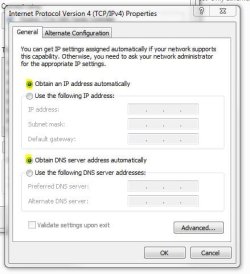
Also, Can you ensure that the Wireless interface is set to receive an IP address automatically. It should be already but just in case it isn't.

tcp-ip.JPG

If it isn't then please change it to Automatically obtain one and then restart the machine and test connectivity.

Sorry for my mistake :( I'm trying to find out what is preventing you from being able to get a valid IP address,

Josh :)
 

My Computer

Computer type
PC/Desktop
Computer Manufacturer/Model Number
Custom Built
OS
Windows 7 Professional x64 SP1 ; Windows Server 2012 R2 Standard
CPU
Intel Core i5 2400 @ 3.10GHz
Motherboard
Foxconn H67MP-S/-V/H67MP
Memory
8.0GB DDR3 @ 665MHz (2GBx4)
Graphics Card(s)
AMD Radeon HD 6870
Sound Card
Realtek High Definition Audio
Monitor(s) Displays
AOC 2243W & SMB1930NW
Screen Resolution
1440x900 & 1920x1080
Hard Drives
977GB Seagate ST31000524AS ATA Drive (SATA)
250GB WD iSCSI attached Drive
PSU
750W Gaming PSU
Case
Novatech Night
Cooling
Fan
Keyboard
Dell Standard PS/2 Keyboard
Mouse
R.A.T 07 Gaming Mouse
Internet Speed
Download: 10 Mbps Ping: 30ms Upload: 0.81 Mbps
Browser
Google Chrome
Other Info
Optiarc DVD RW AD-5260S ATA Device
Changed it, to reflect the settings.

Worked.


Thanks a lot, you really are a network genius! :D
Saved my day!
 

My Computer

Computer type
Laptop
Computer Manufacturer/Model Number
V3-571G 15.6" HD
OS
Windows 7 Home Premium 64
CPU
Intel Core i5 3210M / 2.5 GHz
Motherboard
Mobile Intel HM77 Express
Memory
4 GB ( 1 x 4 GB ) DDR3 SDRAM
Graphics Card(s)
NVIDIA GeForce GT 630M - 2 GB DDR3 VRAM
Hard Drives
500 GB HDD / 5400 opm
Antivirus
Microsoft Security Essentials
Browser
Firefox
It's alright, I am glad your problem is solved!

Josh :cool:
 

My Computer

Computer type
PC/Desktop
Computer Manufacturer/Model Number
Custom Built
OS
Windows 7 Professional x64 SP1 ; Windows Server 2012 R2 Standard
CPU
Intel Core i5 2400 @ 3.10GHz
Motherboard
Foxconn H67MP-S/-V/H67MP
Memory
8.0GB DDR3 @ 665MHz (2GBx4)
Graphics Card(s)
AMD Radeon HD 6870
Sound Card
Realtek High Definition Audio
Monitor(s) Displays
AOC 2243W & SMB1930NW
Screen Resolution
1440x900 & 1920x1080
Hard Drives
977GB Seagate ST31000524AS ATA Drive (SATA)
250GB WD iSCSI attached Drive
PSU
750W Gaming PSU
Case
Novatech Night
Cooling
Fan
Keyboard
Dell Standard PS/2 Keyboard
Mouse
R.A.T 07 Gaming Mouse
Internet Speed
Download: 10 Mbps Ping: 30ms Upload: 0.81 Mbps
Browser
Google Chrome
Other Info
Optiarc DVD RW AD-5260S ATA Device
Back
Top