"Default Gateway not found" Wifi shuts down ever 5-30 minutes

Esekiel

New member
Local time
4:04 AM
Messages
18
"Default Gateway not found" Wifi shuts down ever 5-30 minutes

As title says my wifi connection shuts down every 5-30 minutes. Repairing gives message "Default gateway not available": Solved.

This problem only happends at home and NOT when im at uni, however no other devices are having problems at home.

Details:
Asus Laptop
Intel Centrino N-1000 wifi card
Linksys 3000dg Router (fairly new)

I have tried:

Updating drivers for wifi card (and several old ones)
Updated BIOS
Gone from IPv6 to IPv4
Renamed Homegroup

I also tried removing the tunelling cards but doesnt seem like it worked?
I think there are more alos, just cant remember atm.

Im sorry that the IPCONFIG is in Norwegian, if you need aything translated just let me know.

Any help is greatly apreciated, I have been strugeling for a long time with this.

IPCONFIG /ALL
Microsoft Windows [Versjon 6.1.7601]
Copyright (c) 2009 Microsoft Corporation. Med enerett.

C:\Users\Vegard>ipconfig /all

Windows IP-konfigurasjon

Vertsnavn . . . . . . . . . . . : Vegard-PC
Primær DNS-suffiks . . . . . . . :
Nodetype . . . . . . . . . . . . : Hybrid
IP-ruting aktivert . . . . . . . : Nei
WINS Proxy aktivert . . . . . . . : Nei
Søkeliste for DNS-suffiks . . . . : jensen.com

Trådløst LAN-kort Trådløs nettverkstilkobling 3:

Medietilstand . . . . . . . . . . : Medium frakoblet
Tilkoblingsspesifikt DNS-suffiks :
Beskrivelse . . . . . . . . . . : Microsoft Virtual WiFi Miniport Adapter #
2
Fysisk adresse . . . . . . . . . : 74-E5-0B-52-99-39
DHCP aktivert . . . . . . . . . . : Ja
Automatisk konfigurasjon aktivert : Ja

Trådløst LAN-kort Trådløs nettverkstilkobling 2:

Medietilstand . . . . . . . . . . : Medium frakoblet
Tilkoblingsspesifikt DNS-suffiks :
Beskrivelse . . . . . . . . . . : Microsoft Virtual WiFi Miniport Adapter
Fysisk adresse . . . . . . . . . : 74-E5-0B-52-99-39
DHCP aktivert . . . . . . . . . . : Ja
Automatisk konfigurasjon aktivert : Ja

Trådløst LAN-kort Trådløs nettverkstilkobling:

Tilkoblingsspesifikt DNS-suffiks : jensen.com
Beskrivelse . . . . . . . . . . : Intel(R) Centrino(R) Wireless-N 1000
Fysisk adresse . . . . . . . . . : 74-E5-0B-52-99-38
DHCP aktivert . . . . . . . . . . : Ja
Automatisk konfigurasjon aktivert : Ja
IPv4-adresse. . . . . . . . . . . : 192.168.0.101(Foretrukket)
Nettverksmaske . . . . . . . . . .: 255.255.255.0
Leieavtale inngått. . . . . . . . : 6. mai 2013 20:42:19
Leieavtale utløper. . . . . . . . : 8. mai 2013 20:42:20
Standard gateway . . . . . . . . .: 192.168.0.1
DHCP-server . . . . . . . . . . . : 192.168.0.1
DNS-servere . . . . . . . . . . . : 192.168.0.1
NetBIOS over Tcpip. . . . . . . . : Aktivert

Ethernet-kort Lokal tilkobling:

Medietilstand . . . . . . . . . . : Medium frakoblet
Tilkoblingsspesifikt DNS-suffiks :
Beskrivelse . . . . . . . . . . : Realtek PCIe GBE Family Controller
Fysisk adresse . . . . . . . . . : 54-04-A6-25-09-CC
DHCP aktivert . . . . . . . . . . : Ja
Automatisk konfigurasjon aktivert : Ja

Tunnelkort Teredo Tunneling Pseudo-Interface:

Tilkoblingsspesifikt DNS-suffiks :
Beskrivelse . . . . . . . . . . : Teredo Tunneling Pseudo-Interface
Fysisk adresse . . . . . . . . . : 00-00-00-00-00-00-00-E0
DHCP aktivert . . . . . . . . . . : Nei
Automatisk konfigurasjon aktivert : Ja
IPv6-adresse. . . . . . . . . . . : 2001:0:9d38:6ab8:24d8:2433:3f57:ff9a(Fore
trukket)
Koblingslokal IPv6-adresse. . . . : fe80::24d8:2433:3f57:ff9a%17(Foretrukket)

Standard gateway . . . . . . . . .: ::
NetBIOS over Tcpip. . . . . . . . : Deaktivert

Tunnelkort 6TO4 Adapter:

Medietilstand . . . . . . . . . . : Medium frakoblet
Tilkoblingsspesifikt DNS-suffiks :
Beskrivelse . . . . . . . . . . : Microsoft 6to4 Adapter
Fysisk adresse . . . . . . . . . : 00-00-00-00-00-00-00-E0
DHCP aktivert . . . . . . . . . . : Nei
Automatisk konfigurasjon aktivert : Ja

Tunnelkort isatap.{52D1B875-4388-4E36-A0FB-8EEF81D20FC8}:

Medietilstand . . . . . . . . . . : Medium frakoblet
Tilkoblingsspesifikt DNS-suffiks :
Beskrivelse . . . . . . . . . . : Microsoft ISATAP Adapter #3
Fysisk adresse . . . . . . . . . : 00-00-00-00-00-00-00-E0
DHCP aktivert . . . . . . . . . . : Nei
Automatisk konfigurasjon aktivert : Ja

Tunnelkort isatap.jensen.com:

Medietilstand . . . . . . . . . . : Medium frakoblet
Tilkoblingsspesifikt DNS-suffiks : jensen.com
Beskrivelse . . . . . . . . . . : Microsoft ISATAP Adapter #4
Fysisk adresse . . . . . . . . . : 00-00-00-00-00-00-00-E0
DHCP aktivert . . . . . . . . . . : Nei
Automatisk konfigurasjon aktivert : Ja

Tunnelkort isatap.{3F29ADD8-EB4D-4F5D-BD1B-4881E51FF170}:

Medietilstand . . . . . . . . . . : Medium frakoblet
Tilkoblingsspesifikt DNS-suffiks :
Beskrivelse . . . . . . . . . . : Microsoft ISATAP Adapter #5
Fysisk adresse . . . . . . . . . : 00-00-00-00-00-00-00-E0
DHCP aktivert . . . . . . . . . . : Nei
Automatisk konfigurasjon aktivert : Ja

C:\Users\Vegard>
 

My Computer My Computer

At a glance

Windows 7 64 bit Home premium
Computer type
Laptop
Computer Manufacturer/Model Number
Asus
OS
Windows 7 64 bit Home premium
Going to bed now, will check up in the morning. A few details that i forgot to mention:

The wifi has been working fine for allmost two years before this problem occured.

Sometimes I have to reboot my computer because the troubleshooter simply states that "The card is having problems and cannot start". When the computer turns back on the wifi card is turned off and normally starts just fine. If it does not however I will have to reboot again (rince and repeat)
 

My Computer My Computer

At a glance

Windows 7 64 bit Home premium
Computer type
Laptop
Computer Manufacturer/Model Number
Asus
OS
Windows 7 64 bit Home premium
I dont know if this will help at all, but this is the ipconfig /all for when im at uni

Microsoft Windows [Versjon 6.1.7601]
Copyright (c) 2009 Microsoft Corporation. Med enerett.

C:\Users\Vegard>ipconfig /all

Windows IP-konfigurasjon

Vertsnavn . . . . . . . . . . . : Vegard-PC
Primær DNS-suffiks . . . . . . . :
Nodetype . . . . . . . . . . . . : Hybrid
IP-ruting aktivert . . . . . . . : Nei
WINS Proxy aktivert . . . . . . . : Nei
Søkeliste for DNS-suffiks . . . . : ux.uis.no

Trådløst LAN-kort Trådløs nettverkstilkobling 3:

Medietilstand . . . . . . . . . . : Medium frakoblet
Tilkoblingsspesifikt DNS-suffiks :
Beskrivelse . . . . . . . . . . : Microsoft Virtual WiFi Miniport Adapter #
2
Fysisk adresse . . . . . . . . . : 74-E5-0B-52-99-39
DHCP aktivert . . . . . . . . . . : Ja
Automatisk konfigurasjon aktivert : Ja

Trådløst LAN-kort Trådløs nettverkstilkobling 2:

Medietilstand . . . . . . . . . . : Medium frakoblet
Tilkoblingsspesifikt DNS-suffiks :
Beskrivelse . . . . . . . . . . : Microsoft Virtual WiFi Miniport Adapter
Fysisk adresse . . . . . . . . . : 74-E5-0B-52-99-39
DHCP aktivert . . . . . . . . . . : Ja
Automatisk konfigurasjon aktivert : Ja

Trådløst LAN-kort Trådløs nettverkstilkobling:

Tilkoblingsspesifikt DNS-suffiks : ux.uis.no
Beskrivelse . . . . . . . . . . : Intel(R) Centrino(R) Wireless-N 1000
Fysisk adresse . . . . . . . . . : 74-E5-0B-52-99-38
DHCP aktivert . . . . . . . . . . : Ja
Automatisk konfigurasjon aktivert : Ja
IPv4-adresse. . . . . . . . . . . : 152.94.0.239(Foretrukket)
Nettverksmaske . . . . . . . . . .: 255.255.255.0
Leieavtale inngått. . . . . . . . : 7. mai 2013 10:20:49
Leieavtale utløper. . . . . . . . : 7. mai 2013 10:50:48
Standard gateway . . . . . . . . .: 152.94.0.1
DHCP-server . . . . . . . . . . . : 152.94.1.11
DNS-servere . . . . . . . . . . . : 152.94.1.11
152.94.1.41
152.94.1.18
NetBIOS over Tcpip. . . . . . . . : Aktivert

Ethernet-kort Lokal tilkobling:

Medietilstand . . . . . . . . . . : Medium frakoblet
Tilkoblingsspesifikt DNS-suffiks :
Beskrivelse . . . . . . . . . . : Realtek PCIe GBE Family Controller
Fysisk adresse . . . . . . . . . : 54-04-A6-25-09-CC
DHCP aktivert . . . . . . . . . . : Ja
Automatisk konfigurasjon aktivert : Ja

Tunnelkort Teredo Tunneling Pseudo-Interface:

Tilkoblingsspesifikt DNS-suffiks :
Beskrivelse . . . . . . . . . . : Teredo Tunneling Pseudo-Interface
Fysisk adresse . . . . . . . . . : 00-00-00-00-00-00-00-E0
DHCP aktivert . . . . . . . . . . : Nei
Automatisk konfigurasjon aktivert : Ja
IPv6-adresse. . . . . . . . . . . : 2001:0:5ef5:79fd:1e:23a0:67a1:ff10(Foretr
ukket)
Koblingslokal IPv6-adresse. . . . : fe80::1e:23a0:67a1:ff10%17(Foretrukket)
Standard gateway . . . . . . . . .:
NetBIOS over Tcpip. . . . . . . . : Deaktivert

Tunnelkort isatap.ux.uis.no:

Medietilstand . . . . . . . . . . : Medium frakoblet
Tilkoblingsspesifikt DNS-suffiks : ux.uis.no
Beskrivelse . . . . . . . . . . : Microsoft ISATAP Adapter
Fysisk adresse . . . . . . . . . : 00-00-00-00-00-00-00-E0
DHCP aktivert . . . . . . . . . . : Nei
Automatisk konfigurasjon aktivert : Ja

Tunnelkort 6TO4 Adapter:

Tilkoblingsspesifikt DNS-suffiks : ux.uis.no
Beskrivelse . . . . . . . . . . : Microsoft 6to4 Adapter
Fysisk adresse . . . . . . . . . : 00-00-00-00-00-00-00-E0
DHCP aktivert . . . . . . . . . . : Nei
Automatisk konfigurasjon aktivert : Ja
IPv6-adresse. . . . . . . . . . . : 2002:985e:ef::985e:ef(Foretrukket)
Standard gateway . . . . . . . . .:
DNS-servere . . . . . . . . . . . : 152.94.1.11
152.94.1.41
152.94.1.18
NetBIOS over Tcpip. . . . . . . . : Deaktivert

Tunnelkort isatap.{3F29ADD8-EB4D-4F5D-BD1B-4881E51FF170}:

Medietilstand . . . . . . . . . . : Medium frakoblet
Tilkoblingsspesifikt DNS-suffiks :
Beskrivelse . . . . . . . . . . : Microsoft ISATAP Adapter #2
Fysisk adresse . . . . . . . . . : 00-00-00-00-00-00-00-E0
DHCP aktivert . . . . . . . . . . : Nei
Automatisk konfigurasjon aktivert : Ja

Tunnelkort isatap.{52D1B875-4388-4E36-A0FB-8EEF81D20FC8}:

Medietilstand . . . . . . . . . . : Medium frakoblet
Tilkoblingsspesifikt DNS-suffiks :
Beskrivelse . . . . . . . . . . : Microsoft ISATAP Adapter #5
Fysisk adresse . . . . . . . . . : 00-00-00-00-00-00-00-E0
DHCP aktivert . . . . . . . . . . : Nei
Automatisk konfigurasjon aktivert : Ja

C:\Users\Vegard>
 

My Computer My Computer

At a glance

Windows 7 64 bit Home premium
Computer type
Laptop
Computer Manufacturer/Model Number
Asus
OS
Windows 7 64 bit Home premium
You are showing two of the Msoft virtual adaptors, you should only be showing one per wireless adaptor so you might try uninstalling one of those, you can also disable the remaining one as they are only used for creating a hosted wireless network.

You should check the wireless profile for this connection under Network and Sharing Center, left side> "Manage Wireless Connections" make sure all of the settings match the settings that have been set up in the router. You should be using WPA2 security with AES encryption.

It may also be worth checking out the wireless channels in your area to make sure they aren't overloaded. Xirrus WiFi inspector is good for this.

Wi-Fi Inspector | Xirrus
 

My Computer My Computer

At a glance

Windows 7 Ult, Windows 8.1 Pro,Q9650-4.275GHz, E8600 4.5GHz, E6750-3.8GHzG.Skill PC2 9600 1200Mhz 5 5 5 15 2TGTX480
Computer type
PC/Desktop
Computer Manufacturer/Model Number
Home built
OS
Windows 7 Ult, Windows 8.1 Pro,
CPU
Q9650-4.275GHz, E8600 4.5GHz, E6750-3.8GHz
Motherboard
Evga 780i FTW
Memory
G.Skill PC2 9600 1200Mhz 5 5 5 15 2T
Graphics Card(s)
GTX480
Sound Card
Asus Xonar D2
Monitor(s) Displays
HannsG
Screen Resolution
1680X1050
Hard Drives
GSkill Phoenix Pro 120GB SSD
PSU
ThermalTake Toughpower 1000Watt modular
Case
ThermalTake XaserV
Cooling
Xigmatek S1283
Keyboard
Logitech G15
Mouse
Logitech G9
Internet Speed
T1
You mean the Microsoft Virtual WiFi Miniport Adapters right? I have disabled one of them now and will check back with you as soon as I get home.

I have allready checked the wireless channels, there are no other strong channels near the one that I am trying to connect to.

Thank you very much for your reply.
 

My Computer My Computer

At a glance

Windows 7 64 bit Home premium
Computer type
Laptop
Computer Manufacturer/Model Number
Asus
OS
Windows 7 64 bit Home premium
Disabeling Miniport #2 did not work, I have uninstalled it now and waiting to see.
 

My Computer My Computer

At a glance

Windows 7 64 bit Home premium
Computer type
Laptop
Computer Manufacturer/Model Number
Asus
OS
Windows 7 64 bit Home premium
Adapter #2 uninstalled, did not work. Problem now is that, when it crashes and im able to start it again, im left with adapter #3 and #4 instead -_- (see updated ipconfig)


Microsoft Windows [Versjon 6.1.7601]
Copyright (c) 2009 Microsoft Corporation. Med enerett.

C:\Users\Vegard>ipconfig /all

Windows IP-konfigurasjon

Vertsnavn . . . . . . . . . . . : Vegard-PC
Primær DNS-suffiks . . . . . . . :
Nodetype . . . . . . . . . . . . : Hybrid
IP-ruting aktivert . . . . . . . : Nei
WINS Proxy aktivert . . . . . . . : Nei
Søkeliste for DNS-suffiks . . . . : jensen.com

Trådløst LAN-kort Trådløs nettverkstilkobling 4:

Medietilstand . . . . . . . . . . : Medium frakoblet
Tilkoblingsspesifikt DNS-suffiks :
Beskrivelse . . . . . . . . . . : Microsoft Virtual WiFi Miniport Adapter #
4
Fysisk adresse . . . . . . . . . : 74-E5-0B-52-99-39
DHCP aktivert . . . . . . . . . . : Ja
Automatisk konfigurasjon aktivert : Ja

Trådløst LAN-kort Trådløs nettverkstilkobling 3:

Medietilstand . . . . . . . . . . : Medium frakoblet
Tilkoblingsspesifikt DNS-suffiks :
Beskrivelse . . . . . . . . . . : Microsoft Virtual WiFi Miniport Adapter #
3
Fysisk adresse . . . . . . . . . : 74-E5-0B-52-99-39
DHCP aktivert . . . . . . . . . . : Ja
Automatisk konfigurasjon aktivert : Ja

Trådløst LAN-kort Trådløs nettverkstilkobling:

Tilkoblingsspesifikt DNS-suffiks : jensen.com
Beskrivelse . . . . . . . . . . : Intel(R) Centrino(R) Wireless-N 1000
Fysisk adresse . . . . . . . . . : 74-E5-0B-52-99-38
DHCP aktivert . . . . . . . . . . : Ja
Automatisk konfigurasjon aktivert : Ja
Koblingslokal IPv6-adresse. . . . : fe80::3087:399:a8f3:6ffb%26(Foretrukket)

IPv4-adresse. . . . . . . . . . . : 192.168.0.101(Foretrukket)
Nettverksmaske . . . . . . . . . .: 255.255.255.0
Leieavtale inngått. . . . . . . . : 7. mai 2013 20:14:37
Leieavtale utløper. . . . . . . . : 9. mai 2013 20:14:36
Standard gateway . . . . . . . . .: 192.168.0.1
DHCP-server . . . . . . . . . . . : 192.168.0.1
DNS-servere . . . . . . . . . . . : 192.168.0.1
NetBIOS over Tcpip. . . . . . . . : Aktivert

Ethernet-kort Lokal tilkobling:

Medietilstand . . . . . . . . . . : Medium frakoblet
Tilkoblingsspesifikt DNS-suffiks :
Beskrivelse . . . . . . . . . . : Realtek PCIe GBE Family Controller
Fysisk adresse . . . . . . . . . : 54-04-A6-25-09-CC
DHCP aktivert . . . . . . . . . . : Ja
Automatisk konfigurasjon aktivert : Ja

Tunnelkort Teredo Tunneling Pseudo-Interface:

Tilkoblingsspesifikt DNS-suffiks :
Beskrivelse . . . . . . . . . . : Teredo Tunneling Pseudo-Interface
Fysisk adresse . . . . . . . . . : 00-00-00-00-00-00-00-E0
DHCP aktivert . . . . . . . . . . : Nei
Automatisk konfigurasjon aktivert : Ja
IPv6-adresse. . . . . . . . . . . : 2001:0:9d38:953c:38c6:f6a:3f57:ff9a(Foret
rukket)
Koblingslokal IPv6-adresse. . . . : fe80::38c6:f6a:3f57:ff9a%15(Foretrukket)

Standard gateway . . . . . . . . .: ::
NetBIOS over Tcpip. . . . . . . . : Deaktivert

Tunnelkort isatap.{88166F64-0B79-4881-88E9-C67E5BF5CA4C}:

Medietilstand . . . . . . . . . . : Medium frakoblet
Tilkoblingsspesifikt DNS-suffiks :
Beskrivelse . . . . . . . . . . : Microsoft ISATAP Adapter
Fysisk adresse . . . . . . . . . : 00-00-00-00-00-00-00-E0
DHCP aktivert . . . . . . . . . . : Nei
Automatisk konfigurasjon aktivert : Ja

Tunnelkort 6TO4 Adapter:

Medietilstand . . . . . . . . . . : Medium frakoblet
Tilkoblingsspesifikt DNS-suffiks :
Beskrivelse . . . . . . . . . . : Microsoft 6to4 Adapter
Fysisk adresse . . . . . . . . . : 00-00-00-00-00-00-00-E0
DHCP aktivert . . . . . . . . . . : Nei
Automatisk konfigurasjon aktivert : Ja

Tunnelkort isatap.{55442457-9179-40D3-8691-02C743F68AB9}:

Medietilstand . . . . . . . . . . : Medium frakoblet
Tilkoblingsspesifikt DNS-suffiks :
Beskrivelse . . . . . . . . . . : Microsoft ISATAP Adapter #2
Fysisk adresse . . . . . . . . . : 00-00-00-00-00-00-00-E0
DHCP aktivert . . . . . . . . . . : Nei
Automatisk konfigurasjon aktivert : Ja

Tunnelkort isatap.{FC4173B3-A048-491E-9B0D-EA82F6C2D6E6}:

Medietilstand . . . . . . . . . . : Medium frakoblet
Tilkoblingsspesifikt DNS-suffiks :
Beskrivelse . . . . . . . . . . : Microsoft ISATAP Adapter #4
Fysisk adresse . . . . . . . . . : 00-00-00-00-00-00-00-E0
DHCP aktivert . . . . . . . . . . : Nei
Automatisk konfigurasjon aktivert : Ja

Tunnelkort isatap.{7520D868-F537-4A0B-8FFB-C861043F5C9E}:

Medietilstand . . . . . . . . . . : Medium frakoblet
Tilkoblingsspesifikt DNS-suffiks :
Beskrivelse . . . . . . . . . . : Microsoft ISATAP Adapter #5
Fysisk adresse . . . . . . . . . : 00-00-00-00-00-00-00-E0
DHCP aktivert . . . . . . . . . . : Nei
Automatisk konfigurasjon aktivert : Ja

C:\Users\Vegard>
 

My Computer My Computer

At a glance

Windows 7 64 bit Home premium
Computer type
Laptop
Computer Manufacturer/Model Number
Asus
OS
Windows 7 64 bit Home premium
The extra mini port adaptors can be problematic, to remove them, go to the command prompt as a admin and type this "netsh wlan stop hostednetwork" with no quotes, and hit enter. Than type this "netsh wlan set hostednetwork mode=disallow" also no quotes.

That is just to disable them.

I believe they can be uninstalled by enabling them then uninstalling them. This link shows you how. http://www.ehow.com/how_8440402_uninstall-microsoft-virtual-wifi-miniport.html
 

My Computer My Computer

At a glance

Windows 7 Ult, Windows 8.1 Pro,Q9650-4.275GHz, E8600 4.5GHz, E6750-3.8GHzG.Skill PC2 9600 1200Mhz 5 5 5 15 2TGTX480
Computer type
PC/Desktop
Computer Manufacturer/Model Number
Home built
OS
Windows 7 Ult, Windows 8.1 Pro,
CPU
Q9650-4.275GHz, E8600 4.5GHz, E6750-3.8GHz
Motherboard
Evga 780i FTW
Memory
G.Skill PC2 9600 1200Mhz 5 5 5 15 2T
Graphics Card(s)
GTX480
Sound Card
Asus Xonar D2
Monitor(s) Displays
HannsG
Screen Resolution
1680X1050
Hard Drives
GSkill Phoenix Pro 120GB SSD
PSU
ThermalTake Toughpower 1000Watt modular
Case
ThermalTake XaserV
Cooling
Xigmatek S1283
Keyboard
Logitech G15
Mouse
Logitech G9
Internet Speed
T1
Thank you. Im at Uni again, will try this as soon as i get home and will report back then.
 

My Computer My Computer

At a glance

Windows 7 64 bit Home premium
Computer type
Laptop
Computer Manufacturer/Model Number
Asus
OS
Windows 7 64 bit Home premium
Tried to disable first, that did not help. Then i re-enabled them and tried to uninstall, but that did not work. It failed at Step 2.

Select "Run As Administrator" from the context menu. Input "net start VirtualWiFiService" into the command-line prompt.

I get error msg 2185, invalid service name.
 

My Computer My Computer

At a glance

Windows 7 64 bit Home premium
Computer type
Laptop
Computer Manufacturer/Model Number
Asus
OS
Windows 7 64 bit Home premium
Now I cant even find my WiFi card.... Tried searching for hardware changes etc but got nothing. This has happend before but then all i had to do was re-install the driver and reboot, but that doesnt seem to work anymore
 

My Computer My Computer

At a glance

Windows 7 64 bit Home premium
Computer type
Laptop
Computer Manufacturer/Model Number
Asus
OS
Windows 7 64 bit Home premium
Connecting via kable seemed to magically restore my WiFi card, so its back now
 

My Computer My Computer

At a glance

Windows 7 64 bit Home premium
Computer type
Laptop
Computer Manufacturer/Model Number
Asus
OS
Windows 7 64 bit Home premium
Connecting via kable seemed to magically restore my WiFi card, so its back now

Not sure what is up with the WiFi driver but something isn't right there. If the wireless is still cutting after certain amount of time then try starting up in safe mode with Networking, this will help determine if the problem is caused from an installed program that is starting up with the system.

Run the system in safe mode with networking awhile and let me know if the wireless is still cutting out or not.

http://www.sevenforums.com/tutorials/69585-safe-mode.html
 

My Computer My Computer

At a glance

Windows 7 Ult, Windows 8.1 Pro,Q9650-4.275GHz, E8600 4.5GHz, E6750-3.8GHzG.Skill PC2 9600 1200Mhz 5 5 5 15 2TGTX480
Computer type
PC/Desktop
Computer Manufacturer/Model Number
Home built
OS
Windows 7 Ult, Windows 8.1 Pro,
CPU
Q9650-4.275GHz, E8600 4.5GHz, E6750-3.8GHz
Motherboard
Evga 780i FTW
Memory
G.Skill PC2 9600 1200Mhz 5 5 5 15 2T
Graphics Card(s)
GTX480
Sound Card
Asus Xonar D2
Monitor(s) Displays
HannsG
Screen Resolution
1680X1050
Hard Drives
GSkill Phoenix Pro 120GB SSD
PSU
ThermalTake Toughpower 1000Watt modular
Case
ThermalTake XaserV
Cooling
Xigmatek S1283
Keyboard
Logitech G15
Mouse
Logitech G9
Internet Speed
T1
It is still cutting when im in safe mode... :/
 

My Computer My Computer

At a glance

Windows 7 64 bit Home premium
Computer type
Laptop
Computer Manufacturer/Model Number
Asus
OS
Windows 7 64 bit Home premium

My Computer My Computer

At a glance

Windows 7 Ult, Windows 8.1 Pro,Q9650-4.275GHz, E8600 4.5GHz, E6750-3.8GHzG.Skill PC2 9600 1200Mhz 5 5 5 15 2TGTX480
Computer type
PC/Desktop
Computer Manufacturer/Model Number
Home built
OS
Windows 7 Ult, Windows 8.1 Pro,
CPU
Q9650-4.275GHz, E8600 4.5GHz, E6750-3.8GHz
Motherboard
Evga 780i FTW
Memory
G.Skill PC2 9600 1200Mhz 5 5 5 15 2T
Graphics Card(s)
GTX480
Sound Card
Asus Xonar D2
Monitor(s) Displays
HannsG
Screen Resolution
1680X1050
Hard Drives
GSkill Phoenix Pro 120GB SSD
PSU
ThermalTake Toughpower 1000Watt modular
Case
ThermalTake XaserV
Cooling
Xigmatek S1283
Keyboard
Logitech G15
Mouse
Logitech G9
Internet Speed
T1
Any specific stats you are looking for or do you just want a screenshot of it? At Uni again, so wont be untill late tonight
 

My Computer My Computer

At a glance

Windows 7 64 bit Home premium
Computer type
Laptop
Computer Manufacturer/Model Number
Asus
OS
Windows 7 64 bit Home premium
imgur: the simple image sharer
S7SH6iJ
 

My Computer My Computer

At a glance

Windows 7 64 bit Home premium
Computer type
Laptop
Computer Manufacturer/Model Number
Asus
OS
Windows 7 64 bit Home premium
I'm not seeing any problems here but you might want to change the router to single channel mode, you are using both channel 11 and 7 now which is called channel bonding, although sometimes it works best to use single channel mode, it should look like 20Mhz-40Mhz setting, you might try changing to 20Mhz which is single channel mode.

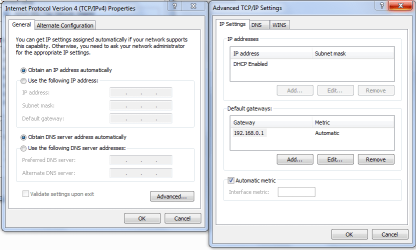
Since the default gateway appears to be disappearing it may help to define the gateway at the IPv4 properties window, hit the Advanced butting and type in the gateway manually there.
 

Attachments

  • gateway type in manually.PNG
    gateway type in manually.PNG
    23.9 KB · Views: 3

My Computer My Computer

At a glance

Windows 7 Ult, Windows 8.1 Pro,Q9650-4.275GHz, E8600 4.5GHz, E6750-3.8GHzG.Skill PC2 9600 1200Mhz 5 5 5 15 2TGTX480
Computer type
PC/Desktop
Computer Manufacturer/Model Number
Home built
OS
Windows 7 Ult, Windows 8.1 Pro,
CPU
Q9650-4.275GHz, E8600 4.5GHz, E6750-3.8GHz
Motherboard
Evga 780i FTW
Memory
G.Skill PC2 9600 1200Mhz 5 5 5 15 2T
Graphics Card(s)
GTX480
Sound Card
Asus Xonar D2
Monitor(s) Displays
HannsG
Screen Resolution
1680X1050
Hard Drives
GSkill Phoenix Pro 120GB SSD
PSU
ThermalTake Toughpower 1000Watt modular
Case
ThermalTake XaserV
Cooling
Xigmatek S1283
Keyboard
Logitech G15
Mouse
Logitech G9
Internet Speed
T1
I manually set the gateway adress, but im not quite sure how to disable dual channels.

I have a setting which is
Mode: AP
Band: 2,4GHz (B+G+N)
Essid: LongstreetAllstars
Channel number: 11

where i can change all of these. Should I change "Band" To something else?
 

My Computer My Computer

At a glance

Windows 7 64 bit Home premium
Computer type
Laptop
Computer Manufacturer/Model Number
Asus
OS
Windows 7 64 bit Home premium
I manually set the gateway adress, but im not quite sure how to disable dual channels.

I have a setting which is
Mode: AP
Band: 2,4GHz (B+G+N)
Essid: LongstreetAllstars
Channel number: 11

where i can change all of these. Should I change "Band" To something else?

For the Band, try to go with the 802.11n Only setting, the 20Mhz setting should be the single channel mode.
 

My Computer My Computer

At a glance

Windows 7 Ult, Windows 8.1 Pro,Q9650-4.275GHz, E8600 4.5GHz, E6750-3.8GHzG.Skill PC2 9600 1200Mhz 5 5 5 15 2TGTX480
Computer type
PC/Desktop
Computer Manufacturer/Model Number
Home built
OS
Windows 7 Ult, Windows 8.1 Pro,
CPU
Q9650-4.275GHz, E8600 4.5GHz, E6750-3.8GHz
Motherboard
Evga 780i FTW
Memory
G.Skill PC2 9600 1200Mhz 5 5 5 15 2T
Graphics Card(s)
GTX480
Sound Card
Asus Xonar D2
Monitor(s) Displays
HannsG
Screen Resolution
1680X1050
Hard Drives
GSkill Phoenix Pro 120GB SSD
PSU
ThermalTake Toughpower 1000Watt modular
Case
ThermalTake XaserV
Cooling
Xigmatek S1283
Keyboard
Logitech G15
Mouse
Logitech G9
Internet Speed
T1
Back
Top