All programs say "not responding" then my computer crashes-please help

nicknkane

New member
Local time
6:09 PM
Messages
11
All programs say "not responding" then my computer crashes-please help

When I turn on my computer, everything seems fine at first. After I open a program, the program usually doesn't run. Programs I've tried include iTunes, Google Chrome, and simply trying to open files stored on my computer.
After about 30 seconds, whatever program I'm using says "not responding" then crashes. After that happens, I can't even open the dock to shut down, restart, etc.... I can't open the file folders on my desktop, the entire operating system becomes unresponsive, then eventually crashes. I have to shut it down by holding down the power button.
I have tried restarting it several times. I have managed to open my computer in "safe mode with networking," but I need to be able to access other programs on here, and I would just like to be able to use it the normal way so I have my preferences, wallpaper, sound, etc.... In safe mode, I ran Defrag, deleted several unnecessary files, and deleted the computer game I recently installed that I thought might have been causing the problem. I don't have any other games on my computer, but I do have video files, music files, Photoshop, Illustrator, VLC Media Player, Chrome, Firefox, Microsoft Office, and some others, I can say which ones if anyone needs to know in order to help.
I found a thread where someone recommended going to the command prompts and typing in "sfc/scannow" and I did that, but it didn't work. I've tried doing system recovery but that didn't work.
Can anyone help me identify the problem and tell me what to do about it? I'm not very advanced with computer knowledge and I don't know a lot of terms, but I can answer any questions you have about what my computer's doing if that can help.

tldr: My computer doesn't work outside safe mode and I have no idea how to fix it, and I am a beginner with computers. Please help.
 

My Computer My Computer

OS
Windos 7 Home Premium

My Computer My Computer

Computer type
PC/Desktop
Computer Manufacturer/Model Number
Own build (new) Desk1 / Asus ROG Win 7 / Desk2 1st build
OS
Desk1 7 Home Prem / Desk2 10 Pro / Main lap Asus ROG 10 Pro 2 laptop Toshiba 7 Pro Asus P2520 7 & 10
CPU
Desk1 i5 3750K / Laptop i7 GTX 860M / Desk2 i5 2500
Motherboard
Desk1 Asus P877-V / Desk2 Gigabyte H67 UD3H / Laptop ?
Memory
Desk1 8GB (1866) / Desk2 16GB (1333) / Laptop 8Gb DDR3
Graphics Card(s)
Desk 1& 2NVidia GTX 650 & Laptops on board Intel
Sound Card
Desk 1 & 2 -XONAR DG Realtek High Def audio Laptop
Monitor(s) Displays
Desk 1 Benq HD 2450 / Desk2 Philips 24" / Laptop 17.5"
Screen Resolution
1920x1080 D1 & D2 & Laptop 1
Hard Drives
Desk1 Samsung 120GB 830 SSD
Asus ROG 256GB 850 Pro SSD
Desk2 Samsung 840 256 SSD
Toshiba 120GB EVO
PSU
Desk 1 Corsair HX 1050/ Laptop ? / Desk 2 Corsair HX 650
Case
Desk 1 Cooler HAF XM ? Toshiba laptop / Desk2 Coolermaster
Cooling
Fans on all Desk1 -2 Desk2 - all Coolermasters 5 Laptop ?
Keyboard
Desk 1 MS Sidewinder X6 Desk 2 MS Sidewinder X 4
Mouse
Desk 1&2 - Gigabyte MS 900 gamer - laptop - Logitec wireless
Internet Speed
ADSL2+
Other Info
One other Desktop (tester) and spare Toshba laptop both with SSD's
Running Kaspersky 2016 ISS on all machines config'd identically
Logitec audio stereo systems on each machine (x3)
Canon MG5250MFC
Router/modem TP-Link running WPA2SK
I have had this happen a lot, especially with Office '10 programs. I'd suggest that as soon as it stops responding, check the time. Use safe mode and begin to gatheer information by going to the event viewer and tracking down every error listed around that time. Hopefully you'll see a pattern as to thee cause(s).

Also run chkdisk just to be sure there's no corrupted data.
 

My Computer My Computer

Computer Manufacturer/Model Number
Desktop made to order - Asus P6x58D Premium
OS
Win 7 64 Prof
CPU
i7 930
Motherboard
Asus P6x58D Premium
Memory
24 gig 1333
Graphics Card(s)
HIS ATI Radeon HD 6850
Sound Card
Creative
Monitor(s) Displays
NEC Multisync P241W
Screen Resolution
1920 x 1200
Hard Drives
2 WD 1tb each black caviar
1 WD black caviar 2tb
1 Plextor SSD SATA 6 256 gig
1 Intel generation 2 SSD 160 gig
PSU
i7 930
Case
Antec 183 (?)
Cooling
Zalman fan and heat pipe
Keyboard
Goldtouch
Mouse
Logitech G 700 used wirelessly
Internet Speed
19.6 Mbps up and 2.00 Mbps down
Other Info
5 usb 3 hard drives used for backup. Until recently also backed up with Crashplan but discovered it was the cause of endless VSS errors and open programs stopping responding. HP Laserjet and large Epson inkjet for photography. Very old Epson Scanner. Cyberpower UPS.
I ran CHKDSK, it took a long time, and I wrote down the results:

41 repairs records processed
1302 large file records processed
0 bad file records processed
0 EA records processed (file verification)

208354 index entries processed (index verification)

0 unindexed files scanned
0 unindexed files recovered (index verification complete)

160512 file SDs/SIDs processed (verifying security desciptors)

23922 data files processed (desciptor verification completed)

34730872 USN bytes processed (verifying USN journal)

160496 files processed (this took about 2 hours and was verifying file data)

verifying free space: 9011502 free clusters

I don't know what most of it means, but I don't think it said any data was corrupted.

I think I typed it with the space, but the scan ran and didn't find anything. Is powering off illegally just holding down the power button? Because I've done that every time. I don't know the password to get into repair mode.

I'll try the event viewer if I can, and hopefully I'll find the errors. What do I do if I know what the errors are?
 

My Computer My Computer

OS
Windos 7 Home Premium
It looks like one error that has happened a lot in the past few days, and looks like it could be every time I start up my computer, is one where the source is "perfnet" and the event ID is 2004. I am going to try SFC /SCANNOW again without the space. Thanks for the help so far.
 

My Computer My Computer

OS
Windos 7 Home Premium

My Computer My Computer

Computer type
PC/Desktop
Computer Manufacturer/Model Number
Own build (new) Desk1 / Asus ROG Win 7 / Desk2 1st build
OS
Desk1 7 Home Prem / Desk2 10 Pro / Main lap Asus ROG 10 Pro 2 laptop Toshiba 7 Pro Asus P2520 7 & 10
CPU
Desk1 i5 3750K / Laptop i7 GTX 860M / Desk2 i5 2500
Motherboard
Desk1 Asus P877-V / Desk2 Gigabyte H67 UD3H / Laptop ?
Memory
Desk1 8GB (1866) / Desk2 16GB (1333) / Laptop 8Gb DDR3
Graphics Card(s)
Desk 1& 2NVidia GTX 650 & Laptops on board Intel
Sound Card
Desk 1 & 2 -XONAR DG Realtek High Def audio Laptop
Monitor(s) Displays
Desk 1 Benq HD 2450 / Desk2 Philips 24" / Laptop 17.5"
Screen Resolution
1920x1080 D1 & D2 & Laptop 1
Hard Drives
Desk1 Samsung 120GB 830 SSD
Asus ROG 256GB 850 Pro SSD
Desk2 Samsung 840 256 SSD
Toshiba 120GB EVO
PSU
Desk 1 Corsair HX 1050/ Laptop ? / Desk 2 Corsair HX 650
Case
Desk 1 Cooler HAF XM ? Toshiba laptop / Desk2 Coolermaster
Cooling
Fans on all Desk1 -2 Desk2 - all Coolermasters 5 Laptop ?
Keyboard
Desk 1 MS Sidewinder X6 Desk 2 MS Sidewinder X 4
Mouse
Desk 1&2 - Gigabyte MS 900 gamer - laptop - Logitec wireless
Internet Speed
ADSL2+
Other Info
One other Desktop (tester) and spare Toshba laptop both with SSD's
Running Kaspersky 2016 ISS on all machines config'd identically
Logitec audio stereo systems on each machine (x3)
Canon MG5250MFC
Router/modem TP-Link running WPA2SK
Question: Have you attempted to do a system recovery?

If not go to safe mode then go to "Control Panel" and bring up "Recovery." At this point choose a date prior to the time you started having problems.

Also if you have a Malware problem run that to see if you have some nasties running around on your OS.

Just some thoughts; good luck.

BTW, always back up your needed files prior to making any changes to the System.
 

My Computer My Computer

Computer Manufacturer/Model Number
HP Pavilion a4302f
OS
Win 7 Pro x64, VM Win XP, Win7 Pro Sandbox, Kubuntu 11
CPU
AMD Athlon(tm) II X4 640 @ 3.0 Gbz
Memory
12GB 1066MHz DDR3 SDRAM - 2x4GB, 2x2GB
Graphics Card(s)
ATI Radeon HD 4350 HD Graphics/Audio with 512MB
Sound Card
Realtek High Definition Audio
Monitor(s) Displays
1. Dell 23" SP2307, 2. Mitsublishi 40" HDTV, Hannspree 25"
Screen Resolution
1. 2048x1152, 2. 1920-1080, 3. 1920x1200
Hard Drives
Int: 1 120 Gig SSD i
1 - 2.5" 500 USB External HDD
1 -1 Tb USB External HDD
Case
Mid Tower
Cooling
Standard Fans - 5 fans (very quiet)
Keyboard
Microsoft Wireless 2000
Mouse
Microsoft Wireless Mouse 5000
Internet Speed
10 Mbit (realistically 500 Kbit - 1.2 Mbit)
Other Info
Speakers - Bose Desktop (Excellent Sound)
1 external CD|DVD\Blue-ray Recorders/Players (Sony)
Question: Have you attempt to do a system recovery?

If not go to safe mode then go to "Control Panel" and bring up "Recovery." At this point choose a date prior to the time you started having problems.

Also if you have a Malware problem run that to see if you have some nasties running around on your OS.

Just some thoughts; good luck.

BTW, always back up your needed files prior to making any changes to the System.
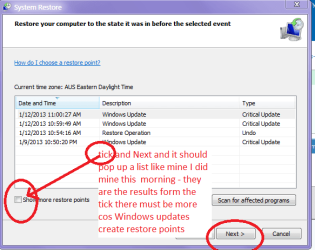
Good idea Lee and NN in there if you can't see a suitable restore point tick the little box for earlier than what is shown ones.
 

My Computer My Computer

Computer type
PC/Desktop
Computer Manufacturer/Model Number
Own build (new) Desk1 / Asus ROG Win 7 / Desk2 1st build
OS
Desk1 7 Home Prem / Desk2 10 Pro / Main lap Asus ROG 10 Pro 2 laptop Toshiba 7 Pro Asus P2520 7 & 10
CPU
Desk1 i5 3750K / Laptop i7 GTX 860M / Desk2 i5 2500
Motherboard
Desk1 Asus P877-V / Desk2 Gigabyte H67 UD3H / Laptop ?
Memory
Desk1 8GB (1866) / Desk2 16GB (1333) / Laptop 8Gb DDR3
Graphics Card(s)
Desk 1& 2NVidia GTX 650 & Laptops on board Intel
Sound Card
Desk 1 & 2 -XONAR DG Realtek High Def audio Laptop
Monitor(s) Displays
Desk 1 Benq HD 2450 / Desk2 Philips 24" / Laptop 17.5"
Screen Resolution
1920x1080 D1 & D2 & Laptop 1
Hard Drives
Desk1 Samsung 120GB 830 SSD
Asus ROG 256GB 850 Pro SSD
Desk2 Samsung 840 256 SSD
Toshiba 120GB EVO
PSU
Desk 1 Corsair HX 1050/ Laptop ? / Desk 2 Corsair HX 650
Case
Desk 1 Cooler HAF XM ? Toshiba laptop / Desk2 Coolermaster
Cooling
Fans on all Desk1 -2 Desk2 - all Coolermasters 5 Laptop ?
Keyboard
Desk 1 MS Sidewinder X6 Desk 2 MS Sidewinder X 4
Mouse
Desk 1&2 - Gigabyte MS 900 gamer - laptop - Logitec wireless
Internet Speed
ADSL2+
Other Info
One other Desktop (tester) and spare Toshba laptop both with SSD's
Running Kaspersky 2016 ISS on all machines config'd identically
Logitec audio stereo systems on each machine (x3)
Canon MG5250MFC
Router/modem TP-Link running WPA2SK
I ran sfc /sannow again, with the space, and got the same result: "Windows resource protection did not find any integrity violations"

First I am going to try to do the Option 2 of DSKCHK, I used Option 1 before. If Option 2 doesn't do anything, I'll take a stab at System Recovery. Thanks again.
 

My Computer My Computer

OS
Windos 7 Home Premium
One question: In the command prompts, do I type: chkdsk:/f I just want to make sure I'm getting the letters'symbols right. If this isn't right, what exactly do I type?
 

My Computer My Computer

OS
Windos 7 Home Premium
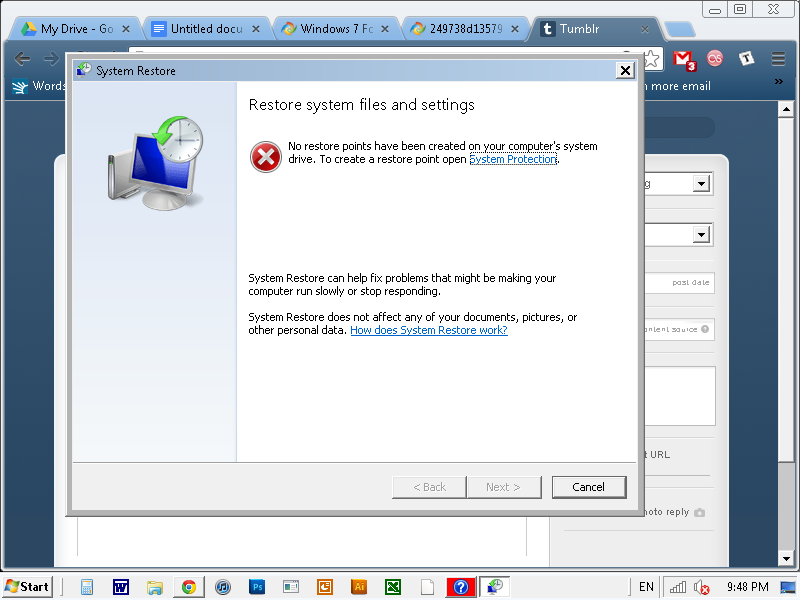
Okay. I tried the last two things, now I am trying system recovery, but I don't know how do get it to work. I go to control panel, then recovery. From there, there is a button that says "Open System Restore." I click on it, and it takes me to a page that says "restore system files and settings" and then says "No restore points have been created on your computer's system drive. TO create a restore point open system protection."
"system protection" is a link, and when I click on it, it takes me to a window with options to rename my computer and do other things unrelated to system recovery. One of the tabs in that window, however, is called "advanced" and has a section for "startup and recovery" with a button called "settings." All it has is things about system debugging and memory dumps, but no way to set a restore point. How do I do it? Thanks so much.
 

My Computer My Computer

OS
Windos 7 Home Premium
Nick try doing this through > Start > Accessories > System tools > system restore - see pic.


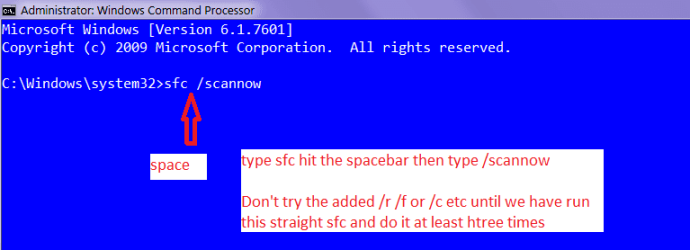
The other you asked about is sfc /scannow /r or /f or /c etc etc spaces in between the previous type and the /alpha but you need to look at what alpha you pick - do the restore first.
 

My Computer My Computer

Computer type
PC/Desktop
Computer Manufacturer/Model Number
Own build (new) Desk1 / Asus ROG Win 7 / Desk2 1st build
OS
Desk1 7 Home Prem / Desk2 10 Pro / Main lap Asus ROG 10 Pro 2 laptop Toshiba 7 Pro Asus P2520 7 & 10
CPU
Desk1 i5 3750K / Laptop i7 GTX 860M / Desk2 i5 2500
Motherboard
Desk1 Asus P877-V / Desk2 Gigabyte H67 UD3H / Laptop ?
Memory
Desk1 8GB (1866) / Desk2 16GB (1333) / Laptop 8Gb DDR3
Graphics Card(s)
Desk 1& 2NVidia GTX 650 & Laptops on board Intel
Sound Card
Desk 1 & 2 -XONAR DG Realtek High Def audio Laptop
Monitor(s) Displays
Desk 1 Benq HD 2450 / Desk2 Philips 24" / Laptop 17.5"
Screen Resolution
1920x1080 D1 & D2 & Laptop 1
Hard Drives
Desk1 Samsung 120GB 830 SSD
Asus ROG 256GB 850 Pro SSD
Desk2 Samsung 840 256 SSD
Toshiba 120GB EVO
PSU
Desk 1 Corsair HX 1050/ Laptop ? / Desk 2 Corsair HX 650
Case
Desk 1 Cooler HAF XM ? Toshiba laptop / Desk2 Coolermaster
Cooling
Fans on all Desk1 -2 Desk2 - all Coolermasters 5 Laptop ?
Keyboard
Desk 1 MS Sidewinder X6 Desk 2 MS Sidewinder X 4
Mouse
Desk 1&2 - Gigabyte MS 900 gamer - laptop - Logitec wireless
Internet Speed
ADSL2+
Other Info
One other Desktop (tester) and spare Toshba laptop both with SSD's
Running Kaspersky 2016 ISS on all machines config'd identically
Logitec audio stereo systems on each machine (x3)
Canon MG5250MFC
Router/modem TP-Link running WPA2SK
Thanks, but I went to system restore that way to and it led me to the same thing - I can't find where/how to set the restore point.
 

My Computer My Computer

OS
Windos 7 Home Premium
One question: In the command prompts, do I type: chkdsk:/f I just want to make sure I'm getting the letters'symbols right. If this isn't right, what exactly do I type?[/QUOTE] No Nick see my pic that is the command you want the chkdsk is run from another point / feature if we need to do that I'll run through that try this first and for three goes it doesn't take long so just hang in there it is frustrating mate but worth it just to eliminate things ok? :)
 

Attachments

  • CMDSCAN.PNG
    CMDSCAN.PNG
    8.6 KB · Views: 6

My Computer My Computer

Computer type
PC/Desktop
Computer Manufacturer/Model Number
Own build (new) Desk1 / Asus ROG Win 7 / Desk2 1st build
OS
Desk1 7 Home Prem / Desk2 10 Pro / Main lap Asus ROG 10 Pro 2 laptop Toshiba 7 Pro Asus P2520 7 & 10
CPU
Desk1 i5 3750K / Laptop i7 GTX 860M / Desk2 i5 2500
Motherboard
Desk1 Asus P877-V / Desk2 Gigabyte H67 UD3H / Laptop ?
Memory
Desk1 8GB (1866) / Desk2 16GB (1333) / Laptop 8Gb DDR3
Graphics Card(s)
Desk 1& 2NVidia GTX 650 & Laptops on board Intel
Sound Card
Desk 1 & 2 -XONAR DG Realtek High Def audio Laptop
Monitor(s) Displays
Desk 1 Benq HD 2450 / Desk2 Philips 24" / Laptop 17.5"
Screen Resolution
1920x1080 D1 & D2 & Laptop 1
Hard Drives
Desk1 Samsung 120GB 830 SSD
Asus ROG 256GB 850 Pro SSD
Desk2 Samsung 840 256 SSD
Toshiba 120GB EVO
PSU
Desk 1 Corsair HX 1050/ Laptop ? / Desk 2 Corsair HX 650
Case
Desk 1 Cooler HAF XM ? Toshiba laptop / Desk2 Coolermaster
Cooling
Fans on all Desk1 -2 Desk2 - all Coolermasters 5 Laptop ?
Keyboard
Desk 1 MS Sidewinder X6 Desk 2 MS Sidewinder X 4
Mouse
Desk 1&2 - Gigabyte MS 900 gamer - laptop - Logitec wireless
Internet Speed
ADSL2+
Other Info
One other Desktop (tester) and spare Toshba laptop both with SSD's
Running Kaspersky 2016 ISS on all machines config'd identically
Logitec audio stereo systems on each machine (x3)
Canon MG5250MFC
Router/modem TP-Link running WPA2SK
Okay. I've run it twice now. It is all frustrating, but I'm glad to even eliminate anything. I'll try running sfc /scannow again, then afterward with /r and /f

I also still want to try system recovery, if you look at my last post it says why I haven't been able to do that.
 

My Computer My Computer

OS
Windos 7 Home Premium
Okay. I've run it twice now. It is all frustrating, but I'm glad to even eliminate anything. I'll try running sfc /scannow again, then afterward with /r and /f

I also still want to try system recovery, if you look at my last post it says why I haven't been able to do that.
Ok we seem to moving on Nick -I am presuming thta is your name anywa I am used to it n=my grandson is a Nick LOL!!

Fro the restore >Strat > All programs > Accessories > System tools > system restore - that wil open up as in my pic and I have put it there what to do.
 

Attachments

  • SYSRES.PNG
    SYSRES.PNG
    16.7 KB · Views: 7

My Computer My Computer

Computer type
PC/Desktop
Computer Manufacturer/Model Number
Own build (new) Desk1 / Asus ROG Win 7 / Desk2 1st build
OS
Desk1 7 Home Prem / Desk2 10 Pro / Main lap Asus ROG 10 Pro 2 laptop Toshiba 7 Pro Asus P2520 7 & 10
CPU
Desk1 i5 3750K / Laptop i7 GTX 860M / Desk2 i5 2500
Motherboard
Desk1 Asus P877-V / Desk2 Gigabyte H67 UD3H / Laptop ?
Memory
Desk1 8GB (1866) / Desk2 16GB (1333) / Laptop 8Gb DDR3
Graphics Card(s)
Desk 1& 2NVidia GTX 650 & Laptops on board Intel
Sound Card
Desk 1 & 2 -XONAR DG Realtek High Def audio Laptop
Monitor(s) Displays
Desk 1 Benq HD 2450 / Desk2 Philips 24" / Laptop 17.5"
Screen Resolution
1920x1080 D1 & D2 & Laptop 1
Hard Drives
Desk1 Samsung 120GB 830 SSD
Asus ROG 256GB 850 Pro SSD
Desk2 Samsung 840 256 SSD
Toshiba 120GB EVO
PSU
Desk 1 Corsair HX 1050/ Laptop ? / Desk 2 Corsair HX 650
Case
Desk 1 Cooler HAF XM ? Toshiba laptop / Desk2 Coolermaster
Cooling
Fans on all Desk1 -2 Desk2 - all Coolermasters 5 Laptop ?
Keyboard
Desk 1 MS Sidewinder X6 Desk 2 MS Sidewinder X 4
Mouse
Desk 1&2 - Gigabyte MS 900 gamer - laptop - Logitec wireless
Internet Speed
ADSL2+
Other Info
One other Desktop (tester) and spare Toshba laptop both with SSD's
Running Kaspersky 2016 ISS on all machines config'd identically
Logitec audio stereo systems on each machine (x3)
Canon MG5250MFC
Router/modem TP-Link running WPA2SK
Work through these other Troubleshooting Steps for Windows 7

If you can't stay booted then move to the steps for Troubleshooting Windows 7 Failure to Start

Keep in mind that maintaining Win7's native instantaneous performance requires a perfect install on adequate hardware. The steps are the same as here to get a perfect Clean Reinstall - Factory OEM Windows 7, while you can find out if your hardware is sufficient using Windows 7 Upgrade Advisor

If you have much different install than given in link above, or maintain it differently, then I would reinstall following the steps and you will get and keep a perfect install as long as you only use the tools and methods given.
 
ICit2lol: My problem is that I go to start > all programs > accessories > system tools > system restore, but what comes up for system restore is different from your pic. It looks like this:
tumblr_mgi06325hE1rmeil2o1_1280.png
DO you know what the problem is?

gregrocker: I went through some of your steps, and when Iran Malwarebytes, it found 8 malicious items. What should I do?

Thanks x
 

My Computer My Computer

OS
Windos 7 Home Premium
Run one of the bootable AV scans to double-check, then run Malwarebytes again to see if it got everything.

Then run SFC /scannow from Command Line as shown in tutorial to see if there are SYstem Files to repair.

Then run the boot repair steps to see if Startup Repair or any of the subsequent steps can get it started.

If not rescue your files to do the Clean Reinstall which is always best after a crippling infection anyway since its hard to get rid of all the effects.
 

My Computer My Computer

Computer type
PC/Desktop
Computer Manufacturer/Model Number
Own build (new) Desk1 / Asus ROG Win 7 / Desk2 1st build
OS
Desk1 7 Home Prem / Desk2 10 Pro / Main lap Asus ROG 10 Pro 2 laptop Toshiba 7 Pro Asus P2520 7 & 10
CPU
Desk1 i5 3750K / Laptop i7 GTX 860M / Desk2 i5 2500
Motherboard
Desk1 Asus P877-V / Desk2 Gigabyte H67 UD3H / Laptop ?
Memory
Desk1 8GB (1866) / Desk2 16GB (1333) / Laptop 8Gb DDR3
Graphics Card(s)
Desk 1& 2NVidia GTX 650 & Laptops on board Intel
Sound Card
Desk 1 & 2 -XONAR DG Realtek High Def audio Laptop
Monitor(s) Displays
Desk 1 Benq HD 2450 / Desk2 Philips 24" / Laptop 17.5"
Screen Resolution
1920x1080 D1 & D2 & Laptop 1
Hard Drives
Desk1 Samsung 120GB 830 SSD
Asus ROG 256GB 850 Pro SSD
Desk2 Samsung 840 256 SSD
Toshiba 120GB EVO
PSU
Desk 1 Corsair HX 1050/ Laptop ? / Desk 2 Corsair HX 650
Case
Desk 1 Cooler HAF XM ? Toshiba laptop / Desk2 Coolermaster
Cooling
Fans on all Desk1 -2 Desk2 - all Coolermasters 5 Laptop ?
Keyboard
Desk 1 MS Sidewinder X6 Desk 2 MS Sidewinder X 4
Mouse
Desk 1&2 - Gigabyte MS 900 gamer - laptop - Logitec wireless
Internet Speed
ADSL2+
Other Info
One other Desktop (tester) and spare Toshba laptop both with SSD's
Running Kaspersky 2016 ISS on all machines config'd identically
Logitec audio stereo systems on each machine (x3)
Canon MG5250MFC
Router/modem TP-Link running WPA2SK
Back
Top