
Had trouble installing my new SSD but finally made it thru (http://www.sevenforums.com/hardware...re-new-ssd-boot-drive-mb-sata-connectors.html)
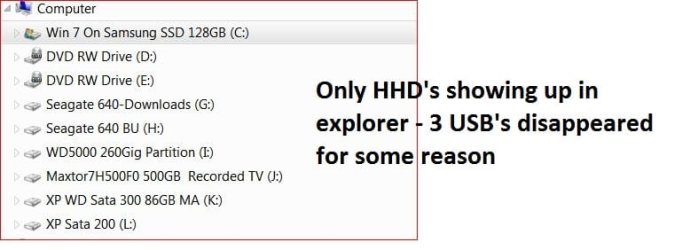
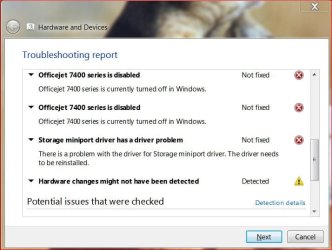
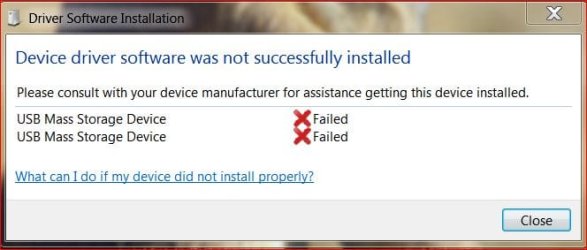
Was reassigning drive letters in MiniTool Partition Magic when I lost all my usb drives. The below jpg shows the issues. Have tried 'hardware/device' repair in Windows but no good.
All three USB devices show up in the bios boot up and usb controller is reported operating OK. The usb devices are just not showing up now in Windows or in Widows Explorer.
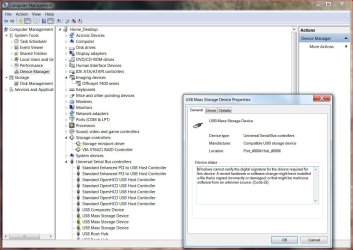
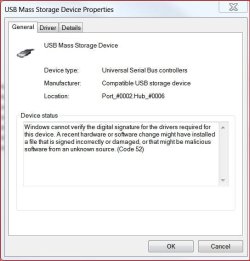
Device manager show these items as errors/trouble...but I can't figure out how to fox/repair them ?
Here's some jpgs showing the issue:
This issue appeared after the successful set up of my new Samsung SSD drive and enabling AHCI in the bios. UBS's disappeared after changing a few drive letters assignments to list the drives in order in Win Explorer ?? (did not change any USB drive letters as far as I know ?)
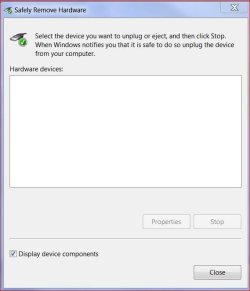
Thanks for any help on this....p.s. my mouse and key board are wireless usb with a toggle in a usb port and obviously I'm typing this so that is fine ? Also noticed no usb listed in safely remove usb hardware screen
TiminAz
Was reassigning drive letters in MiniTool Partition Magic when I lost all my usb drives. The below jpg shows the issues. Have tried 'hardware/device' repair in Windows but no good.
All three USB devices show up in the bios boot up and usb controller is reported operating OK. The usb devices are just not showing up now in Windows or in Widows Explorer.
Device manager show these items as errors/trouble...but I can't figure out how to fox/repair them ?
Here's some jpgs showing the issue:
This issue appeared after the successful set up of my new Samsung SSD drive and enabling AHCI in the bios. UBS's disappeared after changing a few drive letters assignments to list the drives in order in Win Explorer ?? (did not change any USB drive letters as far as I know ?)
Thanks for any help on this....p.s. my mouse and key board are wireless usb with a toggle in a usb port and obviously I'm typing this so that is fine ? Also noticed no usb listed in safely remove usb hardware screen
TiminAz
Attachments
Last edited:
My Computer
- Computer type
- PC/Desktop
- Computer Manufacturer/Model Number
- Self built
- OS
- Windows 7 Pro 64bit SP1
- CPU
- AMD FX-6100 Six-Core Processor
- Motherboard
- M5A78L-M LX PLUS
- Memory
- 2ea Corsair-1333MHz-PC3-10666-240-pin-CMX4GX3M1A1333C9
- Graphics Card(s)
- NVIDIA GeForce GT 630 - 1023MB (EVGA)
- Sound Card
- OnBoard Via High Def Audio
- Monitor(s) Displays
- Samsung 204B main - ASUS VS228 secondary
- Screen Resolution
- 1920x1080 main - 1920x1080 secondary
- Hard Drives
- Samsung SSD 840 128GB Win7 Pro 64bit - Western Digital WDC 465GB - Seagate 640GB Sata B/U - Maxtor 500GB Sata B/U - Maxtor 200GB Sata
- PSU
- Antec 650 watt
- Cooling
- Multiple case fans
- Keyboard
- MS USB dual Wireless Keyboard - IntelliType Pro
- Mouse
- MS USB dual Wireless Mouse - IntelliPoint
- Internet Speed
- Cox Cable
- Antivirus
- Bitdefender IS 2014
- Browser
- FireFox Primary - IE 11
- Other Info
- Hauppaguge Win TV HVR-1250 (Model 22xxx, Hybrid ATSC/QAM)
Samsung HD103SI USB 1TB Desktop Drive - Backup & Disk Image storage


