
Allocating space on new ext. HDD

bawldiggle

GrayGhost2 ret.
Pro User
VIP
Local time
7:04 PM
Messages
895
Location
Australia
With a new external HDD ... in Windows Disk Management the status is "Unallocated".

When I RClick "Disc2" there are two options ...
1. Dynamic Disc
2. GPT Disk
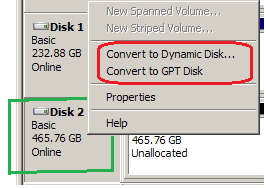
Disc2_1.png

When I RClick the hatched area of Disc 2 there is another option

1. New Simple Volume

Disc2_2.png

With 3 options I do not know what to do next ?
- I don't know what any of the options represent :o :shock:

I want to create 3 partitions on the the external HDD for data only.
Can I create 3 partitions and leave part of the HDD unallocated or must entire capacity of the 500GB be allocated

Would appreciate some help :)

DEVICE:
Case: Astone ISO Gear 481U3 (Sata to USB 3.0 External Storage System) Enclosure
Disc: WD Blue 500GB
 

My Computer My Computer

Computer type
PC/Desktop
Computer Manufacturer/Model Number
Toshiba, Lenovo (laptops) + 4 rigs
OS
XP Pro (x86) | 7 HP (x86) & (x64) | 7 Pro (x64)
For the size of that disk just leave it MBR and not GPT and make three simple volumes. When making the volume it will let you make the size you want just leave enough space to make three.
 

My Computer My Computer

Computer type
PC/Desktop
Computer Manufacturer/Model Number
Custom
OS
10 Pro x64
CPU
Ryzen 9 3900X
Motherboard
Asrock x370 Tachi
Memory
64GB(4x16GB) DDR4
Graphics Card(s)
EVGA 1080ti FTW3
Sound Card
ASUS Xonar Essence STX (V4 Bursons), ODAC rev B, NFB-11, O2
Monitor(s) Displays
3xASUS PB278Q/R, Optoma HD142X
Screen Resolution
3x1440p, 1080p
Hard Drives
512GB 850 EVO(OS, Programs)
4TB (Movies)
3TB (Downloads)
3TB (Programs)
1TB HDD (Games)
2x6TB R1 (videos)
PSU
AX760
Case
Fractal Define R5
Cooling
NH-D15S
Keyboard
Massdrop Ctrl with Box Navy's
Mouse
G903, Alioth XXL Mat
Internet Speed
280/40
Antivirus
MBAM, ESET
Browser
Canary 64 Bit
Other Info
I also own a Thinkpad P50 Xeon 4K, X220T, X1C5
@ rvcjew +1
Should I run "Convert to Dynamic Disc" ?
- I presume that is MBR ?
-OR-
Do I only run "New Simple Volume"
- and leave "Convert to Dynamic Disc" and "Convert to GPT Disc" alone ?

:confused:
 

My Computer My Computer

Computer type
PC/Desktop
Computer Manufacturer/Model Number
Toshiba, Lenovo (laptops) + 4 rigs
OS
XP Pro (x86) | 7 HP (x86) & (x64) | 7 Pro (x64)
@ rvcjew +1
Should I run "Convert to Dynamic Disc" ?
- I presume that is MBR ?
-OR-
Do I only run "New Simple Volume"
- and leave "Convert to Dynamic Disc" and "Convert to GPT Disc" alone ?

:confused:

Only simple, dynamic discs are for like spanning disks (software raid) your disk is already currently MBR.
 

My Computer My Computer

Computer type
PC/Desktop
Computer Manufacturer/Model Number
Custom
OS
10 Pro x64
CPU
Ryzen 9 3900X
Motherboard
Asrock x370 Tachi
Memory
64GB(4x16GB) DDR4
Graphics Card(s)
EVGA 1080ti FTW3
Sound Card
ASUS Xonar Essence STX (V4 Bursons), ODAC rev B, NFB-11, O2
Monitor(s) Displays
3xASUS PB278Q/R, Optoma HD142X
Screen Resolution
3x1440p, 1080p
Hard Drives
512GB 850 EVO(OS, Programs)
4TB (Movies)
3TB (Downloads)
3TB (Programs)
1TB HDD (Games)
2x6TB R1 (videos)
PSU
AX760
Case
Fractal Define R5
Cooling
NH-D15S
Keyboard
Massdrop Ctrl with Box Navy's
Mouse
G903, Alioth XXL Mat
Internet Speed
280/40
Antivirus
MBAM, ESET
Browser
Canary 64 Bit
Other Info
I also own a Thinkpad P50 Xeon 4K, X220T, X1C5
Don't use dynamic disks.

You might have good reason to use 3 partitions, but you might find it more efficient to instead just use 1 partition, with a folder structure to separate stuff by category.

You could leave part of the disk unallocated, although I don't see why you would want to do that.
 

My Computer My Computer

Computer type
PC/Desktop
Computer Manufacturer/Model Number
Ignatz Special; 4 speed manual gearbox; factory air conditioning; one of one
OS
Windows 7 Home Premium SP1, 64-bit
CPU
Intel Skylake i5-6600K, not overclocked
Motherboard
AsRock Z170M Extreme 4, micro ATX
Memory
8 GB HyperX DDR4-2666 (2 x 4 GB)
Graphics Card(s)
none; graphics are integrated on CPU
Sound Card
onboard: Realtek ALC1150; external: USB Behringer UF0-202
Monitor(s) Displays
Dell S2340M 23 inch IPS
Screen Resolution
1600 x 900
Hard Drives
System: Crucial MX100 series SSD, 128 GB;
Data: Samsung Spinpoint 103SJ, 1 TB;
Backup: WD Caviar Green WD30EZRX-00D8PB0, 3 TB
PSU
Rosewill SilentNight 500 watt fanless, semi-modular
Case
Antec Solo II
Cooling
Noctua NH-U12S; Noctua F12 intake, Noctua S12A exhaust
Keyboard
Microsoft 200 6JH-00001 USB
Mouse
Dell or Microsoft optical wired; USB
Antivirus
Microsoft Security Essentials and Malwarebytes Premium
Browser
Pale Moon
Other Info
All fans PWM; speeds at idle: CPU circa 500 rpm; intake circa 600 rpm; exhaust circa 600 rpm; CPU temps 27 idle and 47 C load in a warm room (27 C/81 F) when running Intel Extreme Tuning Utility stress test.
@ rvcjew :)
Thank you for your help
 

My Computer My Computer

Computer type
PC/Desktop
Computer Manufacturer/Model Number
Toshiba, Lenovo (laptops) + 4 rigs
OS
XP Pro (x86) | 7 HP (x86) & (x64) | 7 Pro (x64)
@ ignatzatsonic :)

Didn't realise that buying my first HD enclosure + a new WD Blue 500GB 3.5 HDD, would become so complicated.
- an observation, not a criticism ... just shows how little I know !

I thought the hardest part was following the assembly instructions (fixing the HDD into the enclosure).
- like Lego ... with care.
- I will never buy another off the shelf enclosed HDD again

Now I am in new territory again.
- setting up the new "unallocated" HDD space
- and discovering the technical limits (and politics) of NTFS and FAT32

One of my partitions will be to store downloaded programs, including large ISO files.
- at the moment I have all my laptop data on an external USB powered pocket drive (PD) through a mains powered USB hub -- (NTFS format)
- 4,500 txt files + archived program downloads + Linux info (in MS format)... etc ... a hotch potch of data
- the pocket drive is getting a flogging + it disconnects (not just asleep) at the most inconvenient times -- especially when I am about to save an open doc already on the PD
- the PD is about 8 years old ... a miracle of life expectancy
- add some ominous ticking from the PD ... its time to retire the PD before it dies.


Just read What is a GPT disk and how to create a GPT disk? in an endeavour to increase my knowledge.
From there a DuckGo-search for limits of FAT32 to Format FAT32 drives beyond 32GB limit
From there to an undated FAT32 Format by Ridgecrop Consultants Ltd. (which focuses on Win-XP, so maybe 10 years old.
Then from Ridgecrop to Description of Default Cluster Sizes for FAT32 File System

My Toshiba laptop has only two USB2 ports (no USB3). One port is for a wireless keyboard + mouse. The other has a mains powered USB HUB connected.
- laptop keyboards and touch pads are the stuff of RSI and bad posture.
- I spend most of my time on AutoCad on real rigs.
I want to store archived apps/programs on a separate partition because a separate USB device is stretching the HUB to the point of unstable.

The new external HDD must be connected directly to the laptop USB port else it just is not detected. Leaving the other USB port for the HUB + wireless keyboard/mouse + incidental thumb-drives.

I presume to partition the 500GB (max of 4) and then with a third party program (GParted disc) format the partitions as FAT32 (considering the 32GB limit of Windows built-in formatting)

Am I on the right path ?
 

My Computer My Computer

Computer type
PC/Desktop
Computer Manufacturer/Model Number
Toshiba, Lenovo (laptops) + 4 rigs
OS
XP Pro (x86) | 7 HP (x86) & (x64) | 7 Pro (x64)
My Computer My Computer

Computer type
PC/Desktop
Computer Manufacturer/Model Number
Custom
OS
10 Pro x64
CPU
Ryzen 9 3900X
Motherboard
Asrock x370 Tachi
Memory
64GB(4x16GB) DDR4
Graphics Card(s)
EVGA 1080ti FTW3
Sound Card
ASUS Xonar Essence STX (V4 Bursons), ODAC rev B, NFB-11, O2
Monitor(s) Displays
3xASUS PB278Q/R, Optoma HD142X
Screen Resolution
3x1440p, 1080p
Hard Drives
512GB 850 EVO(OS, Programs)
4TB (Movies)
3TB (Downloads)
3TB (Programs)
1TB HDD (Games)
2x6TB R1 (videos)
PSU
AX760
Case
Fractal Define R5
Cooling
NH-D15S
Keyboard
Massdrop Ctrl with Box Navy's
Mouse
G903, Alioth XXL Mat
Internet Speed
280/40
Antivirus
MBAM, ESET
Browser
Canary 64 Bit
Other Info
I also own a Thinkpad P50 Xeon 4K, X220T, X1C5
Just spent some time on GParted forum.

I was advised to not bother with partitioning, which conflicts with their own Why Partition your Disk Device? -AND- with what I want to do.

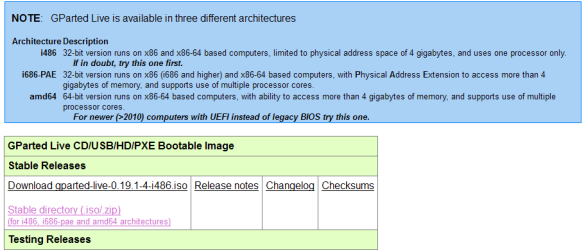
Download offerings are confusing to me
- which to download for external HDD to be accessed by Win7 (and later, by Linux Mint-MATE)
GParted choices.PNG

I have not downloaded anything from GParted ... yet (Only looked)
- I did download an ISO file from sourceforge which turns out to be 2 years old
- the best download source is GParted themselves

I intend (later) using GParted to setup the spinner ready to install Mint-MATE onto a spare Acer laptop.
- inspired by whs in other places on this forum

SPECS:
Win7 Home Premium 32bit
 

My Computer My Computer

Computer type
PC/Desktop
Computer Manufacturer/Model Number
Toshiba, Lenovo (laptops) + 4 rigs
OS
XP Pro (x86) | 7 HP (x86) & (x64) | 7 Pro (x64)
If it's linux it should support everything but maybe HFS/HFS+ (mac/some unix I think). I would for your setup run it this way and you can do this all in windows. In disk management right click the disk make it GPT (should wipe the drive) then make one big partition or smaller ones but make them EXFAT, in the part where it asks what to format it as when creating partitions. If you think you will ever need to bring it on a XP system then make them NTFS as XP can not read EXFAT.

Hope this helps.
 

My Computer My Computer

Computer type
PC/Desktop
Computer Manufacturer/Model Number
Custom
OS
10 Pro x64
CPU
Ryzen 9 3900X
Motherboard
Asrock x370 Tachi
Memory
64GB(4x16GB) DDR4
Graphics Card(s)
EVGA 1080ti FTW3
Sound Card
ASUS Xonar Essence STX (V4 Bursons), ODAC rev B, NFB-11, O2
Monitor(s) Displays
3xASUS PB278Q/R, Optoma HD142X
Screen Resolution
3x1440p, 1080p
Hard Drives
512GB 850 EVO(OS, Programs)
4TB (Movies)
3TB (Downloads)
3TB (Programs)
1TB HDD (Games)
2x6TB R1 (videos)
PSU
AX760
Case
Fractal Define R5
Cooling
NH-D15S
Keyboard
Massdrop Ctrl with Box Navy's
Mouse
G903, Alioth XXL Mat
Internet Speed
280/40
Antivirus
MBAM, ESET
Browser
Canary 64 Bit
Other Info
I also own a Thinkpad P50 Xeon 4K, X220T, X1C5
1. If you right click on the left pane in disk management (where it says Disk2), you can change the format of the whole disk (GPT or Dynamic). But don't do that - especially not Dynamic.

2. You want to work on the right pane - the hatched area. There you can create new simple volumes. Thw wizzard will come up and you can chose the amount of space you want to use for that partition. If e.g. you want 3 partitions of about equal size, allocate 155GB to the first partition. When this is done, you will be left with appr. 310GB of unallocated space.

There again, right click on this unallocated space and create another simple volume. Take again 155GB. That will leave appr. 155GB of unallocated space on which you can repeat the process to create the 3d partition. For that you take what's left which will be 155GB plus change.
 
Last edited:

My Computer My Computer

Computer Manufacturer/Model Number
HP, Dell, Gateway, Toshiba - 4 laptops and 2 desktops
OS
Vista, Windows7, Mint Mate, Zorin, Windows 8
CPU
from 1.6GHz Duo to i7
Monitor(s) Displays
2x HP w2207
Hard Drives
5x HDD, 7x SSD, 12x Externals
Keyboard
with trackball - no mices
Mouse
Trackball mice
Internet Speed
DSL 6000
@ whs -- (Hi Wolfgang)

Q1:What format should I use (considering FAT32 is limited to 32GB partition)
- I know there are other 3rd party programs that will format partitions >32GB to FAT32.
- GParted, AOMEI,

Having read Difference Between exFAT and FAT32 and a lot of reading over the past 4 weeks,
- it looks like format (for Windows) should be one of ... FAT32, exFAT or NTFS
Q2: Cluster size ?
- I do not have a clue what to use

I was hoping to use one of the partitions with my dedicated Linux PC and the other 2 for Windows PCs.
- Linux partition can be done later (if that is viable?)

Q3: Can I leave unallocated space on the external HDD to be partitioned and formatted at a later date ?
- I am drowning in thumb drives --- I would like to centralize all data onto one external HDD

Presently all data + archived downloads are on one USB powered pocket drive, with a variety of folders.
- the pocket drive is now 7 years old.
- everything is pointing to NTFS or exFAT (considering FAT32 fragments files by default)
- and exFAT is not backward compatible with Win-XP
- I have only one XP machine left and it is a busy AutoCad tool.
- I plan to upgrading the XP to Win-7 as a clean install and be rid of XP forever -- when I get the time
- all other (4) machines are Win7 +Win8

Thank you :)
 

My Computer My Computer

Computer type
PC/Desktop
Computer Manufacturer/Model Number
Toshiba, Lenovo (laptops) + 4 rigs
OS
XP Pro (x86) | 7 HP (x86) & (x64) | 7 Pro (x64)
1. NTFS

2. That will depend completely on what you want to put into it (amount of data). I would not double boot with Linux. That can be messy. Use a virtual partition for Linux - for an example see here.

3. Yes
 

My Computer My Computer

Computer Manufacturer/Model Number
HP, Dell, Gateway, Toshiba - 4 laptops and 2 desktops
OS
Vista, Windows7, Mint Mate, Zorin, Windows 8
CPU
from 1.6GHz Duo to i7
Monitor(s) Displays
2x HP w2207
Hard Drives
5x HDD, 7x SSD, 12x Externals
Keyboard
with trackball - no mices
Mouse
Trackball mice
Internet Speed
DSL 6000
@ whs +1

whs said:
2. That will depend completely on what you want to put into it (amount of data)
Partition1: Windows data TXT, PDF, HTML, GNumeric (spreadsheet), files (90% TXT files, no Office apps
Partition2: downloaded program files ZIP, 7z, EXE, ISO files
Partition_3: Linux files (optional: not if it is going to make the ext. HDD to compromised)

Q1: How do I calculate cluster size

whs said:
. I would not double boot with Linux. That can be messy. Use a virtual partition for Linux - for an example see here.

All PCs will be Win7 -- one will have a virtual drive (Win7) for testing/evaluation
One Linux PC will be dedicated Mint-MATE (75GB HDD, an old Acer Aspire 5315)
- for email and browsing only (and learning Linux)

Thank you again for your patience :)
 

My Computer My Computer

Computer type
PC/Desktop
Computer Manufacturer/Model Number
Toshiba, Lenovo (laptops) + 4 rigs
OS
XP Pro (x86) | 7 HP (x86) & (x64) | 7 Pro (x64)
I would make one large partition for the stuff you plan for partitions 1 and 2. Then you can make different folders for the diffferent things you want to put into there. That is a more flexible solution than predefining 2 seperate partitions.

The size of partition for the Linux stuff will depend on what you want to store there. For starters, I would think that 50GB is plenty.
 

My Computer My Computer

Computer Manufacturer/Model Number
HP, Dell, Gateway, Toshiba - 4 laptops and 2 desktops
OS
Vista, Windows7, Mint Mate, Zorin, Windows 8
CPU
from 1.6GHz Duo to i7
Monitor(s) Displays
2x HP w2207
Hard Drives
5x HDD, 7x SSD, 12x Externals
Keyboard
with trackball - no mices
Mouse
Trackball mice
Internet Speed
DSL 6000
Q1: How many partitions are allowed on a simple volume external HDD ?
- when I open the "wizard the default partition size is 476937 MB (not MiB)
- my ext. HDD is 500GB (nominal)
- I know MS and most storage devices are quoted in a nominal capacity (ie, 1,000s ... not 1024 sizing)
- in other places (I have read) problems can occur if partitions over lap, when defining "start" and "finish"


Q2: In other places I read "4" partitions is maximum ... is that correct ?
Q3: Is it possible to make one of the partitions the "default drive" on the external HDD ?
- I am trying to learn as much as I can
Example:-
Anybody can drive an automatic gearbox car.
I learnt to drive 60 years ago on a manual (tractor) "crash box" (when 9 years old)
And disassembling non-synchromesh and syncromesh gearboxes (in my mid teens) taught me a lot about the "what" and especially the "WHY?"


My Computer My Computer

Computer type
PC/Desktop
Computer Manufacturer/Model Number
Toshiba, Lenovo (laptops) + 4 rigs
OS
XP Pro (x86) | 7 HP (x86) & (x64) | 7 Pro (x64)
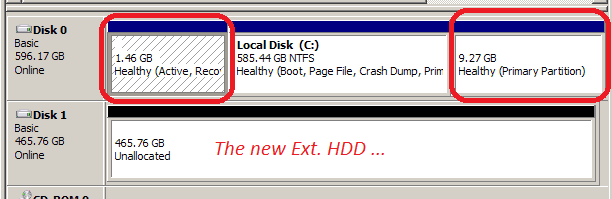
1. If all partitions are primary partition, a maximum of 4 partitions is the limit in NTFS. Howeber, a primary partition is only required for an active partition (that is the one where the bootmgr resides). All other partitions should be logical partitions. So if a disk has no operating system, it has no bootmgr and does not need any primary partition.

For logical partitions (simple partitions), the maximu is appr. 120. The first logical partition you create is called an extended partition because that is the "umbrella" for all the following logical partitions. If, for whatever crazy reason, you have a mix more than 1 primary and logicals, then there is a maximum of 3 primaries plus 1 logical (which would act as the extended partition under which up to 120 addl. logical partitions can be created.

Note: Brand new OEM PCs often have 4 primary partitions (system partition, OS partition C, recovery partition and tools partition). There is absolutely no good reason for such a setup. Only the system partitiom contains a bootmgr and has to be a primary partition. The other 3 can be logical partitions. Beats me why some OEMs make such a setup. It will only lead to troubel for the layman because if you create a 5th partition in such a setup, all partitions will be converted to dynamic partitions - and those are a real PITA (e.g. the system will not boot any more).

On a GPT disk, the situation is different. Consult the Wiki for that.

And yes, the capacity numbers you see on your screen are in binary. At the GigaByte level the binary number will be appr. 7% smaller than at the decimal number but the actual number of bytes will be the same.

2. See above

3. There is no such thing as a "default drive". What are you trying to accomplish. If anything, the 'active' partition (the one that contains a bootmgr) has a special position. That is the one to which the MBR points when the BIOS is looking for a bootmgr. The MBR (master boot record) is in a fixed position on the disk - the first 512 bytes of each disk. But on disks where no OS is installed, it really has no function. There is nothing to boot.
 

My Computer My Computer

Computer Manufacturer/Model Number
HP, Dell, Gateway, Toshiba - 4 laptops and 2 desktops
OS
Vista, Windows7, Mint Mate, Zorin, Windows 8
CPU
from 1.6GHz Duo to i7
Monitor(s) Displays
2x HP w2207
Hard Drives
5x HDD, 7x SSD, 12x Externals
Keyboard
with trackball - no mices
Mouse
Trackball mice
Internet Speed
DSL 6000
Thank you Wolfgang :)

An excellent overview that I actually understand. :geek:
- two weeks ago I would not have got it at all. :o
- I have read dozens of blogs, wikis and other forum threads. And some very late nights/early mornings.
- my notes (in TXT files) are "tagged" so they are easily found with file-contents-search (using commercial "FileSearchEX") in Win7.

whs said:
Note: Brand new OEM PCs often have 4 primary partitions (system partition, OS partition C, recovery partition and tools partition). There is absolutely no good reason for such a setup... etc
hidden partitions.PNG

You anticipated and answered my next question .. thank you :cool:

I really appreciate your help, details and patience. :D

Thank you ... Russell :)

Next post is my solution for other newbies
 
Last edited:

My Computer My Computer

Computer type
PC/Desktop
Computer Manufacturer/Model Number
Toshiba, Lenovo (laptops) + 4 rigs
OS
XP Pro (x86) | 7 HP (x86) & (x64) | 7 Pro (x64)
You are welcome Russel. Looks like you ran out of questions - LOL.
 

My Computer My Computer

Computer Manufacturer/Model Number
HP, Dell, Gateway, Toshiba - 4 laptops and 2 desktops
OS
Vista, Windows7, Mint Mate, Zorin, Windows 8
CPU
from 1.6GHz Duo to i7
Monitor(s) Displays
2x HP w2207
Hard Drives
5x HDD, 7x SSD, 12x Externals
Keyboard
with trackball - no mices
Mouse
Trackball mice
Internet Speed
DSL 6000
Guilty :o :D
 

My Computer My Computer

Computer type
PC/Desktop
Computer Manufacturer/Model Number
Toshiba, Lenovo (laptops) + 4 rigs
OS
XP Pro (x86) | 7 HP (x86) & (x64) | 7 Pro (x64)
Back
Top