
"Allow device to wake computer" won't stay disabled.

bowtiebill

New member
Local time
8:34 PM
Messages
8
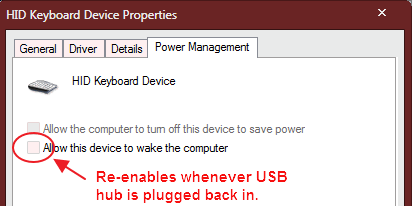
I use a basic (non-powered) USB hub when working on my laptop at my desk, so I can use an external USB keyboard and mouse (both plugged into the USB hub). After using the laptop elsewhere, then reconnecting it to the USB hub at my desk, I find that Windows has reset (ie. re-enabled) the "Allow device to wake computer" settings for both the keyboard and mouse. It does this every time and I keep having to disable the "Allow wake" settings each time I reconnect the USB hub. :huh:

Pic: I disable wake from devices, then Windows turns it on again when the hub is reconnected.
0c9o66g.gif


Process is as follows (laptop is on, USB hub is connected):
1. Disable "Allow device to wake computer" for both the keyboard and mouse devices.
2. Put the laptop to sleep. Keyboard/mouse now cannot wake it, which is good.
3. Disconnect USB hub. Laptop is woken and used on its own, then put to sleep again.
4. Reconnect USB hub. Wake laptop via power button. Lo and behold, the "Allow device to wake" options for the keyboard and mouse are enabled again. :eek:

I need "Allow device to wake computer" to *always* be off, since each little desk vibration will wake the computer when it's asleep on my desk. Unless the hub is unplugged every time of course, but who wants to keep doing that? :)

I don't mind if it's a system-wide setting to permanently disable wake via devices, as I will never want to wake the laptop any way other than using the power button.


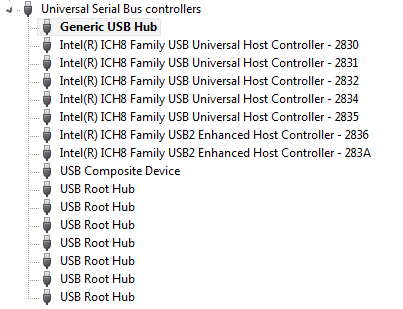
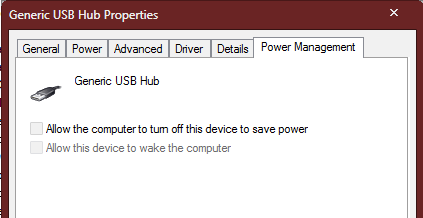
Edit more info: I have also disabled "Allow device to wake" for *all* the USB hub devices, and Windows does indeed remember *those* settings, and yet it re-enables them specifically for the mouse and keyboard devices, as above, when the hub is plugged in again. Weirrrd..
KnXpRBX.gif


Juknt4J.gif
 
Last edited:

My Computer My Computer

At a glance

Windows 7 Ultimate x64 SP1Intel Core2 Duo T8100 @ 2.10GHz4GBATI Mobility Radeon HD 2600
Computer type
Laptop
Computer Manufacturer/Model Number
HP 8510p
OS
Windows 7 Ultimate x64 SP1
CPU
Intel Core2 Duo T8100 @ 2.10GHz
Memory
4GB
Graphics Card(s)
ATI Mobility Radeon HD 2600
Hard Drives
Intel SSD 240GB AHCI
Antivirus
Avast Home
Browser
Firefox
You could change the Power Settings. To do that open Control Panel, select Power Options, then click on Change Plan Setting, when that opens click on Change Advanced Power Settings, that will open & you will see settings that you can change. Scroll down to the USB settings, click on the little + sign & that will show USB Selective Suspend settings, click on the + sign that is there, then click on Settings & that will show Enabled or Disabled. Select Disabled. Then click Apply & then OK.

That should stop the problem you are having.
 

My Computer My Computer

At a glance

Windows 7 Home Premium 64 bit sp1Intel i5 3570 3.4Ghz Ivy Bridge SKT 1155 quad...G-Skill Rip Jaws 16Gb (8x2) DDR3 -1600 PC3 12...Gigabyte NVIDIA GT610 1Gb DDR3 810/1200 PCI-E...
Computer type
PC/Desktop
Computer Manufacturer/Model Number
Self built using existing case
OS
Windows 7 Home Premium 64 bit sp1
CPU
Intel i5 3570 3.4Ghz Ivy Bridge SKT 1155 quad core
Motherboard
Gigabyte Z77-HD3 SKT 1155 2xSata 3, 4x USB 3.0
Memory
G-Skill Rip Jaws 16Gb (8x2) DDR3 -1600 PC3 12800 CL 10 red
Graphics Card(s)
Gigabyte NVIDIA GT610 1Gb DDR3 810/1200 PCI-E 2.0 Silent
Sound Card
NVIDIA High Definition & Realtech High Definition Audio
Monitor(s) Displays
2 x Philips 226V4L 16:9 aspect ratio
Screen Resolution
1920 x 1080 HD
Hard Drives
Samsung 840 Pro 256gb SSD, SATA 3.
Hitachi Touro Portable 1tb, USB 3.0 HDD used for image b/ups.
PSU
Corsair VS450
Case
Codeng
Cooling
PSU fan & CPU fan
Keyboard
Logitech
Mouse
Logitech Wireless trackball M570
Internet Speed
Wireless 3G. 3mg down & 550kb up.
Antivirus
Bitdefender Internet Security 2020
Browser
Opera (Current Version) & Firefox
Other Info
MS Office 2013 Pro. Davis weather station software. MGE Nova 600 avr UPS.
Hi Ranger, thanks, but "selective suspend" doesn't relate to waking up. It is a power-saving option to turn off USB devices while the computer is on. In any case it was already off. :)
 

My Computer My Computer

At a glance

Windows 7 Ultimate x64 SP1Intel Core2 Duo T8100 @ 2.10GHz4GBATI Mobility Radeon HD 2600
Computer type
Laptop
Computer Manufacturer/Model Number
HP 8510p
OS
Windows 7 Ultimate x64 SP1
CPU
Intel Core2 Duo T8100 @ 2.10GHz
Memory
4GB
Graphics Card(s)
ATI Mobility Radeon HD 2600
Hard Drives
Intel SSD 240GB AHCI
Antivirus
Avast Home
Browser
Firefox

My Computer My Computer

At a glance

Win 10 Pro x64Intel I5-2500K @3.3GHz16GB G.Skill Ripjaws X (4x4GB)EVGA GeForce 750 Ti SC 2GB
Computer type
PC/Desktop
Computer Manufacturer/Model Number
Self Built
OS
Win 10 Pro x64
CPU
Intel I5-2500K @3.3GHz
Motherboard
Asrock P67 Extreme4
Memory
16GB G.Skill Ripjaws X (4x4GB)
Graphics Card(s)
EVGA GeForce 750 Ti SC 2GB
Sound Card
ASUS Xonar DG 5.1 Channels 24-bit 96KHz PCI Interface Sound
Monitor(s) Displays
auria eq2367
Screen Resolution
1920 x 1080
Hard Drives
250GB Samsung 850 EVO SSD
1TB WD Blue
1TB Hitachi
PSU
SeaSonic X 650W 80 Plus Gold
Case
Corsair Obsidian 750D
Cooling
Corsair H60, Three 140mm case fans
Keyboard
Logitech Wireless Keyboard K520
Mouse
Logitech Wireless Mouse M310
Internet Speed
Wave Broadband ~ 100 dn 5 up
Antivirus
Windows Defender, Malwarebytes Premium
Browser
Edge, IE11, Chrome
Other Info
Laptop specs: HP g7-1365dx /
CPU: AMD A6-3420M APU with Radeon(tm) HD Graphics /
RAM: Crucial 8Gb (2x4Gb) /
SSD: Crucial M4-CT128M4SSD2 ATA Device/ FW 000F /
GFX: AMD Radeon HD 6520G /
OS: Windows 10 Pro x64

My Computer My Computer

At a glance

Windows 7 Ultimate x64 SP1Intel Core2 Duo T8100 @ 2.10GHz4GBATI Mobility Radeon HD 2600
Computer type
Laptop
Computer Manufacturer/Model Number
HP 8510p
OS
Windows 7 Ultimate x64 SP1
CPU
Intel Core2 Duo T8100 @ 2.10GHz
Memory
4GB
Graphics Card(s)
ATI Mobility Radeon HD 2600
Hard Drives
Intel SSD 240GB AHCI
Antivirus
Avast Home
Browser
Firefox

My Computer My Computer

At a glance

Win 10 Pro x64Intel I5-2500K @3.3GHz16GB G.Skill Ripjaws X (4x4GB)EVGA GeForce 750 Ti SC 2GB
Computer type
PC/Desktop
Computer Manufacturer/Model Number
Self Built
OS
Win 10 Pro x64
CPU
Intel I5-2500K @3.3GHz
Motherboard
Asrock P67 Extreme4
Memory
16GB G.Skill Ripjaws X (4x4GB)
Graphics Card(s)
EVGA GeForce 750 Ti SC 2GB
Sound Card
ASUS Xonar DG 5.1 Channels 24-bit 96KHz PCI Interface Sound
Monitor(s) Displays
auria eq2367
Screen Resolution
1920 x 1080
Hard Drives
250GB Samsung 850 EVO SSD
1TB WD Blue
1TB Hitachi
PSU
SeaSonic X 650W 80 Plus Gold
Case
Corsair Obsidian 750D
Cooling
Corsair H60, Three 140mm case fans
Keyboard
Logitech Wireless Keyboard K520
Mouse
Logitech Wireless Mouse M310
Internet Speed
Wave Broadband ~ 100 dn 5 up
Antivirus
Windows Defender, Malwarebytes Premium
Browser
Edge, IE11, Chrome
Other Info
Laptop specs: HP g7-1365dx /
CPU: AMD A6-3420M APU with Radeon(tm) HD Graphics /
RAM: Crucial 8Gb (2x4Gb) /
SSD: Crucial M4-CT128M4SSD2 ATA Device/ FW 000F /
GFX: AMD Radeon HD 6520G /
OS: Windows 10 Pro x64
Back
Top