Allow running a program for users

i know that game..and i'm also play it..so if you want to other help you.please write a patient on your thread,ok?
read my thread before. add your user account become administrator group. that's should work
 

My Computer

Computer Manufacturer/Model Number
built up
OS
windows 7
CPU
Phenom II AMD Dragon 3.5Ghz
Memory
DDR3 4GB
Graphics Card(s)
ATI Radeon 512Mb
Monitor(s) Displays
HP L1506
Screen Resolution
1152 x 864
Hard Drives
WDC 1 TB SATA-II Green Power
Keyboard
HP wireless keyboard
Mouse
HP Optic
Internet Speed
1GB
Maybe the OP does not want to add his account to the Admin Group or the parents don't want that.

Here is what you need to do:

Go to the WarCraft Folder and right click, permissions, add your account name and give full control, you can not log on as yourself without Admin Rights and run the game.
 

My Computer

Computer type
PC/Desktop
Computer Manufacturer/Model Number
Dell OP7010
OS
Windows 7 Enterprise (x64); Windows Server 2008 R2 (x64)
Memory
16GB
Monitor(s) Displays
4 Dell 24" LCD
Screen Resolution
1280x1024
Keyboard
Dell
Mouse
Dell Optical
Internet Speed
40meg
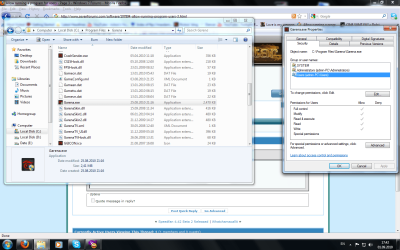
I did this, the Full Control thing... It doesn't work.
And that's the whole point... accessing the program without having an admin user.
 

Attachments

  • Untitled1.png
    Untitled1.png
    127.8 KB · Views: 10

My Computer

Computer type
Laptop
Computer Manufacturer/Model Number
Acer
OS
Microsoft Windows 7 Ultimate 64-bit
CPU
Intel(R) Core(TM) i5 CPU 3230M @ 2.53GHz
Motherboard
Sony Corporation Base Board VAIO
Memory
8,00 GB DDR3@1600Mhz
Graphics Card(s)
nVidia GT730M
Screen Resolution
1920 x 1080
Did the permissions propagate through all folders and apply to all files in all folders? You may have to give permissions to the registry keys as well. Some programs are picky like that. If that does not work I have a special process for getting all of it to work. It is time consuming but does work. I will take the time to post it if you cannot get this to work.
 

My Computer

Computer type
PC/Desktop
Computer Manufacturer/Model Number
Dell OP7010
OS
Windows 7 Enterprise (x64); Windows Server 2008 R2 (x64)
Memory
16GB
Monitor(s) Displays
4 Dell 24" LCD
Screen Resolution
1280x1024
Keyboard
Dell
Mouse
Dell Optical
Internet Speed
40meg
I tried firstly only with garena.exe, then with the whole folder. Yes, it popped up a small window showing me all the subfiles and subfolders... I waited for like 10 seconds for the job to finish. Then i right-clicked the folder, properties, security, users, and it showed me that Users have full control over the folder.
 

My Computer

Computer type
Laptop
Computer Manufacturer/Model Number
Acer
OS
Microsoft Windows 7 Ultimate 64-bit
CPU
Intel(R) Core(TM) i5 CPU 3230M @ 2.53GHz
Motherboard
Sony Corporation Base Board VAIO
Memory
8,00 GB DDR3@1600Mhz
Graphics Card(s)
nVidia GT730M
Screen Resolution
1920 x 1080
Is it working? If not give me a day or so to put together how to track this down. There maybe some files that are in other directories that need permission too, or some special registry keys.

Let me know if it is working.
 

My Computer

Computer type
PC/Desktop
Computer Manufacturer/Model Number
Dell OP7010
OS
Windows 7 Enterprise (x64); Windows Server 2008 R2 (x64)
Memory
16GB
Monitor(s) Displays
4 Dell 24" LCD
Screen Resolution
1280x1024
Keyboard
Dell
Mouse
Dell Optical
Internet Speed
40meg
Did the permissions propagate through all folders and apply to all files in all folders? You may have to give permissions to the registry keys as well. Some programs are picky like that. If that does not work I have a special process for getting all of it to work. It is time consuming but does work. I will take the time to post it if you cannot get this to work.

I don't quite know how to handle those registries. I once had another problem, a guy told me to do something with the registries, then the next day my soundboard wouldn't work. So if you could tell me what to do, step by step....
 

My Computer

Computer type
Laptop
Computer Manufacturer/Model Number
Acer
OS
Microsoft Windows 7 Ultimate 64-bit
CPU
Intel(R) Core(TM) i5 CPU 3230M @ 2.53GHz
Motherboard
Sony Corporation Base Board VAIO
Memory
8,00 GB DDR3@1600Mhz
Graphics Card(s)
nVidia GT730M
Screen Resolution
1920 x 1080
Did the permissions propagate through all folders and apply to all files in all folders? You may have to give permissions to the registry keys as well. Some programs are picky like that. If that does not work I have a special process for getting all of it to work. It is time consuming but does work. I will take the time to post it if you cannot get this to work.

I don't quite know how to handle those registries. I once had another problem, a guy told me to do something with the registries, then the next day my soundboard wouldn't work. So if you could tell me what to do, step by step....

Since I don't have the software you are using I would not be able to tell you where to go or what to change. Let me put together the instructions on how to figure this all out. It will take me some time. I will have to do it over the weekend as I am way to busy at work. -WS
 

My Computer

Computer type
PC/Desktop
Computer Manufacturer/Model Number
Dell OP7010
OS
Windows 7 Enterprise (x64); Windows Server 2008 R2 (x64)
Memory
16GB
Monitor(s) Displays
4 Dell 24" LCD
Screen Resolution
1280x1024
Keyboard
Dell
Mouse
Dell Optical
Internet Speed
40meg
Take your time :D. Thanks.
 

My Computer

Computer type
Laptop
Computer Manufacturer/Model Number
Acer
OS
Microsoft Windows 7 Ultimate 64-bit
CPU
Intel(R) Core(TM) i5 CPU 3230M @ 2.53GHz
Motherboard
Sony Corporation Base Board VAIO
Memory
8,00 GB DDR3@1600Mhz
Graphics Card(s)
nVidia GT730M
Screen Resolution
1920 x 1080
Back
Top