http://www.sevenforums.com/network-...ng-issue-win7-printer-xp-remote-machines.html is a thread in this forum where I got some help that allowed me to share my printer (wired to my Windows 7 machine) so that the XP machines in the house could use it.
The substantive advice from that thread was to go to How to Enable Printer & File Sharing between Windows 7 and Windows XP | Windows 7 for a great tutorial on printer and file sharing between Windows 7 and XP machines.
Except - a seemingly simple task I'd like to do isn't working.
On my Windows 7 machine I have a folder with the path name "D:\My Documents\My Pictures (digital)\digital pictures\2010" Reasonably self-evidently, this folder has my photos from 2010.
I'd like to put a desktop shortcut on an XP computer in my home network so that double-clicking on the shortcut allows that user to view the contents (including subfolders) of that path. And it's not happening.
Oddly, there's another computer in the house where I have that capability, and it does work. No idea what I did to cause that to happen - obviously if I did, I'd have fixed it.
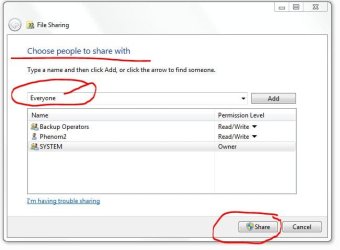
The folder in question is shared from the Windows 7 machine. The XP machine shows up in its Network and vice versa. The XP machine is able to print to a network printer connected to the Windows 7 machine.
Could someone, slowly and patiently, tell me step by step what to do to make this happen?
I've created a shortcut and typed in the above pathname as to what the shortcut was supposed to take me to, but I'm being unsuccessful.
Thanks!
The substantive advice from that thread was to go to How to Enable Printer & File Sharing between Windows 7 and Windows XP | Windows 7 for a great tutorial on printer and file sharing between Windows 7 and XP machines.
Except - a seemingly simple task I'd like to do isn't working.
On my Windows 7 machine I have a folder with the path name "D:\My Documents\My Pictures (digital)\digital pictures\2010" Reasonably self-evidently, this folder has my photos from 2010.
I'd like to put a desktop shortcut on an XP computer in my home network so that double-clicking on the shortcut allows that user to view the contents (including subfolders) of that path. And it's not happening.
Oddly, there's another computer in the house where I have that capability, and it does work. No idea what I did to cause that to happen - obviously if I did, I'd have fixed it.
The folder in question is shared from the Windows 7 machine. The XP machine shows up in its Network and vice versa. The XP machine is able to print to a network printer connected to the Windows 7 machine.
Could someone, slowly and patiently, tell me step by step what to do to make this happen?
I've created a shortcut and typed in the above pathname as to what the shortcut was supposed to take me to, but I'm being unsuccessful.
Thanks!
My Computer
- Computer Manufacturer/Model Number
- custom-built
- OS
- Win7 Professional 64
- CPU
- Intel I3 550 (3.2 GHz)
- Motherboard
- GIGABYTE|GA-H55M-S2V H55 1156 R
- Memory
- 8 gig (2x4gig Kingston DDR 3)
- Graphics Card(s)
- Intel HD graphics (from CPU)
- Sound Card
- Realtek ALC888B
- Monitor(s) Displays
- ViewSonic
- Screen Resolution
- 1280x1024
- Hard Drives
- Seagate ST3250310CS (250 gig C drive for OS and programs)
WDC WD5000AAKS-00V1A0 (2x500 gig drives, software mirrored in a RAID 1 configuration, as a D drive, for documents and data)
- Internet Speed
- download > 15 mbps; upload approx 1 mbps