Alt-Tab icon list does not stay on top

jorgeszabo

New member
Local time
8:52 AM
Messages
7
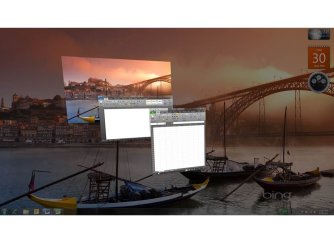
Hello, I'm having some issues with the alt-tab functionality using the aero peek. Until a week ago, whenever I pressed alt-tab I was able to scroll through the applications using the aero peek and the app list would always stay on top of everything. Now the list loses focus and is covered by the peek. I have attached a screen capture here.

This is really anoying and I have been looking everywhere for a solution to this but nothing so far. Have any of you had this behavior from alt-tab?

Cheers,
Jorge
 

Attachments
  • Desktop.jpg
    Desktop.jpg
    56.8 KB · Views: 55

My Computer My Computer

At a glance

Windows 7 Ultimate x86
Computer Manufacturer/Model Number
Lenovo X200 Tablet
OS
Windows 7 Ultimate x86
Hello Jorge, and welcome to Seven Forums.

You can press CTRL+ALT+TAB, then tap TAB to cycle through the windows instead for this. Press enter to select.

Hope this helps,
Shawn
 

My Computer My Computer

At a glance

64-bit Windows 11 Pro for WorkstationsIntel i7-8700K OC'd to 5 GHz64 GB (4x16GB) G.SKILL TridentZ RGB DDR4 3600...ASUS ROG-STRIX-GTX1080TI-O11G-GAMING
Computer type
PC/Desktop
Computer Manufacturer/Model Number
Self built custom
OS
64-bit Windows 11 Pro for Workstations
CPU
Intel i7-8700K OC'd to 5 GHz
Motherboard
ASUS ROG Maximus XI Formula Z390
Memory
64 GB (4x16GB) G.SKILL TridentZ RGB DDR4 3600 MHz
Graphics Card(s)
ASUS ROG-STRIX-GTX1080TI-O11G-GAMING
Sound Card
Integrated
Monitor(s) Displays
2 x Samsung Odyssey G7 27"
Screen Resolution
2560x1440
Hard Drives
1TB Samsung 990 PRO M.2,
4TB Samsung 990 PRO PRO M.2,
TerraMaster F8 SSD Plus NAS
PSU
Seasonic Prime Titanium 850W
Case
Thermaltake Core P3
Cooling
Corsair Hydro H115i
Keyboard
Logitech wireless K800
Mouse
Logitech MX Master 4
Internet Speed
2 Gb/s Download and 100 Mb/s Upload
Antivirus
Malwarebyte Anti-Malware Premium
Browser
Google Chrome
Other Info
Logitech Z625 speaker system,
Logitech BRIO 4K Pro webcam,
HP Color LaserJet Pro MFP M477fdn,
APC SMART-UPS RT 1000 XL - SURT1000XLI,
Galaxy S23 Plus phone
I see your point and it works well as a workaround, but the app list still goes to the background. I've also tryed disabling the aero peek and that way, since there are no peeks, nothing covers the list, but I was hoping to find a fix for this bug.

Note that if I restart the system the behavior goes away and starts showing up again after a few minutes. Maybe a process triggers it?

Cheers,
Jorge
 

My Computer My Computer

At a glance

Windows 7 Ultimate x86
Computer Manufacturer/Model Number
Lenovo X200 Tablet
OS
Windows 7 Ultimate x86
Umm, not sure why the ALT+TAB window is not always on top. How does CTRL+Windows Key+TAB with TAB to cycle and enter to select work for you?
 

My Computer My Computer

At a glance

64-bit Windows 11 Pro for WorkstationsIntel i7-8700K OC'd to 5 GHz64 GB (4x16GB) G.SKILL TridentZ RGB DDR4 3600...ASUS ROG-STRIX-GTX1080TI-O11G-GAMING
Computer type
PC/Desktop
Computer Manufacturer/Model Number
Self built custom
OS
64-bit Windows 11 Pro for Workstations
CPU
Intel i7-8700K OC'd to 5 GHz
Motherboard
ASUS ROG Maximus XI Formula Z390
Memory
64 GB (4x16GB) G.SKILL TridentZ RGB DDR4 3600 MHz
Graphics Card(s)
ASUS ROG-STRIX-GTX1080TI-O11G-GAMING
Sound Card
Integrated
Monitor(s) Displays
2 x Samsung Odyssey G7 27"
Screen Resolution
2560x1440
Hard Drives
1TB Samsung 990 PRO M.2,
4TB Samsung 990 PRO PRO M.2,
TerraMaster F8 SSD Plus NAS
PSU
Seasonic Prime Titanium 850W
Case
Thermaltake Core P3
Cooling
Corsair Hydro H115i
Keyboard
Logitech wireless K800
Mouse
Logitech MX Master 4
Internet Speed
2 Gb/s Download and 100 Mb/s Upload
Antivirus
Malwarebyte Anti-Malware Premium
Browser
Google Chrome
Other Info
Logitech Z625 speaker system,
Logitech BRIO 4K Pro webcam,
HP Color LaserJet Pro MFP M477fdn,
APC SMART-UPS RT 1000 XL - SURT1000XLI,
Galaxy S23 Plus phone
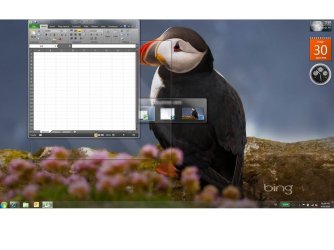
Works fine, I think. This is the regular 3d flip. But I do find this much slower to navigate between open applications.

I have attached a screen capture.

Jorge
 

Attachments

  • Desktop2.jpg
    Desktop2.jpg
    54.8 KB · Views: 23

My Computer My Computer

At a glance

Windows 7 Ultimate x86
Computer Manufacturer/Model Number
Lenovo X200 Tablet
OS
Windows 7 Ultimate x86
Jorge,

That looks correct to me.

Back to your Alt+Tab issue. See if changing your theme to a Basic theme, then back to an Aero theme may be able to reset this for you to have it work properly always on top again.
 

My Computer My Computer

At a glance

64-bit Windows 11 Pro for WorkstationsIntel i7-8700K OC'd to 5 GHz64 GB (4x16GB) G.SKILL TridentZ RGB DDR4 3600...ASUS ROG-STRIX-GTX1080TI-O11G-GAMING
Computer type
PC/Desktop
Computer Manufacturer/Model Number
Self built custom
OS
64-bit Windows 11 Pro for Workstations
CPU
Intel i7-8700K OC'd to 5 GHz
Motherboard
ASUS ROG Maximus XI Formula Z390
Memory
64 GB (4x16GB) G.SKILL TridentZ RGB DDR4 3600 MHz
Graphics Card(s)
ASUS ROG-STRIX-GTX1080TI-O11G-GAMING
Sound Card
Integrated
Monitor(s) Displays
2 x Samsung Odyssey G7 27"
Screen Resolution
2560x1440
Hard Drives
1TB Samsung 990 PRO M.2,
4TB Samsung 990 PRO PRO M.2,
TerraMaster F8 SSD Plus NAS
PSU
Seasonic Prime Titanium 850W
Case
Thermaltake Core P3
Cooling
Corsair Hydro H115i
Keyboard
Logitech wireless K800
Mouse
Logitech MX Master 4
Internet Speed
2 Gb/s Download and 100 Mb/s Upload
Antivirus
Malwarebyte Anti-Malware Premium
Browser
Google Chrome
Other Info
Logitech Z625 speaker system,
Logitech BRIO 4K Pro webcam,
HP Color LaserJet Pro MFP M477fdn,
APC SMART-UPS RT 1000 XL - SURT1000XLI,
Galaxy S23 Plus phone
Thanks Brink, I tried what you said, but after going back to any aero theme it always does the same thing. The alt-tab goes to the back and the peek windows jump to the front.

Cheers,
Jorge
 

My Computer My Computer

At a glance

Windows 7 Ultimate x86
Computer Manufacturer/Model Number
Lenovo X200 Tablet
OS
Windows 7 Ultimate x86
I must admit that I'm stumped as to why the ALT+TAB is not always on top. As a test, create a new administrator account to see if it works properly in it.

If it does, then you can copy the contents of all folders (including hidden AppData folder) from your old account's C:\Users\(user-name) user folders into the corresponding new account's C:\Users\(user-name) user folders to copy over most of the old account's settings. After everything checks out ok, you can delete the old account from within the new account.
 

My Computer My Computer

At a glance

64-bit Windows 11 Pro for WorkstationsIntel i7-8700K OC'd to 5 GHz64 GB (4x16GB) G.SKILL TridentZ RGB DDR4 3600...ASUS ROG-STRIX-GTX1080TI-O11G-GAMING
Computer type
PC/Desktop
Computer Manufacturer/Model Number
Self built custom
OS
64-bit Windows 11 Pro for Workstations
CPU
Intel i7-8700K OC'd to 5 GHz
Motherboard
ASUS ROG Maximus XI Formula Z390
Memory
64 GB (4x16GB) G.SKILL TridentZ RGB DDR4 3600 MHz
Graphics Card(s)
ASUS ROG-STRIX-GTX1080TI-O11G-GAMING
Sound Card
Integrated
Monitor(s) Displays
2 x Samsung Odyssey G7 27"
Screen Resolution
2560x1440
Hard Drives
1TB Samsung 990 PRO M.2,
4TB Samsung 990 PRO PRO M.2,
TerraMaster F8 SSD Plus NAS
PSU
Seasonic Prime Titanium 850W
Case
Thermaltake Core P3
Cooling
Corsair Hydro H115i
Keyboard
Logitech wireless K800
Mouse
Logitech MX Master 4
Internet Speed
2 Gb/s Download and 100 Mb/s Upload
Antivirus
Malwarebyte Anti-Malware Premium
Browser
Google Chrome
Other Info
Logitech Z625 speaker system,
Logitech BRIO 4K Pro webcam,
HP Color LaserJet Pro MFP M477fdn,
APC SMART-UPS RT 1000 XL - SURT1000XLI,
Galaxy S23 Plus phone
Ok, I will give that a shot tomorrow and I will let you know how it goes.
 

My Computer My Computer

At a glance

Windows 7 Ultimate x86
Computer Manufacturer/Model Number
Lenovo X200 Tablet
OS
Windows 7 Ultimate x86
No luck. I created the new user, logged in and the unwaned behavior kicks in after about a minute or two of loading the desktop. I have no idea what could be the possible cause for this.
 

My Computer My Computer

At a glance

Windows 7 Ultimate x86
Computer Manufacturer/Model Number
Lenovo X200 Tablet
OS
Windows 7 Ultimate x86
After trying every possible option without success (getting the latest drivers, enabling and disabling aero and creating a new user profile), I ended up doing a clean install of the OS. The funny thing is that after booting up for the first time and running all windows updates and Lenovo's System Update, the bug showed up again!

I did another run at the clean install, this time I let windows update take care of all the drivers it could and after windows update was done I installed only a few of the Lenovo System Updates (Drivers for hardware that were still missing from device manager and some Thinkvantage Tools) but one at the time. The alt tab is working fine now, staying on top of the peeks.

The key this time was that I did not install the following drivers and updates from the Lenovo System Update:
  • All windows update modules downloadable via Lenovo System Update
  • Thinkvantage communications utility
  • Intel Wireless Wifi for Windows 7 32 bit
  • Lenovo integrated camera device driver for Windows
  • Thinkvantage Access Connections for Windows 7
  • Conexant audio features for Windows 7
  • Access help for Thinkpad x200 Tablet
  • ThinkPad BIOS update for windows xp/vista/7 32 bit
For some reason I believe the BIOS update is the culprit but I did not have the patience to do a third clean install in case I was right!

There is certainly something wrong with one of those updates. A friend of mine just upgraded to Windows 7 (clen install) with a Lenovo Thinkpad X200 Tablet just like mine and installed everything from the Lenovo System Update and sure enough it started showing the same alt tab behavior.

Hope this helps anyone with the same issue.
Cheers,
Jorge
 

My Computer My Computer

At a glance

Windows 7 Ultimate x86
Computer Manufacturer/Model Number
Lenovo X200 Tablet
OS
Windows 7 Ultimate x86
I did a clean install and installed all the Lenovo System Updates one by one, and it turned out to be the Thinkvantage communications utility that was the problem. Not to sure why, I would have never guessed that would have an affect on the display features.

I installed everything else, including the BIOS and all.
 

My Computer My Computer

At a glance

Windows 7Intel Core2 Duo T9400 @ 2.53Ghz3.00 GBATI Mobility FireGL V5700 (Switchable)
Computer Manufacturer/Model Number
Lenovo W500
OS
Windows 7
CPU
Intel Core2 Duo T9400 @ 2.53Ghz
Memory
3.00 GB
Graphics Card(s)
ATI Mobility FireGL V5700 (Switchable)
Sound Card
Conexant SmartAudio HD
Hard Drives
HITACHI 160 GB
P.S

you don't have to do a clean install to get it to work. Just uninstall the Thinkvantage Communications utility from Programs and Features.
 

My Computer My Computer

At a glance

Windows 7Intel Core2 Duo T9400 @ 2.53Ghz3.00 GBATI Mobility FireGL V5700 (Switchable)
Computer Manufacturer/Model Number
Lenovo W500
OS
Windows 7
CPU
Intel Core2 Duo T9400 @ 2.53Ghz
Memory
3.00 GB
Graphics Card(s)
ATI Mobility FireGL V5700 (Switchable)
Sound Card
Conexant SmartAudio HD
Hard Drives
HITACHI 160 GB
I don't have ThinkVantage Communications installed, yet I have the same problem.
 

My Computer My Computer

At a glance

Windows 7 Professional 64-bit
Computer Manufacturer/Model Number
ThinkPad T410
OS
Windows 7 Professional 64-bit
Just to be sure, there is a difference between the ThinkVantage Communications Utility and ThinkVantage Communications program. The ThinkVantage Communications Utility is the program that launches when you press Fn+F6, the ThinkVantage Communications program is the one that is used to connect to wireless networks and stuff. Look at your Programs and Features installed to be sure that there isn't the Utility installed. A quick test to see if the utility is installed is by pressing Fn+F6, if something pops up, then you have it installed, if not then you don't :)

If you don't have it installed, then I don't know. Try what I did, uninstall all the Lenovo drivers and programs and just install the Lenovo drivers one by one and test to see which one causes this issue.

Regards,
 

My Computer My Computer

At a glance

Windows 7Intel Core2 Duo T9400 @ 2.53Ghz3.00 GBATI Mobility FireGL V5700 (Switchable)
Computer Manufacturer/Model Number
Lenovo W500
OS
Windows 7
CPU
Intel Core2 Duo T9400 @ 2.53Ghz
Memory
3.00 GB
Graphics Card(s)
ATI Mobility FireGL V5700 (Switchable)
Sound Card
Conexant SmartAudio HD
Hard Drives
HITACHI 160 GB
Many causes for Alt+Tab bug

There are many programs that can cause the Alt+Tab depth-inversion bug (where the list of Alt+Tab icons goes behind the active window). The two that I have found that can cause it are ipoint.exe (Microsoft Intellipoint driver) and sidebar.exe (the desktop gadget host process). You can often fix this problem by killing these processes with task manager, or by configuring windows so that they do not run.

Since the causes may be different on other machines it is worth experimenting with task manager to see what processes trigger the bug on *your* machine.

See Alt+Tab Depth Inversion Bug | Random ASCII for more details.
 

My Computer My Computer

At a glance

Windows 7 Ultimate x64
OS
Windows 7 Ultimate x64
sorry, no help on a solution but I am having the same problem. I don't use alt+tab unless I'm getting out of a full-screen app so I didn't notice until I saw this but yeah, mine's doing the same.
 

My Computer My Computer

At a glance

Seven Home Premium x64 / Vista Home Premium x86Intel Core i5 2.53 GHz overclocked to 2.8 GHz8 GBIntel HD Graphics / nVidia GeForce GT 420M (e...
Computer Manufacturer/Model Number
Dell XPS 15
OS
Seven Home Premium x64 / Vista Home Premium x86
CPU
Intel Core i5 2.53 GHz overclocked to 2.8 GHz
Memory
8 GB
Graphics Card(s)
Intel HD Graphics / nVidia GeForce GT 420M (external)
Screen Resolution
1366x768
Hard Drives
Seagate Momentus, 500GB, 7400 RPM, SATA 2.0
Internet Speed
Never Fast Enough!!!
Has anybody solved the “alt tab not on the top problem”?

I see that this is an old thread, however, this happened to me a few days back. Googling I found that if one kills the sidebar.exe the problem disappears. Trying this I figured and it does solve the problem.
Wondering, however, why this has happened after years of using windows 7 I realized that this issue may be related with IE9. Installing IE9 a few days ago I come to believe that this is the case.

Has anybody found a cure?
 

My Computer My Computer

At a glance

Windows 7 Pro x64Intel(R) Core(TM)2 Quad CPU Q6600 @ 2.40GHzmushkin DDR2 PC2-8000 Total 8.00 GB RAMNVIDIA GeForce 9800 GX2
Computer Manufacturer/Model Number
Built to order
OS
Windows 7 Pro x64
CPU
Intel(R) Core(TM)2 Quad CPU Q6600 @ 2.40GHz
Motherboard
Gigabyte P35-DQ6
Memory
mushkin DDR2 PC2-8000 Total 8.00 GB RAM
Graphics Card(s)
NVIDIA GeForce 9800 GX2
Monitor(s) Displays
Eizo FlexScan S1910
On my system I was able to fix it by taking each window out of "full screen" then back again. (actually while they were all in non-full screen I did a bunch of alt-tabs, then I switch them all back to full screen).
 

My Computer My Computer

At a glance

XP
OS
XP
Hello Gentlemen,

I inform you that I am the same problems every time I run the Alt + Tab the computer screen lock, getting dead. Once you grasp the "Alt" key or "Alt Gr" the computer back to normal. This ends up becoming a boring process, if anyone can figure out a solution and can pass me. I will be grateful.

S.O. used: Windows 7 Professional x86 EN

Hugs.
 

My Computer My Computer

At a glance

Windows 7 Professional x32Core 2 duo4 GB RAMIntel Graphics
Computer type
PC/Desktop
Computer Manufacturer/Model Number
HP
OS
Windows 7 Professional x32
CPU
Core 2 duo
Motherboard
HP
Memory
4 GB RAM
Graphics Card(s)
Intel Graphics
Back
Top