Am I doing something Wrong?

glennc

New member
Power User
VIP
Local time
5:16 PM
Messages
1,024
Hello to all,
As some know I just installed a UPS on my system, an APC 550 Watt unit. I've noticed having it three days, that when I turn the UPS on it it blinks. On looking on the APC software log it shows that there were three events where the battery was turned on for 10 seconds due to line noise. These events seem to occur when I turned it on the first three times. For clarity I have a Surge Supressor strip feeding all the other devices plugged into the surge protected only outlet on the UPS and it does not turn off when the it is powered down. I shut it down at night and when the box is off and the monitor show it's off, then I turn the UPS off.
Am I doing something wrong? I also noted that the UPS reached originally a runtime of 26 minutes on a full charge. Now it only goes to 14 minutes power with the battery fully charged. What might be causing this.
Thanks from the ignorant side.
glennc
 

My Computer

Computer type
PC/Desktop
Computer Manufacturer/Model Number
Self-Built
OS
Windows 7 Ultimate
CPU
AMD Phenom-II X4 965
Motherboard
Gigabyte GA-MA785GM-US2H
Memory
8192 MB DDR2-SDRAM
Graphics Card(s)
ATI Radeon HD 4200
Sound Card
ATI Radeon HD 4200 High Definition Audo
Monitor(s) Displays
LG Electronics W1943
Screen Resolution
1360 X 768
Hard Drives
C: 500 GB Caviar Black SATA
E: 500 GB Caviar Black SATA
PSU
Ultra LSP 750
Case
Ultra XBlaster
Cooling
2 Fans, CPU Fan, PS Fan
Keyboard
Acer
Mouse
Logitech
Internet Speed
6 MB
My UPS's kick in for a few seconds here and there pretty regularly. It's one of the nice benefits of having a UPS....becuase it's often moments of low voltage that kill computer components.

The amount of run time is determined by the load on the device. So, obviously it would decrease if you add a monitor, external drive, more hardware, a new video card, etc.

These UPS's are really only intended to sustain you through a short/minor outage. I have my software configured to gracefully shut down my PC if it's on battery for 2 minutes.
 

My Computer

Computer Manufacturer/Model Number
Self-Built in July 2009
OS
Windows 7 Ultimate x64
CPU
Intel Q9550 2.83Ghz OC'd to 3.40Ghz
Motherboard
Gigabyte GA-EP45-UD3R rev. 1.1, F12 BIOS
Memory
8GB G.Skill PI DDR2-800, 4-4-4-12 timings
Graphics Card(s)
EVGA 1280MB Nvidia GeForce GTX570
Sound Card
Realtek ALC899A 8 channel onboard audio
Monitor(s) Displays
23" Acer x233H
Screen Resolution
1920x1080
Hard Drives
Intel X25-M 80GB Gen 2 SSD
Western Digital 1TB Caviar Black, 32MB cache. WD1001FALS
PSU
Corsair 620HX modular
Case
Antec P182
Cooling
stock
Keyboard
ABS M1 Mechanical
Mouse
Logitech G9 Laser Mouse
Internet Speed
15/2 cable modem
Other Info
Windows and Linux enthusiast. Logitech G35 Headset.
Hello pparks1,
Thanks for your participation. I see your point on the use of the UPS. Is it strange to at least coincidentally occurring with power up? In reference to the runtime difference, the original 26 minutes was with the monitor and box, same as now. It just changed to 14 minutes and I am interested in why.
Have any ideas?
glennc
 

My Computer

Computer type
PC/Desktop
Computer Manufacturer/Model Number
Self-Built
OS
Windows 7 Ultimate
CPU
AMD Phenom-II X4 965
Motherboard
Gigabyte GA-MA785GM-US2H
Memory
8192 MB DDR2-SDRAM
Graphics Card(s)
ATI Radeon HD 4200
Sound Card
ATI Radeon HD 4200 High Definition Audo
Monitor(s) Displays
LG Electronics W1943
Screen Resolution
1360 X 768
Hard Drives
C: 500 GB Caviar Black SATA
E: 500 GB Caviar Black SATA
PSU
Ultra LSP 750
Case
Ultra XBlaster
Cooling
2 Fans, CPU Fan, PS Fan
Keyboard
Acer
Mouse
Logitech
Internet Speed
6 MB
...I just installed a UPS on my system, an APC 550 Watt unit... For clarity I have a Surge Supressor strip feeding all the other devices plugged into the surge protected only outlet on the UPS and it does not turn off when the it is powered down. I shut it down at night and when the box is off and the monitor show it's off, then I turn the UPS off.
Am I doing something wrong? I also noted that the UPS reached originally a runtime of 26 minutes on a full charge. Now it only goes to 14 minutes power...

Are you saying you're using two surge protectors: one in addition to the surge protection provided by the UPS? If so, don't.

Second, don't turn the UPS off at night: allow it to fully recharge, which can take some time if you're house is subject to a lot of brown outs, which may be the case given what you're reporting.

26 minutes is a long time. I'm not sure, given your machine, that that's a realistic expectation. Neither is 14 minutes really. The unit isn't all that big, and it's not storing a whole lot of power. It's really there so you can close out your work and safely turn the machine off given a black out.
 

My Computer

OS
7 Ultimate x64
CPU
i5-2500k
Motherboard
Asus P8P67 Pro
Memory
8GB G.Skill Ripjaws X F3-12800CL7D-8GBXH 1866MHz 8-9-8-24
Graphics Card(s)
EVGA GTX 570 SC
Sound Card
X-Fi Titanium Fatality
Monitor(s) Displays
Samsung S27A550H 27" LED
Screen Resolution
1920x1080
Hard Drives
OCZ Vertex 3 120GB.
1TB Samsung F3.
2TB Samsung F4.
PSU
PC Power & Cooling Silencer 760
Case
Lian Li Lancool K62
Cooling
Thermalright Venomous X Black/Scythe S-Flex/Shin-Etsu X23
Keyboard
MS Natural Elite 4000 Ergonomic
Mouse
Logitech G500
Internet Speed
6MB/768
Other Info
Logitech Z-5500 505 watts.
D-Link DGL-4500.
Tripp-Lite Smart Pro 1500.
...I just installed a UPS on my system, an APC 550 Watt unit... For clarity I have a Surge Supressor strip feeding all the other devices plugged into the surge protected only outlet on the UPS and it does not turn off when the it is powered down. I shut it down at night and when the box is off and the monitor show it's off, then I turn the UPS off.
Am I doing something wrong? I also noted that the UPS reached originally a runtime of 26 minutes on a full charge. Now it only goes to 14 minutes power...

Are you saying you're using two surge protectors: one in addition to the surge protection provided by the UPS? If so, don't.

Second, don't turn the UPS off at night: allow it to fully recharge, which can take some time if you're house is subject to a lot of brown outs, which may be the case given what you're reporting.

26 minutes is a long time. I'm not sure, given your machine, that that's a realistic expectation. Neither is 14 minutes really. The unit isn't all that big, and it's not storing a whole lot of power. It's really there so you can close out your work and safely turn the machine off given a black out.

Hello Fumz,
Thanks for replying to my plight. As a novice with UPS and surge protectors, what little I know is that the UPS Joule rating is way lower than the surge protector I have coming of it. Would that add up, I easily may be missing something important.
I agree about the times, I was just wondering how the UPS determines the value that it displays and how it changed so drastically. I have it set to shutdown after 2 minutes.
Lastly I thought I read that the UPS was charging even when off. I will try to figure out the manual. So leaving it on and just powering down the attached devices is o.k.?
glennc
 

My Computer

Computer type
PC/Desktop
Computer Manufacturer/Model Number
Self-Built
OS
Windows 7 Ultimate
CPU
AMD Phenom-II X4 965
Motherboard
Gigabyte GA-MA785GM-US2H
Memory
8192 MB DDR2-SDRAM
Graphics Card(s)
ATI Radeon HD 4200
Sound Card
ATI Radeon HD 4200 High Definition Audo
Monitor(s) Displays
LG Electronics W1943
Screen Resolution
1360 X 768
Hard Drives
C: 500 GB Caviar Black SATA
E: 500 GB Caviar Black SATA
PSU
Ultra LSP 750
Case
Ultra XBlaster
Cooling
2 Fans, CPU Fan, PS Fan
Keyboard
Acer
Mouse
Logitech
Internet Speed
6 MB
When it comes to any kind of surge protector/power strip, you should never have one plugged into another. All kinds of problems can occur. I thought that it would charge even when turned off, but I'd look that up if I were you. The change may have to do with the age of the device. All rechargeable batteries lose charge over time. The more time goes by, the less they can hold. I hope that answers some of your questions.
 

My Computer

Computer type
Laptop
Computer Manufacturer/Model Number
Toshiba P775-S7100
OS
Windows 7 Professional SP1 64-bit
CPU
Intel Core i5-2450M @2.5 GHz
Memory
6 GB DDR3 1333MHz
Graphics Card(s)
Intel HD 3000
Monitor(s) Displays
Built-in 17.3" LED; 22" Insignia NS-L22Q-10A
Screen Resolution
1600x900; 1360x768
Hard Drives
750 GB Hitachi
1TB Seagate FreeAgent External
Internet Speed
Verizon DSL Speed(Down/Up): 3360 Kbps / 800 Kbps
Antivirus
MSE and MBAM Pro
Browser
IE10
Most UPS's that I've used have been left on all the time. Some charge the batteries when off and some don't. As a rule of thumb, I just leave mine on all the time since the charging circuit slows to a trickle once the batteries are fully charged, so it isn't a problem. I'm running a server and a media machine off of it, so I need to leave it on.

I do use a surge protected power bar on the output of one circuit on my UPS. That powers my tower and main monitor. It has no effect on the operation of the UPS, provides a slight bit more protection, and gives me the convenience of being able to easily cut the power to my main PC at night, without turning off the UPS. The circuits that power the server and media PC don't need that capability, so no power bars there.

@ Glenn: It's normal for a UPS to kick on and off once in a while. It's just leveling out the brownouts that are common in times of high electricity demand. Like after work, around the dinner hour. It's the opposite of the normal surge protection that clamps the high voltages that show up once in a while.
 

My Computer

Computer type
PC/Desktop
Computer Manufacturer/Model Number
Mellon Labs (custom build)
OS
Win 7 Pro x64/Win 10 Pro x64 dual boot
CPU
AMD FX 8350 Vishera @ 4200
Motherboard
ASUS M5A97 R2.0
Memory
16 GB Mushkin Blackline DDR3-2400 @ 1866 (9-10-10-10-31)
Graphics Card(s)
XFX Radeon R9 280 Double D Black Edition
Sound Card
Realtek HD Audio on MB. Sounds great.
Monitor(s) Displays
Acer 24", Acer 22"
Screen Resolution
3840 x 1080
Hard Drives
1 x Mushkin Chronos 120 GB SSD (Win 10)
1 x Samsung 850 EVO 250 GB SSD (Win 7)
1 x WD 1TB SATA Blue
1 x WD 1TB SATA Green
PSU
Corsair TX-750
Case
CoolerMaster HAF 912+
Cooling
Coolermaster Seidon 240M Liquid AIO. 6 case fans
Keyboard
Logitech G710+
Mouse
Logitech G500s
Internet Speed
Much better since I got fiber, but still way overpriced.
Antivirus
MSE, Malware Bytes for scanning
Browser
Firefox
Other Info
Corsair VOID USB headphones.

A Mellon Labs X-1 - LCD Smartie driven system status display.

Brought to you by the letter E
When it comes to any kind of surge protector/power strip, you should never have one plugged into another. All kinds of problems can occur. I thought that it would charge even when turned off, but I'd look that up if I were you. The change may have to do with the age of the device. All rechargeable batteries lose charge over time. The more time goes by, the less they can hold. I hope that answers some of your questions.

Hey Petey7,
I will look into that. I am just wondering why it seems to only occur when I turn it on. 3 times on, 3 line noise events. Weird, at least in my mind? Do know of the problems that might occur with surge protectors off of another? I'd like to get some clearer explanations, not that I don't trust your experience. Thanks for the reply.
As to battery losing charge its only been on for 3 or 4 days. Anyway thanks I appreciate your reply.
glennc
 

My Computer

Computer type
PC/Desktop
Computer Manufacturer/Model Number
Self-Built
OS
Windows 7 Ultimate
CPU
AMD Phenom-II X4 965
Motherboard
Gigabyte GA-MA785GM-US2H
Memory
8192 MB DDR2-SDRAM
Graphics Card(s)
ATI Radeon HD 4200
Sound Card
ATI Radeon HD 4200 High Definition Audo
Monitor(s) Displays
LG Electronics W1943
Screen Resolution
1360 X 768
Hard Drives
C: 500 GB Caviar Black SATA
E: 500 GB Caviar Black SATA
PSU
Ultra LSP 750
Case
Ultra XBlaster
Cooling
2 Fans, CPU Fan, PS Fan
Keyboard
Acer
Mouse
Logitech
Internet Speed
6 MB
Most UPS's that I've used have been left on all the time. Some charge the batteries when off and some don't. As a rule of thumb, I just leave mine on all the time since the charging circuit slows to a trickle once the batteries are fully charged, so it isn't a problem. I'm running a server and a media machine off of it, so I need to leave it on.

I do use a surge protected power bar on the output of one circuit on my UPS. That powers my tower and main monitor. It has no effect on the operation of the UPS, provides a slight bit more protection, and gives me the convenience of being able to easily cut the power to my main PC at night, without turning off the UPS. The circuits that power the server and media PC don't need that capability, so no power bars there.

@ Glenn: It's normal for a UPS to kick on and off once in a while. It's just leveling out the brownouts that are common in times of high electricity demand. Like after work, around the dinner hour. It's the opposite of the normal surge protection that clamps the high voltages that show up once in a while.

Hey Hey Mellon Head,
So basically you're using a surge protector off another surge protector. I like the idea as I may have mentioned if I decide to leave the UPS on all the time. Better than turning off the devices individually. Do you think putting a router and a DSL modem on the backup circuits would be too much drain on the UPS, in addition to an LG Led? monitor and the computer?
Thanks as always.
glennc
 

My Computer

Computer type
PC/Desktop
Computer Manufacturer/Model Number
Self-Built
OS
Windows 7 Ultimate
CPU
AMD Phenom-II X4 965
Motherboard
Gigabyte GA-MA785GM-US2H
Memory
8192 MB DDR2-SDRAM
Graphics Card(s)
ATI Radeon HD 4200
Sound Card
ATI Radeon HD 4200 High Definition Audo
Monitor(s) Displays
LG Electronics W1943
Screen Resolution
1360 X 768
Hard Drives
C: 500 GB Caviar Black SATA
E: 500 GB Caviar Black SATA
PSU
Ultra LSP 750
Case
Ultra XBlaster
Cooling
2 Fans, CPU Fan, PS Fan
Keyboard
Acer
Mouse
Logitech
Internet Speed
6 MB
My brothers and dad understand it more than I do (second oldest is an electrician for an electrical contractor, oldest works at Calvert Cliffs Nuclear Power Plant in Maryland, and dad is the head of maintenance at a HP production plant). Among the things they have told me are 1) not enough power to the devices plugged into the second power strip, 2) increased chances of over loading the circuit, 3) damage to the outlet the first power strip is plugged into (easy to replace if you know what you are doing, easy to electrocute yourself is you don't). There were a few others, but those are the ones I remember off the top of my head.
 

My Computer

Computer type
Laptop
Computer Manufacturer/Model Number
Toshiba P775-S7100
OS
Windows 7 Professional SP1 64-bit
CPU
Intel Core i5-2450M @2.5 GHz
Memory
6 GB DDR3 1333MHz
Graphics Card(s)
Intel HD 3000
Monitor(s) Displays
Built-in 17.3" LED; 22" Insignia NS-L22Q-10A
Screen Resolution
1600x900; 1360x768
Hard Drives
750 GB Hitachi
1TB Seagate FreeAgent External
Internet Speed
Verizon DSL Speed(Down/Up): 3360 Kbps / 800 Kbps
Antivirus
MSE and MBAM Pro
Browser
IE10
Are you saying you're using two surge protectors: one in addition to the surge protection provided by the UPS? If so, don't.

That is dangerous, and a very likely event that something terrible may happen.
 

My Computer

Computer Manufacturer/Model Number
custom of course...built by grimreaper
OS
Windows 7 Ultimate X64
CPU
Intel Core 2 Quad Q9650 3.0GHz (3.6GHz 24/7) maxed 4.05GHz
Motherboard
EVGA 790i Ultra SLi Model#132-CK-NF79-A1 BIOS P10
Memory
8GB OCZ DDR3 PC3-14400 @ 1800MHz NVIDIA SLi-Ready
Graphics Card(s)
2XBFG GeForce GTX 280 OC Edition SLi'd
Sound Card
SoundBlaster X-Fi Titanium Fatal1ty Pro Series
Monitor(s) Displays
Samsung 52" 1080P LCD HDTV (LN52B550)
Screen Resolution
1920X1080 @ 60Hz
Hard Drives
3xWestern Digital WD1001FALS Caviar Black 1TB Hard Drive(s) RAID 0 x2 encased in 3xMasscool KuFormula SHF1 HDD Cooler(s)
PSU
ThermalTake ToughPower 1200W P/N:W0133RU Modularized
Case
ThermalTake P/N: VH6000BWS Armor Full-Tower
Cooling
ThermalTake SpinQ P/N: P0466 CPU Cooler
Keyboard
Logitech cordless Y-RAJ56A piece of ****
Mouse
Logitech G7 Laser Cordless mouse black
Internet Speed
10 Mbps DL-1Mbps UL wirelessly DWA-552 extreme N
Other Info
1XSamsung DVD burner SH-S223Q/BEBN SATA
1XSamsung DVD burner SH-S223L/BEBN SATA
1XLG GGW-H20L Blu-Ray burner
4XCooler Master 120mm Blue LED SickleFlow 2000 RPM
1XBelkin UPS F6C1500TWRK) backup power supply
I have a Belkin UPS F6C1500TWRK backup power supply, and it's not your typical UPS unit....this thing can power a fridge:cool:

I have mine connected to everything (Desktop PC, XBOX360,Netbook, external HD, 7.1 AMP,Blu-Ray player,DVD player, and of course my HDTV)... it's plugged in straight into the wall (grounded properly as it should).
It's the best investment everyone should have in case of a brownout or blackout, or even worse an unexpected Surge, it has never failed me once.

Do not ever plug a surge protector in a UPS, give it plenty of ventilation, and space for the wires.
Here's my 2 cents:)
 

My Computer

Computer Manufacturer/Model Number
custom of course...built by grimreaper
OS
Windows 7 Ultimate X64
CPU
Intel Core 2 Quad Q9650 3.0GHz (3.6GHz 24/7) maxed 4.05GHz
Motherboard
EVGA 790i Ultra SLi Model#132-CK-NF79-A1 BIOS P10
Memory
8GB OCZ DDR3 PC3-14400 @ 1800MHz NVIDIA SLi-Ready
Graphics Card(s)
2XBFG GeForce GTX 280 OC Edition SLi'd
Sound Card
SoundBlaster X-Fi Titanium Fatal1ty Pro Series
Monitor(s) Displays
Samsung 52" 1080P LCD HDTV (LN52B550)
Screen Resolution
1920X1080 @ 60Hz
Hard Drives
3xWestern Digital WD1001FALS Caviar Black 1TB Hard Drive(s) RAID 0 x2 encased in 3xMasscool KuFormula SHF1 HDD Cooler(s)
PSU
ThermalTake ToughPower 1200W P/N:W0133RU Modularized
Case
ThermalTake P/N: VH6000BWS Armor Full-Tower
Cooling
ThermalTake SpinQ P/N: P0466 CPU Cooler
Keyboard
Logitech cordless Y-RAJ56A piece of ****
Mouse
Logitech G7 Laser Cordless mouse black
Internet Speed
10 Mbps DL-1Mbps UL wirelessly DWA-552 extreme N
Other Info
1XSamsung DVD burner SH-S223Q/BEBN SATA
1XSamsung DVD burner SH-S223L/BEBN SATA
1XLG GGW-H20L Blu-Ray burner
4XCooler Master 120mm Blue LED SickleFlow 2000 RPM
1XBelkin UPS F6C1500TWRK) backup power supply
My brothers and dad understand it more than I do (second oldest is an electrician for an electrical contractor, oldest works at Calvert Cliffs Nuclear Power Plant in Maryland, and dad is the head of maintenance at a HP production plant). Among the things they have told me are 1) not enough power to the devices plugged into the second power strip, 2) increased chances of over loading the circuit, 3) damage to the outlet the first power strip is plugged into (easy to replace if you know what you are doing, easy to electrocute yourself is you don't). There were a few others, but those are the ones I remember off the top of my head.

Actually having worked with electrics, the explanation makes sense. I will have to do some thinking about that. Thanks because I didn't think of those things myself.
Good night.
glennc
 

My Computer

Computer type
PC/Desktop
Computer Manufacturer/Model Number
Self-Built
OS
Windows 7 Ultimate
CPU
AMD Phenom-II X4 965
Motherboard
Gigabyte GA-MA785GM-US2H
Memory
8192 MB DDR2-SDRAM
Graphics Card(s)
ATI Radeon HD 4200
Sound Card
ATI Radeon HD 4200 High Definition Audo
Monitor(s) Displays
LG Electronics W1943
Screen Resolution
1360 X 768
Hard Drives
C: 500 GB Caviar Black SATA
E: 500 GB Caviar Black SATA
PSU
Ultra LSP 750
Case
Ultra XBlaster
Cooling
2 Fans, CPU Fan, PS Fan
Keyboard
Acer
Mouse
Logitech
Internet Speed
6 MB
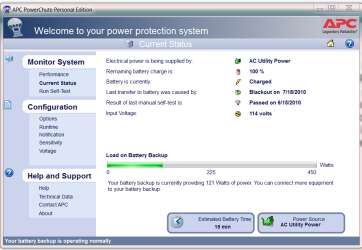
I assume you are using the APC software to monitor your UPS.
This is what mine looks like. After a few blackouts the UPS seams to adjust to the load it sees and then recalculates the run time.
On my Battery Backup ports I have my PC, Monitor, Cable Modem, Router, Vontage Box and Wireless Phone System. I just turn off my PC and Monitor and leave the UPS on for the others since my Phone systems runs through the Router and Modem. I have two others for my two big screen TV's and cable boxes.

APC.PNG

Jim :geek:
 

My Computer

Computer type
PC/Desktop
Computer Manufacturer/Model Number
Home Built
OS
Windows 8.1 Pro w/Media Center 64bit, Windows 7 HP 64bit
CPU
Phenom II X6 1100T
Motherboard
ASUS M5A99X EVO
Memory
Crucial Balistic 8gb DDR3-1866 CL9
Graphics Card(s)
MSI R6850 Cyclone IGD5 PE
Sound Card
On Board
Monitor(s) Displays
ASUS VE258Q 25" LED with DVI-HDMI-DisplayPort
Screen Resolution
1920 x 1080
Hard Drives
Two WD Cavier Black 2TB Sata III, WD My Book Essential 2TB USB 3.0
PSU
Seasonic X650 80 Plus GOLD Modular
Case
Corsair 400R
Cooling
Antec Kuhler H2O 620, Two 120mm and four 140mm
Keyboard
Logitech K120
Mouse
Logitech Marble Mouse USB, Logitech Precision Game Pad
Internet Speed
15MB
Antivirus
Norton IS 2013, Malwarebytes Pro Beta 2
Browser
IE-11, FF-27
Other Info
APC UPS ES 750, Netgear WNR3500L Gigabit & Wireless N Router with SamKnows Test Program, Motorola SB6120 Gigabit Cable Modem. Brother HL-2170W Laser Printer, Epson V300 Scanner
I have a Belkin UPS F6C1500TWRK backup power supply, and it's not your typical UPS unit....this thing can power a fridge:cool:

I have mine connected to everything (Desktop PC, XBOX360,Netbook, external HD, 7.1 AMP,Blu-Ray player,DVD player, and of course my HDTV)... it's plugged in straight into the wall (grounded properly as it should).
It's the best investment everyone should have in case of a brownout or blackout, or even worse an unexpected Surge, it has never failed me once.

Do not ever plug a surge protector in a UPS, give it plenty of ventilation, and space for the wires.
Here's my 2 cents:)

Hello grimreaper,
I appreciate you adding your knowledge. That is some UPS you've got there. Since I'm only concerned with line regulation and a auto nice shutdown I think/hope I'm going to be o.k.
To all, if I find out that my UPS doesn't charge when off, would it be bad to add a surge protector of of it within wattage ratings for the availability of an on/off switch and some additional surge protection? I'm talking about just the monitor and computer? Is that considered that dangerous within output wattage rating. I'm just concerned that the UPS I have seems to line noise fault when I power it up. The extra surge protector would be solely for convenience. Appreciate your opinions.
I can see why some, but if the wattage wasn't overdrawing the output, then that potential danger would be eliminated and it would just be the issue of a second probably larger surge protector circuit off the built in one.
glennc
 

My Computer

Computer type
PC/Desktop
Computer Manufacturer/Model Number
Self-Built
OS
Windows 7 Ultimate
CPU
AMD Phenom-II X4 965
Motherboard
Gigabyte GA-MA785GM-US2H
Memory
8192 MB DDR2-SDRAM
Graphics Card(s)
ATI Radeon HD 4200
Sound Card
ATI Radeon HD 4200 High Definition Audo
Monitor(s) Displays
LG Electronics W1943
Screen Resolution
1360 X 768
Hard Drives
C: 500 GB Caviar Black SATA
E: 500 GB Caviar Black SATA
PSU
Ultra LSP 750
Case
Ultra XBlaster
Cooling
2 Fans, CPU Fan, PS Fan
Keyboard
Acer
Mouse
Logitech
Internet Speed
6 MB
I assume you are using the APC software to monitor your UPS.
This is what mine looks like. After a few blackouts the UPS seams to adjust to the load it sees and then recalculates the run time.
On my Battery Backup ports I have my PC, Monitor, Cable Modem, Router, Vontage Box and Wireless Phone System. I just turn off my PC and Monitor and leave the UPS on for the others since my Phone systems runs through the Router and Modem. I have two others for my two big screen TV's and cable boxes.

View attachment 89079

Jim :geek:

Hey Jim,
Ah an APC window I can almost recognize. Mine doesn't have the bar graph for the battery load or the manual self test. If I understand you, and I may not, the UPS actually monitors the load and recalculates the runtime on it's findings. My battery is showing 100% charged. What size is yours may I ask.
Thanks for the visual aid and your computer UPS.
With all the things you guys have come up with to protect, this may cost a lot more than I was thinking:sick:
glennc
 

My Computer

Computer type
PC/Desktop
Computer Manufacturer/Model Number
Self-Built
OS
Windows 7 Ultimate
CPU
AMD Phenom-II X4 965
Motherboard
Gigabyte GA-MA785GM-US2H
Memory
8192 MB DDR2-SDRAM
Graphics Card(s)
ATI Radeon HD 4200
Sound Card
ATI Radeon HD 4200 High Definition Audo
Monitor(s) Displays
LG Electronics W1943
Screen Resolution
1360 X 768
Hard Drives
C: 500 GB Caviar Black SATA
E: 500 GB Caviar Black SATA
PSU
Ultra LSP 750
Case
Ultra XBlaster
Cooling
2 Fans, CPU Fan, PS Fan
Keyboard
Acer
Mouse
Logitech
Internet Speed
6 MB
I have the APC Back-UPS ES 750 which can support up to 450 Watts. I am using ver 2.2 of the software to monitor the UPS.
What model do you have? My old ones did not have the graph either so it depends on what model you have.

Jim :geek:
 

My Computer

Computer type
PC/Desktop
Computer Manufacturer/Model Number
Home Built
OS
Windows 8.1 Pro w/Media Center 64bit, Windows 7 HP 64bit
CPU
Phenom II X6 1100T
Motherboard
ASUS M5A99X EVO
Memory
Crucial Balistic 8gb DDR3-1866 CL9
Graphics Card(s)
MSI R6850 Cyclone IGD5 PE
Sound Card
On Board
Monitor(s) Displays
ASUS VE258Q 25" LED with DVI-HDMI-DisplayPort
Screen Resolution
1920 x 1080
Hard Drives
Two WD Cavier Black 2TB Sata III, WD My Book Essential 2TB USB 3.0
PSU
Seasonic X650 80 Plus GOLD Modular
Case
Corsair 400R
Cooling
Antec Kuhler H2O 620, Two 120mm and four 140mm
Keyboard
Logitech K120
Mouse
Logitech Marble Mouse USB, Logitech Precision Game Pad
Internet Speed
15MB
Antivirus
Norton IS 2013, Malwarebytes Pro Beta 2
Browser
IE-11, FF-27
Other Info
APC UPS ES 750, Netgear WNR3500L Gigabit & Wireless N Router with SamKnows Test Program, Motorola SB6120 Gigabit Cable Modem. Brother HL-2170W Laser Printer, Epson V300 Scanner
Hello Phone Man,
I'm using the BE550G and I've updated the software to Windows 7 v2.2. I just got another event and they are not all occurring at power up. Still got to dig up the book, so until then I'll just leave it on and charge.
Tanks
glennc
 

My Computer

Computer type
PC/Desktop
Computer Manufacturer/Model Number
Self-Built
OS
Windows 7 Ultimate
CPU
AMD Phenom-II X4 965
Motherboard
Gigabyte GA-MA785GM-US2H
Memory
8192 MB DDR2-SDRAM
Graphics Card(s)
ATI Radeon HD 4200
Sound Card
ATI Radeon HD 4200 High Definition Audo
Monitor(s) Displays
LG Electronics W1943
Screen Resolution
1360 X 768
Hard Drives
C: 500 GB Caviar Black SATA
E: 500 GB Caviar Black SATA
PSU
Ultra LSP 750
Case
Ultra XBlaster
Cooling
2 Fans, CPU Fan, PS Fan
Keyboard
Acer
Mouse
Logitech
Internet Speed
6 MB
You have the same family of UPS I have only mine is the next larger size. Are you looking at the Current Status page. That is where the Load Bar is located. From what I see on the APC site your UPS with Software ver 2.2 should show the Load Bar and also have the self-test.
Also your unit WILL charge when plugged in even if you turn it off.

Jim :geek:
 

My Computer

Computer type
PC/Desktop
Computer Manufacturer/Model Number
Home Built
OS
Windows 8.1 Pro w/Media Center 64bit, Windows 7 HP 64bit
CPU
Phenom II X6 1100T
Motherboard
ASUS M5A99X EVO
Memory
Crucial Balistic 8gb DDR3-1866 CL9
Graphics Card(s)
MSI R6850 Cyclone IGD5 PE
Sound Card
On Board
Monitor(s) Displays
ASUS VE258Q 25" LED with DVI-HDMI-DisplayPort
Screen Resolution
1920 x 1080
Hard Drives
Two WD Cavier Black 2TB Sata III, WD My Book Essential 2TB USB 3.0
PSU
Seasonic X650 80 Plus GOLD Modular
Case
Corsair 400R
Cooling
Antec Kuhler H2O 620, Two 120mm and four 140mm
Keyboard
Logitech K120
Mouse
Logitech Marble Mouse USB, Logitech Precision Game Pad
Internet Speed
15MB
Antivirus
Norton IS 2013, Malwarebytes Pro Beta 2
Browser
IE-11, FF-27
Other Info
APC UPS ES 750, Netgear WNR3500L Gigabit & Wireless N Router with SamKnows Test Program, Motorola SB6120 Gigabit Cable Modem. Brother HL-2170W Laser Printer, Epson V300 Scanner
Hello grimreaper,
I appreciate you adding your knowledge. That is some UPS you've got there. Since I'm only concerned with line regulation and a auto nice shutdown I think/hope I'm going to be o.k.
To all, if I find out that my UPS doesn't charge when off, would it be bad to add a surge protector of of it within wattage ratings for the availability of an on/off switch and some additional surge protection? I'm talking about just the monitor and computer? Is that considered that dangerous within output wattage rating. I'm just concerned that the UPS I have seems to line noise fault when I power it up. The extra surge protector would be solely for convenience. Appreciate your opinions.
I can see why some, but if the wattage wasn't overdrawing the output, then that potential danger would be eliminated and it would just be the issue of a second probably larger surge protector circuit off the built in one.
glennc

Thanx for the compliments, I choose this UPS for the sole fact I knew I had a ton of electronic gear to protect in case of the obvious reasons.
It's better to have a UPS that has more juice available then what you're plugging in.

With regards to your question, I cannot stress adding a surge protector to your UPS is wrong, and as a matter of fact in the manuals, this is mentioned also not to plug a surge protector to the UPS.
I can only tell you what I think, it's up to you now to make your own choice if you want to plug in a surge protector to your UPS.
Good luck my friend:)
 

My Computer

Computer Manufacturer/Model Number
custom of course...built by grimreaper
OS
Windows 7 Ultimate X64
CPU
Intel Core 2 Quad Q9650 3.0GHz (3.6GHz 24/7) maxed 4.05GHz
Motherboard
EVGA 790i Ultra SLi Model#132-CK-NF79-A1 BIOS P10
Memory
8GB OCZ DDR3 PC3-14400 @ 1800MHz NVIDIA SLi-Ready
Graphics Card(s)
2XBFG GeForce GTX 280 OC Edition SLi'd
Sound Card
SoundBlaster X-Fi Titanium Fatal1ty Pro Series
Monitor(s) Displays
Samsung 52" 1080P LCD HDTV (LN52B550)
Screen Resolution
1920X1080 @ 60Hz
Hard Drives
3xWestern Digital WD1001FALS Caviar Black 1TB Hard Drive(s) RAID 0 x2 encased in 3xMasscool KuFormula SHF1 HDD Cooler(s)
PSU
ThermalTake ToughPower 1200W P/N:W0133RU Modularized
Case
ThermalTake P/N: VH6000BWS Armor Full-Tower
Cooling
ThermalTake SpinQ P/N: P0466 CPU Cooler
Keyboard
Logitech cordless Y-RAJ56A piece of ****
Mouse
Logitech G7 Laser Cordless mouse black
Internet Speed
10 Mbps DL-1Mbps UL wirelessly DWA-552 extreme N
Other Info
1XSamsung DVD burner SH-S223Q/BEBN SATA
1XSamsung DVD burner SH-S223L/BEBN SATA
1XLG GGW-H20L Blu-Ray burner
4XCooler Master 120mm Blue LED SickleFlow 2000 RPM
1XBelkin UPS F6C1500TWRK) backup power supply
Back
Top