Am I running Waterfox 64bit?

hello people

New member
Power User
Local time
11:55 AM
Messages
210
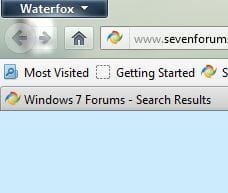
Hi...just installed Waterfox...or so I thought...I pinned the icon to my task bar...but when I click on that icon the older style Firefox icon appears as can be seen in this pic:

waterfox.jpg


So...in the Help section of the browser it says I am running Firefox 13.0.1

Shouldn't it say Waterfox??

Is this normal? Or have I installed it wrong? Should I have uninstalled Firefox first?

Why are the icons different? (The blue icon is the Waterfox pinned icon...the orange icon is the regular Firefox icon. When I click the blue icon to launch Waterfox...the orange Firefox icon is the one that appears next to msn.)

thanks
 

My Computer My Computer

OS
Windows 7 Home Premium 64bit
CPU
i7 930 2.8g
Motherboard
x58A-Ud3R rev2.0 FB
Memory
Corsair xms3 CMX6GX3M3C 1600 C7 2gx3
Graphics Card(s)
HIS ATI pcie HD5670
Sound Card
Presonus Firebox
Monitor(s) Displays
Flatron W2343T x2
Hard Drives
1x500g Seagate Sata2 7200
2x1TB Seagate Sata2 7200
PSU
Cooler Master 700W Silent Pro
Case
Antec
Cooling
Zalman CPU Cooler CNPS10x-Quiet
Hi,

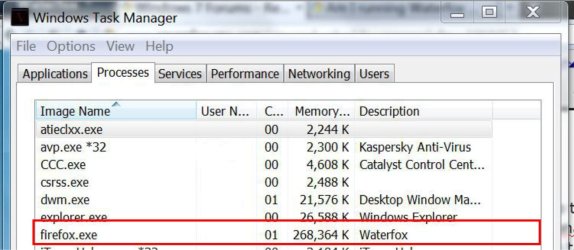
Double-check to see that the icons are pointing to the correct executable. Also when Waterfox/Firefox is open, open TaskManager and see if you can find the Waterfox executable under the processes tab.

Regards,
Golden
 

My Computer My Computer

Computer type
PC/Desktop
Computer Manufacturer/Model Number
Golden Mk. I.4
OS
Windows 10 Pro x64 ; Xubuntu x64
CPU
Intel i7 860 @ 2.80 GHz O/C'ed to 4.0GHz
Motherboard
Gigabyte P55A-UD3R Rev.1. Award BIOS F13
Memory
16GB Corsair Vengance DDR3 @ 661 MHz Dual Channel (9-9-9-24)
Graphics Card(s)
EVGA NVidia GTX 560 1024MB
Sound Card
Realtek Integrated
Monitor(s) Displays
Dual Samsung SyncMaster 2494HS
Screen Resolution
1920*1080 and 1920*1080
Hard Drives
1*Samsung 840 EVO 120GB SSD;
1*OCZ Vertex 2 60GB SSD;
2*Samsung F3 SpinPoint 1TB in RAID0;
1*Samsung F1 SpinPoint 1TB;
2*Western Digital 1TB External USB 3.0
1*Western Digital 500GB External USB 3.0
1*Seagate 500GB External USB 2.0
PSU
Thermaltake ToughPower QFan 750W
Case
Thermaltake Element S VK60001W2Z
Cooling
Corsair H60 Water Cooling, 2*230mm and 2*80mm case fans
Keyboard
Logitech G110
Mouse
Logitech MX518
Thanks...Task Manager doesn't show any Waterfox

I'll check the executable...but I don't see how it could be faulty...the install asked me if I would like to add an icon to the desktop, which I did...after the install I right clicked that icon and pinned it to the task bar...

Anyway...maybe I will uninstall and reinstall...thanks
 

My Computer My Computer

OS
Windows 7 Home Premium 64bit
CPU
i7 930 2.8g
Motherboard
x58A-Ud3R rev2.0 FB
Memory
Corsair xms3 CMX6GX3M3C 1600 C7 2gx3
Graphics Card(s)
HIS ATI pcie HD5670
Sound Card
Presonus Firebox
Monitor(s) Displays
Flatron W2343T x2
Hard Drives
1x500g Seagate Sata2 7200
2x1TB Seagate Sata2 7200
PSU
Cooler Master 700W Silent Pro
Case
Antec
Cooling
Zalman CPU Cooler CNPS10x-Quiet
Hi,

If you right-click on the icon, select Properties, and then check the 'Target' and 'Start In' items....what do they say?

Regards,
Golden
 

My Computer My Computer

Computer type
PC/Desktop
Computer Manufacturer/Model Number
Golden Mk. I.4
OS
Windows 10 Pro x64 ; Xubuntu x64
CPU
Intel i7 860 @ 2.80 GHz O/C'ed to 4.0GHz
Motherboard
Gigabyte P55A-UD3R Rev.1. Award BIOS F13
Memory
16GB Corsair Vengance DDR3 @ 661 MHz Dual Channel (9-9-9-24)
Graphics Card(s)
EVGA NVidia GTX 560 1024MB
Sound Card
Realtek Integrated
Monitor(s) Displays
Dual Samsung SyncMaster 2494HS
Screen Resolution
1920*1080 and 1920*1080
Hard Drives
1*Samsung 840 EVO 120GB SSD;
1*OCZ Vertex 2 60GB SSD;
2*Samsung F3 SpinPoint 1TB in RAID0;
1*Samsung F1 SpinPoint 1TB;
2*Western Digital 1TB External USB 3.0
1*Western Digital 500GB External USB 3.0
1*Seagate 500GB External USB 2.0
PSU
Thermaltake ToughPower QFan 750W
Case
Thermaltake Element S VK60001W2Z
Cooling
Corsair H60 Water Cooling, 2*230mm and 2*80mm case fans
Keyboard
Logitech G110
Mouse
Logitech MX518
Target says: "C:\Program Files\Waterfox\firefox.exe"

And Start In says: "C:\Program Files\Waterfox"

One other piece of info....on install I'm asked to click 'Finish'...both times the install has hung at that point after I click Finish...I get 'not responding' and am told that Firefox or Waterfox (I don't recall which it said) is running and to stop it...but before I started the install there was no Firefox web pages open at all...no browser was running.
 

My Computer My Computer

OS
Windows 7 Home Premium 64bit
CPU
i7 930 2.8g
Motherboard
x58A-Ud3R rev2.0 FB
Memory
Corsair xms3 CMX6GX3M3C 1600 C7 2gx3
Graphics Card(s)
HIS ATI pcie HD5670
Sound Card
Presonus Firebox
Monitor(s) Displays
Flatron W2343T x2
Hard Drives
1x500g Seagate Sata2 7200
2x1TB Seagate Sata2 7200
PSU
Cooler Master 700W Silent Pro
Case
Antec
Cooling
Zalman CPU Cooler CNPS10x-Quiet
Task manager does not know that it is waterfox. to it, it is just Firefox 64 bit. Which it actually is.

Close both the apps. Unpin the taskbar icon for firefox and waterfox, run waterfox and pin the icon again, the issue should be solved.

For being sure which version is running, look at the top left corner ... it will tell you the truth.
Capture.JPG
 

My Computer My Computer

Computer type
PC/Desktop
Computer Manufacturer/Model Number
Self Assembled
OS
Microsoft Windows 10 Pro Insider Preview 64-bit
CPU
Intel(R) Core(TM) i3-4130 CPU @ 3.40GHz
Motherboard
Gigabyte Technology Co., Ltd. B85M-D3H
Memory
Corsair Vengence 4GB x2 (8.00GB Dual-Channel DDR3 @ 798MHz)
Graphics Card(s)
2047MB GeForce GTS 450 (ZOTAC International)
Sound Card
Onboard (Realtek High Definition Audio)
Monitor(s) Displays
LG Flatron E2040T
Screen Resolution
1600x900
Hard Drives
Western Digital 1 TB
Seagate 500 GB
PSU
Corsair VS550
Case
Cooler Master K380
Cooling
Cooler Master Seidon 120V Plus
Keyboard
Logitech MK260r
Mouse
Logitech MK260r
Internet Speed
PMPL Broadband
Antivirus
Windows Defender + MBAM
Browser
Firefox
Other Info
Dell Studio 15" Laptop
Thanks Arc but that didn't fix it...I click the blue Waterfox icon and still get the orange Firefox browser...top left corner says Firefox
 

My Computer My Computer

OS
Windows 7 Home Premium 64bit
CPU
i7 930 2.8g
Motherboard
x58A-Ud3R rev2.0 FB
Memory
Corsair xms3 CMX6GX3M3C 1600 C7 2gx3
Graphics Card(s)
HIS ATI pcie HD5670
Sound Card
Presonus Firebox
Monitor(s) Displays
Flatron W2343T x2
Hard Drives
1x500g Seagate Sata2 7200
2x1TB Seagate Sata2 7200
PSU
Cooler Master 700W Silent Pro
Case
Antec
Cooling
Zalman CPU Cooler CNPS10x-Quiet
It's foobared...I just checked Program Files..the install path...but the folders are empty. I can locate a blue exe icon...but it doesn't say Waterfox...it says Firefox...maybe I've dl'd the latest beta and there's bugs or something.

I'll give it the coke and sars for now.
 

My Computer My Computer

OS
Windows 7 Home Premium 64bit
CPU
i7 930 2.8g
Motherboard
x58A-Ud3R rev2.0 FB
Memory
Corsair xms3 CMX6GX3M3C 1600 C7 2gx3
Graphics Card(s)
HIS ATI pcie HD5670
Sound Card
Presonus Firebox
Monitor(s) Displays
Flatron W2343T x2
Hard Drives
1x500g Seagate Sata2 7200
2x1TB Seagate Sata2 7200
PSU
Cooler Master 700W Silent Pro
Case
Antec
Cooling
Zalman CPU Cooler CNPS10x-Quiet
Hmm ... nice :D In my machine if I open Firefox it opens waterfox :) As I set it as the default browser.
I hope an uninstallation of Firefox (that one in program files x86) will be enough :) For a 64 bit system, waterfox is the best, and you dont need the 32 bit version anymore, actually .

Let us know what is the situation after the uninstallation.

Edit : In that case, uninstall the both, and reinstall waterfox only .
 

My Computer My Computer

Computer type
PC/Desktop
Computer Manufacturer/Model Number
Self Assembled
OS
Microsoft Windows 10 Pro Insider Preview 64-bit
CPU
Intel(R) Core(TM) i3-4130 CPU @ 3.40GHz
Motherboard
Gigabyte Technology Co., Ltd. B85M-D3H
Memory
Corsair Vengence 4GB x2 (8.00GB Dual-Channel DDR3 @ 798MHz)
Graphics Card(s)
2047MB GeForce GTS 450 (ZOTAC International)
Sound Card
Onboard (Realtek High Definition Audio)
Monitor(s) Displays
LG Flatron E2040T
Screen Resolution
1600x900
Hard Drives
Western Digital 1 TB
Seagate 500 GB
PSU
Corsair VS550
Case
Cooler Master K380
Cooling
Cooler Master Seidon 120V Plus
Keyboard
Logitech MK260r
Mouse
Logitech MK260r
Internet Speed
PMPL Broadband
Antivirus
Windows Defender + MBAM
Browser
Firefox
Other Info
Dell Studio 15" Laptop
You're not saying that I need to set Waterfox as the default browser are you?

And what about the fact that the install had a blue exe icon in Program Files that said Firefox instead of Waterfox?

Also I get this message at the end of install:

Waterfox is already running (no it shouldn't be...I had NOTHING running...NO browser was open at all) Please close Waterfox prior to launching the version you have just installed.

Well...I can't close Waterfox if I never opened it in the first place...so I dunno what's what

Maybe I should completely uninstall Firefox first
 

My Computer My Computer

OS
Windows 7 Home Premium 64bit
CPU
i7 930 2.8g
Motherboard
x58A-Ud3R rev2.0 FB
Memory
Corsair xms3 CMX6GX3M3C 1600 C7 2gx3
Graphics Card(s)
HIS ATI pcie HD5670
Sound Card
Presonus Firebox
Monitor(s) Displays
Flatron W2343T x2
Hard Drives
1x500g Seagate Sata2 7200
2x1TB Seagate Sata2 7200
PSU
Cooler Master 700W Silent Pro
Case
Antec
Cooling
Zalman CPU Cooler CNPS10x-Quiet
A restart could make it easy :)
 

My Computer My Computer

Computer type
PC/Desktop
Computer Manufacturer/Model Number
Self Assembled
OS
Microsoft Windows 10 Pro Insider Preview 64-bit
CPU
Intel(R) Core(TM) i3-4130 CPU @ 3.40GHz
Motherboard
Gigabyte Technology Co., Ltd. B85M-D3H
Memory
Corsair Vengence 4GB x2 (8.00GB Dual-Channel DDR3 @ 798MHz)
Graphics Card(s)
2047MB GeForce GTS 450 (ZOTAC International)
Sound Card
Onboard (Realtek High Definition Audio)
Monitor(s) Displays
LG Flatron E2040T
Screen Resolution
1600x900
Hard Drives
Western Digital 1 TB
Seagate 500 GB
PSU
Corsair VS550
Case
Cooler Master K380
Cooling
Cooler Master Seidon 120V Plus
Keyboard
Logitech MK260r
Mouse
Logitech MK260r
Internet Speed
PMPL Broadband
Antivirus
Windows Defender + MBAM
Browser
Firefox
Other Info
Dell Studio 15" Laptop
How about an OS reinstall?

;)
 

My Computer My Computer

OS
Windows 7 Home Premium 64bit
CPU
i7 930 2.8g
Motherboard
x58A-Ud3R rev2.0 FB
Memory
Corsair xms3 CMX6GX3M3C 1600 C7 2gx3
Graphics Card(s)
HIS ATI pcie HD5670
Sound Card
Presonus Firebox
Monitor(s) Displays
Flatron W2343T x2
Hard Drives
1x500g Seagate Sata2 7200
2x1TB Seagate Sata2 7200
PSU
Cooler Master 700W Silent Pro
Case
Antec
Cooling
Zalman CPU Cooler CNPS10x-Quiet
Waterfox: V13 PL1, 6 Jun [Firefox 64-Bit]

Have a pleasant visit and a long read! (From page 200 to the current 269.) Most are embedded quotes within embedded quotes and so on. There is also an FAQ on the first page. The answer to "Is it Waterfox or Firefox?" is somewhere in there. An answer to "... is still running ..." is also in there.

I use as default PaleMoonx64 and, as standby, Waterfox. During one of those standby moments, I had to start Firefox, close Firefox, wait a second or two and then start Waterfox for it to take.
 

My Computer My Computer

OS
Windows 7 Home Premium x64
Thanks...that website takes forever to load a page...it's horrendous...or maybe my Firefox is just starting to suck more.

Jesus...who would have thought a simple browser could be such a bitch.

If Waterfox doesn't have a water-tight download then they can get stuffed.

I'll persist with FF until something that works out of the box comes along.

thanks
 

My Computer My Computer

OS
Windows 7 Home Premium 64bit
CPU
i7 930 2.8g
Motherboard
x58A-Ud3R rev2.0 FB
Memory
Corsair xms3 CMX6GX3M3C 1600 C7 2gx3
Graphics Card(s)
HIS ATI pcie HD5670
Sound Card
Presonus Firebox
Monitor(s) Displays
Flatron W2343T x2
Hard Drives
1x500g Seagate Sata2 7200
2x1TB Seagate Sata2 7200
PSU
Cooler Master 700W Silent Pro
Case
Antec
Cooling
Zalman CPU Cooler CNPS10x-Quiet
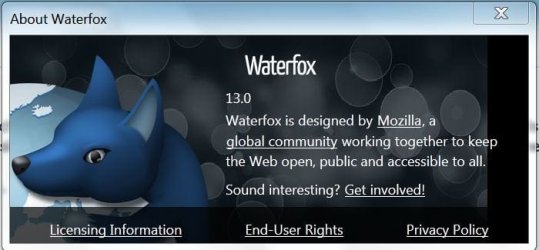
If Waterfox is installed correctly under the Help > About menu Waterfox should resemble the image pictured below.

waterfox.JPG


Hi,

Double-check to see that the icons are pointing to the correct executable. Also when Waterfox/Firefox is open, open TaskManager and see if you can find the Waterfox executable under the processes tab.

Regards,
Golden

Image of Taskmanager under processes tab as per Golden's quote above from post #2.

Untitled-2.jpg

Before installing Waterfox I first backed up my extensions, themes and bookmarks in my current Firefox installation using the FEBE extension which is a firefox add on.

I then completely uninstalled Firefox & all customizations and also the Firefox folder in C:\Program Files x86.

I then installed Waterfox and installed the FEBE add on after searching for it under "Get add ons". After FEBE was installed in Waterfox I restored my saved extensions themes & bookmarks.

Bookmarks can also be natively exported from current firefox to a file & imported into Waterfox.
 

My Computer My Computer

Computer type
PC/Desktop
Computer Manufacturer/Model Number
My own abomination, I call it the Money Pit
OS
Windows 10 Pro x 2/Windows 11 Home
CPU
Intel i7 2600K @ 3.40 GHz
Motherboard
ASUS Sabertooth P67
Memory
Corsair Vengeance 16GB DDR3 1600MHz CL8 Dual Channel Kit
Graphics Card(s)
EVGA GeForce RTX 3080 XC3 ULTRA GAMING 10GB GDDR6X
Sound Card
Onboard Realtek or Nvidia High Definition Audio (HDMI)
Monitor(s) Displays
Samsung JS7000 50" SUHD TV or Samsung 27" FHD 60Hz 8ms GTG V
Screen Resolution
1920 x 1080
Hard Drives
1 x Samsung 870 EVO 250 GB SSD (Windows 10 Pro), 1 x Samsung 850 EVO 250 GB SSD (Windows 10 Pro)
PSU
Corsair AX860 - 860W Modular Power Supply
Case
Phanteks Enthoo Luxe Full Tower Case - Black
Cooling
CORSAIR Hydro Series H150i PRO RGB 360mm Liquid CPU Cooler
Keyboard
Logitech K830 Illuminated Living-Room Keyboard
Mouse
Logitech MX Anywhere 2S Wireless Mouse
Internet Speed
100 Mbps
Antivirus
ESET Internet Security
Browser
Latest Version Of Firefox & Microsoft Edge Chromium Stable
Other Info
LG Super Multi Blue Internal Blu-ray Disk Rewriter - BH10LS30
6x2 HDMI Switcher (6 inputs, 2 outputs) so I can send the output of my Cable Box, Roku, or any my 4 computers to either my TV or Monitor separately or simultaneously.
I just tried to install Waterfox on my work computer which is essentially the same as my home rig (though nowhere near as powerful haha)...and it installed no problem...without uninstalling Firefox or anything.

It may be something to do with the fact that I had not shut my home computer down for a few days. Also not sure if I opted to have Waterfox as the default browser during the install at home...which I did do here at work.

So anyway...Waterfox is running fine on this work computer. I'll try again at home later.

Waterfox seems alright. I use browsers in purely vanilla mode anyway...no plugins...at least no weird, special plugins

thanks
 

My Computer My Computer

OS
Windows 7 Home Premium 64bit
CPU
i7 930 2.8g
Motherboard
x58A-Ud3R rev2.0 FB
Memory
Corsair xms3 CMX6GX3M3C 1600 C7 2gx3
Graphics Card(s)
HIS ATI pcie HD5670
Sound Card
Presonus Firebox
Monitor(s) Displays
Flatron W2343T x2
Hard Drives
1x500g Seagate Sata2 7200
2x1TB Seagate Sata2 7200
PSU
Cooler Master 700W Silent Pro
Case
Antec
Cooling
Zalman CPU Cooler CNPS10x-Quiet
Well I came home for lunch and installed Waterfox successfully. I suppose my computer needed a reboot.

Anyway...don't notice much difference yet between FF and WF
 

My Computer My Computer

OS
Windows 7 Home Premium 64bit
CPU
i7 930 2.8g
Motherboard
x58A-Ud3R rev2.0 FB
Memory
Corsair xms3 CMX6GX3M3C 1600 C7 2gx3
Graphics Card(s)
HIS ATI pcie HD5670
Sound Card
Presonus Firebox
Monitor(s) Displays
Flatron W2343T x2
Hard Drives
1x500g Seagate Sata2 7200
2x1TB Seagate Sata2 7200
PSU
Cooler Master 700W Silent Pro
Case
Antec
Cooling
Zalman CPU Cooler CNPS10x-Quiet
Well I came home for lunch and installed Waterfox successfully. I suppose my computer needed a reboot.

Anyway...don't notice much difference yet between FF and WF

Glad to hear you have had success hello people I didn't notice much difference either except that Waterfox is a 64 bit browser and the only plugins used by Waterfox are Java, Flash and Siverlight plugins whereas regular Firefox was also using related plugins from other programs installed on my computer.
 

My Computer My Computer

Computer type
PC/Desktop
Computer Manufacturer/Model Number
My own abomination, I call it the Money Pit
OS
Windows 10 Pro x 2/Windows 11 Home
CPU
Intel i7 2600K @ 3.40 GHz
Motherboard
ASUS Sabertooth P67
Memory
Corsair Vengeance 16GB DDR3 1600MHz CL8 Dual Channel Kit
Graphics Card(s)
EVGA GeForce RTX 3080 XC3 ULTRA GAMING 10GB GDDR6X
Sound Card
Onboard Realtek or Nvidia High Definition Audio (HDMI)
Monitor(s) Displays
Samsung JS7000 50" SUHD TV or Samsung 27" FHD 60Hz 8ms GTG V
Screen Resolution
1920 x 1080
Hard Drives
1 x Samsung 870 EVO 250 GB SSD (Windows 10 Pro), 1 x Samsung 850 EVO 250 GB SSD (Windows 10 Pro)
PSU
Corsair AX860 - 860W Modular Power Supply
Case
Phanteks Enthoo Luxe Full Tower Case - Black
Cooling
CORSAIR Hydro Series H150i PRO RGB 360mm Liquid CPU Cooler
Keyboard
Logitech K830 Illuminated Living-Room Keyboard
Mouse
Logitech MX Anywhere 2S Wireless Mouse
Internet Speed
100 Mbps
Antivirus
ESET Internet Security
Browser
Latest Version Of Firefox & Microsoft Edge Chromium Stable
Other Info
LG Super Multi Blue Internal Blu-ray Disk Rewriter - BH10LS30
6x2 HDMI Switcher (6 inputs, 2 outputs) so I can send the output of my Cable Box, Roku, or any my 4 computers to either my TV or Monitor separately or simultaneously.
all waterfox is another browser that is over hyped

I downloaded it and it runs hella fast but nothing i would loose sleep over if i didnt have it

By the way the icon is set in my task bar i could also set it on the bottom it works fine
 

Attachments

  • water.PNG
    water.PNG
    14 KB · Views: 4

My Computer My Computer

Computer type
PC/Desktop
Computer Manufacturer/Model Number
CoreI7-6700K MrFingerIII Special Builds
OS
Windows 10 Home Premium 64bit sp1
CPU
Intel I7-6700K @ 4.6 Ghz 1.344 volts everyday OC
Motherboard
Asrock Fatality K6 Z170 Socket 1151
Memory
32GB G-Skill TridentZ 3200mhz 16-18-18-38 DDR4
Graphics Card(s)
Sli Gigabyte Windforce GTX 980 G1
Sound Card
AC97 Creative Rage Tactic 3D Headphones Bluetooth
Monitor(s) Displays
27" Asus ROG Swift PG278Q G-Sync 48" Vizio Smart HD TV
Screen Resolution
2560x1440p 27"- 48" Currently Gaming at 2560x1440p Res 2K
Hard Drives
250GB Samsung Evo840SSD Seagate baracuda 500 GB WD Mybook 500Gb 1TB Seagate Barracuda
PSU
HX1050w Corsair Silver 80plus certified crosfire/sli
Case
Enthod Pro Full Tower
Cooling
Corsair H110i GT 280 mm High Performance WaterBlock
Keyboard
Logitech wireless keyboard
Mouse
Logitech wireless mouse
Internet Speed
Cox Cable 100+ mb
Antivirus
WebRoot Spysweeper with Antivirus
Browser
IE-10, Chrome, Opera
Other Info
My Other Rig is a AMD FX8320E @4.6Ghz 16GB Ballistic Sport Ram
Mobo Asrock Fatality 990FX 120GB OCZ SSD 1TB Seagate Barracuda Corsair H75 Cooling PSU Corsair CX750
GPU GTX Gigabyte 970G1
I've just been noticing a few ever so slight frustrations in Firefox lately...that's why I wanted to look at another option.
 

My Computer My Computer

OS
Windows 7 Home Premium 64bit
CPU
i7 930 2.8g
Motherboard
x58A-Ud3R rev2.0 FB
Memory
Corsair xms3 CMX6GX3M3C 1600 C7 2gx3
Graphics Card(s)
HIS ATI pcie HD5670
Sound Card
Presonus Firebox
Monitor(s) Displays
Flatron W2343T x2
Hard Drives
1x500g Seagate Sata2 7200
2x1TB Seagate Sata2 7200
PSU
Cooler Master 700W Silent Pro
Case
Antec
Cooling
Zalman CPU Cooler CNPS10x-Quiet
Back
Top