AMD Catalyst Intall Error Messages

ViperMWC

New member
Member
Local time
6:58 PM
Messages
54
AMD Catalyst Install Error Messages

Could someone explain the reasons behind the error messages I'm getting trying to install my AMD Catalyst Drivers.

From a clean system, ie: all previous ATI/AMD drivers, folders and software removed.

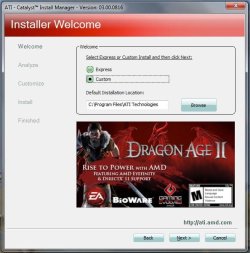
The Catalyst install runs and opens, on running the Install option.
Image 01

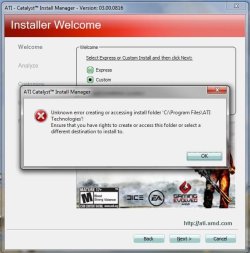
Clicking Next gives this,
Image 02

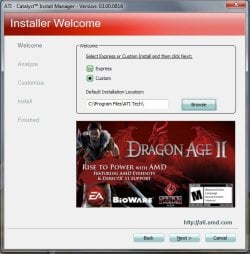
Selecting Yes gives this,
Image 03

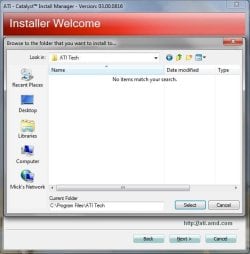
Bypassing this to create a different install folder,
Image 04
Image 05

Retrying gives this,
Image 06

Dialog box appears again,
Image 07

Then the Installer is hung and can only be closed by opening Task Manager and manually shutting it down.

This seems to be a continuous loop, nothing I've tried gets past this, so I'm asking what could be preventing the creation of a folder on my C:\ drive ? Single User with full Administrator rights !!

I've tried a variety of different Catalyst Installer Versions, old to new, same thing happens every time.

Any thoughts, advice would be welcomed.

Regards,
Mick C.
 

Attachments
  • Catalyst 01.JPG
    Catalyst 01.JPG
    54 KB · Views: 56
  • Catalyst 02.JPG
    Catalyst 02.JPG
    54.3 KB · Views: 56
  • Catalyst 03.JPG
    Catalyst 03.JPG
    50.8 KB · Views: 56
  • Catalyst 04.JPG
    Catalyst 04.JPG
    43.8 KB · Views: 56
  • Catalyst 05.JPG
    Catalyst 05.JPG
    51.4 KB · Views: 56
  • Catalyst 06.JPG
    Catalyst 06.JPG
    49 KB · Views: 56
  • Catalyst 07.JPG
    Catalyst 07.JPG
    50.1 KB · Views: 56
Last edited:

My Computer

Computer type
PC/Desktop
Computer Manufacturer/Model Number
Arbico i7 PC
OS
Windows 7 Home Premium 64 bit - SP1
CPU
Intel Core i7 920 (2.66GHz 8MB L2 Cache)
Motherboard
Asus P6X58D-E
Memory
6Gb (3 x Kingston 2Gb PC12800 DDR3 1600MHZ)
Graphics Card(s)
ATI Radeon HD 5850 1Gb
Sound Card
AMD HIgh Def HDMI
Monitor(s) Displays
LG 24EB23 Digital
Screen Resolution
1920x1080 (32bit) (60Hz)
Hard Drives
Samsung HD103SJ
Samsung HD5021J
Samsung HD204UI
Samsung M3 External USB 3
PSU
Nexus RX-8500 850w
Case
NZXT Hush Black ATA
Cooling
3 x Xilence Red Wing 120mm Case Fans
Keyboard
Microsoft Wireless Keyboard 6000 v3.0
Mouse
Microsoft Wireless Laser Mouse 6000 v 2.0
Internet Speed
60.0 Mbps Average
Antivirus
Spybot Search & Destroy
Browser
Avant Browser
Try right clicking on the installer, and choosing "Run as Administrator." Windows often can't write to the "Program Files" folder without elevated privilege.
 

My Computer

Computer type
PC/Desktop
Computer Manufacturer/Model Number
Mellon Labs (custom build)
OS
Win 7 Pro x64/Win 10 Pro x64 dual boot
CPU
AMD FX 8350 Vishera @ 4200
Motherboard
ASUS M5A97 R2.0
Memory
16 GB Mushkin Blackline DDR3-2400 @ 1866 (9-10-10-10-31)
Graphics Card(s)
XFX Radeon R9 280 Double D Black Edition
Sound Card
Realtek HD Audio on MB. Sounds great.
Monitor(s) Displays
Acer 24", Acer 22"
Screen Resolution
3840 x 1080
Hard Drives
1 x Mushkin Chronos 120 GB SSD (Win 10)
1 x Samsung 850 EVO 250 GB SSD (Win 7)
1 x WD 1TB SATA Blue
1 x WD 1TB SATA Green
PSU
Corsair TX-750
Case
CoolerMaster HAF 912+
Cooling
Coolermaster Seidon 240M Liquid AIO. 6 case fans
Keyboard
Logitech G710+
Mouse
Logitech G500s
Internet Speed
Much better since I got fiber, but still way overpriced.
Antivirus
MSE, Malware Bytes for scanning
Browser
Firefox
Other Info
Corsair VOID USB headphones.

A Mellon Labs X-1 - LCD Smartie driven system status display.

Brought to you by the letter E
Try right clicking on the installer, and choosing "Run as Administrator." Windows often can't write to the "Program Files" folder without elevated privilege.

Thanks for looking in on this Mellon.
Gave this a try, same result as above :(
Puzzling, as I'm having no problems installing other software to the same drive and "Program Files" folder !!
It's not just this incarnation of the Catalyst package [13-12_win7_win8_64_dd_ccc_whql] that's behaving like this, earlier versions are doing the same thing.
Perhaps there is something missing the CCC needs, what that is, is eluding me.
Thanks,
Mick C.
 

My Computer

Computer type
PC/Desktop
Computer Manufacturer/Model Number
Arbico i7 PC
OS
Windows 7 Home Premium 64 bit - SP1
CPU
Intel Core i7 920 (2.66GHz 8MB L2 Cache)
Motherboard
Asus P6X58D-E
Memory
6Gb (3 x Kingston 2Gb PC12800 DDR3 1600MHZ)
Graphics Card(s)
ATI Radeon HD 5850 1Gb
Sound Card
AMD HIgh Def HDMI
Monitor(s) Displays
LG 24EB23 Digital
Screen Resolution
1920x1080 (32bit) (60Hz)
Hard Drives
Samsung HD103SJ
Samsung HD5021J
Samsung HD204UI
Samsung M3 External USB 3
PSU
Nexus RX-8500 850w
Case
NZXT Hush Black ATA
Cooling
3 x Xilence Red Wing 120mm Case Fans
Keyboard
Microsoft Wireless Keyboard 6000 v3.0
Mouse
Microsoft Wireless Laser Mouse 6000 v 2.0
Internet Speed
60.0 Mbps Average
Antivirus
Spybot Search & Destroy
Browser
Avant Browser

My Computer

Computer type
PC/Desktop
Computer Manufacturer/Model Number
Dude Build
OS
Windows 10 Pro X64
CPU
Intel(R) Core(TM) i5-3570K CPU OC@ 4.5GHZ Turbo
Motherboard
MSI Z77A-G45 Gaming
Memory
8.00 GB DDR3 1600Mhz
Graphics Card(s)
MSI Gaming X GTX 1070
Sound Card
Realtek High Definition
Monitor(s) Displays
Dell S23O9W, HP L1710
Screen Resolution
DELL-1920 x 1080 HP-1280 x1024
Hard Drives
Crucial m4 256 SSD, WD 7200RPM 500GB WD 1TB
PSU
Seasonic X650 GOLD
Case
Zalman Z12
Cooling
Antec Kuhler 920
Keyboard
Logitech
Mouse
MSI DS100 Interceptor
Internet Speed
50 down and 5 up
Antivirus
MSE
Browser
Chrome, IE 11
Other Info
Logitech X-620 Speakers
I would try a clean install after complete removal

AMD Catalyst Uninstall Utility 1.2.1.0

Then see what happens with an Express install, not custom.

There are two issues here
1) the custom folder
2) failure to load detection driver

I've had difficulties with the Catalyst Install Manager (CIM) on my system - I've used both custom and express.
Standard secondary folders are created even if you create a custom, so I gave up trying to figure out CIM, uninstalled as Dude suggested and went with Express. Then I backtracked and removed CCC - I didn't need it and I don't OC this machine.
 

My Computer

Computer type
Laptop
Computer Manufacturer/Model Number
HP Pavilion dv6-6c10us
OS
x64 (6.3.9600) Win8.1 Pro & soon dual boot x64 (6.1.7601) Win7_SP1 HomePrem
CPU
AMD A6-3420M APU with Radeon(tm) HD Graphics
Motherboard
Hewlett-Packard 1805
Memory
6.00 GB
Graphics Card(s)
AMD Radeon(TM) HD 6520G
Sound Card
(1) AMD High Definition Audio Device (2) IDT High Definiti
Monitor(s) Displays
HP W2072a 20" LCD (1600 x 900) @ 60 Hz
Screen Resolution
1366 x 768 x 32 bits (4294967296 colors) @ 60 Hz
Hard Drives
ST640LM0 00 HM641JI SATA Disk Device
Keyboard
Logitech k520 wireless KB
Mouse
Logitech m320 wireless mouse (bundled with KB)
Internet Speed
15/5 | 54 MB Wireless 'n'
Antivirus
Realtime: Defender or Avast | On-demand: Malwarebytes, ESET
Browser
IE 11 on Win8, IE 10 on win 7
Other Info
Media: [Gimp, Audacity, VLC] || Comm: [WEmail 2012, Skype] || Productivity: [OpenOffice,| Textpad] || Utils: [Sysinternals, cCleaner, Speccy, Defraggler]
I would try a clean install after complete removal

AMD Catalyst Uninstall Utility 1.2.1.0

Thanks Dude, Ran this utility, started with a clean slate !!

Up until the install of the latest drivers, [13-12_win7_win8_64_dd_ccc_whql] I'd had no trouble with CCC etc. This one just threw a fit and crashed my system. Upon getting Windows back I've had this issue ever since. Have "cleaned up" with the above utility, Driver Fusion, and Atiman's Uninstaller at various times.
This is what I don't understand !!
"Unknown error creating or accessing folder C:\Program Files\ATI Technologies !"
What would stop CCC from creating a folder on a drive I've had no problems installing other programs on.

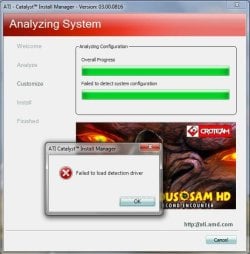
Slartybart, tried that one too, "Express Install", goes past the create error box fail from before, but soon as I pick NEXT, the 2nd message appears, "AMD Catalyst Install Manager Failed to load detection driver" !!
Creating the "ATI Technologies" folder myself, or another named folder first, just sends it to the "2nd" Fail each time.

This is not like an end of the world thing, but I really would like to find out what's going wrong here.

Thanks for the input and idea though,
Regards to you both,
Mick C.
 

My Computer

Computer type
PC/Desktop
Computer Manufacturer/Model Number
Arbico i7 PC
OS
Windows 7 Home Premium 64 bit - SP1
CPU
Intel Core i7 920 (2.66GHz 8MB L2 Cache)
Motherboard
Asus P6X58D-E
Memory
6Gb (3 x Kingston 2Gb PC12800 DDR3 1600MHZ)
Graphics Card(s)
ATI Radeon HD 5850 1Gb
Sound Card
AMD HIgh Def HDMI
Monitor(s) Displays
LG 24EB23 Digital
Screen Resolution
1920x1080 (32bit) (60Hz)
Hard Drives
Samsung HD103SJ
Samsung HD5021J
Samsung HD204UI
Samsung M3 External USB 3
PSU
Nexus RX-8500 850w
Case
NZXT Hush Black ATA
Cooling
3 x Xilence Red Wing 120mm Case Fans
Keyboard
Microsoft Wireless Keyboard 6000 v3.0
Mouse
Microsoft Wireless Laser Mouse 6000 v 2.0
Internet Speed
60.0 Mbps Average
Antivirus
Spybot Search & Destroy
Browser
Avant Browser
Mick, I might not have stated it correctly

I suggested that after you run the Catalyst uninstall utility, you try an express install.

I'll change that to
run the Catalyst uninstall utility
search your c: drive
kind:=folder ATI OR AMD
>> OR must be capitalized in the search

Selectively rename any folders found (search might find Fatigues or Camd)
AMD_prior, AMD_bad... ATI_prior, ATI_bad or something

Then give an express install a shot.
 

My Computer

Computer type
Laptop
Computer Manufacturer/Model Number
HP Pavilion dv6-6c10us
OS
x64 (6.3.9600) Win8.1 Pro & soon dual boot x64 (6.1.7601) Win7_SP1 HomePrem
CPU
AMD A6-3420M APU with Radeon(tm) HD Graphics
Motherboard
Hewlett-Packard 1805
Memory
6.00 GB
Graphics Card(s)
AMD Radeon(TM) HD 6520G
Sound Card
(1) AMD High Definition Audio Device (2) IDT High Definiti
Monitor(s) Displays
HP W2072a 20" LCD (1600 x 900) @ 60 Hz
Screen Resolution
1366 x 768 x 32 bits (4294967296 colors) @ 60 Hz
Hard Drives
ST640LM0 00 HM641JI SATA Disk Device
Keyboard
Logitech k520 wireless KB
Mouse
Logitech m320 wireless mouse (bundled with KB)
Internet Speed
15/5 | 54 MB Wireless 'n'
Antivirus
Realtime: Defender or Avast | On-demand: Malwarebytes, ESET
Browser
IE 11 on Win8, IE 10 on win 7
Other Info
Media: [Gimp, Audacity, VLC] || Comm: [WEmail 2012, Skype] || Productivity: [OpenOffice,| Textpad] || Utils: [Sysinternals, cCleaner, Speccy, Defraggler]
Mick, I might not have stated it correctly

I suggested that after you run the Catalyst uninstall utility, you try an express install.

I'll change that to
run the Catalyst uninstall utility
search your c: drive
kind:=folder ATI OR AMD
>> OR must be capitalized in the search

Selectively rename any folders found (search might find Fatigues or Camd)
AMD_prior, AMD_bad... ATI_prior, ATI_bad or something

Then give an express install a shot.

Failed again I'm afraid Slarty !!
I know the AMD uninstall worked as I'm looking at Lego sized fonts just now :)
Catalyst ran till the "accept" on the License thing, the again failed to create that folder !!
I tried an earlier version of CCC this time just in case there was a problem with the new package.
13-4_vista_win7_win8_64_dd_ccc_whql", which I know has installed OK in the past.
Perhaps this isn't an AMD package issue ?
On a side thought, the .NET Framework 4.5.1 is there and working OK.
Bemused again here.

I'm offering cake now :D
Thanks for mulling on this for me,
Mick C.
 

My Computer

Computer type
PC/Desktop
Computer Manufacturer/Model Number
Arbico i7 PC
OS
Windows 7 Home Premium 64 bit - SP1
CPU
Intel Core i7 920 (2.66GHz 8MB L2 Cache)
Motherboard
Asus P6X58D-E
Memory
6Gb (3 x Kingston 2Gb PC12800 DDR3 1600MHZ)
Graphics Card(s)
ATI Radeon HD 5850 1Gb
Sound Card
AMD HIgh Def HDMI
Monitor(s) Displays
LG 24EB23 Digital
Screen Resolution
1920x1080 (32bit) (60Hz)
Hard Drives
Samsung HD103SJ
Samsung HD5021J
Samsung HD204UI
Samsung M3 External USB 3
PSU
Nexus RX-8500 850w
Case
NZXT Hush Black ATA
Cooling
3 x Xilence Red Wing 120mm Case Fans
Keyboard
Microsoft Wireless Keyboard 6000 v3.0
Mouse
Microsoft Wireless Laser Mouse 6000 v 2.0
Internet Speed
60.0 Mbps Average
Antivirus
Spybot Search & Destroy
Browser
Avant Browser
Cake! Sure, a big piece for me.

One last stab. What happens if you pre allocate (create) the folder?

going for milk now to wash down this cake.;)

Thanks Mike.
 

My Computer

Computer type
Laptop
Computer Manufacturer/Model Number
HP Pavilion dv6-6c10us
OS
x64 (6.3.9600) Win8.1 Pro & soon dual boot x64 (6.1.7601) Win7_SP1 HomePrem
CPU
AMD A6-3420M APU with Radeon(tm) HD Graphics
Motherboard
Hewlett-Packard 1805
Memory
6.00 GB
Graphics Card(s)
AMD Radeon(TM) HD 6520G
Sound Card
(1) AMD High Definition Audio Device (2) IDT High Definiti
Monitor(s) Displays
HP W2072a 20" LCD (1600 x 900) @ 60 Hz
Screen Resolution
1366 x 768 x 32 bits (4294967296 colors) @ 60 Hz
Hard Drives
ST640LM0 00 HM641JI SATA Disk Device
Keyboard
Logitech k520 wireless KB
Mouse
Logitech m320 wireless mouse (bundled with KB)
Internet Speed
15/5 | 54 MB Wireless 'n'
Antivirus
Realtime: Defender or Avast | On-demand: Malwarebytes, ESET
Browser
IE 11 on Win8, IE 10 on win 7
Other Info
Media: [Gimp, Audacity, VLC] || Comm: [WEmail 2012, Skype] || Productivity: [OpenOffice,| Textpad] || Utils: [Sysinternals, cCleaner, Speccy, Defraggler]
Cake! Sure, a big piece for me.

One last stab. What happens if you pre allocate (create) the folder?

going for milk now to wash down this cake.;)

Thanks Mike.

Sorry Slarty, looks like the cow is safe :cry:
Creating the folder in advance bypasses the CCC failed creation effort, but simply falls over again on the "AMD Catalyst Install Manager Failed to load detection driver" error !!
It's almost as if the Installer can't read the drive.
The AMD/Support folder that's got all the pre installation bits [Including the detection app], is on drive C:\
CCC is supposed to be reading that lot and setting up the install on the same drive in the C:\Program Files\ATI Technologies folder !!

Cake and Candles anyone LOL
Mick
 

My Computer

Computer type
PC/Desktop
Computer Manufacturer/Model Number
Arbico i7 PC
OS
Windows 7 Home Premium 64 bit - SP1
CPU
Intel Core i7 920 (2.66GHz 8MB L2 Cache)
Motherboard
Asus P6X58D-E
Memory
6Gb (3 x Kingston 2Gb PC12800 DDR3 1600MHZ)
Graphics Card(s)
ATI Radeon HD 5850 1Gb
Sound Card
AMD HIgh Def HDMI
Monitor(s) Displays
LG 24EB23 Digital
Screen Resolution
1920x1080 (32bit) (60Hz)
Hard Drives
Samsung HD103SJ
Samsung HD5021J
Samsung HD204UI
Samsung M3 External USB 3
PSU
Nexus RX-8500 850w
Case
NZXT Hush Black ATA
Cooling
3 x Xilence Red Wing 120mm Case Fans
Keyboard
Microsoft Wireless Keyboard 6000 v3.0
Mouse
Microsoft Wireless Laser Mouse 6000 v 2.0
Internet Speed
60.0 Mbps Average
Antivirus
Spybot Search & Destroy
Browser
Avant Browser
Just lost a nice post when IE crashed. This will be short

AMD search results for Desktop / ATI Radeon HD / Series 5xxxx / Win7 x64

How-To Uninstall AMD Catalyst Drivers From A Windows Based System
How-To Install AMD Catalyst? Drivers For A Windows® Based System
AMD Graphics Software and Drivers FAQ
>> How do I install the graphics driver manually if the AMD Catalyst? software suite fails to install?

In my crashed post, I had a reference that mentioned leaning on Dev Mgr to get out of this. It might be in one of the FAQs.

I'll check back to see if any of that helped, but other than what I've posted I don't think I can search any better than you search. This issue has been around for a LONG time.

Bill
-
 

My Computer

Computer type
Laptop
Computer Manufacturer/Model Number
HP Pavilion dv6-6c10us
OS
x64 (6.3.9600) Win8.1 Pro & soon dual boot x64 (6.1.7601) Win7_SP1 HomePrem
CPU
AMD A6-3420M APU with Radeon(tm) HD Graphics
Motherboard
Hewlett-Packard 1805
Memory
6.00 GB
Graphics Card(s)
AMD Radeon(TM) HD 6520G
Sound Card
(1) AMD High Definition Audio Device (2) IDT High Definiti
Monitor(s) Displays
HP W2072a 20" LCD (1600 x 900) @ 60 Hz
Screen Resolution
1366 x 768 x 32 bits (4294967296 colors) @ 60 Hz
Hard Drives
ST640LM0 00 HM641JI SATA Disk Device
Keyboard
Logitech k520 wireless KB
Mouse
Logitech m320 wireless mouse (bundled with KB)
Internet Speed
15/5 | 54 MB Wireless 'n'
Antivirus
Realtime: Defender or Avast | On-demand: Malwarebytes, ESET
Browser
IE 11 on Win8, IE 10 on win 7
Other Info
Media: [Gimp, Audacity, VLC] || Comm: [WEmail 2012, Skype] || Productivity: [OpenOffice,| Textpad] || Utils: [Sysinternals, cCleaner, Speccy, Defraggler]
Possible workaround

Hi,

Maybe try this just for the next boot to see if it gets around the _driver_ loading issue:

Press F8 when Windows is booting up until you get the Advanced Boot Options menu, then select “Disable Driver Signature Enforcement”.

Don't worry - it's not a permanent change.

Then try installing again.

Also I don't recommend this next approach but I tend to uninstall - reboot - then install the latest AMD graphics card drivers using:
ATIc Install Tool 1.16.0

I'd save that one until it's your last resort!
 
Last edited:

My Computer

Computer type
Laptop
Computer Manufacturer/Model Number
ASUS
OS
Microsoft Windows 7 Home Premium 64-bit 7601 Multiprocessor Free Service Pack 1
CPU
AMD C-60 APU with Radeon(tm) HD Graphics
Motherboard
ASUSTeK COMPUTER INC. X501U
Memory
4.00 GB
Graphics Card(s)
AMD Radeon HD 6290 Graphics
Sound Card
(1) AMD High Definition Audio Device (2) Realtek High Defi
Screen Resolution
1366 x 768 x 32 bits (4294967296 colors) @ 60 Hz
Hard Drives
Hitachi HTS545050A7E380 SATA Disk Device
Antivirus
Comodo CIS & FW, SecureAplus App Whitelisting, Threatfire
Browser
Cyberfox 64bit, Opera 64bit, Airfox
Other Info
Spy-The-Spy, HitmanPro.Alert, Norton Connect Safe, MJRegWatcher, BitDefender TrafficLight, Voodoo Shield, Zemana AntiMalware
Just lost a nice post when IE crashed. This will be short

AMD search results for Desktop / ATI Radeon HD / Series 5xxxx / Win7 x64

How-To Uninstall AMD Catalyst Drivers From A Windows Based System
How-To Install AMD Catalyst? Drivers For A Windows® Based System
AMD Graphics Software and Drivers FAQ
>> How do I install the graphics driver manually if the AMD Catalyst? software suite fails to install?

In my crashed post, I had a reference that mentioned leaning on Dev Mgr to get out of this. It might be in one of the FAQs.

I'll check back to see if any of that helped, but other than what I've posted I don't think I can search any better than you search. This issue has been around for a LONG time.

Bill
-

Well Bill,
Running out of memory cells here now, they are packed with a multitude of Catalyst gobbledegook !!

I have the new drivers installed, but not using the Catalyst Install Manager.
Fairly straightforward once I realised there was a path to achieve it.
First part of the Catalyst Installed unpacked the files to that AMD/Support folder.
Your hint to the Device Manager was the one, used the standard "update driver" button and aimed it at the AMD/Support folder, Windows found the .Inf files and loaded in the new drivers.

No Catalyst Control Center though, that is all still falling over whatever state I've set things up in. I've a grim feeling that whatever it is, it's going to take a system re-install to get rid of it.

Another adventure into Bill Gates's Wonderland :party: LOL
I've posted something on the AMD Gamers forum, see if any of them can figure it out, but as it's not really game related I don't hold much hope, and I'm not even going to waste electrons bothering to ask AMD !!

Thanks for dabbling about in this with me Bill, I'll put it on the back burner for a day or so, but I'll niggle me, I can be very persistent LOL

Any way's as Zebedee said, it's time for bed.
Regards.
Mick.
 

My Computer

Computer type
PC/Desktop
Computer Manufacturer/Model Number
Arbico i7 PC
OS
Windows 7 Home Premium 64 bit - SP1
CPU
Intel Core i7 920 (2.66GHz 8MB L2 Cache)
Motherboard
Asus P6X58D-E
Memory
6Gb (3 x Kingston 2Gb PC12800 DDR3 1600MHZ)
Graphics Card(s)
ATI Radeon HD 5850 1Gb
Sound Card
AMD HIgh Def HDMI
Monitor(s) Displays
LG 24EB23 Digital
Screen Resolution
1920x1080 (32bit) (60Hz)
Hard Drives
Samsung HD103SJ
Samsung HD5021J
Samsung HD204UI
Samsung M3 External USB 3
PSU
Nexus RX-8500 850w
Case
NZXT Hush Black ATA
Cooling
3 x Xilence Red Wing 120mm Case Fans
Keyboard
Microsoft Wireless Keyboard 6000 v3.0
Mouse
Microsoft Wireless Laser Mouse 6000 v 2.0
Internet Speed
60.0 Mbps Average
Antivirus
Spybot Search & Destroy
Browser
Avant Browser
Hi,

Maybe try this just for the next boot to see if it gets around the _driver_ loading issue:

Press F8 when Windows is booting up until you get the Advanced Boot Options menu, then select “Disable Driver Signature Enforcement”.

Don't worry - it's not a permanent change.

Then try installing again.

Also I don't recommend this next approach but I tend to uninstall - reboot - then install the latest AMD graphics card drivers using:
ATIc Install Tool 1.16.0

I'd save that one until it's your last resort!

Thanks also to you Callender,
Sadly the Driver Signature thing made no difference, routine went exactly the same, and failed exactly the same !!

Took the plunge with your 'Custer's Last Stand' :p
As it turns out it's not much more than a GUI bolted onto the front of AMD's own utility.
Virtually the same procedure, I was able to leave out some of the components, but as the CCC and drivers are united it really left me in same situation, it all downloaded, ran the Catalyst Install Manager, and failed just the same way.

So, chips 1 user 0 :eek:

As you can read in the post to Slarty, the old fashioned way has at least given me updated drivers, and no issues for the future about keeping them up to date.
But the main issue is still unsolved, for now.

If you happen to have an epiphany and work it out, let me know LOL

Thanks for your efforts,
Mick
 

My Computer

Computer type
PC/Desktop
Computer Manufacturer/Model Number
Arbico i7 PC
OS
Windows 7 Home Premium 64 bit - SP1
CPU
Intel Core i7 920 (2.66GHz 8MB L2 Cache)
Motherboard
Asus P6X58D-E
Memory
6Gb (3 x Kingston 2Gb PC12800 DDR3 1600MHZ)
Graphics Card(s)
ATI Radeon HD 5850 1Gb
Sound Card
AMD HIgh Def HDMI
Monitor(s) Displays
LG 24EB23 Digital
Screen Resolution
1920x1080 (32bit) (60Hz)
Hard Drives
Samsung HD103SJ
Samsung HD5021J
Samsung HD204UI
Samsung M3 External USB 3
PSU
Nexus RX-8500 850w
Case
NZXT Hush Black ATA
Cooling
3 x Xilence Red Wing 120mm Case Fans
Keyboard
Microsoft Wireless Keyboard 6000 v3.0
Mouse
Microsoft Wireless Laser Mouse 6000 v 2.0
Internet Speed
60.0 Mbps Average
Antivirus
Spybot Search & Destroy
Browser
Avant Browser
Great Mick,

CCC is fairly useless unless you want to OC.

I don't have enough brian cells to try and figure out why AMD/ATI is so difficult to install - so I always Punt.

Sleep well, my friend. It was a pleasure.

Bill
-
 

My Computer

Computer type
Laptop
Computer Manufacturer/Model Number
HP Pavilion dv6-6c10us
OS
x64 (6.3.9600) Win8.1 Pro & soon dual boot x64 (6.1.7601) Win7_SP1 HomePrem
CPU
AMD A6-3420M APU with Radeon(tm) HD Graphics
Motherboard
Hewlett-Packard 1805
Memory
6.00 GB
Graphics Card(s)
AMD Radeon(TM) HD 6520G
Sound Card
(1) AMD High Definition Audio Device (2) IDT High Definiti
Monitor(s) Displays
HP W2072a 20" LCD (1600 x 900) @ 60 Hz
Screen Resolution
1366 x 768 x 32 bits (4294967296 colors) @ 60 Hz
Hard Drives
ST640LM0 00 HM641JI SATA Disk Device
Keyboard
Logitech k520 wireless KB
Mouse
Logitech m320 wireless mouse (bundled with KB)
Internet Speed
15/5 | 54 MB Wireless 'n'
Antivirus
Realtime: Defender or Avast | On-demand: Malwarebytes, ESET
Browser
IE 11 on Win8, IE 10 on win 7
Other Info
Media: [Gimp, Audacity, VLC] || Comm: [WEmail 2012, Skype] || Productivity: [OpenOffice,| Textpad] || Utils: [Sysinternals, cCleaner, Speccy, Defraggler]
Great Mick,

CCC is fairly useless unless you want to OC.

I don't have enough brian cells to try and figure out why AMD/ATI is so difficult to install - so I always Punt.

Sleep well, my friend. It was a pleasure.

Bill
-

:sick:
ZZZZZzzzzzzzzzz :sleep:
 

My Computer

Computer type
PC/Desktop
Computer Manufacturer/Model Number
Arbico i7 PC
OS
Windows 7 Home Premium 64 bit - SP1
CPU
Intel Core i7 920 (2.66GHz 8MB L2 Cache)
Motherboard
Asus P6X58D-E
Memory
6Gb (3 x Kingston 2Gb PC12800 DDR3 1600MHZ)
Graphics Card(s)
ATI Radeon HD 5850 1Gb
Sound Card
AMD HIgh Def HDMI
Monitor(s) Displays
LG 24EB23 Digital
Screen Resolution
1920x1080 (32bit) (60Hz)
Hard Drives
Samsung HD103SJ
Samsung HD5021J
Samsung HD204UI
Samsung M3 External USB 3
PSU
Nexus RX-8500 850w
Case
NZXT Hush Black ATA
Cooling
3 x Xilence Red Wing 120mm Case Fans
Keyboard
Microsoft Wireless Keyboard 6000 v3.0
Mouse
Microsoft Wireless Laser Mouse 6000 v 2.0
Internet Speed
60.0 Mbps Average
Antivirus
Spybot Search & Destroy
Browser
Avant Browser
Small steps !!

A small update, after some sleep :)

Have worked around the 1st error message, "Unknown error creating or accessing folder C:\Program Files\ATI Technologies " Created the folder in advance, got in and did some digging about and made sure it was set for full control, did the same with the AMD/Support folder before trying an install of CCC.
No request from CCC about creating a folder so it recognised it was there this time.
Failed again though on the driver detection. But with a change of error message.
from :- AMD Catalyst Install Manager Failed to load detection driver.
to :- Detection Manager Failed to load the driver.

Will keep poking at this a while longer.
Mick C.
 

My Computer

Computer type
PC/Desktop
Computer Manufacturer/Model Number
Arbico i7 PC
OS
Windows 7 Home Premium 64 bit - SP1
CPU
Intel Core i7 920 (2.66GHz 8MB L2 Cache)
Motherboard
Asus P6X58D-E
Memory
6Gb (3 x Kingston 2Gb PC12800 DDR3 1600MHZ)
Graphics Card(s)
ATI Radeon HD 5850 1Gb
Sound Card
AMD HIgh Def HDMI
Monitor(s) Displays
LG 24EB23 Digital
Screen Resolution
1920x1080 (32bit) (60Hz)
Hard Drives
Samsung HD103SJ
Samsung HD5021J
Samsung HD204UI
Samsung M3 External USB 3
PSU
Nexus RX-8500 850w
Case
NZXT Hush Black ATA
Cooling
3 x Xilence Red Wing 120mm Case Fans
Keyboard
Microsoft Wireless Keyboard 6000 v3.0
Mouse
Microsoft Wireless Laser Mouse 6000 v 2.0
Internet Speed
60.0 Mbps Average
Antivirus
Spybot Search & Destroy
Browser
Avant Browser

My Computer

Computer type
PC/Desktop
Computer Manufacturer/Model Number
Home Build Kit
OS
Windows 7 Ultimate 64bit
CPU
AMD Phenom II X6 1045T
Motherboard
MSI 880GM-E41 (MS-7623)
Memory
12gb TTL 2-4gb PC3-12800 DDR3 & 2-2gb PC3-12800 DDR3 SDRAM
Graphics Card(s)
ATI/AMD radeon HD 6770
Sound Card
AMD High Def HDMI
Monitor(s) Displays
Hannstar 27" (iH282) and Samsung SyncMaster 21" (213T)
Screen Resolution
1920 x 1200 (iH282) and 1600 x 1200 (SyncMaster)
Hard Drives
Samsung 840 EVO - 250gb SSD
WDC 160gb WD1600AAJS-75M0A0
PSU
Ultra LSP650 650-Watt Power Supply - ATX, SATA-Ready,
Case
MSI IN-9410 Raptor Mid Tower Case
Cooling
COOLER MASTER Hyper TX3 RR-910-HTX3-G1 92mm CPU Cooler
Keyboard
Logitech K350 wireless
Mouse
Logitech M510 wireless
Internet Speed
Avg Upload 30.1 Avg Download 9.8
Antivirus
Comodo Internet Security Premium
Browser
Chrome
Other Info
CCleaner
Malwarebytes Anti-Malware
SuperAntiSpyware
I had problems in the past installing CCC. Came across the below link to "totally" remove all entries of CCC and then do a clean reinstall. It's cumbersome and extensive; but it works! :)

how to properly uninstall ATI/AMD Software Drivers for Graphics Cards.

Good luck.
Thanks jr, have had a quick look at that, very interesting and worth a shot for sure.
Back to work here, so little evening time to go at this, but I'll be back with an update when I've studied and tried that guide.
Regards,
Mick C.
 

My Computer

Computer type
PC/Desktop
Computer Manufacturer/Model Number
Arbico i7 PC
OS
Windows 7 Home Premium 64 bit - SP1
CPU
Intel Core i7 920 (2.66GHz 8MB L2 Cache)
Motherboard
Asus P6X58D-E
Memory
6Gb (3 x Kingston 2Gb PC12800 DDR3 1600MHZ)
Graphics Card(s)
ATI Radeon HD 5850 1Gb
Sound Card
AMD HIgh Def HDMI
Monitor(s) Displays
LG 24EB23 Digital
Screen Resolution
1920x1080 (32bit) (60Hz)
Hard Drives
Samsung HD103SJ
Samsung HD5021J
Samsung HD204UI
Samsung M3 External USB 3
PSU
Nexus RX-8500 850w
Case
NZXT Hush Black ATA
Cooling
3 x Xilence Red Wing 120mm Case Fans
Keyboard
Microsoft Wireless Keyboard 6000 v3.0
Mouse
Microsoft Wireless Laser Mouse 6000 v 2.0
Internet Speed
60.0 Mbps Average
Antivirus
Spybot Search & Destroy
Browser
Avant Browser
Oh yeah.... Good call jr48az

I forgot about Driver Fusion (previously known as Driver Sweeper) - it works
Download from author's site: Treexy - Software for everyday use
 

My Computer

Computer type
Laptop
Computer Manufacturer/Model Number
HP Pavilion dv6-6c10us
OS
x64 (6.3.9600) Win8.1 Pro & soon dual boot x64 (6.1.7601) Win7_SP1 HomePrem
CPU
AMD A6-3420M APU with Radeon(tm) HD Graphics
Motherboard
Hewlett-Packard 1805
Memory
6.00 GB
Graphics Card(s)
AMD Radeon(TM) HD 6520G
Sound Card
(1) AMD High Definition Audio Device (2) IDT High Definiti
Monitor(s) Displays
HP W2072a 20" LCD (1600 x 900) @ 60 Hz
Screen Resolution
1366 x 768 x 32 bits (4294967296 colors) @ 60 Hz
Hard Drives
ST640LM0 00 HM641JI SATA Disk Device
Keyboard
Logitech k520 wireless KB
Mouse
Logitech m320 wireless mouse (bundled with KB)
Internet Speed
15/5 | 54 MB Wireless 'n'
Antivirus
Realtime: Defender or Avast | On-demand: Malwarebytes, ESET
Browser
IE 11 on Win8, IE 10 on win 7
Other Info
Media: [Gimp, Audacity, VLC] || Comm: [WEmail 2012, Skype] || Productivity: [OpenOffice,| Textpad] || Utils: [Sysinternals, cCleaner, Speccy, Defraggler]
Back
Top