AMD CCC installing issue; desktop won't load after restart.

Sierra23

New member
Local time
11:10 PM
Messages
13
Hey there!

I've just recently bought a new PC, and 2 weeks later I'm having issues with it already. Here's the config.:

Motherboard - LGA1155 H61 MSI H61M-P21 (B3)
Processor - Intel® Core™ i3-2120
RAM - DDR3 8GB (2x4)
HDD - Hitachi Deskstar HDS721050DLE630 500GB 7200rpm
Graphics - VGA AMD Radeon 6770
Power supply - 500W

So anyways, everything worked like a charm first week or so. I was well impressed. Then I had some issues with my 5.1 surround system; after trying everything possible software-wise, I got talked into re-installing Windows 7 to fix the sound problem I was having with the speakers. Foolish decision it turned out to be, not only it didn't help me solve the sound problem, but now I can't even install Catalyst Drivers anymore.

Here's where the problem is: after I re-installed Windows 7 Ultimate x64 (all clean and proper of course), and applied all the updates/fixes through Windows Update Action Center etc - I need to install AMD Catalyst Control Center in order to make my graphics show up on device manager/work. When I install it, and it asks for restart after (so it can complete the install and apply it), my Windows won't load proper. Firstly a black screen appears shortly (intead of standard "Welcome" screen), and then few moments later desktop appears with no taskbar or any icons on it. I'm not even able to opet task manager or anything, my whole computer seems to freeze up.

I have tried installing graphics drivers from the original disc I received with my card, I've tried downloading it manually (and through the Windows Update as well); no matter what way I install it, after the reboot my desktop won't load, my Windows doesn't start proper.

I have installed 3 different versions of Windows 7 Ultimate ever since, I've tried pretty much everything that crossed my mind and I'm still rather clueless about the whole thing. Does anyone know what the problem might be, and/or how can it be fixed? I can't play a single game meanwhile, matter a fact I can't even get my graphics to show up under device manager (until I install AMD CCC).

Sorry for the long text and please pardon my choppy english (it's not my mother tongue). Thanks in advance.
 

My Computer My Computer

OS
Windows 7 Ultimate x64
CPU
Intel i3-2120
Motherboard
MSI H61M-P21
Memory
8GB DDR3
Graphics Card(s)
AMD Radeon HD6770
Hard Drives
HDS721050DLE630
Internet Speed
4mb/s
what version of the CCC were you trying to install

If it was from the Disc you should have just went to the site and if you got the 12.7 beta you are also better off going 12.6 i have new 7900 cards and they give me some issues in certain games but nothing to problematic

i would go with the 12.6 or 12.5 12.4 isnt a good driver or 12.7 probally end up skipping it and waiting on a 12.8

As for the install issue it happens on the version of the driver used sometimes it finishes in red or goes into yellow indicating it wasnt installed correectly


also im not sure if your conflicting with any intel hd graphics
 

My Computer My Computer

Computer type
PC/Desktop
Computer Manufacturer/Model Number
CoreI7-6700K MrFingerIII Special Builds
OS
Windows 10 Home Premium 64bit sp1
CPU
Intel I7-6700K @ 4.6 Ghz 1.344 volts everyday OC
Motherboard
Asrock Fatality K6 Z170 Socket 1151
Memory
32GB G-Skill TridentZ 3200mhz 16-18-18-38 DDR4
Graphics Card(s)
Sli Gigabyte Windforce GTX 980 G1
Sound Card
AC97 Creative Rage Tactic 3D Headphones Bluetooth
Monitor(s) Displays
27" Asus ROG Swift PG278Q G-Sync 48" Vizio Smart HD TV
Screen Resolution
2560x1440p 27"- 48" Currently Gaming at 2560x1440p Res 2K
Hard Drives
250GB Samsung Evo840SSD Seagate baracuda 500 GB WD Mybook 500Gb 1TB Seagate Barracuda
PSU
HX1050w Corsair Silver 80plus certified crosfire/sli
Case
Enthod Pro Full Tower
Cooling
Corsair H110i GT 280 mm High Performance WaterBlock
Keyboard
Logitech wireless keyboard
Mouse
Logitech wireless mouse
Internet Speed
Cox Cable 100+ mb
Antivirus
WebRoot Spysweeper with Antivirus
Browser
IE-10, Chrome, Opera
Other Info
My Other Rig is a AMD FX8320E @4.6Ghz 16GB Ballistic Sport Ram
Mobo Asrock Fatality 990FX 120GB OCZ SSD 1TB Seagate Barracuda Corsair H75 Cooling PSU Corsair CX750
GPU GTX Gigabyte 970G1
Hello Solarstarshines! Thanks for the quick reply!

I have tried installing both from their official web site and the Disc itself. Same problem appears, regardless what way I decide to do it. Also, I believe it was 12.6 version on both sources (web/disc).

The install finishes in green every time, it reports no issue during/after it. The problem shows up after the restart. As I said, Windows doesn't start proper, Desktop appears with no taskbar/icons on it, and my PC sort of freezes. After I restore system from the safe mode (and that way undo the previously installed AMD CCC), I'm able to start Windows 7 normally..

Right now, without AMD CCC being installed, Device Manager reports only integrated Intel graphics. When I install AMD CCC, integ. card disappears and gets replaced with 6770 in device manager. But again, I can't install AMD CCC because my Windows doesn't load normal after it.

Oh and what do you mean by "conflicting with any intel hd graphics"? My knowledge about computers is limited, if you have any ideas/suggestions I'm willing to try 'em out if you think it might help resolve the problem :).
 

My Computer My Computer

OS
Windows 7 Ultimate x64
CPU
Intel i3-2120
Motherboard
MSI H61M-P21
Memory
8GB DDR3
Graphics Card(s)
AMD Radeon HD6770
Hard Drives
HDS721050DLE630
Internet Speed
4mb/s

My Computer My Computer

Computer type
PC/Desktop
Computer Manufacturer/Model Number
Custom build
OS
Windows 7 SP1 x64 Ultimate
CPU
FX 8320 4ghz
Motherboard
Gigabyte 970A UD3P
Memory
Crucial Ballistix Tactical 8GB 240-Pin DDR3 1600 Mhz
Graphics Card(s)
Sapphire R9 270 Dual X
Sound Card
VIA HD Audio
Monitor(s) Displays
Samsung SyncMaster 2032BW
Screen Resolution
1680 * 1050
Hard Drives
WD Blue WD10EZEX
PSU
Energon 650w
Case
Aerocool Strike X One
Cooling
Xigmatek Dark Knight SD1283 Night Hawk Edition
Keyboard
Typhoon CarbonKey
Mouse
Trust GXT 25 Gaming Mouse
Internet Speed
120mb/4mb
Antivirus
Comodo Internet Security 8.1
Browser
Firefox
Other Info
CfosSpeed 10
Okei so.. After running AMD Driver Autodetect - AMD Driver Autodetect
Downloading failed when reaching about 99%, and a window popped up saying:


wow.jpg


What does this mean in other words lol? Is this where the issue lays? Sigh this can't be good, what do I do now
 

My Computer My Computer

OS
Windows 7 Ultimate x64
CPU
Intel i3-2120
Motherboard
MSI H61M-P21
Memory
8GB DDR3
Graphics Card(s)
AMD Radeon HD6770
Hard Drives
HDS721050DLE630
Internet Speed
4mb/s

My Computer My Computer

Computer type
PC/Desktop
Computer Manufacturer/Model Number
Custom build
OS
Windows 7 SP1 x64 Ultimate
CPU
FX 8320 4ghz
Motherboard
Gigabyte 970A UD3P
Memory
Crucial Ballistix Tactical 8GB 240-Pin DDR3 1600 Mhz
Graphics Card(s)
Sapphire R9 270 Dual X
Sound Card
VIA HD Audio
Monitor(s) Displays
Samsung SyncMaster 2032BW
Screen Resolution
1680 * 1050
Hard Drives
WD Blue WD10EZEX
PSU
Energon 650w
Case
Aerocool Strike X One
Cooling
Xigmatek Dark Knight SD1283 Night Hawk Edition
Keyboard
Typhoon CarbonKey
Mouse
Trust GXT 25 Gaming Mouse
Internet Speed
120mb/4mb
Antivirus
Comodo Internet Security 8.1
Browser
Firefox
Other Info
CfosSpeed 10
Hey DigDeep!

I did that previous to writing this thread (as I explained above already). After its' installation and restart that follows it - I don't get the typical blue windows "Welcome" screen -- instead I get all black screen, which later on loads into an empty desktop background with no icons or taskbar on it. Every time. I can't ctrl+alt+del, my computer freezes at that point.

Until I do system restore to undo the AMD CCC install, only then my Windows boots normally again.
 

My Computer My Computer

OS
Windows 7 Ultimate x64
CPU
Intel i3-2120
Motherboard
MSI H61M-P21
Memory
8GB DDR3
Graphics Card(s)
AMD Radeon HD6770
Hard Drives
HDS721050DLE630
Internet Speed
4mb/s
Did you try to install video drivers ONLY?

deselect everythig else, and select video driver only. That helped my BSOD.
 

My Computer My Computer

Computer type
PC/Desktop
Computer Manufacturer/Model Number
Custom build
OS
Windows 7 SP1 x64 Ultimate
CPU
FX 8320 4ghz
Motherboard
Gigabyte 970A UD3P
Memory
Crucial Ballistix Tactical 8GB 240-Pin DDR3 1600 Mhz
Graphics Card(s)
Sapphire R9 270 Dual X
Sound Card
VIA HD Audio
Monitor(s) Displays
Samsung SyncMaster 2032BW
Screen Resolution
1680 * 1050
Hard Drives
WD Blue WD10EZEX
PSU
Energon 650w
Case
Aerocool Strike X One
Cooling
Xigmatek Dark Knight SD1283 Night Hawk Edition
Keyboard
Typhoon CarbonKey
Mouse
Trust GXT 25 Gaming Mouse
Internet Speed
120mb/4mb
Antivirus
Comodo Internet Security 8.1
Browser
Firefox
Other Info
CfosSpeed 10
Uhhmm.. Not sure. I think I didn't, no. I went for the "Express install" option or whatever it was, you know - the default stuff...

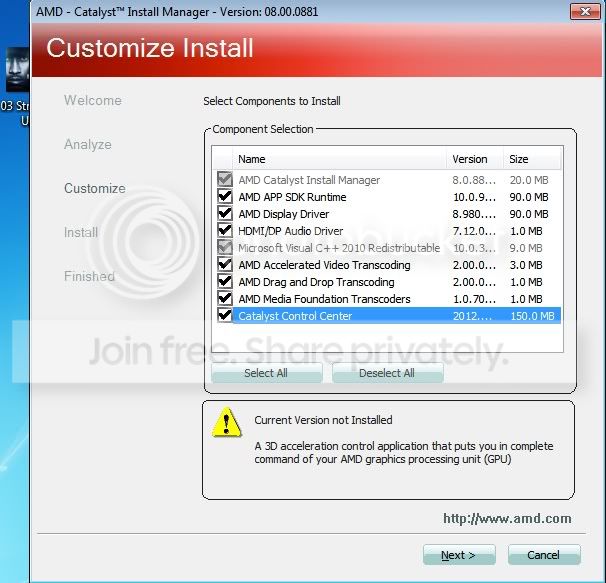
I can try installing drivers only I guess, I assume that's under "custom" option yeah? I'll give it a go right now then, and tell you what's happening.

p.s. Though I will need to install CCC at some point as well however, 'cause I've got HDTV hooked up on my computer too. CCC helps me sort out the overscan resolution etc.

Edit: Huhh there's so many options here, which ones should I/should not install? Honestly I'm affraid I'll have to do system restore again if I install wrong thing, I've downloaded/installed so many things this morning lol.

mm.jpg
 
Last edited:

My Computer My Computer

OS
Windows 7 Ultimate x64
CPU
Intel i3-2120
Motherboard
MSI H61M-P21
Memory
8GB DDR3
Graphics Card(s)
AMD Radeon HD6770
Hard Drives
HDS721050DLE630
Internet Speed
4mb/s

My Computer My Computer

Computer type
PC/Desktop
Computer Manufacturer/Model Number
CoreI7-6700K MrFingerIII Special Builds
OS
Windows 10 Home Premium 64bit sp1
CPU
Intel I7-6700K @ 4.6 Ghz 1.344 volts everyday OC
Motherboard
Asrock Fatality K6 Z170 Socket 1151
Memory
32GB G-Skill TridentZ 3200mhz 16-18-18-38 DDR4
Graphics Card(s)
Sli Gigabyte Windforce GTX 980 G1
Sound Card
AC97 Creative Rage Tactic 3D Headphones Bluetooth
Monitor(s) Displays
27" Asus ROG Swift PG278Q G-Sync 48" Vizio Smart HD TV
Screen Resolution
2560x1440p 27"- 48" Currently Gaming at 2560x1440p Res 2K
Hard Drives
250GB Samsung Evo840SSD Seagate baracuda 500 GB WD Mybook 500Gb 1TB Seagate Barracuda
PSU
HX1050w Corsair Silver 80plus certified crosfire/sli
Case
Enthod Pro Full Tower
Cooling
Corsair H110i GT 280 mm High Performance WaterBlock
Keyboard
Logitech wireless keyboard
Mouse
Logitech wireless mouse
Internet Speed
Cox Cable 100+ mb
Antivirus
WebRoot Spysweeper with Antivirus
Browser
IE-10, Chrome, Opera
Other Info
My Other Rig is a AMD FX8320E @4.6Ghz 16GB Ballistic Sport Ram
Mobo Asrock Fatality 990FX 120GB OCZ SSD 1TB Seagate Barracuda Corsair H75 Cooling PSU Corsair CX750
GPU GTX Gigabyte 970G1
Fuuuuuu*****...!~@'

So I've installed Microsoft Visual C++ 2010, and shortly after that I've also downloaded and installed Security Update for it. As for DirectX, my computer already has the newest version of it installed - it says.

After all that, I've tried installing AMD CCC 12.6 once again (this time drivers only, minus the CCC itself, as DigDeep suggested). After restart, and "Starting Windows" screen -- same problem appeared...

Black screen, few seconds later desktop showed up with no icons/taskbar/mouse cursor. After doing Ctrl+Alt+Del, the black screen (previously mentioned) showed up once more, and from there on I had to manually restart PC; boot Windows in safe mode and restore system to a point prior to AMD drivers installation.

Long story short - the issue still exists, I still can't start up Windows normally after I install AMD Drivers. Also, MSI Afterburner 2.1.0 setup shows up every time Windows loads in now, asks me if I want to install it :/. Sigh

Thank you, Solarstarshines and DigDeep. I appreciate your help! Still looking for suggestions..
 

My Computer My Computer

OS
Windows 7 Ultimate x64
CPU
Intel i3-2120
Motherboard
MSI H61M-P21
Memory
8GB DDR3
Graphics Card(s)
AMD Radeon HD6770
Hard Drives
HDS721050DLE630
Internet Speed
4mb/s
I found this solution that worked:

Boot into low resolution mode (like 640xsomething) and then the login screen/desktop was viewable. I then, switched my screen resolution to maximum and it didnt stuff up.

I then switched off and on to check if it was a permanent fix and it was. Dont know what was going on but its all good now.

F8 is for advanced boot options
 

My Computer My Computer

Computer type
PC/Desktop
Computer Manufacturer/Model Number
Custom build
OS
Windows 7 SP1 x64 Ultimate
CPU
FX 8320 4ghz
Motherboard
Gigabyte 970A UD3P
Memory
Crucial Ballistix Tactical 8GB 240-Pin DDR3 1600 Mhz
Graphics Card(s)
Sapphire R9 270 Dual X
Sound Card
VIA HD Audio
Monitor(s) Displays
Samsung SyncMaster 2032BW
Screen Resolution
1680 * 1050
Hard Drives
WD Blue WD10EZEX
PSU
Energon 650w
Case
Aerocool Strike X One
Cooling
Xigmatek Dark Knight SD1283 Night Hawk Edition
Keyboard
Typhoon CarbonKey
Mouse
Trust GXT 25 Gaming Mouse
Internet Speed
120mb/4mb
Antivirus
Comodo Internet Security 8.1
Browser
Firefox
Other Info
CfosSpeed 10
Hey again DigDeep! Thank you for still sticking with me through all of this!

I did as you recommended. It didn't fix the problem. At this point, clueless as I am, I think it would be the best to just return the PC back to the store I bought it at, and ask their customers service for assistance.

Thanks to everyone that tried to help out.
 

My Computer My Computer

OS
Windows 7 Ultimate x64
CPU
Intel i3-2120
Motherboard
MSI H61M-P21
Memory
8GB DDR3
Graphics Card(s)
AMD Radeon HD6770
Hard Drives
HDS721050DLE630
Internet Speed
4mb/s
Hey again DigDeep! Thank you for still sticking with me through all of this!

I did as you recommended. It didn't fix the problem. At this point, clueless as I am, I think it would be the best to just return the PC back to the store I bought it at, and ask their customers service for assistance.

Thanks to everyone that tried to help out.

Not sure if you have fixed your pc yet but I had the same problem as you. By any chance, do you have a HDMI cable plugged in to your video card?
If you do, unplug it, then boot your pc. Your problem should now be solved.

Also, if your monitor is HDMI, use the DVI cable to set up your computer then plug the HDMI cable in. You should now have the correct resolution set up and it will work.
 

My Computer My Computer

Computer Manufacturer/Model Number
I Built my self
OS
Windows 7 Ultimate x64
CPU
AMD 995
Motherboard
ASUS
Memory
8GB DDR3 1800mhz
Graphics Card(s)
Sapphire Radeon HD 4780 1GB DDR5
Sound Card
Built in
Monitor(s) Displays
ASUS 22"
Hard Drives
Corsair 128GB SSD
Seagate 2TB
WD 1TB
PSU
XIGMATEK 650w
Case
Lian Li
Hey Subx!

I can't tell you how grateful I was to find your answer (I only registered to write this post :D).

So yeah, I had the same problem. I have reinstalled Win7 for like 10 times, always with different CCC options, to rule out the bad one. It seems that when CCC installs and restarts the Windows, it automatically recognizes if there are multiple displays connected to the VGA, and usually the monitor will not be the primary display. I have my TV connected by HDMI, and it became primary. I was so relieved to find the Windows desktop when I turned on my TV! :D

So anyway, thanks again for the tip. :)
 

My Computer My Computer

OS
Windows 7 Enterprise x64
Hey Subz,

Yep its 2015.
Almost 3 years after the last post!
I also only registered to write this post (bit of a faff:D)

But I am sooooo grateful for your solution.
As I've been searching for this since 12.30am (Its now 2.03;))

I starting installing drivers for my new pc yesterday and encountered this problem, and was stuck ever since.

I am grateful that I can now go to bed and impressive my father in the morning about fixing the computer before him.:D


It also applies to DVI to HDMI cables for people wondering...
I think its for any second display.
Surprised there arnt any more people with this issue considering most people connect the PCs to a TV.:rolleyes:

Long post, but I don't care...
This post saved me a lot of hassle.:D(well... most of it :p)

Thanks again.
 

My Computer My Computer

Computer type
PC/Desktop
OS
Windows 64bit
Back
Top