
AMD External Events Service?

rap33042

Senior Moment
Guru
Local time
9:28 PM
Messages
570
Location
Osceola, WI
What do these services do:

AMD External Events Service
AMD Fuel Service
AMD Reservation Manager Service
---

I have searched high and low to no avail.
I'd like to turn them off if it won't break anything, but I can't get any information :p

TIA!
 

My Computer

Computer Manufacturer/Model Number
OEM - Me
OS
Windows 7 Home Premium x64
CPU
AMD Phenom II X6 1600T
Motherboard
GigaByte GZ-990FXA-UD3
Memory
16GB PC3-10700 (1342MHz)
Graphics Card(s)
ATI Radeon 5770 HD (x2) CrossFire
Sound Card
On-board RealTek chipset
Monitor(s) Displays
3x Hanns-G 1920x1080 Monitors
Screen Resolution
3x Hanns-G 1920x1080 Monitors
Hard Drives
Intel 25-V SSD 40GB: 218 MB/s AT: 0.1ms
Intel X-25M SSD 80GB: 230MB/s AT: 0.1ms
Seagate 750GB: 133 MB/s AT: 13ms (perpendicular storage)
Buffalo HD-PCTU3 1TB External drive
PSU
OCZ Stealth X Stream 750W
Case
Cheap (unknown)
Cooling
Stock
Keyboard
HP USB
Mouse
LogiTech USB
Internet Speed
1.5 Mbps - Slow - At the tail-end of a rural network
Other Info
Printer: Epson Stylus C-84
Scanner: HP 3500C Flatbed
DVD-RW: Plextor
DVD-ROM: Unknown
WEI: 7.4
AMD External Events Service is the AMD/ATI hotkey poller, so if you turn off hotkeys in Catalyst control panel, the service just sits there and won't do anything, so no need to disable it. Also delete the entry for this in HKEY_LOCAL_MACHINE\SOFTWARE\Microsoft\Windows\CurrentVersion\Run if it's there. I haven't come across the other two, but maybe they are also to do with your AMD/ATI graphics card and you might trawl through the graphics adapter settings to figure it out.

Edit: Just to add that you don't really need all that CCC stuff and can download simply the display driver here: http://sites.amd.com/us/game/downloads/Pages/downloads.aspx
Go to the Windows 7 64-bit link and choose the "Individual download" tab, and the display driver is at the top. Maybe then those obscure services will not even be installed.
 
Last edited:

My Computer

OS
Windows 7
AMD Fuel Service
AMD Reservation Manager Service

Those are new services and they have not been explained yet, even on the AMD forums.
 

My Computer

Computer type
PC/Desktop
Computer Manufacturer/Model Number
Custom Build
OS
Windows 7 Home Premium 64 bit
CPU
Intel Core i7-4790
Motherboard
GA-Z87X-D3H
Memory
G.SKILL 8GB (2 x 4GB) DDR3 F3-10666CL9D-8GBNT
Graphics Card(s)
AMD Radeon R7 250
Sound Card
Realtek ALC892
Monitor(s) Displays
Samsung UN32EH5000, Dell 1703FPT
Screen Resolution
1920 x 1080, 1280 x 1024
Hard Drives
WD5003AZEX
WD10EZEX
Samsung HD103SJ
Samsung 128 GB 840 PRO
PSU
SeaSonic M12II SS-500GM
Case
Fractal Design Define R4
Cooling
Zalman CNPS9900ALED
Keyboard
Logitech K800
Mouse
Logitech M705
Internet Speed
16 Mbps
Antivirus
Avast
Browser
Firefox
Other Info
Bose Companion 2 Multimedia Speakers
@debugged:
It never occurred to me that I wouldn't need the extraneous stuff; the drivers are all I really want anyway, right?

I'm going to give this a shot and see what happens.

TNX,
rap
 

My Computer

Computer Manufacturer/Model Number
OEM - Me
OS
Windows 7 Home Premium x64
CPU
AMD Phenom II X6 1600T
Motherboard
GigaByte GZ-990FXA-UD3
Memory
16GB PC3-10700 (1342MHz)
Graphics Card(s)
ATI Radeon 5770 HD (x2) CrossFire
Sound Card
On-board RealTek chipset
Monitor(s) Displays
3x Hanns-G 1920x1080 Monitors
Screen Resolution
3x Hanns-G 1920x1080 Monitors
Hard Drives
Intel 25-V SSD 40GB: 218 MB/s AT: 0.1ms
Intel X-25M SSD 80GB: 230MB/s AT: 0.1ms
Seagate 750GB: 133 MB/s AT: 13ms (perpendicular storage)
Buffalo HD-PCTU3 1TB External drive
PSU
OCZ Stealth X Stream 750W
Case
Cheap (unknown)
Cooling
Stock
Keyboard
HP USB
Mouse
LogiTech USB
Internet Speed
1.5 Mbps - Slow - At the tail-end of a rural network
Other Info
Printer: Epson Stylus C-84
Scanner: HP 3500C Flatbed
DVD-RW: Plextor
DVD-ROM: Unknown
WEI: 7.4
@debugged:
It never occurred to me that I wouldn't need the extraneous stuff; the drivers are all I really want anyway, right?

I'm going to give this a shot and see what happens.

TNX,
rap
Once you know exactly what you need, you can install just that. The usual package of drivers and accessories is for people who don't want to think about it and just install everything.

Make sure you uninstall the AMD/ATI drivers from Programs and Features first, reboot and go back to Programs and Features and make sure nothing is left over - some say it's a good idea to use something like CCleaner to remove all traces. Also go back to the Run registry location I mentioned and delete the catalyst or other AMD items if still there. Then reboot and install the drivers you want.
 

My Computer

OS
Windows 7
AMD Fuel Service
AMD Reservation Manager Service

Those are new services and they have not been explained yet, even on the AMD forums.

Managed to find one thing that they do,

ccc.png

which disappears with them disabled. Would fit with something I saw somewhere that mentioned that AMD were looking to integrated Overdrive (the program, not the part already in CCC); would also explain why they are there but not fully functional yet (at least on mine so far).
 

My Computer

Computer type
PC/Desktop
Computer Manufacturer/Model Number
Me
OS
Win 7 Ultimate x64
CPU
FX-8350 @ 4.6 GHz so far
Motherboard
Asus M5A97 EVO
Memory
ADATA XPG V1 Series Black 8GB DDR3 1600
Graphics Card(s)
Sapphire R9 270x Dual-X
Sound Card
Xonar DGX w/ Corsair Vengence 1300
Monitor(s) Displays
Acer S232HL Abid
Screen Resolution
1920x1080
Hard Drives
120 GB OCZ Vertex 3
500 GB Seagate 7200.12
PSU
Antec Earthwatts 650W Green
Case
Antec Three Hundred
Cooling
Cooler Master 212 EVO
Keyboard
Logitech G510
Mouse
Logitech G500s
Internet Speed
35000/3000
stormy13!
Ya know? I think you're the only person in the world that knew the answer to this question!
I've been to every forum, web site, and search engine with absolutely zero luck until you came along!
Always a lot of guessing and toe-grinding... :)
Good job!
 

My Computer

Computer Manufacturer/Model Number
OEM - Me
OS
Windows 7 Home Premium x64
CPU
AMD Phenom II X6 1600T
Motherboard
GigaByte GZ-990FXA-UD3
Memory
16GB PC3-10700 (1342MHz)
Graphics Card(s)
ATI Radeon 5770 HD (x2) CrossFire
Sound Card
On-board RealTek chipset
Monitor(s) Displays
3x Hanns-G 1920x1080 Monitors
Screen Resolution
3x Hanns-G 1920x1080 Monitors
Hard Drives
Intel 25-V SSD 40GB: 218 MB/s AT: 0.1ms
Intel X-25M SSD 80GB: 230MB/s AT: 0.1ms
Seagate 750GB: 133 MB/s AT: 13ms (perpendicular storage)
Buffalo HD-PCTU3 1TB External drive
PSU
OCZ Stealth X Stream 750W
Case
Cheap (unknown)
Cooling
Stock
Keyboard
HP USB
Mouse
LogiTech USB
Internet Speed
1.5 Mbps - Slow - At the tail-end of a rural network
Other Info
Printer: Epson Stylus C-84
Scanner: HP 3500C Flatbed
DVD-RW: Plextor
DVD-ROM: Unknown
WEI: 7.4
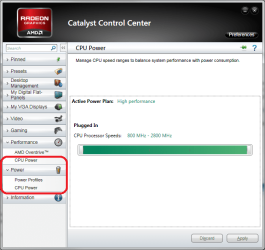
The way I figured it out was I didn't have those two services with the 11.1a hotfix, but they showed up with the latest 11.2. That and those new items that are in that screen shot disappear from CCC once you stop one or both of those services.

This is where I saw the mention of AMD combining Overdrive (and possibly Fusion) into CCC,

AMD Game Forums - New CCC services ..

Still nothing official I can see, but those extra bits showing up certainly make it look like that is what is coming.
 

My Computer

Computer type
PC/Desktop
Computer Manufacturer/Model Number
Me
OS
Win 7 Ultimate x64
CPU
FX-8350 @ 4.6 GHz so far
Motherboard
Asus M5A97 EVO
Memory
ADATA XPG V1 Series Black 8GB DDR3 1600
Graphics Card(s)
Sapphire R9 270x Dual-X
Sound Card
Xonar DGX w/ Corsair Vengence 1300
Monitor(s) Displays
Acer S232HL Abid
Screen Resolution
1920x1080
Hard Drives
120 GB OCZ Vertex 3
500 GB Seagate 7200.12
PSU
Antec Earthwatts 650W Green
Case
Antec Three Hundred
Cooling
Cooler Master 212 EVO
Keyboard
Logitech G510
Mouse
Logitech G500s
Internet Speed
35000/3000
stormy, your screenshots mention 'CPU' power and speeds - should that be Gpu?

i don't want no graphics driver mucking around with my cpu!

personally, i never use ccc, and i always disable the non-critical amd services crap, but that's me - then again i'm still using last year's drivers...and will probably continue to do so until i get a 6950...
 

My Computer

Computer Manufacturer/Model Number
mickey megabyte 1234
OS
ultimate 64 sp1
CPU
i5 2500K [email protected]
Motherboard
MSI P67A-GD53
Memory
8 gigs GSkill Ripjaws 1600
Graphics Card(s)
amd hd6950
Sound Card
creative x-fi gamer
Monitor(s) Displays
samsung 24"
Screen Resolution
1920x1080
Hard Drives
ocz vertex 2e 60 gig, samsung f3 1tb, buffalo 2tb ext
PSU
antec 550
Case
antec three hundred
Cooling
i'm a cooling fan
Keyboard
saitek eclipse ii
Mouse
logitech g3
Internet Speed
about 4 Mbps
Other Info
i love win7
Pretty sure the "CPU Power" part will only show up if you have an AMD CPU.
 

My Computer

Computer type
PC/Desktop
Computer Manufacturer/Model Number
Me
OS
Win 7 Ultimate x64
CPU
FX-8350 @ 4.6 GHz so far
Motherboard
Asus M5A97 EVO
Memory
ADATA XPG V1 Series Black 8GB DDR3 1600
Graphics Card(s)
Sapphire R9 270x Dual-X
Sound Card
Xonar DGX w/ Corsair Vengence 1300
Monitor(s) Displays
Acer S232HL Abid
Screen Resolution
1920x1080
Hard Drives
120 GB OCZ Vertex 3
500 GB Seagate 7200.12
PSU
Antec Earthwatts 650W Green
Case
Antec Three Hundred
Cooling
Cooler Master 212 EVO
Keyboard
Logitech G510
Mouse
Logitech G500s
Internet Speed
35000/3000
Most have the answer already. But I normally simply start up "msconfig" ad simply disable the service from starting up (In this way there is no need to fuss around the registry. The entry will still be there but it will disable it)
As for the drivers:
After almost all Software comes along with a lot of crappware that I really do not need, or fancy taskbar Icons I have no use for like almost all Graphic cards have, I found the best way to install drivers by NOT using the EXE files they come with.
Simply download all the drivers in on directory (all in their own subfolder of course).
After reinstalling Windows (or when you would like to update the drivers) go to the Device manager. If there are devices without drivers still they will show up.
Go to "Update driver" and point manually to the location where you downloaded all the drivers.
Windows will simply grab all the files it needs from there without installing all the crappware along with it :D
If the device only has an outdated driver, it might not show up that obvious in the Device manager, but you still can browse to the device which you want to update the drivers and simply click again "Update driver"
My Task manager show much less services and other stuff running when I go about it that way.
 

My Computer

Computer type
PC/Desktop
Computer Manufacturer/Model Number
Custom
OS
Windows 7 Ultimate x64 (Home)/ Win 7 Enterprise 32 Bit (Work)
CPU
Phenom Black II x4 3.2GHz
Motherboard
Gigabyte 880GA-UD3H
Memory
16GB
Graphics Card(s)
Onboard
Sound Card
Onboard
Monitor(s) Displays
2x 22" Asus
Screen Resolution
1680 x 1050 (16:10)
Hard Drives
1x 120GB Samsung SSD (for C Drive)
1x 55GB Adata SSD (for personal data and mail)
2x 2TB Seagate (after 2 1/2 years one is on the brink of dying!), (Backup, Pictures and Music)
1x 2TB Hitachi (External, 2nd Backup)
1x 2TB Samsung (TV recording)
PSU
Fanless 95+
Cooling
only CPU fan left :-)
Antivirus
Avira
Browser
Opera 12.54 (don't like the new one...but have it also)
By a process of elimination I found these 2 services were causing huge system interrupts. Like Marwerno says I just disabled them in MSConfig. This only started after installing SP1
 

My Computer

OS
win 7 home 32 bit
If you got an Intel processor with Switchable graphic you cant disable AMD External Events,
Behavior i noticed on cpu while service not runing:
Instead of Cpu going idle to 36C (ambient temp 30C here) it would do 40C
also some 3/4C diference on Cpu Load too, that service is controling GPU and CPU it seems
since VGA driver also have the Intel Components install too.

Definitly dont recommend disabling that for systems with dual graphics.
Also i notice no diference on performance disabled or not, other than helping rising cpu temp.
 

My Computer

Computer Manufacturer/Model Number
Acer Aspire 7750G
OS
Windows 7 Home Premium 64 bit
CPU
Intel® Core™ i5-2430M Processor (3M Cache, 2.40 GHz)
Memory
8gb DDR3
Graphics Card(s)
Switchable Cards/ Intel HD 3000/ Radeon HD 6650M 2gb vram
Sound Card
Realtek
Monitor(s) Displays
Acer 17.3
Screen Resolution
1600x900
Hard Drives
Western Digital 500gb
Can cause extreme slowdown

My laptop always welcomed me in 5-6 seconds and got to the desktop quickly, but my Welcome screen started taking 1min,20sec to finish and my games started running slow at the same time. Using a clean boot allowed me to check my running services one-by-one to try to find a culprit. It turned out to be the AMD External Events Utility. I couldn't find what this was attached to, but deleted the service. Computer runs fine now.
 

My Computer

Computer type
Laptop
Computer Manufacturer/Model Number
Dell
OS
win 7 Home Premium 64 bit
It's part of Catalyst bloatware which I would uninstall to use only the actual display driver.

I would keep a Clean Boot for best performance, with only the AV, Sync, any gadgets or stickies you want to start with Windows. Nothing else is needed though many try to sneak in to spy on you.
 
Back
Top