AMD Services & Startup

CJW

New member
Power User
VIP
Local time
11:43 AM
Messages
439
Background:
I was trying to get RAGE to work & had to DL & install the AMD Catalyst™ - Rage Performance Driver & game works fine now (though my Graphics Card is on the low end performance-wise).

Catalyst Question:
I DL'd the AMD Catalyst™ - Rage Performance Driver, then proceeded to run it; after it installed, it then asked to install the Catalyst Install Manager (which I did). Why the double installation & do I need both?

AMD Services Question:
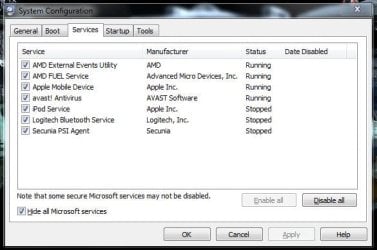
After the installations, I have 2 new Services running. What are these 2 & can I stop/disable them?:
1. AMD External Events Utility
2. AMD FUEL Service

AMD Startup Question:
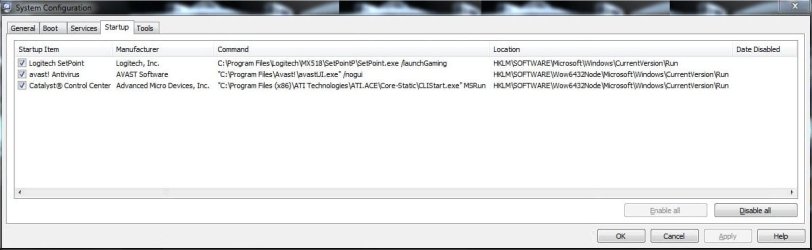
Can I remove the Catalyst Control Center from Startup since I probably won't be changing it's settings much ... if at all? I can always start it w/the R-Click Command Menu.
 

Attachments
  • Services.JPG
    Services.JPG
    40.2 KB · Views: 416
  • Startup.JPG
    Startup.JPG
    51.1 KB · Views: 268

My Computer

Computer type
PC/Desktop
Computer Manufacturer/Model Number
Self built comfuser
OS
10 Pro. 64Bit
CPU
AMD FX 4100, 4-Core Black Edition. Socket AM3+ ~ 3.60GHz
Motherboard
ASUS M5A97 LE R2.0
Memory
2x 4GB Kingston HyperX DDR3-1866 (PC3-14900) - 8GB Total
Graphics Card(s)
ASUS Radeon HD 6670-2GD3
Sound Card
Onboard High Definition Audio Device
Monitor(s) Displays
HP 2009m LCD
Screen Resolution
1600x900, True Color (32bit), 60Hertz
Hard Drives
WD Blue - 1TB, 3D NAND - SATA SSD
PSU
XFX Pro 450W Core Edition - Fully Wired
Case
Antec Super Lanboy
Cooling
Stock CPU fan + 2 (1 front, 1 back) 120mm Antec fans
Keyboard
Logitech MK700/MK710
Mouse
Logitech M705
Internet Speed
Frontier FiOS 50/50
Antivirus
Windows Security
Browser
Vivaldi
Other Info
1x ASUS DRW-24B1ST Multi-DVD Rewriter
1x RocketFish AIO Media Card Reader
1x WD 1TB Passport USB External Drive
I have disabled them long time ago and i don't see any problem.
 

My Computer

Computer Manufacturer/Model Number
/
OS
Windows 7 Pro 64bit
CPU
AMD Phenom II X4 945
Motherboard
GA-MA790XT-UD4P
Memory
8.0GB Dual-Channel DDR3 @ 669MHz
Graphics Card(s)
ATI Radeon HD 5750
Sound Card
AMD High Definition Audio Device
Monitor(s) Displays
SyncMaster (1920x1080@60Hz)
Hard Drives
60GB Kingston SSDNow V+200 & 500GB Western Digital Green
PSU
CHIEFTEC 550W
Case
/
Cooling
CoolerMaster TX3
Internet Speed
10MBps
All 3?:
1. AMD External Events Utility from Services
2. AMD FUEL Service from Services
3. Catalyst Control Center from Startup
 

My Computer

Computer type
PC/Desktop
Computer Manufacturer/Model Number
Self built comfuser
OS
10 Pro. 64Bit
CPU
AMD FX 4100, 4-Core Black Edition. Socket AM3+ ~ 3.60GHz
Motherboard
ASUS M5A97 LE R2.0
Memory
2x 4GB Kingston HyperX DDR3-1866 (PC3-14900) - 8GB Total
Graphics Card(s)
ASUS Radeon HD 6670-2GD3
Sound Card
Onboard High Definition Audio Device
Monitor(s) Displays
HP 2009m LCD
Screen Resolution
1600x900, True Color (32bit), 60Hertz
Hard Drives
WD Blue - 1TB, 3D NAND - SATA SSD
PSU
XFX Pro 450W Core Edition - Fully Wired
Case
Antec Super Lanboy
Cooling
Stock CPU fan + 2 (1 front, 1 back) 120mm Antec fans
Keyboard
Logitech MK700/MK710
Mouse
Logitech M705
Internet Speed
Frontier FiOS 50/50
Antivirus
Windows Security
Browser
Vivaldi
Other Info
1x ASUS DRW-24B1ST Multi-DVD Rewriter
1x RocketFish AIO Media Card Reader
1x WD 1TB Passport USB External Drive
yes, all 3
 

My Computer

Computer Manufacturer/Model Number
/
OS
Windows 7 Pro 64bit
CPU
AMD Phenom II X4 945
Motherboard
GA-MA790XT-UD4P
Memory
8.0GB Dual-Channel DDR3 @ 669MHz
Graphics Card(s)
ATI Radeon HD 5750
Sound Card
AMD High Definition Audio Device
Monitor(s) Displays
SyncMaster (1920x1080@60Hz)
Hard Drives
60GB Kingston SSDNow V+200 & 500GB Western Digital Green
PSU
CHIEFTEC 550W
Case
/
Cooling
CoolerMaster TX3
Internet Speed
10MBps
Going to give it a go, thanks.
Do you happen to know what they are used for?
 

My Computer

Computer type
PC/Desktop
Computer Manufacturer/Model Number
Self built comfuser
OS
10 Pro. 64Bit
CPU
AMD FX 4100, 4-Core Black Edition. Socket AM3+ ~ 3.60GHz
Motherboard
ASUS M5A97 LE R2.0
Memory
2x 4GB Kingston HyperX DDR3-1866 (PC3-14900) - 8GB Total
Graphics Card(s)
ASUS Radeon HD 6670-2GD3
Sound Card
Onboard High Definition Audio Device
Monitor(s) Displays
HP 2009m LCD
Screen Resolution
1600x900, True Color (32bit), 60Hertz
Hard Drives
WD Blue - 1TB, 3D NAND - SATA SSD
PSU
XFX Pro 450W Core Edition - Fully Wired
Case
Antec Super Lanboy
Cooling
Stock CPU fan + 2 (1 front, 1 back) 120mm Antec fans
Keyboard
Logitech MK700/MK710
Mouse
Logitech M705
Internet Speed
Frontier FiOS 50/50
Antivirus
Windows Security
Browser
Vivaldi
Other Info
1x ASUS DRW-24B1ST Multi-DVD Rewriter
1x RocketFish AIO Media Card Reader
1x WD 1TB Passport USB External Drive
I'm not shore now, i didn't remember the things i read, but since i don't have any problems without them... :)
p.s. i don't play games, so i don't know if there is any impact on gaming performance( AMD FUEL Service?)
 

My Computer

Computer Manufacturer/Model Number
/
OS
Windows 7 Pro 64bit
CPU
AMD Phenom II X4 945
Motherboard
GA-MA790XT-UD4P
Memory
8.0GB Dual-Channel DDR3 @ 669MHz
Graphics Card(s)
ATI Radeon HD 5750
Sound Card
AMD High Definition Audio Device
Monitor(s) Displays
SyncMaster (1920x1080@60Hz)
Hard Drives
60GB Kingston SSDNow V+200 & 500GB Western Digital Green
PSU
CHIEFTEC 550W
Case
/
Cooling
CoolerMaster TX3
Internet Speed
10MBps
you can disable all three safely

-- ccc.exe just preloads the applet for display settings, you can always get to ccc thru windows display options (assuming you installed it)
-- fuel.exe is used for the power options manager through ccc - you don't need FUEL unless you use want to change power options/plans thru ccc
-- atiesrxx.exe (or other similar) is for External Events Monitor used for user defined keyboard shortcuts through the ccc

Furthermore, you don't need CCC unless you want to change things like antialiasing, overclock gpu, etc.

The driver is available as a separate download, without all the other stuff, from amd.
 
Last edited:

My Computer

OS
win7x64
I would not 'remove' them. Just disable. Then you can always reenable them when you think it impacts your games.
 

My Computer

Computer Manufacturer/Model Number
HP, Dell, Gateway, Toshiba - 4 laptops and 2 desktops
OS
Vista, Windows7, Mint Mate, Zorin, Windows 8
CPU
from 1.6GHz Duo to i7
Monitor(s) Displays
2x HP w2207
Hard Drives
5x HDD, 7x SSD, 12x Externals
Keyboard
with trackball - no mices
Mouse
Trackball mice
Internet Speed
DSL 6000
The Rage Performance Driver is now and old release, I'd go with Cats 12.2 preview with CAP3, thats what catalystMaker and CatalystCreator recommend on twitter.
 

My Computer

Computer type
PC/Desktop
OS
Microsoft Windows 10 Professional / Windows 7 Professional
CPU
Intel i5-3570
Motherboard
Lenovo Mahobay
Memory
16GB DDR3
Graphics Card(s)
AMD Radeon HD 7850 2GB
Sound Card
(1) Realtek HD Audio (2) AMD HD Audio
Monitor(s) Displays
LG LS192WS
Screen Resolution
1440 x 900 @ 32bit color
Hard Drives
(1) SUV300S37A/120G (2) ST3500413AS SATA Disk Device AHCI mode enabled.
PSU
Corsair HX620
Case
Thermaltake V4 Black Edition
Cooling
Cooler Master Hyper 212 + Artic Silver 5 on CPU/GPU
Keyboard
Dell SK-8115
Mouse
Razer Copperhead with MAPED mat (awesome!)
Internet Speed
100 Mbps up/down
Browser
Chrome
Back
Top