Solved AMD Radeon™ HD 7640G Graphics Drivers Not Working?

SilverMonster05

New member
Local time
3:45 PM
Messages
7
AMD Radeon™ HD 7640G Graphics Drivers Not Working?

I have a fresh install of Windows 7 Ultimate 64 Bit SP1. I was going to play minecraft for the first time on this new computer and it gave me an error saying no open GL found? I was making sure I had my graphics drivers installed and realized something was wrong when it just says "standard vga graphics adapter" in the device manager for display adapters. My computer is a Toshiba Satellite L875D-S7342 with AMD Radeon™ HD 7640G graphics. I have tried every driver I can find, but none work. I have tried the ones on AMD's website and on Toshiba's website. Neither worked for me. Any help is appreciated! :confused:
 

My Computer My Computer

At a glance

Windows 7 Ultimate X64AMD A8-4500 APU6GB Ram
Computer type
Laptop
Computer Manufacturer/Model Number
Toshiba Satellite L875D-S7342
OS
Windows 7 Ultimate X64
CPU
AMD A8-4500 APU
Memory
6GB Ram
Antivirus
Windows Security Essentials
Browser
Google Chrome
I have a fresh install of Windows 7 Ultimate 64 Bit SP1. I was going to play minecraft for the first time on this new computer and it gave me an error saying no open GL found? I was making sure I had my graphics drivers installed and realized something was wrong when it just says "standard vga graphics adapter" in the device manager for display adapters. My computer is a Toshiba Satellite L875D-S7342 with AMD Radeon™ HD 7640G graphics. I have tried every driver I can find, but none work. I have tried the ones on AMD's website and on Toshiba's website. Neither worked for me. Any help is appreciated! :confused:

What is the actual message you are being given when the drivers don't install?
 

My Computer My Computer

At a glance

8 Pro x64i7 3770K 4.6GHz16GB G.Skill Trident X 2666mhzx2 EVGA 780 Ti Superclocked SLI
Computer type
PC/Desktop
Computer Manufacturer/Model Number
Systems by SmartEyeball
OS
8 Pro x64
CPU
i7 3770K 4.6GHz
Motherboard
ASUS P8Z77 WS
Memory
16GB G.Skill Trident X 2666mhz
Graphics Card(s)
x2 EVGA 780 Ti Superclocked SLI
Sound Card
SB X-FI Surround 5.1 PRO USB / ATH-AD900 Headphones
Monitor(s) Displays
x3 Dell U2410 / 58" Samsung
Screen Resolution
5760*1200/ 1920*1200
Hard Drives
2x Intel 520 240GB (RAID 0) * 2x WD Caviar Blacks 2TB (RAID 0) * 2TB WD Caviar Black * Sony Optirac DVD
PSU
Silverstone Strider Evolution 1200W
Case
Thermaltake Level 10 GT Snow Edition
Cooling
Noctua NH-D14
Keyboard
Topre Realforce // Ducky Shine MX Black // Filco Ninja TKL
Mouse
Thermaltake Theron (Highly Recommended) + Razer Imperator
Antivirus
MSE
Browser
IE, FF, WaterFox
Other Info
GT Extreme V2 Sim Racing Cockpit + 40" LCD and K/B Mouse stand ▼
Fanatec CSR Elite Wheel + Clubsport V1 Pedals + CSR shifter/7G-H ▼Saitek X52 Pro ▼ TrackIR 5 Pro
Buttkicker v2 Seat Rumbler with Dedicated 5.1 and Sub Woofer attached to frame ▼
=
Bloody Big Grin
minecraft was unable to start because it failed to find an accelerated OpenGL mode. It says it has bad video card drivers. I know this isn't true because I downloaded the ones from Toshiba's website. They installed fine. However, under my device manager, it still says "generic pnp monitor". Minecraft has worked on this computer before with no problems.
 

My Computer My Computer

At a glance

Windows 7 Ultimate X64AMD A8-4500 APU6GB Ram
Computer type
Laptop
Computer Manufacturer/Model Number
Toshiba Satellite L875D-S7342
OS
Windows 7 Ultimate X64
CPU
AMD A8-4500 APU
Memory
6GB Ram
Antivirus
Windows Security Essentials
Browser
Google Chrome
I would restart and put bios to default. See if windows picks up the right hardware.
 

My Computer My Computer

At a glance

Microsoft Windows 7 Home Premium 64-bit 7601 ...AMD Phenom(tm) II X4 965 Processor8.0 GBNVIDIA GeForce GTX 560 Ti
Computer type
PC/Desktop
Computer Manufacturer/Model Number
Custom Build
OS
Microsoft Windows 7 Home Premium 64-bit 7601 Multiprocessor Free Service Pack 1
CPU
AMD Phenom(tm) II X4 965 Processor
Motherboard
ASUSTeK Computer INC. M4A785-M
Memory
8.0 GB
Graphics Card(s)
NVIDIA GeForce GTX 560 Ti
Sound Card
(1) NVIDIA High Definition Audio (2) NVIDIA High Definitio
Monitor(s) Displays
Samsung SyncMaster T220G
Screen Resolution
1680 x 1050 x 32 bits (4294967296 colors) @ 59 Hz
Hard Drives
WDC WD7500AADS-00M2B0
PSU
650 Watt
Case
Cooler Master HAF XM
Cooling
Air
Keyboard
CompUSA SK-6200
Mouse
Logitech M-510
Internet Speed
Comcast
Antivirus
MSE
Browser
Firefox 27.0 IE 11
Other Info
Belkin Hub To Go F5U706
Can you give more details on putting the bios to default? I went into the settings at startup and did not have any options to change with the bios.
 

My Computer My Computer

At a glance

Windows 7 Ultimate X64AMD A8-4500 APU6GB Ram
Computer type
Laptop
Computer Manufacturer/Model Number
Toshiba Satellite L875D-S7342
OS
Windows 7 Ultimate X64
CPU
AMD A8-4500 APU
Memory
6GB Ram
Antivirus
Windows Security Essentials
Browser
Google Chrome
He probably meant OPTIMAL defaults within the BIOS.

I would reinstall Direct-X and see if that fixes your Minecraft issue.

I have feeling that is all you needed, just missing the OpenGL fare from Direct-X.

Just FYI: [Read if interested or need help with insomnia] :sleepy:

http://en.wikipedia.org/wiki/OpenGL
 

My Computer My Computer

At a glance

Windows 7 Ultimate Retail Box (64-bit install...AMD FX-8350 CPU v1.15 (or 1.0F) BIOS was requ...8G CAS-7 G-Skill DDR3 @1333 (2 fours) [mobo n...Radeon HD 7950 [3 gigs of GDDR5] MSI Twin Fro...
Computer type
PC/Desktop
Computer Manufacturer/Model Number
Self Built Custom
OS
Windows 7 Ultimate Retail Box (64-bit installed) + Service Pack 1
CPU
AMD FX-8350 CPU v1.15 (or 1.0F) BIOS was required!
Motherboard
MSI 890FXA-GD70
Memory
8G CAS-7 G-Skill DDR3 @1333 (2 fours) [mobo nonOC max rec'd]
Graphics Card(s)
Radeon HD 7950 [3 gigs of GDDR5] MSI Twin Frozr model
Sound Card
Realtek High Definition Audio (onboard mobo, ALC-889 chip)
Monitor(s) Displays
2 WS LED Monitors: One LG One Viewsonic
Screen Resolution
1920 by 1080
Hard Drives
SSD for OS: Samsung 840 Pro
SSD for VM and utilities: Adata SX900
7200 RPM SATA HDs for the rest: Hitachi and Seagate
PSU
Corsair TX850 - 850W max, in service since August 2010.
Case
Thermaltake Armor A90
Cooling
Thermaltake Spin Q CPU Cooler, in service since August 2010
Keyboard
Logitech G11
Mouse
Logitech M310 Wireless
Internet Speed
100 Megabit broadband supposedly upgraded from 50 (Cable)
Antivirus
Bitdefender Internet Security 2014 suite
Browser
Pale Moon 64-bit main, also IceDragon, Opera, and Maxthon.
Other Info
CompTIA A+ certified (220-800 series) in July 2013.
He probably meant OPTIMAL defaults within the BIOS.

I would reinstall Direct-X and see if that fixes your Minecraft issue.

I have feeling that is all you needed, just missing the OpenGL fare from Direct-X.

Just FYI: [Read if interested or need help with insomnia] :sleepy:

OpenGL - Wikipedia, the free encyclopedia

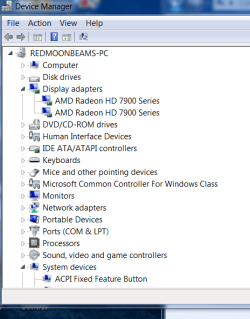
I tried to uninstall and reinstall direct x, but I can't since it was pre loaded on windows 7. One problem I noticed in the device manager is under "display adapter" it says "standard vga graphics adapter". I have tried updating the graphics drivers from AMD's website, but It doesn't work.
 

My Computer My Computer

At a glance

Windows 7 Ultimate X64AMD A8-4500 APU6GB Ram
Computer type
Laptop
Computer Manufacturer/Model Number
Toshiba Satellite L875D-S7342
OS
Windows 7 Ultimate X64
CPU
AMD A8-4500 APU
Memory
6GB Ram
Antivirus
Windows Security Essentials
Browser
Google Chrome
why not uninstall the generic driver from the Device manager and set up the new driver through the Toshiba drivers it will give you the option to install

then after select the driver you want to install hence the amd one from Toshiba select it let it install sometimes it takes going this route just a suggestion don't take it as a fix unless it works
 

Attachments

  • device.PNG
    device.PNG
    22 KB · Views: 7

My Computer My Computer

At a glance

Windows 10 Home Premium 64bit sp1Intel I7-6700K @ 4.6 Ghz 1.344 volts everyday OC32GB G-Skill TridentZ 3200mhz 16-18-18-38 DDR4Sli Gigabyte Windforce GTX 980 G1
Computer type
PC/Desktop
Computer Manufacturer/Model Number
CoreI7-6700K MrFingerIII Special Builds
OS
Windows 10 Home Premium 64bit sp1
CPU
Intel I7-6700K @ 4.6 Ghz 1.344 volts everyday OC
Motherboard
Asrock Fatality K6 Z170 Socket 1151
Memory
32GB G-Skill TridentZ 3200mhz 16-18-18-38 DDR4
Graphics Card(s)
Sli Gigabyte Windforce GTX 980 G1
Sound Card
AC97 Creative Rage Tactic 3D Headphones Bluetooth
Monitor(s) Displays
27" Asus ROG Swift PG278Q G-Sync 48" Vizio Smart HD TV
Screen Resolution
2560x1440p 27"- 48" Currently Gaming at 2560x1440p Res 2K
Hard Drives
250GB Samsung Evo840SSD Seagate baracuda 500 GB WD Mybook 500Gb 1TB Seagate Barracuda
PSU
HX1050w Corsair Silver 80plus certified crosfire/sli
Case
Enthod Pro Full Tower
Cooling
Corsair H110i GT 280 mm High Performance WaterBlock
Keyboard
Logitech wireless keyboard
Mouse
Logitech wireless mouse
Internet Speed
Cox Cable 100+ mb
Antivirus
WebRoot Spysweeper with Antivirus
Browser
IE-10, Chrome, Opera
Other Info
My Other Rig is a AMD FX8320E @4.6Ghz 16GB Ballistic Sport Ram
Mobo Asrock Fatality 990FX 120GB OCZ SSD 1TB Seagate Barracuda Corsair H75 Cooling PSU Corsair CX750
GPU GTX Gigabyte 970G1
why not uninstall the generic driver from the Device manager and set up the new driver through the Toshiba drivers it will give you the option to install

then after select the driver you want to install hence the amd one from Toshiba select it let it install sometimes it takes going this route just a suggestion don't take it as a fix unless it works

This worked! Thanks for the suggestion. I had to reload the sm bus controller and usb 3.0 drivers after doing this, but I got everything working.
 

My Computer My Computer

At a glance

Windows 7 Ultimate X64AMD A8-4500 APU6GB Ram
Computer type
Laptop
Computer Manufacturer/Model Number
Toshiba Satellite L875D-S7342
OS
Windows 7 Ultimate X64
CPU
AMD A8-4500 APU
Memory
6GB Ram
Antivirus
Windows Security Essentials
Browser
Google Chrome
why not uninstall the generic driver from the Device manager and set up the new driver through the Toshiba drivers it will give you the option to install

then after select the driver you want to install hence the amd one from Toshiba select it let it install sometimes it takes going this route just a suggestion don't take it as a fix unless it works

This worked! Thanks for the suggestion. I had to reload the sm bus controller and usb 3.0 drivers after doing this, but I got everything working.

Glad it got you going :)
 

My Computer My Computer

At a glance

Windows 10 Home Premium 64bit sp1Intel I7-6700K @ 4.6 Ghz 1.344 volts everyday OC32GB G-Skill TridentZ 3200mhz 16-18-18-38 DDR4Sli Gigabyte Windforce GTX 980 G1
Computer type
PC/Desktop
Computer Manufacturer/Model Number
CoreI7-6700K MrFingerIII Special Builds
OS
Windows 10 Home Premium 64bit sp1
CPU
Intel I7-6700K @ 4.6 Ghz 1.344 volts everyday OC
Motherboard
Asrock Fatality K6 Z170 Socket 1151
Memory
32GB G-Skill TridentZ 3200mhz 16-18-18-38 DDR4
Graphics Card(s)
Sli Gigabyte Windforce GTX 980 G1
Sound Card
AC97 Creative Rage Tactic 3D Headphones Bluetooth
Monitor(s) Displays
27" Asus ROG Swift PG278Q G-Sync 48" Vizio Smart HD TV
Screen Resolution
2560x1440p 27"- 48" Currently Gaming at 2560x1440p Res 2K
Hard Drives
250GB Samsung Evo840SSD Seagate baracuda 500 GB WD Mybook 500Gb 1TB Seagate Barracuda
PSU
HX1050w Corsair Silver 80plus certified crosfire/sli
Case
Enthod Pro Full Tower
Cooling
Corsair H110i GT 280 mm High Performance WaterBlock
Keyboard
Logitech wireless keyboard
Mouse
Logitech wireless mouse
Internet Speed
Cox Cable 100+ mb
Antivirus
WebRoot Spysweeper with Antivirus
Browser
IE-10, Chrome, Opera
Other Info
My Other Rig is a AMD FX8320E @4.6Ghz 16GB Ballistic Sport Ram
Mobo Asrock Fatality 990FX 120GB OCZ SSD 1TB Seagate Barracuda Corsair H75 Cooling PSU Corsair CX750
GPU GTX Gigabyte 970G1
Back
Top