An external USB3 WD Passport no longer "accessible"

gigagiggles

New member
Pro User
Local time
6:30 PM
Messages
279
Windows 7x64 home premium sp1

I can no longer access an external HD. The other two are still accessible through a USB3 hub.

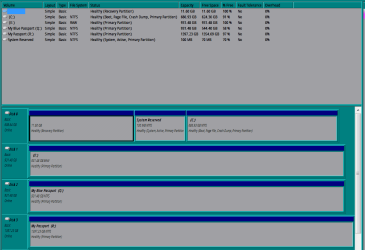
Adminstrative tools/computer management/disk storage recognizes the drive as empty when it should be two-thirds full. Last backed-up some time ago.

I lost "access" after the following "event":

A downloaded .mp4 did not result in an video icon while browsing with XNView as file manager. As part of work-flow, I tried to move the .mp4 file from the C drive to the external drive. XNView stopped responding. I tried again later with explorer.exe with no success.

How can I regain "access", if possible?

Windows Security Updates applied Tuesday, Drives optimally defragmented by Auslogics Wednesday, lost "access" Thursday.

Can and will a "live" Linux OS overcome this obstacle?
 

My Computer My Computer

At a glance

Windows 7 Home Premium x64
OS
Windows 7 Home Premium x64
When transfering the MP4 file to the USB3 HD, I'm right in saying, It never completed and crashed? ( not responding )

If so, THe usb HD may well be corrupt.
 

My Computer My Computer

At a glance

Windows 7 Home Premium 64 BitCore I7 1155 3.4GHZ8GB DDR 1600
Computer Manufacturer/Model Number
Cooler Master
OS
Windows 7 Home Premium 64 Bit
CPU
Core I7 1155 3.4GHZ
Memory
8GB DDR 1600
Hard Drives
64 GB SSD - OS
1TB - DATA
PSU
340 Watt Corsair
Case
Cooler Master
Cooling
Cooler Master
Hi gigagiggles,

Please upload a screenshot of your Disk Management with the external drive plugged in.
 

My Computer My Computer

At a glance

Windows 7 Home Premium 32 bit
OS
Windows 7 Home Premium 32 bit
Can and will a "live" Linux OS overcome this obstacle?

Most likely -- NOT. If the external drive is formatted NTFS, and the filesystem is corrupted, Linux is likely to refuse to mount it -- to prevent any more damage to the filesystem. There are postings all the time on the Ubuntu forum about folks simply disconnecting their external drive, instead of "safely removing" them, and the first thing they notice is that they can't access the drive anymore.

Also, while running CHKDSK might "fix" the drive, it has also been know to remove access to some of the filesystem while repairing it. To be safe, you would want to use some kind of data recovery app (one that does not use the existing index) to copy the files you need saved elsewhere, before running chkdsk.
 

My Computer My Computer

At a glance

Win7 Pro 32-bit, Win8 Pro 32-bitAMD Phenom II X6 1090T4GB ddr3 1300AMD HD 4290 onboard
Computer type
PC/Desktop
Computer Manufacturer/Model Number
Custom
OS
Win7 Pro 32-bit, Win8 Pro 32-bit
CPU
AMD Phenom II X6 1090T
Motherboard
Gigabyte
Memory
4GB ddr3 1300
Graphics Card(s)
AMD HD 4290 onboard
Sound Card
Builtin Realtek HD Audio
Monitor(s) Displays
Samsung 24" widescreen, LG 23" widescreen
Screen Resolution
1920x1200/1920x1080
Hard Drives
Kingston 256GB SSD
Keyboard
Logitech Illuminated Keyboard
Mouse
Logitech M705 wireless mouse
Antivirus
Norton Av 2013
Browser
IE v10
I haven't done anything yet. I've initially despaired and grieved. Now I'm calming my nerves to go the PartedMagic route. That route is expected to take at least a week from start to finish non-stop.
 

Attachments

  • corruptdisk.PNG
    corruptdisk.PNG
    20.9 KB · Views: 2

My Computer My Computer

At a glance

Windows 7 Home Premium x64
OS
Windows 7 Home Premium x64
Back
Top