Second hard disk drive no longer accessible.

Henadin

New member
Local time
1:31 AM
Messages
11
Hello! I have two drives(C:, D:). I booted up my computer one day and 'D:' was no longer available. I'm not too savvy with partitions or how they work, but I'd like to recover the data lost on the other drive if possible. If not possible, I want to be able to save new files on that partition which includes around 100 gb of space. Any help is great! Let me know if you need more info to help. Thanks!
 

My Computer

Computer type
Laptop
Computer Manufacturer/Model Number
Samsung
OS
Windoes 7 Home Premium
Memory
4.00 Gigabytes
Graphics Card(s)
Intel Integrated Graphics
Hard Drives
500 gigabyte
Antivirus
avast
Browser
Opera
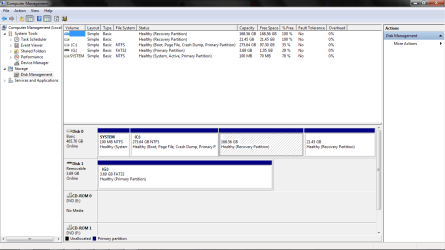
It is very helpful if you can post a screen shot of the disk management window - stretched so we can see everything - so we can see what is going on.

There is a big difference between having 2 partitions C&D on one hard disk, and having 2 hard disks one C one D.
 

My Computer

Computer type
PC/Desktop
Computer Manufacturer/Model Number
Home Built - Jan 2013
OS
Windows 7 64 Bit Home Premium SP1
CPU
i7-3820
Motherboard
Asus P9X79-PRO - Bios 4608
Memory
GSkill F3-14900CL9Q - 16GB
Graphics Card(s)
EVGA GeForce GTX660 - Driver 352.86
Sound Card
On board Realtek ALC898
Monitor(s) Displays
Acer S271HL
Screen Resolution
1920 x 1080
Hard Drives
#1- Samsung 840 Pro Series
#2- Western Digital WD1002FAEX Sata3 Black
#3- Western Digital WD1002FAEX Sata3 Black
PSU
Corsair CMPSU-850TX-V2 - 850 watt (by Seasonic)
Case
Corsair Obsidian 550D
Cooling
Standard 3 120mm case fans, Cooler Master Hyper 212 EVO
Keyboard
MS KC-0405
Mouse
Intellimouse 5-button
Internet Speed
56 Mbits/Sec (on a good day)
Antivirus
Avast & Malwarebytes
Browser
Firefox
Other Info
Asus DVD - DRW-24B1ST 24X
Attached is the screenshot
 

Attachments

  • Untitled.png
    Untitled.png
    81 KB · Views: 12

My Computer

Computer type
Laptop
Computer Manufacturer/Model Number
Samsung
OS
Windoes 7 Home Premium
Memory
4.00 Gigabytes
Graphics Card(s)
Intel Integrated Graphics
Hard Drives
500 gigabyte
Antivirus
avast
Browser
Opera
Mmm. That's different.

I assume the 168.56 GB partition is the one that is supposed to be D.

Can you do this:

  • Right click on that partition and then click on Properties
  • At the top of that window there is a text box and I'm going to guess it says "Recovery Partition" > highlight that and backspace to erase it.
  • Then Right click on that partition again and then click on "Change Drive Letter and Paths"
  • Give the drive a letter. D if you can.
Let's see what happens there.
 

My Computer

Computer type
PC/Desktop
Computer Manufacturer/Model Number
Home Built - Jan 2013
OS
Windows 7 64 Bit Home Premium SP1
CPU
i7-3820
Motherboard
Asus P9X79-PRO - Bios 4608
Memory
GSkill F3-14900CL9Q - 16GB
Graphics Card(s)
EVGA GeForce GTX660 - Driver 352.86
Sound Card
On board Realtek ALC898
Monitor(s) Displays
Acer S271HL
Screen Resolution
1920 x 1080
Hard Drives
#1- Samsung 840 Pro Series
#2- Western Digital WD1002FAEX Sata3 Black
#3- Western Digital WD1002FAEX Sata3 Black
PSU
Corsair CMPSU-850TX-V2 - 850 watt (by Seasonic)
Case
Corsair Obsidian 550D
Cooling
Standard 3 120mm case fans, Cooler Master Hyper 212 EVO
Keyboard
MS KC-0405
Mouse
Intellimouse 5-button
Internet Speed
56 Mbits/Sec (on a good day)
Antivirus
Avast & Malwarebytes
Browser
Firefox
Other Info
Asus DVD - DRW-24B1ST 24X
Thanks for your continued help. I right clicked and properties are not available. I right click and the only option is 'help'
 

My Computer

Computer type
Laptop
Computer Manufacturer/Model Number
Samsung
OS
Windoes 7 Home Premium
Memory
4.00 Gigabytes
Graphics Card(s)
Intel Integrated Graphics
Hard Drives
500 gigabyte
Antivirus
avast
Browser
Opera
I don't want to tell you to do anything that may cause data loss. I'm going to check some things and ask for more eyes on this if I can.
 

My Computer

Computer type
PC/Desktop
Computer Manufacturer/Model Number
Home Built - Jan 2013
OS
Windows 7 64 Bit Home Premium SP1
CPU
i7-3820
Motherboard
Asus P9X79-PRO - Bios 4608
Memory
GSkill F3-14900CL9Q - 16GB
Graphics Card(s)
EVGA GeForce GTX660 - Driver 352.86
Sound Card
On board Realtek ALC898
Monitor(s) Displays
Acer S271HL
Screen Resolution
1920 x 1080
Hard Drives
#1- Samsung 840 Pro Series
#2- Western Digital WD1002FAEX Sata3 Black
#3- Western Digital WD1002FAEX Sata3 Black
PSU
Corsair CMPSU-850TX-V2 - 850 watt (by Seasonic)
Case
Corsair Obsidian 550D
Cooling
Standard 3 120mm case fans, Cooler Master Hyper 212 EVO
Keyboard
MS KC-0405
Mouse
Intellimouse 5-button
Internet Speed
56 Mbits/Sec (on a good day)
Antivirus
Avast & Malwarebytes
Browser
Firefox
Other Info
Asus DVD - DRW-24B1ST 24X
I appreciate it. I have no irreplacable data on that drive, but I'd like to keep what is on there. If there is no other way, I will not be devastated with formatting the drive, as long as I can save files there in the future.
 

My Computer

Computer type
Laptop
Computer Manufacturer/Model Number
Samsung
OS
Windoes 7 Home Premium
Memory
4.00 Gigabytes
Graphics Card(s)
Intel Integrated Graphics
Hard Drives
500 gigabyte
Antivirus
avast
Browser
Opera
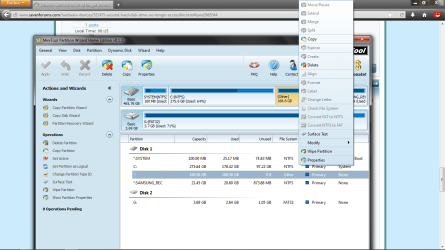
I would install Partition Wizard to right click on the partition to Explore to see if you can see your data.

It's possible it's partition type has been changed somehow to a restricted OEM Recovery which won't allow access via DIsk Mgmt. But from PW you should be able to rightclick on the partition to see its contents and assign a Drive letter so you can access your data.

If there are any more restrictions they can possibly be resolved by changing it's partition type, also using PW. We have experts here who are advanced enough to help do this.
 
Thanks Greg. I installed Partition Wizard. Now when I right click on my partition I receive only these options, "Explore" being grayed out.

How should I continue?
 

Attachments

  • woa.png
    woa.png
    155.3 KB · Views: 3

My Computer

Computer type
Laptop
Computer Manufacturer/Model Number
Samsung
OS
Windoes 7 Home Premium
Memory
4.00 Gigabytes
Graphics Card(s)
Intel Integrated Graphics
Hard Drives
500 gigabyte
Antivirus
avast
Browser
Opera
Okay. I will try this tomorrow when I have a disk to use. Thank you.
 

My Computer

Computer type
Laptop
Computer Manufacturer/Model Number
Samsung
OS
Windoes 7 Home Premium
Memory
4.00 Gigabytes
Graphics Card(s)
Intel Integrated Graphics
Hard Drives
500 gigabyte
Antivirus
avast
Browser
Opera
Trying my luck with the recovery disk. Thank you for your continued help :)
 

My Computer

Computer type
Laptop
Computer Manufacturer/Model Number
Samsung
OS
Windoes 7 Home Premium
Memory
4.00 Gigabytes
Graphics Card(s)
Intel Integrated Graphics
Hard Drives
500 gigabyte
Antivirus
avast
Browser
Opera
Just out of curiosity, what happens if you try to use the "partition recovery wizard" function available using Partition Wizard that you've now installed? What does it find?

Does it discover your original 168GB D partition on that drive which is currently showing as a "healthy recovery partition of 168GB" in your screenshot?

In other words you currently show TWO recovery partitions, so somehow D got mis-marked. I wonder if PW's "partition recovery wizard" has anything to say about what it currently sees?
 

My Computer

Computer type
PC/Desktop
Computer Manufacturer/Model Number
Home-built, two systems (1) and (2)
OS
Windows 7 Pro x64 (1), Win7 Pro X64 (2)
CPU
i5-3350p 3.1Ghz/6MB-cache (1); E8400 3.0Ghz/6MB-cache (2)
Motherboard
ASUS P8Z77-V Pro (1); ASUS P5Q3 (2)
Memory
8GB PC3-12800 DDR3 (1); 4GB PC3-10600 DDR3 (2)
Graphics Card(s)
ATI HD7750 (1), (see TV cards); ATI R7 250 (2)
Sound Card
Realtek ALC892 HD Audio (1); Realtek ALC1200 HD Audio (2)
Monitor(s) Displays
Eizo HD2441W LCD, Eizo S2433W (1); Eizo 24" S2433W (2)
Screen Resolution
1920x1200, 1920x1200 (1); 1920x1200 (2)
Hard Drives
(1) 1TB SATA-II (7200RPM), 2x2TB SATA-III (7200RPM), 250GB SATA-III (10000RPM) for OS; 2x2TB external USB 3.0

(2) 320GB SATA-II (7200RPM), 750GB SATA-II (7200RPM), 150GB SATA-II (10000RPM) for OS; 2TB external USB 3.0
PSU
Nesteq ECS-6001 600W (1); Nesteq ECS-5001 500W (2)
Case
Acousti-Case 360 (1) and (2)
Cooling
Noctua NH-U12P SE2 for CPU, 2x120mm case fans (1) and (2)
Keyboard
IBM PS/2 (1) and (2)
Mouse
Logitech MX Revolution wireless (1); Microsoft wired (2)
Internet Speed
100mbps down / 10mbps up
Antivirus
Microsoft Security Essentials; Malwarebyte Anti-Malware Pro
Browser
Firefox
Other Info
Ceton InfiniTV 4-tuner cablecard-enabled TV card as well as Hauppauge HVR-2250 OTA/ATSC 2-tuner TV card in (1), running under Win7 WMC
Just to update you all, I found that the process of copying over all my files within the boot disk as was suggested was not worth all the time I would have spent. I deleted the partition, then used the unallocated data and combined it with my C: partition. Now I have a new problem, the partition was deleted, not formatted meaning the files are still there I believe but inaccessable and unformattable in the situation the partitions are now. Should I create a new thread for this new problem? Thanks again.
 

My Computer

Computer type
Laptop
Computer Manufacturer/Model Number
Samsung
OS
Windoes 7 Home Premium
Memory
4.00 Gigabytes
Graphics Card(s)
Intel Integrated Graphics
Hard Drives
500 gigabyte
Antivirus
avast
Browser
Opera
If you had asked back we could have given you other options to copy out your data which might not have been as slow. It may have also been possible to change the OEM Recovery partition type so that the data could be accessed again once we knew it was there.

If you've now deleted the partition and Extended C over it, then C has most likely quick formatted the space and the data is much harder to recover.

Please post back another screenshot of Disk Mgmt, tell us what you would like to do now.
 
Back
Top