An irritating issue with my Samsung SyncMaster 214t monitor

hamaguna

New member
Local time
3:35 PM
Messages
4
:party:Hi
I have an irritating issue with my Samsung SyncMaster 214ts monitor..
(the same model 214T)
Windows 7 resolution is set to 1600x1200 @ 60hz - (native for this monitor)
Samsung SyncMaster 214ts monitor keeps coming up with message "1920x1600 Not optimum Mode - Recommended Mode 1600x1200 60hz"
Tried adjusting with button controls on monitor - some features are grayed out and an adjustment for the resolution within these controls is nowhere to be found.
Have the correct driver installed but this is a issue (message), generated by the monitor itself
Any information greatly appreciated.
Thank you.

I have
DELL PRECISION 670 Workstation
Windows 7 Home Premium(X86)
Nvidia Quadro FX 3450(the latest version driver)
 

My Computer My Computer

At a glance

windows 7 home premiumIntel dual 3.03.0 Gbnvidia quadro fx3450
Computer Manufacturer/Model Number
Dell Precision 670
OS
windows 7 home premium
CPU
Intel dual 3.0
Motherboard
intel(dell)
Memory
3.0 Gb
Graphics Card(s)
nvidia quadro fx3450
Sound Card
maxsound
Monitor(s) Displays
samsung 214ts
Hard Drives
samsung 180Gb
In the monitors setting screens, is there something relating to "AV Mode"? If there is, try turning it off.
 

My Computer My Computer

At a glance

Main - Windows 7 Pro SP1 64-Bit; 2nd - Window...Main - Core i7 2600K; 2nd - Core i7 920Main - 16GB Corsair Vengeance; 2nd - 12GB Cor...Main - XFX Radeon 6870 1GB; 2nd - XFX Radeon ...
Computer Manufacturer/Model Number
Self
OS
Main - Windows 7 Pro SP1 64-Bit; 2nd - Windows Server 2008 R2
CPU
Main - Core i7 2600K; 2nd - Core i7 920
Motherboard
Main - Asus P8Z68-V Pro/Gen3; 2nd - Gigabyte GA-EX58-UDR3
Memory
Main - 16GB Corsair Vengeance; 2nd - 12GB Corsair Vengeance
Graphics Card(s)
Main - XFX Radeon 6870 1GB; 2nd - XFX Radeon 4870 1GB
Sound Card
Both: Onboard Realtek Azalia
Monitor(s) Displays
Main - Hann 25" + I-INC 25" + Acer 23"; 2nd - Upgrading Soon
Screen Resolution
Main - 1920x1080 (All Three Monitors); 2nd - Upgrading Soon
Hard Drives
Main - (1) Crucial M4 128GB (Boot)
Main - (1) Seagate 2TB 64MB Cache (Data)
Main - (1) Seagate 2TB 64MB Cache (Data Backup)
2nd - (1) Intel X25-M SSD 80GB (Boot)
2nd - (3) Seagate 1TB 32MB Cache (Data Backup)
2nd - (1) Seagate 320GB (Because)
PSU
Main - OCZ 600W Modular; 2nd - OCZ 600W
Case
Main - Thermaltake Element G; 2nd - NZXT something or other
Cooling
Main - Corsair H80; 2nd - Prolimatech Megahalems
Keyboard
Main - Razer Reclusa; 2nd - Old MS Keyboard
Mouse
Main - Logitech MX Revolution; 2nd - Old MS Mouse
Internet Speed
20Mbps Time-Warner Cable
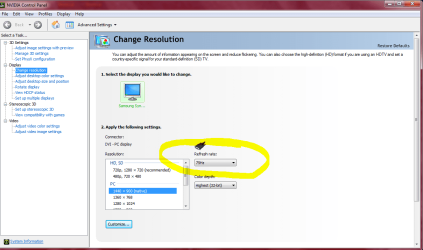
Right click an open area of the desk top. Go down to Nvidia control panel and left click.
The Snip I posted below will be the window that opens.
Open Display and highlight Change Resolution.

Highlight your needed screen resolution and refresh rate.

As you can see mine is 1400x900 @75Hz.

Nvidia driver is primary not the Windows one that is why settings need to be made here.

Mike
 

Attachments

  • Refresh 75Hz.PNG
    Refresh 75Hz.PNG
    42.1 KB · Views: 224
Last edited:

My Computer My Computer

At a glance

Windows7 Pro 64bit SP-1; Windows XP Pro 32bitIntel Core i7-870 Lynnfield 2.93GHz LGA 1156 ...8GB@1400MHz Crucial Ballistix DDR3-1600 4x2GBASUS ENGTX460 DirectCU/2DI/1GD5 1GB 256-bit G...
Computer Manufacturer/Model Number
Hopalong/ Godzilla
OS
Windows7 Pro 64bit SP-1; Windows XP Pro 32bit
CPU
Intel Core i7-870 Lynnfield 2.93GHz LGA 1156 95W Quad-Core
Motherboard
ASUS P7P55D-E PRO
Memory
8GB@1400MHz Crucial Ballistix DDR3-1600 4x2GB
Graphics Card(s)
ASUS ENGTX460 DirectCU/2DI/1GD5 1GB 256-bit GDDR5
Sound Card
VIA Onboard
Monitor(s) Displays
Asus VS248H-P 24"; Samsung SyncMaster 941BW 19"ws
Screen Resolution
1920x1080; 1440x900
Hard Drives
Samsung 830 120GB SSD
Intel 320 120GB SSD
Western Digital Caviar Black WD7501AALS 750GB 7200 RPM SATA 3.0Gb/s
Western Digital Caviar Black WD6401AALS 640GB 7200 RPM SATA 3.0Gb/s
PSU
COOLER MASTER Silent Pro RS850-AMBAJ3-US 850W Modular
Case
COOLER MASTER HAF 932 RC-932-KKN5-GP Black
Cooling
Scythe "Mugen-2 Rev.B" (2 ScytheKaze-Jyuni PWM fans)
Keyboard
Logitech K-320
Mouse
Kensington
Antivirus
Avast Inernet Suite
Browser
IE 9 ; Chrome
In the monitors setting screens, is there something relating to "AV Mode"? If there is, try turning it off.

Thank you
I will try it.;)
 

My Computer My Computer

At a glance

windows 7 home premiumIntel dual 3.03.0 Gbnvidia quadro fx3450
Computer Manufacturer/Model Number
Dell Precision 670
OS
windows 7 home premium
CPU
Intel dual 3.0
Motherboard
intel(dell)
Memory
3.0 Gb
Graphics Card(s)
nvidia quadro fx3450
Sound Card
maxsound
Monitor(s) Displays
samsung 214ts
Hard Drives
samsung 180Gb
In the monitors setting screens, is there something relating to "AV Mode"? If there is, try turning it off.

Thank you.
I will try it.;)
 

My Computer My Computer

At a glance

windows 7 home premiumIntel dual 3.03.0 Gbnvidia quadro fx3450
Computer Manufacturer/Model Number
Dell Precision 670
OS
windows 7 home premium
CPU
Intel dual 3.0
Motherboard
intel(dell)
Memory
3.0 Gb
Graphics Card(s)
nvidia quadro fx3450
Sound Card
maxsound
Monitor(s) Displays
samsung 214ts
Hard Drives
samsung 180Gb
Right click an open area of the desk top. Go down to Nvidia control panel and left click.
The Snip I posted below will be the window that opens.
Open Display and highlight Change Resolution.

Highlight your needed screen resolution and refresh rate.

As you can see mine is 1400x900 @75Hz.

Nvidia driver is primary not the Windows one that is why settings need to be made here.

Mike


Thank you Mike

The setting of Nvidia control panel is 1600X1400(recommended) already and it doesn't exist more higher resolution in Nvidia control panel option
But Samsung SyncMaster 214ts monitor keeps 1920X1600.
This resolution is groundly not supported by Samsung SyncMaster 214ts monitor.
 

My Computer My Computer

At a glance

windows 7 home premiumIntel dual 3.03.0 Gbnvidia quadro fx3450
Computer Manufacturer/Model Number
Dell Precision 670
OS
windows 7 home premium
CPU
Intel dual 3.0
Motherboard
intel(dell)
Memory
3.0 Gb
Graphics Card(s)
nvidia quadro fx3450
Sound Card
maxsound
Monitor(s) Displays
samsung 214ts
Hard Drives
samsung 180Gb
hamaguna
I am having the same issue with my 214T as well. I've adjusted display settings in control panel for 1600x1200 but my crazy monitor reports the setting of 1920X1600. I've tried to adjust the monitor itself to no avail. I have also searched the Internet high and low for the solution. I am going to call Sumsang (last resort because call customer service/help desk is usually a fruitless venture) and see if they can give me any suggestions. I'll report back with my findings.
 

My Computer My Computer

At a glance

Windows 7 Ultimate x64
OS
Windows 7 Ultimate x64
There are no drivers for the resolution issue ?

Or better yet Contact the Corp and ask them why you have that particular situation maybe they can provide some reasoning

If not maybe you need to return it for a monitor with the desired resolution you can adjust unless you think it is your Vidcard keeping you from correcting it
 

My Computer My Computer

At a glance

Windows 10 Home Premium 64bit sp1Intel I7-6700K @ 4.6 Ghz 1.344 volts everyday OC32GB G-Skill TridentZ 3200mhz 16-18-18-38 DDR4Sli Gigabyte Windforce GTX 980 G1
Computer type
PC/Desktop
Computer Manufacturer/Model Number
CoreI7-6700K MrFingerIII Special Builds
OS
Windows 10 Home Premium 64bit sp1
CPU
Intel I7-6700K @ 4.6 Ghz 1.344 volts everyday OC
Motherboard
Asrock Fatality K6 Z170 Socket 1151
Memory
32GB G-Skill TridentZ 3200mhz 16-18-18-38 DDR4
Graphics Card(s)
Sli Gigabyte Windforce GTX 980 G1
Sound Card
AC97 Creative Rage Tactic 3D Headphones Bluetooth
Monitor(s) Displays
27" Asus ROG Swift PG278Q G-Sync 48" Vizio Smart HD TV
Screen Resolution
2560x1440p 27"- 48" Currently Gaming at 2560x1440p Res 2K
Hard Drives
250GB Samsung Evo840SSD Seagate baracuda 500 GB WD Mybook 500Gb 1TB Seagate Barracuda
PSU
HX1050w Corsair Silver 80plus certified crosfire/sli
Case
Enthod Pro Full Tower
Cooling
Corsair H110i GT 280 mm High Performance WaterBlock
Keyboard
Logitech wireless keyboard
Mouse
Logitech wireless mouse
Internet Speed
Cox Cable 100+ mb
Antivirus
WebRoot Spysweeper with Antivirus
Browser
IE-10, Chrome, Opera
Other Info
My Other Rig is a AMD FX8320E @4.6Ghz 16GB Ballistic Sport Ram
Mobo Asrock Fatality 990FX 120GB OCZ SSD 1TB Seagate Barracuda Corsair H75 Cooling PSU Corsair CX750
GPU GTX Gigabyte 970G1
The web is littered with similar complaints. Have you installed the latest drivers for your graphics card and for the monitor?

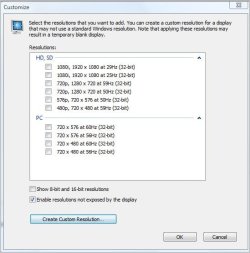
Have you tried setting the resolution to what it should be using the Customize button then using 'Create Custom Resolution' if necessary?

This picture is for a different graphics card and monitor but gives an idea of what I mean.
 

Attachments

  • Capture.JPG
    Capture.JPG
    41.7 KB · Views: 31

My Computer My Computer

At a glance

Win 7 Ult SP1/Win 10 Pro (all x64)Intel® Core™ i7-975 Extreme O/C to 4.02 GHz, ...24GB Corsair Vengeance DDR3 SDRAM at 1600MHz ...1792 MB NVIDIA® GeForce® GTX 295 Dual Core
Computer type
PC/Desktop
Computer Manufacturer/Model Number
Alienware® ALX X58
OS
Win 7 Ult SP1/Win 10 Pro (all x64)
CPU
Intel® Core™ i7-975 Extreme O/C to 4.02 GHz, 8MB Cache
Motherboard
Asus® P6T Deluxe V2 X58 LGA1366
Memory
24GB Corsair Vengeance DDR3 SDRAM at 1600MHz - 6 x 4096MB
Graphics Card(s)
1792 MB NVIDIA® GeForce® GTX 295 Dual Core
Sound Card
Onboard Soundmax® High-Definition 7.1 Performance Audio
Monitor(s) Displays
Samsung XL2370 LED backlit 23" W/S 2ms response time
Screen Resolution
1920 X 1080
Hard Drives
2 x 500gb SATA II
1 x 1TB SATA II
1 external eSATA LaCie 3TB
(Non-RAID)
PSU
Alienware® 1200 Watt Multi-GPU
Case
Alienware® P2 ALX Chassis with AlienIce™ 3.0 Video Cooling
Cooling
Alienware® High-Perf. Liquid Cooling + Acoustic Dampening
Keyboard
Microsoft® Wireless Entertainment 8000 + Logitech® G15 Wired
Mouse
Microsoft® Wireless Laser 8000 + Logitech® G9 Wired
Internet Speed
1Gb/s
Antivirus
McAfee LiveSafe
Browser
Firefox - latest
Other Info
Using non-RAID on purpose as I find RAID to be too temperamental.
Now set to AHCI
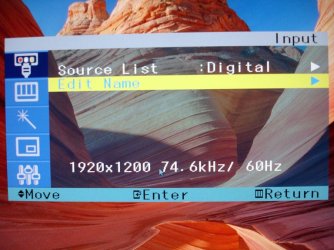
I have installed the latest drivers - that's the first thing that goes on my system after an OS upgrade. I have also tried the customized settings. That is not it. The issue resides on the monitor itself. See the pictures I've included.
The first screen is what I get upon boot up and does not go away until approximately 1 minute - very annoying. The second picture is the actual monitor setting (what needs to be adjusted). Unfortunately the screen resolution that you see in that second picture is NOT selectable through the monitor's controls.
You can try adjusting settings via the control panel all day long. It's the monitor that needs adjusting and unless you know the secret to adjusting the monitor - that error will always be there on boot up. It's been a great monitor for XP or other OSs - just not 7.
 

Attachments

  • 214T 1.jpg
    214T 1.jpg
    35.4 KB · Views: 33
  • 214T 2.jpg
    214T 2.jpg
    89.1 KB · Views: 23

My Computer My Computer

At a glance

Windows 7 Ultimate x64
OS
Windows 7 Ultimate x64
According to the user manual resolution and frequency settings are controlled by the graphics card, but as Samsung don't have Windows 7 (or Vista) drivers maybe it's time to upgrade the monitor as obviously Windows thinks it's a generic monitor.
 
Last edited:

My Computer My Computer

At a glance

Win 7 Ult SP1/Win 10 Pro (all x64)Intel® Core™ i7-975 Extreme O/C to 4.02 GHz, ...24GB Corsair Vengeance DDR3 SDRAM at 1600MHz ...1792 MB NVIDIA® GeForce® GTX 295 Dual Core
Computer type
PC/Desktop
Computer Manufacturer/Model Number
Alienware® ALX X58
OS
Win 7 Ult SP1/Win 10 Pro (all x64)
CPU
Intel® Core™ i7-975 Extreme O/C to 4.02 GHz, 8MB Cache
Motherboard
Asus® P6T Deluxe V2 X58 LGA1366
Memory
24GB Corsair Vengeance DDR3 SDRAM at 1600MHz - 6 x 4096MB
Graphics Card(s)
1792 MB NVIDIA® GeForce® GTX 295 Dual Core
Sound Card
Onboard Soundmax® High-Definition 7.1 Performance Audio
Monitor(s) Displays
Samsung XL2370 LED backlit 23" W/S 2ms response time
Screen Resolution
1920 X 1080
Hard Drives
2 x 500gb SATA II
1 x 1TB SATA II
1 external eSATA LaCie 3TB
(Non-RAID)
PSU
Alienware® 1200 Watt Multi-GPU
Case
Alienware® P2 ALX Chassis with AlienIce™ 3.0 Video Cooling
Cooling
Alienware® High-Perf. Liquid Cooling + Acoustic Dampening
Keyboard
Microsoft® Wireless Entertainment 8000 + Logitech® G15 Wired
Mouse
Microsoft® Wireless Laser 8000 + Logitech® G9 Wired
Internet Speed
1Gb/s
Antivirus
McAfee LiveSafe
Browser
Firefox - latest
Other Info
Using non-RAID on purpose as I find RAID to be too temperamental.
Now set to AHCI
Luckily, I do have another monitor (NEC MultiSync LCD2170NX) that I was using as a display for my laptop. The NEC sports the same screen size as the Samsung 214T. From the moment I slapped the NEC on my system, I've had no problem with the monitor. So, I've made the NEC as my primary and I'll still use the Samsung just as my right hand screen (I'm using dual screens now). That way the Samsung won't be a waste.
 

My Computer My Computer

At a glance

Windows 7 Ultimate x64
OS
Windows 7 Ultimate x64
I have also seen this problem when using DVI-VGA adapters and some KVM's not passing on though the monitor EDID.

I got around this by manually installing a random Monitor Driver that had the supported res. (no idea what i used anymore)
 

My Computer My Computer

At a glance

Windows 7Core I7 26004096MB Kingston DDR3 667MhzAsus nV560Ti
Computer Manufacturer/Model Number
Built by Billman
OS
Windows 7
CPU
Core I7 2600
Motherboard
Intel DH67GD
Memory
4096MB Kingston DDR3 667Mhz
Graphics Card(s)
Asus nV560Ti
Sound Card
Realtek High Definition Audio
Monitor(s) Displays
BenQ E2220HD
Screen Resolution
1920x1080
Hard Drives
60Gb OCZ Vexer 2 (boot)
500Gb WD Green (Swap)
2x500Gb WD Blacks non RE (Striped)
PSU
1000 Watt Antec
Case
Coolmaster Elite 353
Cooling
Stock
Keyboard
Microsoft Wired
Mouse
Microsoft Wired
Internet Speed
Usless
Glad you have a work around and yes there is probably something to that DVI-VGA adapter theory.
 

My Computer My Computer

At a glance

Win 7 Ult SP1/Win 10 Pro (all x64)Intel® Core™ i7-975 Extreme O/C to 4.02 GHz, ...24GB Corsair Vengeance DDR3 SDRAM at 1600MHz ...1792 MB NVIDIA® GeForce® GTX 295 Dual Core
Computer type
PC/Desktop
Computer Manufacturer/Model Number
Alienware® ALX X58
OS
Win 7 Ult SP1/Win 10 Pro (all x64)
CPU
Intel® Core™ i7-975 Extreme O/C to 4.02 GHz, 8MB Cache
Motherboard
Asus® P6T Deluxe V2 X58 LGA1366
Memory
24GB Corsair Vengeance DDR3 SDRAM at 1600MHz - 6 x 4096MB
Graphics Card(s)
1792 MB NVIDIA® GeForce® GTX 295 Dual Core
Sound Card
Onboard Soundmax® High-Definition 7.1 Performance Audio
Monitor(s) Displays
Samsung XL2370 LED backlit 23" W/S 2ms response time
Screen Resolution
1920 X 1080
Hard Drives
2 x 500gb SATA II
1 x 1TB SATA II
1 external eSATA LaCie 3TB
(Non-RAID)
PSU
Alienware® 1200 Watt Multi-GPU
Case
Alienware® P2 ALX Chassis with AlienIce™ 3.0 Video Cooling
Cooling
Alienware® High-Perf. Liquid Cooling + Acoustic Dampening
Keyboard
Microsoft® Wireless Entertainment 8000 + Logitech® G15 Wired
Mouse
Microsoft® Wireless Laser 8000 + Logitech® G9 Wired
Internet Speed
1Gb/s
Antivirus
McAfee LiveSafe
Browser
Firefox - latest
Other Info
Using non-RAID on purpose as I find RAID to be too temperamental.
Now set to AHCI
Back
Top