Samsung SyncMaster 2342BWX Driver Issue

Veritas32x

New member
Local time
11:20 AM
Messages
9
I have a dual monitor setup with two Samsung SyncMaster 2342BWX. I have had one for 6 months everything works fine resolution goes up to 2048 X 1152 the max. I just purchased a second one and it only goes up to 1920 X 1080. The issue I'm having is I cant get the new one to go to 2048 X 1152. Monitor driver on the site and disk only goes up to 1920 X 1080. Driver on the one that's working is called "SyncMaster 2343BW/2343BWX(Digital)". I cant seem to find that driver anywhere. And windows update thinks my monitor is the 22 inch model. So that driver wont work either..

Relevant Information:
-Windows 7 Ultimate 64 Bit
-Both hooked up with DVI into a Radeon 4870 (Shouldn't have a problem running dual at 2048 X 1152).
-Driver on disk and web site called "SyncMaster 2343BW/2343BWX, SyncMaster Magic CX2343BW/CX2343BWX(Digital)" Only allows 1920 X 1080

Any help with be appreciated!
 

My Computer

Computer Manufacturer/Model Number
Custom
OS
Windows 7 Ultimate 64-Bit
CPU
ASUS M4A78T-E
Motherboard
ASUS M4A78T-E
Memory
OCZ Gold 6GB (3 x 2GB) DDR3 1600
Graphics Card(s)
AMD Phenom II X4 945 Deneb
Monitor(s) Displays
Dual- Samsung SyncMaster 2343BWX
PSU
OCZ ModXStream Pro 700W
Case
Custom
Welcome to the forums Veritas32x!

What happens if you switch the monitors around on the video card? Does issue stay with monitor?
 

My Computer

Computer Manufacturer/Model Number
Homebrew PC - "Alpha_Dawg"
OS
Windows 7 Ultimate 64 bit Steve Ballmer Signature Edition
CPU
Intel Core 2 Quad - Q9550 - 2.83GHz stock - OC'd to 3.6GHz
Motherboard
Gigabyte EP45-UD3P
Memory
4GB DDR2 800MHz (PC6400) OCZ Reaper
Graphics Card(s)
Nvidia GE Force 8800 GTS
Sound Card
Asus Xonar DX
Monitor(s) Displays
Samsung SyncMaster 2333HD
Screen Resolution
1920 x 1080
Hard Drives
WD Caviar Black 750GB - 7200RPM - 32MB cache
WD Caviar Green 1.5TB - 5400RPM - 64MB cache
WD Caviar Green 2.0TB - 5400RPM - 64MB cache
PSU
PC Power & Cooling Silencer 750
Case
Gigabyte 3D Aurora
Cooling
Case is Air - 5ea. 120mm fans (mix of Arctic and Xigmatec)
Keyboard
MS Natural Wireless KB
Mouse
MS Wireless Mouse
Internet Speed
50 mbps down/5 mbps up
Other Info
AVerMedia - AVerTVHD G2 Dual Tuner Card
Thanks. This forum seems to have everything.

Yea it stays. I have tried only hooking up the new one and it wont go above 1920 X 1080. With the "PnP Driver" or the "SyncMaster 2343BW/2343BWX, SyncMaster Magic CX2343BW/CX2343BWX(Digital)" or the 22 one from windows update.
 

My Computer

Computer Manufacturer/Model Number
Custom
OS
Windows 7 Ultimate 64-Bit
CPU
ASUS M4A78T-E
Motherboard
ASUS M4A78T-E
Memory
OCZ Gold 6GB (3 x 2GB) DDR3 1600
Graphics Card(s)
AMD Phenom II X4 945 Deneb
Monitor(s) Displays
Dual- Samsung SyncMaster 2343BWX
PSU
OCZ ModXStream Pro 700W
Case
Custom
Yea it stays. I have tried only hooking up the new one and it wont go above 1920 X 1080. With the "PnP Driver" or the "SyncMaster 2343BW/2343BWX, SyncMaster Magic CX2343BW/CX2343BWX(Digital)" or the 22 one from windows update.

Have you looked at the driver location for the driver that works and tried manually forcing that driver for the "bad" monitor?
 

My Computer

Computer Manufacturer/Model Number
Homebrew PC - "Alpha_Dawg"
OS
Windows 7 Ultimate 64 bit Steve Ballmer Signature Edition
CPU
Intel Core 2 Quad - Q9550 - 2.83GHz stock - OC'd to 3.6GHz
Motherboard
Gigabyte EP45-UD3P
Memory
4GB DDR2 800MHz (PC6400) OCZ Reaper
Graphics Card(s)
Nvidia GE Force 8800 GTS
Sound Card
Asus Xonar DX
Monitor(s) Displays
Samsung SyncMaster 2333HD
Screen Resolution
1920 x 1080
Hard Drives
WD Caviar Black 750GB - 7200RPM - 32MB cache
WD Caviar Green 1.5TB - 5400RPM - 64MB cache
WD Caviar Green 2.0TB - 5400RPM - 64MB cache
PSU
PC Power & Cooling Silencer 750
Case
Gigabyte 3D Aurora
Cooling
Case is Air - 5ea. 120mm fans (mix of Arctic and Xigmatec)
Keyboard
MS Natural Wireless KB
Mouse
MS Wireless Mouse
Internet Speed
50 mbps down/5 mbps up
Other Info
AVerMedia - AVerTVHD G2 Dual Tuner Card
Ya its located in my Windows\System32\Spool\Drivers\Color\ . Windows says that the PnP is still better then that driver.
 

My Computer

Computer Manufacturer/Model Number
Custom
OS
Windows 7 Ultimate 64-Bit
CPU
ASUS M4A78T-E
Motherboard
ASUS M4A78T-E
Memory
OCZ Gold 6GB (3 x 2GB) DDR3 1600
Graphics Card(s)
AMD Phenom II X4 945 Deneb
Monitor(s) Displays
Dual- Samsung SyncMaster 2343BWX
PSU
OCZ ModXStream Pro 700W
Case
Custom
Ya its located in my Windows\System32\Spool\Drivers\Color\ . Windows says that the PnP is still better then that driver.

Force it!

Wait that looks like a printer driver with spool in the path...

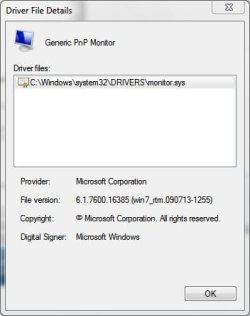
Heres the correct path for the PNP driver:
PNP Driver.JPG
 

My Computer

Computer Manufacturer/Model Number
Homebrew PC - "Alpha_Dawg"
OS
Windows 7 Ultimate 64 bit Steve Ballmer Signature Edition
CPU
Intel Core 2 Quad - Q9550 - 2.83GHz stock - OC'd to 3.6GHz
Motherboard
Gigabyte EP45-UD3P
Memory
4GB DDR2 800MHz (PC6400) OCZ Reaper
Graphics Card(s)
Nvidia GE Force 8800 GTS
Sound Card
Asus Xonar DX
Monitor(s) Displays
Samsung SyncMaster 2333HD
Screen Resolution
1920 x 1080
Hard Drives
WD Caviar Black 750GB - 7200RPM - 32MB cache
WD Caviar Green 1.5TB - 5400RPM - 64MB cache
WD Caviar Green 2.0TB - 5400RPM - 64MB cache
PSU
PC Power & Cooling Silencer 750
Case
Gigabyte 3D Aurora
Cooling
Case is Air - 5ea. 120mm fans (mix of Arctic and Xigmatec)
Keyboard
MS Natural Wireless KB
Mouse
MS Wireless Mouse
Internet Speed
50 mbps down/5 mbps up
Other Info
AVerMedia - AVerTVHD G2 Dual Tuner Card
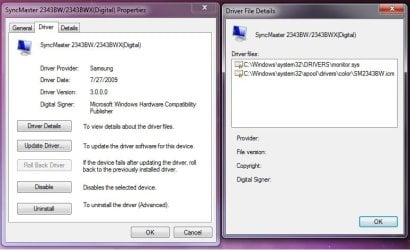
So I was able to install the same driver. So they both look like the picture below. But its still not working so I'm starting to think its a bad monitor.

Working.jpg
 

My Computer

Computer Manufacturer/Model Number
Custom
OS
Windows 7 Ultimate 64-Bit
CPU
ASUS M4A78T-E
Motherboard
ASUS M4A78T-E
Memory
OCZ Gold 6GB (3 x 2GB) DDR3 1600
Graphics Card(s)
AMD Phenom II X4 945 Deneb
Monitor(s) Displays
Dual- Samsung SyncMaster 2343BWX
PSU
OCZ ModXStream Pro 700W
Case
Custom

My Computer

Computer Manufacturer/Model Number
Homebrew PC - "Alpha_Dawg"
OS
Windows 7 Ultimate 64 bit Steve Ballmer Signature Edition
CPU
Intel Core 2 Quad - Q9550 - 2.83GHz stock - OC'd to 3.6GHz
Motherboard
Gigabyte EP45-UD3P
Memory
4GB DDR2 800MHz (PC6400) OCZ Reaper
Graphics Card(s)
Nvidia GE Force 8800 GTS
Sound Card
Asus Xonar DX
Monitor(s) Displays
Samsung SyncMaster 2333HD
Screen Resolution
1920 x 1080
Hard Drives
WD Caviar Black 750GB - 7200RPM - 32MB cache
WD Caviar Green 1.5TB - 5400RPM - 64MB cache
WD Caviar Green 2.0TB - 5400RPM - 64MB cache
PSU
PC Power & Cooling Silencer 750
Case
Gigabyte 3D Aurora
Cooling
Case is Air - 5ea. 120mm fans (mix of Arctic and Xigmatec)
Keyboard
MS Natural Wireless KB
Mouse
MS Wireless Mouse
Internet Speed
50 mbps down/5 mbps up
Other Info
AVerMedia - AVerTVHD G2 Dual Tuner Card
Ya everything's looks installed. But the new one still wont go over 1920 X 1080... They are both the same model so it doesn't make sense.
 

My Computer

Computer Manufacturer/Model Number
Custom
OS
Windows 7 Ultimate 64-Bit
CPU
ASUS M4A78T-E
Motherboard
ASUS M4A78T-E
Memory
OCZ Gold 6GB (3 x 2GB) DDR3 1600
Graphics Card(s)
AMD Phenom II X4 945 Deneb
Monitor(s) Displays
Dual- Samsung SyncMaster 2343BWX
PSU
OCZ ModXStream Pro 700W
Case
Custom
A couple of things come to mind...

Have you tried uninstalling "bad" monitor via device manger, disconnecting "bad" monitor then rebooting, plugging in monitor and pointing to proper driver I gave you path to?

Have you checked the HW revision or model # & confirmed they are the same?
 

My Computer

Computer Manufacturer/Model Number
Homebrew PC - "Alpha_Dawg"
OS
Windows 7 Ultimate 64 bit Steve Ballmer Signature Edition
CPU
Intel Core 2 Quad - Q9550 - 2.83GHz stock - OC'd to 3.6GHz
Motherboard
Gigabyte EP45-UD3P
Memory
4GB DDR2 800MHz (PC6400) OCZ Reaper
Graphics Card(s)
Nvidia GE Force 8800 GTS
Sound Card
Asus Xonar DX
Monitor(s) Displays
Samsung SyncMaster 2333HD
Screen Resolution
1920 x 1080
Hard Drives
WD Caviar Black 750GB - 7200RPM - 32MB cache
WD Caviar Green 1.5TB - 5400RPM - 64MB cache
WD Caviar Green 2.0TB - 5400RPM - 64MB cache
PSU
PC Power & Cooling Silencer 750
Case
Gigabyte 3D Aurora
Cooling
Case is Air - 5ea. 120mm fans (mix of Arctic and Xigmatec)
Keyboard
MS Natural Wireless KB
Mouse
MS Wireless Mouse
Internet Speed
50 mbps down/5 mbps up
Other Info
AVerMedia - AVerTVHD G2 Dual Tuner Card
The model code matches on both. I uninstalled, disconnected the bad monitor, rebooted, plugged it back in, and updated the bad monitors driver to match the good ones. I cant even set the screen refresh rate to 60 hertz like the other one. It goes back to 59 right after.
 

My Computer

Computer Manufacturer/Model Number
Custom
OS
Windows 7 Ultimate 64-Bit
CPU
ASUS M4A78T-E
Motherboard
ASUS M4A78T-E
Memory
OCZ Gold 6GB (3 x 2GB) DDR3 1600
Graphics Card(s)
AMD Phenom II X4 945 Deneb
Monitor(s) Displays
Dual- Samsung SyncMaster 2343BWX
PSU
OCZ ModXStream Pro 700W
Case
Custom
The model code matches on both. I uninstalled, disconnected the bad monitor, rebooted, plugged it back in, and updated the bad monitors driver to match the good ones. I cant even set the screen refresh rate to 60 hertz like the other one. It goes back to 59 right after.

Hitting all the bases here, trying to help you get this going... You have refresh issue and still same resolution issue? or?

Have you doubled checked the internal menu on the "bad" monitor? Perhaps there is a setting you need to change... or make sure it matches other "good" monitor
 

My Computer

Computer Manufacturer/Model Number
Homebrew PC - "Alpha_Dawg"
OS
Windows 7 Ultimate 64 bit Steve Ballmer Signature Edition
CPU
Intel Core 2 Quad - Q9550 - 2.83GHz stock - OC'd to 3.6GHz
Motherboard
Gigabyte EP45-UD3P
Memory
4GB DDR2 800MHz (PC6400) OCZ Reaper
Graphics Card(s)
Nvidia GE Force 8800 GTS
Sound Card
Asus Xonar DX
Monitor(s) Displays
Samsung SyncMaster 2333HD
Screen Resolution
1920 x 1080
Hard Drives
WD Caviar Black 750GB - 7200RPM - 32MB cache
WD Caviar Green 1.5TB - 5400RPM - 64MB cache
WD Caviar Green 2.0TB - 5400RPM - 64MB cache
PSU
PC Power & Cooling Silencer 750
Case
Gigabyte 3D Aurora
Cooling
Case is Air - 5ea. 120mm fans (mix of Arctic and Xigmatec)
Keyboard
MS Natural Wireless KB
Mouse
MS Wireless Mouse
Internet Speed
50 mbps down/5 mbps up
Other Info
AVerMedia - AVerTVHD G2 Dual Tuner Card
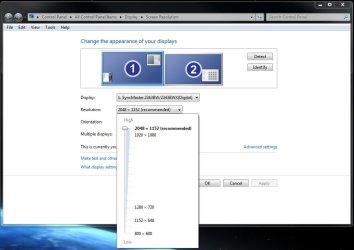
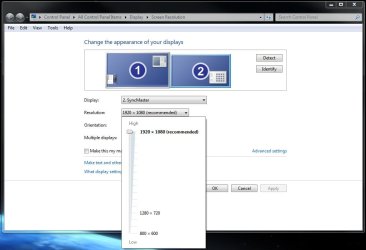
I just wanna say thanks for all your help Darryl. Yep both resolution issue and refresh rate (not as big of a deal). I looked on the menus of both monitors (also reset to default). Only thing i noticed was on the old monitors menu it reads " 70.9 kHz 60Hz PN 2048x1152" and on the new "66.6kHz 60Hz PN 1920x1080". When in the display properties it says the new ones only running 59Hertz. Weird

Old
OldDisplay.jpg

New
NewDisplay.jpg
 

My Computer

Computer Manufacturer/Model Number
Custom
OS
Windows 7 Ultimate 64-Bit
CPU
ASUS M4A78T-E
Motherboard
ASUS M4A78T-E
Memory
OCZ Gold 6GB (3 x 2GB) DDR3 1600
Graphics Card(s)
AMD Phenom II X4 945 Deneb
Monitor(s) Displays
Dual- Samsung SyncMaster 2343BWX
PSU
OCZ ModXStream Pro 700W
Case
Custom
Veritas32xL:

I'm sorry for not being clear... I meant the on screen menu, the one you get to by pushing the buttons on the monitor.

The "bad" monitor may be in demo mode or have different settings than the other good one... compare screen for screen through those menus! Was you new "bad" monitor a store display or an open box???

I will be gone all day (helping a friend mix concrete all day) but will check here later! Have Fun! :)
 

My Computer

Computer Manufacturer/Model Number
Homebrew PC - "Alpha_Dawg"
OS
Windows 7 Ultimate 64 bit Steve Ballmer Signature Edition
CPU
Intel Core 2 Quad - Q9550 - 2.83GHz stock - OC'd to 3.6GHz
Motherboard
Gigabyte EP45-UD3P
Memory
4GB DDR2 800MHz (PC6400) OCZ Reaper
Graphics Card(s)
Nvidia GE Force 8800 GTS
Sound Card
Asus Xonar DX
Monitor(s) Displays
Samsung SyncMaster 2333HD
Screen Resolution
1920 x 1080
Hard Drives
WD Caviar Black 750GB - 7200RPM - 32MB cache
WD Caviar Green 1.5TB - 5400RPM - 64MB cache
WD Caviar Green 2.0TB - 5400RPM - 64MB cache
PSU
PC Power & Cooling Silencer 750
Case
Gigabyte 3D Aurora
Cooling
Case is Air - 5ea. 120mm fans (mix of Arctic and Xigmatec)
Keyboard
MS Natural Wireless KB
Mouse
MS Wireless Mouse
Internet Speed
50 mbps down/5 mbps up
Other Info
AVerMedia - AVerTVHD G2 Dual Tuner Card
Yeah I checked the settings on the physical monitors. That's where I noticed the new one thinking its running 60Hz (where in windows it shows 59). And neither monitor had any weird settings. I added the pictures in my earlier post to give a idea of what its looking like windows also. It was one of the last new ones fry's had in stock.

Thanks!!
 

My Computer

Computer Manufacturer/Model Number
Custom
OS
Windows 7 Ultimate 64-Bit
CPU
ASUS M4A78T-E
Motherboard
ASUS M4A78T-E
Memory
OCZ Gold 6GB (3 x 2GB) DDR3 1600
Graphics Card(s)
AMD Phenom II X4 945 Deneb
Monitor(s) Displays
Dual- Samsung SyncMaster 2343BWX
PSU
OCZ ModXStream Pro 700W
Case
Custom
It was one of the last new ones fry's had in stock.

Perhaps return it for another and see if you have same issue...
 

My Computer

Computer Manufacturer/Model Number
Homebrew PC - "Alpha_Dawg"
OS
Windows 7 Ultimate 64 bit Steve Ballmer Signature Edition
CPU
Intel Core 2 Quad - Q9550 - 2.83GHz stock - OC'd to 3.6GHz
Motherboard
Gigabyte EP45-UD3P
Memory
4GB DDR2 800MHz (PC6400) OCZ Reaper
Graphics Card(s)
Nvidia GE Force 8800 GTS
Sound Card
Asus Xonar DX
Monitor(s) Displays
Samsung SyncMaster 2333HD
Screen Resolution
1920 x 1080
Hard Drives
WD Caviar Black 750GB - 7200RPM - 32MB cache
WD Caviar Green 1.5TB - 5400RPM - 64MB cache
WD Caviar Green 2.0TB - 5400RPM - 64MB cache
PSU
PC Power & Cooling Silencer 750
Case
Gigabyte 3D Aurora
Cooling
Case is Air - 5ea. 120mm fans (mix of Arctic and Xigmatec)
Keyboard
MS Natural Wireless KB
Mouse
MS Wireless Mouse
Internet Speed
50 mbps down/5 mbps up
Other Info
AVerMedia - AVerTVHD G2 Dual Tuner Card
I went back to fry's which is 2 hours away. Exchanged for another and it works perfect. It was the monitor the whole time. They need to check these things before they send them out. Thanks Darryl for all your help!!!
 

My Computer

Computer Manufacturer/Model Number
Custom
OS
Windows 7 Ultimate 64-Bit
CPU
ASUS M4A78T-E
Motherboard
ASUS M4A78T-E
Memory
OCZ Gold 6GB (3 x 2GB) DDR3 1600
Graphics Card(s)
AMD Phenom II X4 945 Deneb
Monitor(s) Displays
Dual- Samsung SyncMaster 2343BWX
PSU
OCZ ModXStream Pro 700W
Case
Custom
I went back to fry's which is 2 hours away. Exchanged for another and it works perfect. It was the monitor the whole time. They need to check these things before they send them out. Thanks Darryl for all your help!!!

No problem Veritas! Sorry you had to drive so far!

If you think I, or anyone here, helped you can click the scales in the upper right to add to an individuals rep count!
 

My Computer

Computer Manufacturer/Model Number
Homebrew PC - "Alpha_Dawg"
OS
Windows 7 Ultimate 64 bit Steve Ballmer Signature Edition
CPU
Intel Core 2 Quad - Q9550 - 2.83GHz stock - OC'd to 3.6GHz
Motherboard
Gigabyte EP45-UD3P
Memory
4GB DDR2 800MHz (PC6400) OCZ Reaper
Graphics Card(s)
Nvidia GE Force 8800 GTS
Sound Card
Asus Xonar DX
Monitor(s) Displays
Samsung SyncMaster 2333HD
Screen Resolution
1920 x 1080
Hard Drives
WD Caviar Black 750GB - 7200RPM - 32MB cache
WD Caviar Green 1.5TB - 5400RPM - 64MB cache
WD Caviar Green 2.0TB - 5400RPM - 64MB cache
PSU
PC Power & Cooling Silencer 750
Case
Gigabyte 3D Aurora
Cooling
Case is Air - 5ea. 120mm fans (mix of Arctic and Xigmatec)
Keyboard
MS Natural Wireless KB
Mouse
MS Wireless Mouse
Internet Speed
50 mbps down/5 mbps up
Other Info
AVerMedia - AVerTVHD G2 Dual Tuner Card
Back
Top