Solved [annoyance]Any file copied to desktop snaps to top right hand corner??

Jarmezrocks

New member
Member
Local time
2:45 PM
Messages
17
Ok seriously WTF? I have no known snapping settings applied anywhere that I can think of?
This has been p!$$ing me off to no end! I don't have a crowded desktop, I actually like a neat minimalistic type desktop to tell the truth, however I quite frequently unzip files or copy them to desktop for a short period of time. If I find that a project or piece of work or a certain group of files are being accessed more regularly I tend to leave them at their location on my home drive and right click and symlink their folder to the desktop. I am not sure if this is best practice or not, but to me it seems logical and it sure beats the hell out of having everything dumped on the desktop like most average/mild Windows users do. Anyway that's not what I am here about, I am here about the issue that is annoying....the reason I find this so annoying is because unlike a fair amount of Windows users I still like to use Windows Gadgets. What ever, shoot me, I don't care for you opinion for why they are not good so save it.
My point is that I like to have a constant eye on resources so I have translucent sidebar (not quite as intrusive as the traditional vista one I might add) and on there is a CPU & RAM gadget, the good ol indexing gadget, sticky notes (yes vista ones - not that they get used a hell of a lot), file shreddder and small HTC style flip clock with local weather and that's it. The annoying part is that each and every single time I copy any file to desktop it ends up underneath my gadgets :mad: I then have to right click go to gadget options and choose align to left hand side. I drag the file to the middle of the desktop and then choose options shift gadgets back to the right side again :rolleyes:

Does anyone know any sort of registry edit that I can put in an XY coordinate to override the current settings cause it is rather annoying.
Please no suggestions or lectures about how I shouldn't have gadgets and they are a security risk bla bla bla, I can reassure you I vet them heavily and strip them down and inspect the code myself, usually because I want to theme them to my own liking and so that I can comment out any sort of auto-updating behavior/code that I see and also I like to figure out how stuff works. So yeah anyway, just straight answers (or not if there are none?) to solving my problem. No I am not upgrading to Windows 8 either, last time I checked this was sevenforums anyway so :p
 

My Computer My Computer

At a glance

Windows 7 Ultimate x64Intel Core Duo 3.4GhzKingstone 4 x 2GB DDR2Nvidia GForce E8400GT
Computer type
PC/Desktop
Computer Manufacturer/Model Number
Custom Build Asus board
OS
Windows 7 Ultimate x64
CPU
Intel Core Duo 3.4Ghz
Motherboard
Asus P5Q SE/R
Memory
Kingstone 4 x 2GB DDR2
Graphics Card(s)
Nvidia GForce E8400GT
Hard Drives
Intel 180G SSD 330 Series 2.5in SATA, Samsung 250GB 2.5in SATA, Seagate 250GB 3.5in SATA, WD 250GB 3.5in SATA, WD 1TB 3.5 SATA
Antivirus
Microsoft Security Essentials
Browser
Comodo Dragon Chrome
I have now tried to reproduce this behavior in all possible ways I can think of but am unable to do so.

Whether Desktop context menu > View > Auto arrange icons is enabled or disabled, the shortcuts on desktop will be created starting from top left when I use both of these options:
  • Context menu > Create Shortcut

    2014-05-28_16h46_20.png
  • Context Menu > Send to > Desktop

    2014-05-28_16h37_08.png
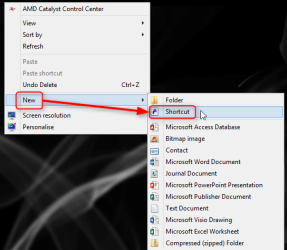
Context menu > New > Shortcut will create the shortcut where the pointer was located when context menu was opened if Auto arrange is disabled, top left if enabled.

2014-05-28_16h50_29.png

Right click a file > Drag & Drop to desktop creates the shortcut where the pointer is released ("dropped") when Auto arrange is disabled, top left if enabled.

I am totally unable to find a way to get shortcuts automatically created at right.

Are you using some third party desktop replacement or other tools which might change the Windows default behavior?

Kari
 

My Computer My Computer

At a glance

Windows 10 Pro x64 EN-GB1.6 GHz Intel Core i7-720QM Processor6 GBATI Mobility Radeon HD 5850 Graphics
Computer type
Laptop
Computer Manufacturer/Model Number
HP ENVY 17-1150eg
OS
Windows 10 Pro x64 EN-GB
CPU
1.6 GHz Intel Core i7-720QM Processor
Memory
6 GB
Graphics Card(s)
ATI Mobility Radeon HD 5850 Graphics
Sound Card
Beats sound system with integrated subwoofer
Monitor(s) Displays
17" laptop display, 22" LED and 32" Full HD TV through HDMI
Screen Resolution
1600*900 (1), 1920*1080 (2&3)
Hard Drives
Internal: 2 x 500 GB SATA Hard Disk Drive 7200 rpm
External: 2TB for backups, 3TB USB3 network drive for media
Cooling
As Envy runs a bit warm, I have it on a Cooler Master pad
Keyboard
Logitech diNovo Media Desktop Laser (bluetooth)
Mouse
Logitech Performance Mouse MX
Internet Speed
50/10 Mbps VDSL
Antivirus
Windows Defender 4.3.9431.0
Browser
Maxthon 3.5.2., IE11
The way mine works and has always worked is when I download to Desktop or create a new shortcut for something it always goes to the lower left corner. I do not use align or auto arrange.
I don't know why Windows put it their; I just leave room for it and then put it where I want it and select refresh.

As long at Windows put it in the same placed every time I'm happy. I don't have to go looking for it.
 

My Computer My Computer

At a glance

Windows 10 Pro. 64/ version 1709 Windows 7 Pr...Intel i7-6800K @ 4.3Corsair Platinum 16 gig @2400EVGA GTX 1070 OC
Computer type
PC/Desktop
Computer Manufacturer/Model Number
Home made Desktop
OS
Windows 10 Pro. 64/ version 1709 Windows 7 Pro/64
CPU
Intel i7-6800K @ 4.3
Motherboard
ASUS X-99 Deluxe II
Memory
Corsair Platinum 16 gig @2400
Graphics Card(s)
EVGA GTX 1070 OC
Monitor(s) Displays
Asus 27" LED LCD/VE278Q
Screen Resolution
1920-1080 or 1280-720 HDMI
Hard Drives
INTEL SSD 730-240 Gb Sata 3.0/
PSU
EVGA Platium 1200W
Case
Phanteks Luxe Tempered Glass 8 fans/ one radiator
Cooling
XSPC/ Water Cooled CPU
Keyboard
Das 4 Professional
Mouse
Logitech M705/MX Anywhere 2-S
Internet Speed
100 mbits
Antivirus
Microsoft Security Essentials/ Malwarebytes Premium 3.0/ SAS
Browser
I.E. 11 default/Firefox/ ISP Time Warner Cable/Spectrum
Other Info
LG BluRay Burner/
Sound system-KLipsch-THX/
Icy Dock ssd Hot Swap bays.
I have mine set to align icon to grid... I throws whatever I save to desktop in the next available spot of the last icon from left side of desktop...
Right click on desktop/view/align icon to grid...
 

My Computer My Computer

At a glance

Windows 7 Pro x64AMD Phenom II X6 1090T ProcessorPhysical Memory (RAM) 8.00 GBAMD Radeon HD 6870 2GB's Memory
Computer Manufacturer/Model Number
Raner
OS
Windows 7 Pro x64
CPU
AMD Phenom II X6 1090T Processor
Motherboard
AsRock 890FX Deluxe 4 (AM3)
Memory
Physical Memory (RAM) 8.00 GB
Graphics Card(s)
AMD Radeon HD 6870 2GB's Memory
Sound Card
Onboard Sound (Realtek) (8 channel)
Monitor(s) Displays
Samsong 24 inch
Hard Drives
60 gb SSD
120 gb SSD
1T Conventional HD
PSU
1000 Watts
Case
Azza Solano 1000
Cooling
Water Cooled
To be honest, you have quite the knack for expressing yourself when asking for help. I understand frustration, everyone gets frustrated. Your post has some good information in it, unfortunately most of it gets hidden between your frustration.

Are the problematic objects only "symlinks" or any shortcut?
edit: How are you creating "symlinks", please provide a full example, not a terse response.

When you right click on the desktop, what options do you have set for view and sort?

A screen shot will be best for both menus.
See: http://www.sevenforums.com/tutorials/9733-screenshots-files-upload-post-seven-forums.html

The description you gave puts the gadgets on the right and any thing you drag to the desktop aligns on the right side of the screen as well. Is that correct?

You also mention "theme them to my own liking". So this question begs an answer: Do you have any 3rd party themes on your system or do you use native Win7 themes?
edit: You seem to be interested in registry tweaks. Do you run any 3rd party "optimizer" or registry cleaner? Have you applied registry tweaks to your system?

I do not know of any registry setting that controls icons alignment Left, Right, Top, Bottom - only align to grid which in vanilla Win7 is the left side of the screen.

I will offer one "best practices" -> don't use your desktop folder for temporary use. Download to your downloads folder or create a special folder for the type of operation you employ. I agree with you - a minimal desktop is better (I have 6 icons on mine, 3 std and 3 custom).
 

My Computer My Computer

At a glance

x64 (6.3.9600) Win8.1 Pro & soon dual boot x6...AMD A6-3420M APU with Radeon(tm) HD Graphics6.00 GBAMD Radeon(TM) HD 6520G
Computer type
Laptop
Computer Manufacturer/Model Number
HP Pavilion dv6-6c10us
OS
x64 (6.3.9600) Win8.1 Pro & soon dual boot x64 (6.1.7601) Win7_SP1 HomePrem
CPU
AMD A6-3420M APU with Radeon(tm) HD Graphics
Motherboard
Hewlett-Packard 1805
Memory
6.00 GB
Graphics Card(s)
AMD Radeon(TM) HD 6520G
Sound Card
(1) AMD High Definition Audio Device (2) IDT High Definiti
Monitor(s) Displays
HP W2072a 20" LCD (1600 x 900) @ 60 Hz
Screen Resolution
1366 x 768 x 32 bits (4294967296 colors) @ 60 Hz
Hard Drives
ST640LM0 00 HM641JI SATA Disk Device
Keyboard
Logitech k520 wireless KB
Mouse
Logitech m320 wireless mouse (bundled with KB)
Internet Speed
15/5 | 54 MB Wireless 'n'
Antivirus
Realtime: Defender or Avast | On-demand: Malwarebytes, ESET
Browser
IE 11 on Win8, IE 10 on win 7
Other Info
Media: [Gimp, Audacity, VLC] || Comm: [WEmail 2012, Skype] || Productivity: [OpenOffice,| Textpad] || Utils: [Sysinternals, cCleaner, Speccy, Defraggler]
Apparently clicking Mark As solved wipes your post if you haven't clicked post already? hmm anyway won't go into explaining like the post I just wiped. Firstly @Slartybart sorry for my previous post not being structured and clear to the point. I will try to make an excuse now with the fact that I suffer with a disease known as narcolepsy; what I mean is that sometimes my medication can get my brain racing a little ahead of it's self. Unfortunately from time to time you maybe unlucky to be subjected to incoherent babble.

In short, Yes all files, not just symlinks. I used symlinks as an example of how 1 method I use to keep my desktop clean.

NA

Gadgets appear in the top right (now in the top right of my right hand second monitor - I'll explain)

Yes, lots of registry edits. All pretty much applied by me manually. I tend not to use 3rd party apps that perform modifications to my registry, as I like to learn how something is done and what it is changing. If I must run an app due to lack of information or sources provided my the developer, I will perform a differential analysis of the registry before and after inside a fresh Windows 7 virtual machine.
Note: No after market themes or theme engine have been applied to Windows it's self, all theming I was referring to was directly to gadgets I test and apply.

Solved. Plugging in a second monitor somehow did the trick? I ended up reviving my decommissioned second monitor after finding a SVI to VGA adapter; my (spare)monitor's standard VGA plug was broken or had some fault.
Note: Disconnecting the secondary monitor and reverting the settings to single screen again like how it was before I was unable to replicate the said issue? All is fixed in other words! :)
 

My Computer My Computer

At a glance

Windows 7 Ultimate x64Intel Core Duo 3.4GhzKingstone 4 x 2GB DDR2Nvidia GForce E8400GT
Computer type
PC/Desktop
Computer Manufacturer/Model Number
Custom Build Asus board
OS
Windows 7 Ultimate x64
CPU
Intel Core Duo 3.4Ghz
Motherboard
Asus P5Q SE/R
Memory
Kingstone 4 x 2GB DDR2
Graphics Card(s)
Nvidia GForce E8400GT
Hard Drives
Intel 180G SSD 330 Series 2.5in SATA, Samsung 250GB 2.5in SATA, Seagate 250GB 3.5in SATA, WD 250GB 3.5in SATA, WD 1TB 3.5 SATA
Antivirus
Microsoft Security Essentials
Browser
Comodo Dragon Chrome
.....
Firstly @Slartybart sorry for my previous post not being structured and clear to the point. I will try to make an excuse now with the fact that I suffer with a disease known as narcolepsy; what I mean is that sometimes my medication can get my brain racing a little ahead of it's self. Unfortunately from time to time you maybe unlucky to be subjected to incoherent babble.
.....
Solved. Plugging in a second monitor somehow did the trick? I ended up reviving my decommissioned second monitor after finding a SVI to VGA adapter; my (spare)monitor's standard VGA plug was broken or had some fault.
Note: Disconnecting the secondary monitor and reverting the settings to single screen again like how it was before I was unable to replicate the said issue? All is fixed in other words! :)

No problem James, meds can do that.

Dual monitors (or configured dual monitors) can be tricky. I have to 'reset' similarly if I connect to my flat screen TV using a VGA cable. I don't know why, the problem does not occur if I connect with an HDMI or a DVI cable.

I'm glad you were able to figure it out. Thank you for posting the solution that worked or you.

Bill
.
 

My Computer My Computer

At a glance

x64 (6.3.9600) Win8.1 Pro & soon dual boot x6...AMD A6-3420M APU with Radeon(tm) HD Graphics6.00 GBAMD Radeon(TM) HD 6520G
Computer type
Laptop
Computer Manufacturer/Model Number
HP Pavilion dv6-6c10us
OS
x64 (6.3.9600) Win8.1 Pro & soon dual boot x64 (6.1.7601) Win7_SP1 HomePrem
CPU
AMD A6-3420M APU with Radeon(tm) HD Graphics
Motherboard
Hewlett-Packard 1805
Memory
6.00 GB
Graphics Card(s)
AMD Radeon(TM) HD 6520G
Sound Card
(1) AMD High Definition Audio Device (2) IDT High Definiti
Monitor(s) Displays
HP W2072a 20" LCD (1600 x 900) @ 60 Hz
Screen Resolution
1366 x 768 x 32 bits (4294967296 colors) @ 60 Hz
Hard Drives
ST640LM0 00 HM641JI SATA Disk Device
Keyboard
Logitech k520 wireless KB
Mouse
Logitech m320 wireless mouse (bundled with KB)
Internet Speed
15/5 | 54 MB Wireless 'n'
Antivirus
Realtime: Defender or Avast | On-demand: Malwarebytes, ESET
Browser
IE 11 on Win8, IE 10 on win 7
Other Info
Media: [Gimp, Audacity, VLC] || Comm: [WEmail 2012, Skype] || Productivity: [OpenOffice,| Textpad] || Utils: [Sysinternals, cCleaner, Speccy, Defraggler]
Back
Top