No Icons In Bottom Right Hand Corner???

KhazR

New member
Local time
8:20 PM
Messages
20
One day I booted up my laptop and all the icons that are normally in the bottom right hand corner of my screen are gone. Etc. Volume, Internet Connection and Battery Life

any ideas????
 

My Computer My Computer

At a glance

Windows 7 64 Bit
OS
Windows 7 64 Bit
Other Info
OS Name Microsoft Windows 7 Home Premium
Version 6.1.7600 Build 7600
Other OS Description Not Available
OS Manufacturer Microsoft Corporation
System Name KHAZR-PC
System Manufacturer Acer
System Model Aspire 5536
System Type X86-based PC
Processor AMD Turion(tm) X2 Dual-Core Mobile RM-74, 2200 Mhz, 2 Core(s), 2 Logical Processor(s)
BIOS Version/Date Phoenix Technologies LTD V1.03, 27/02/2009
SMBI
Go to search
type notification
In the notification area tick off the icons that you want
 

My Computer My Computer

At a glance

Windows 10, Home Clean InstallIntel Core2 processsor Q8200(2.33Ghz 1333FSB)...6 gbATI Radeon 256MB HD3650
Computer type
PC/Desktop
Computer Manufacturer/Model Number
Dell XPS 420
OS
Windows 10, Home Clean Install
CPU
Intel Core2 processsor Q8200(2.33Ghz 1333FSB) Quad Core Tech
Motherboard
Dell
Memory
6 gb
Graphics Card(s)
ATI Radeon 256MB HD3650
Sound Card
Intergrated 7.1 Channel Audio
Monitor(s) Displays
Dell SP2009W 20"
Hard Drives
640 GB Serial ATA Hard drive
Cooling
Fan
Keyboard
Dell USB Keyboard
Mouse
Dell Premium Optical USB
Internet Speed
DSL 2.85
Go to search
type notification
In the notification area tick off the icons that you want

I can't change the system icons on the off in grey and won't let me change it to on :confused:
 

My Computer My Computer

At a glance

Windows 7 64 Bit
OS
Windows 7 64 Bit
Other Info
OS Name Microsoft Windows 7 Home Premium
Version 6.1.7600 Build 7600
Other OS Description Not Available
OS Manufacturer Microsoft Corporation
System Name KHAZR-PC
System Manufacturer Acer
System Model Aspire 5536
System Type X86-based PC
Processor AMD Turion(tm) X2 Dual-Core Mobile RM-74, 2200 Mhz, 2 Core(s), 2 Logical Processor(s)
BIOS Version/Date Phoenix Technologies LTD V1.03, 27/02/2009
SMBI
Bottom left, click restore defaualt behavior.
 

My Computer My Computer

At a glance

Windows 10, Home Clean InstallIntel Core2 processsor Q8200(2.33Ghz 1333FSB)...6 gbATI Radeon 256MB HD3650
Computer type
PC/Desktop
Computer Manufacturer/Model Number
Dell XPS 420
OS
Windows 10, Home Clean Install
CPU
Intel Core2 processsor Q8200(2.33Ghz 1333FSB) Quad Core Tech
Motherboard
Dell
Memory
6 gb
Graphics Card(s)
ATI Radeon 256MB HD3650
Sound Card
Intergrated 7.1 Channel Audio
Monitor(s) Displays
Dell SP2009W 20"
Hard Drives
640 GB Serial ATA Hard drive
Cooling
Fan
Keyboard
Dell USB Keyboard
Mouse
Dell Premium Optical USB
Internet Speed
DSL 2.85

My Computer My Computer

At a glance

Windows 7 64 Bit
OS
Windows 7 64 Bit
Other Info
OS Name Microsoft Windows 7 Home Premium
Version 6.1.7600 Build 7600
Other OS Description Not Available
OS Manufacturer Microsoft Corporation
System Name KHAZR-PC
System Manufacturer Acer
System Model Aspire 5536
System Type X86-based PC
Processor AMD Turion(tm) X2 Dual-Core Mobile RM-74, 2200 Mhz, 2 Core(s), 2 Logical Processor(s)
BIOS Version/Date Phoenix Technologies LTD V1.03, 27/02/2009
SMBI

My Computer My Computer

At a glance

Windows 10, Home Clean InstallIntel Core2 processsor Q8200(2.33Ghz 1333FSB)...6 gbATI Radeon 256MB HD3650
Computer type
PC/Desktop
Computer Manufacturer/Model Number
Dell XPS 420
OS
Windows 10, Home Clean Install
CPU
Intel Core2 processsor Q8200(2.33Ghz 1333FSB) Quad Core Tech
Motherboard
Dell
Memory
6 gb
Graphics Card(s)
ATI Radeon 256MB HD3650
Sound Card
Intergrated 7.1 Channel Audio
Monitor(s) Displays
Dell SP2009W 20"
Hard Drives
640 GB Serial ATA Hard drive
Cooling
Fan
Keyboard
Dell USB Keyboard
Mouse
Dell Premium Optical USB
Internet Speed
DSL 2.85
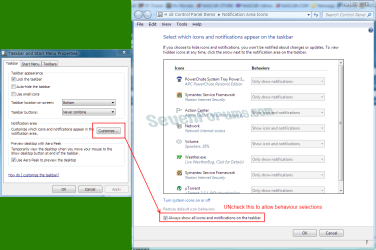
Right click an empty area on the Taskbar, Properties, Notification area, Customize. UNcheck the box indicated. This will allow you to set behaviour. Or check it to see all icons.
Capture.PNG
 

My Computer My Computer

At a glance

Windows 7 Ultimate X64 SP1Intel i5-2550K, Differing ~4.4-4.8GHz No buil...16GB G.Skill Sniper 1866MHz @ 2133MHz 2x8GBASUS GTX650TIB-DC2OC-2GD5, (650TI Boost)
Computer type
PC/Desktop
Computer Manufacturer/Model Number
Home Built Desktop By DataTech
OS
Windows 7 Ultimate X64 SP1
CPU
Intel i5-2550K, Differing ~4.4-4.8GHz No built in GPU
Motherboard
ASUS P8Z68-V PRO/GEN3
Memory
16GB G.Skill Sniper 1866MHz @ 2133MHz 2x8GB
Graphics Card(s)
ASUS GTX650TIB-DC2OC-2GD5, (650TI Boost)
Sound Card
Onboard Realtek 5-1
Monitor(s) Displays
Samsung P2570HD
Screen Resolution
1920x1080
Hard Drives
Samsung 840 Pro 256GB SSD for OS, 500GB Seagate Constellation (Enterprise drive) for Data
PSU
Corsair HX650W
Case
Inwin Dragon Rider
Cooling
Hyper 212 EVO w/two Noctua fans, push-pull, @1300 RPM
Keyboard
E-Z Eyes, bright yellow keys with large characters
Mouse
steelseries SENSEI Laser Pro Gaming
Internet Speed
48-51Mbs Mbs down, 11 Mbs up Xfinity Cable
Antivirus
Norton Internet Security 2013
Browser
IE 10, Opera, Pale Moon if needed
Other Info
4 case fans, LG BluRay-RE, ASUS DVD-RW, Mr. Fusion power supply, 1.21 gigawatts.
Right click an empty area on the Taskbar, Properties, Notification area, Customize. UNcheck the box indicated. This will allow you to set behaviour. Or check it to see all icons.
View attachment 162642

I still can't change the icons and when i check that box everything shows except the system icons :(
 

My Computer My Computer

At a glance

Windows 7 64 Bit
OS
Windows 7 64 Bit
Other Info
OS Name Microsoft Windows 7 Home Premium
Version 6.1.7600 Build 7600
Other OS Description Not Available
OS Manufacturer Microsoft Corporation
System Name KHAZR-PC
System Manufacturer Acer
System Model Aspire 5536
System Type X86-based PC
Processor AMD Turion(tm) X2 Dual-Core Mobile RM-74, 2200 Mhz, 2 Core(s), 2 Logical Processor(s)
BIOS Version/Date Phoenix Technologies LTD V1.03, 27/02/2009
SMBI
Here are some additional suggestions for you:

How to Clean the Notification Area Icon Cache
How to Reset and Clean Out Old Windows 7 Notification Area Icons

Either follow the above tutorials or, using CCleaner, in the Windows tab check the setting Tray Notification Cache under Advanced and run CCleaner. (UNcheck when finished.)
Both will reset the Cache, fix any corrupt icons, and clear any old ones from the list. Once you've done either/or above, restart Explorer.exe by typing "TSKILL EXPLORER" (without the quotes) in the Start/Search box and hit Enter. NOTE: You will have to reset your System Tray icon Preferences though everything should be working correctly again.
 

My Computer My Computer

At a glance

Vista 64 bit and 32 bit (SP2)Intel(R) Core(TM)2 Duo Processor T9400 (2.53 GHz4GB DDR2 System Memory (2 Dimm)512 MB NVIDIA GeForce 9600M GT
Computer Manufacturer/Model Number
HP Pavillion dv5t (generation 1)
OS
Vista 64 bit and 32 bit (SP2)
CPU
Intel(R) Core(TM)2 Duo Processor T9400 (2.53 GHz
Memory
4GB DDR2 System Memory (2 Dimm)
Graphics Card(s)
512 MB NVIDIA GeForce 9600M GT
Monitor(s) Displays
15.4" diagonal WSXGA+ High-Definition HP BrightView Widescre
Screen Resolution
1680 x 1050
Hard Drives
320GB 5400RPM SATA Hard Drive with HP ProtectSmart Hard Drive Protection
Keyboard
Built-in HP
Mouse
Built in - Synaptics TouchPad V6.5 on PS/2 Port
Internet Speed
Max
Other Info
~ Intel Next-Gen Wireless-N Mini-card w/Bluetooth ~ Blu-Ray ROM DVD+/-R/RW ~ Integ. HDTV Hybrid Tuner ~ 12 Cell Battery ~ MS Office (Home Premium) 2007 ~
Back
Top