
I have an annoying dllhost.exe problem which occurred about a week ago.
I have a custom build computer with Windows 7 Professional which has worked perfect for more than five years. I also have an old NHL2004 game which has worked perfect on Windows XP since 2005 and on my current computer with Windows 7 since 2014.
This winter I started to have problems with Windows Update (I mention that because it might be related) which simply refused to install the monthly security updates from Microsoft, although it updated other Microsoft updates from time to time. I've searched here and there but I found no solution to that problem.
About three weeks ago, the NHL game started to behave oddly. Normally, I just have to click on the icon, the AUC pops up, I click on the "yes" button and here we go.
But then, one day when I clicked on the AUC button as usual, the game wouldn't start. When I clicked on the icon and then on the AUC button again, then the game started and worked perfect as usual.
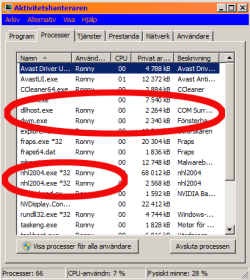
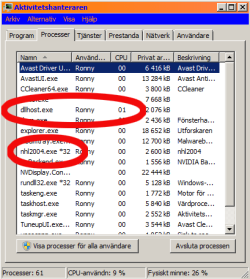
When I later looked at the Task Manager, I saw that when the game was on, it were two NHL2004.exe files working.When I closed the game, one was still there!
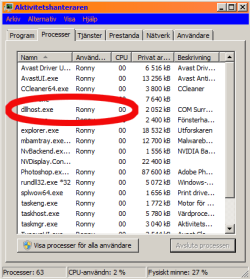
Then this dllhost.exe problem occured, I don't think it was the same day as the game problem started but some days later. The dllhost.exe file starts and stops once in a minute over and over again. I do have some sound files in my computer which I have had for many, many years and they are good to have because if I'm in another room and there is some sound which shouldn't occur, I can run in and take care of what it is. But now with this crazy dll.file opening and closing over and over again, I get stir crazy with the constant beeping.
OK, to the core of the problem: When I get up in the morning and start the computer, everything is fine. But if I feels for playing this game, then I get two NHL2004.exe files in the Task manager after the starting problems I described above and then the crazy dllhost.exe file starts.
If I finish the game, then there is still one NHL2004.exe file working plus the crazy dllhost.exe file. If I terminate the NHL2004.exe process in Task Manager, the crazy dllhost.exe file still continue with it's annoying starts and stops.
The only way to get rid of that is to restart the computer and I don't want to do that every time I've played the game.
I've been searching over and over for how to solve the problem and I have used all sorts of antivirus and malware programs to try to solve the problem but no luck.
Yesterday, after consulting my local Computer dealer who gave me the advice to do a System Restore, I decided to follow that advice. Since I'm on vacation I do have some time to work with this so I did a System Restore all the way back to last summer (the only option available since Windows Update has created too many recent restore points during the last month due to failed installs).
The System restore worked fine but after working from 12.00 to 23.45 with just a minor break for dinner with reinstalls, scanning with antivirus programs, malwarebytes, system cleanup and who knows what, I'm basically back to Square One.
The only good thing is that Windows Update works again! I don't know why and how long it will last but it updated a lot of stuff it has refused to update before.
But the other problem remains!
I don't want to scrap this old game which was the advice I got on another forum because I like the game and it's the main reason why I still have a Windows 7 computer. It has worked fine since the beginning of 2014 on this computer so why not now?
And I don't want to upgrade to Windows 10 which was the advice I got from Microsoft's Swedish support!
I hope that there is someone on this forum who can help me to solve the problem. OK, I could of course re-install Windows 7 but that's an option I don't want to try yet.
I have attached three PNG pictures which shows how it looks in Task Manager.
I have a custom build computer with Windows 7 Professional which has worked perfect for more than five years. I also have an old NHL2004 game which has worked perfect on Windows XP since 2005 and on my current computer with Windows 7 since 2014.
This winter I started to have problems with Windows Update (I mention that because it might be related) which simply refused to install the monthly security updates from Microsoft, although it updated other Microsoft updates from time to time. I've searched here and there but I found no solution to that problem.
About three weeks ago, the NHL game started to behave oddly. Normally, I just have to click on the icon, the AUC pops up, I click on the "yes" button and here we go.
But then, one day when I clicked on the AUC button as usual, the game wouldn't start. When I clicked on the icon and then on the AUC button again, then the game started and worked perfect as usual.
When I later looked at the Task Manager, I saw that when the game was on, it were two NHL2004.exe files working.When I closed the game, one was still there!
Then this dllhost.exe problem occured, I don't think it was the same day as the game problem started but some days later. The dllhost.exe file starts and stops once in a minute over and over again. I do have some sound files in my computer which I have had for many, many years and they are good to have because if I'm in another room and there is some sound which shouldn't occur, I can run in and take care of what it is. But now with this crazy dll.file opening and closing over and over again, I get stir crazy with the constant beeping.
OK, to the core of the problem: When I get up in the morning and start the computer, everything is fine. But if I feels for playing this game, then I get two NHL2004.exe files in the Task manager after the starting problems I described above and then the crazy dllhost.exe file starts.
If I finish the game, then there is still one NHL2004.exe file working plus the crazy dllhost.exe file. If I terminate the NHL2004.exe process in Task Manager, the crazy dllhost.exe file still continue with it's annoying starts and stops.
The only way to get rid of that is to restart the computer and I don't want to do that every time I've played the game.
I've been searching over and over for how to solve the problem and I have used all sorts of antivirus and malware programs to try to solve the problem but no luck.
Yesterday, after consulting my local Computer dealer who gave me the advice to do a System Restore, I decided to follow that advice. Since I'm on vacation I do have some time to work with this so I did a System Restore all the way back to last summer (the only option available since Windows Update has created too many recent restore points during the last month due to failed installs).
The System restore worked fine but after working from 12.00 to 23.45 with just a minor break for dinner with reinstalls, scanning with antivirus programs, malwarebytes, system cleanup and who knows what, I'm basically back to Square One.
The only good thing is that Windows Update works again! I don't know why and how long it will last but it updated a lot of stuff it has refused to update before.
But the other problem remains!
I don't want to scrap this old game which was the advice I got on another forum because I like the game and it's the main reason why I still have a Windows 7 computer. It has worked fine since the beginning of 2014 on this computer so why not now?
And I don't want to upgrade to Windows 10 which was the advice I got from Microsoft's Swedish support!
I hope that there is someone on this forum who can help me to solve the problem. OK, I could of course re-install Windows 7 but that's an option I don't want to try yet.
I have attached three PNG pictures which shows how it looks in Task Manager.
Attachments
My Computer
At a glance
- Computer type
- PC/Desktop
- Computer Manufacturer/Model Number
- Custom build
- OS
- Windows 7 Professional 64-bit
- CPU
- Intel Core i5 [email protected]
- Motherboard
- B75M-PLUS
- Memory
- 8.00GB
- Graphics Card(s)
- NVIDIA GeForce GTX 650Ti
- Hard Drives
- ATA Intenso SSD Sata SCSI Disk Device
ATA ST3000DM0011-1ER 1 SCSI Disk Device
- Antivirus
- Avast
- Browser
- Avast Secure Browser, Opera, Google Crome, Explore

