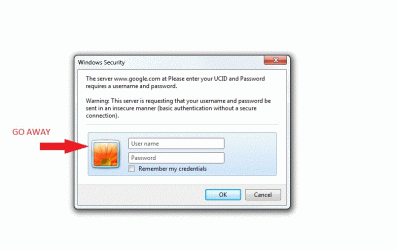
E evo1087 Guest Feb 19, 2010 #1 Cannot be changed through control panel -> User Account -> user picture. Is there anyway to change or get rid of this annoying thing
Cannot be changed through control panel -> User Account -> user picture. Is there anyway to change or get rid of this annoying thing
S sergiogarcia9 ︻┳テ=一 Guru Local time 8:25 PM Messages 4,755 Feb 19, 2010 #2 I really doubt it. Maybe editing some system file, but i wouldnt know where to start And whats the big deal? It's just a picture you'll see once when you logon to another PC
I really doubt it. Maybe editing some system file, but i wouldnt know where to start And whats the big deal? It's just a picture you'll see once when you logon to another PC
E evo1087 Guest Thread Starter Feb 20, 2010 #3 Im pretty good at using reshacker (edited start button, taskbar, folderband etc.) if someone could point me in the right dirrection. I found the folder the picture are stored C->programdata->Microsoft->useracountpictures.
Im pretty good at using reshacker (edited start button, taskbar, folderband etc.) if someone could point me in the right dirrection. I found the folder the picture are stored C->programdata->Microsoft->useracountpictures.