Another 5.1 Surround sound issue for Win7

Mariusbinx

New member
Local time
10:37 AM
Messages
4
I'm decent with computers, but don't know much about sound cards, so I'll be using some screen caps.

I just bought some new speakers, the Logitech Z506s (front left/right, center, rear left/right, subwoofer). They are connected to laptop via a single cable, jacked into my single audio out.

Stuff that works:
- All the speakers produce sound, the speakers themselves convert audio signals to 5.1 (though with limited quality, not true 5.1)

That's it.
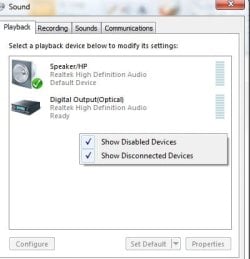
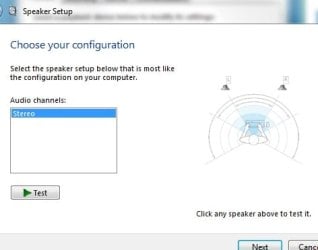
The problem is I am unable to set 5.1 Surround via Win7's sound config, or even test speakers. I know the audio is not playing true 5.1 as I've downloaded 5.1 test mp3s. I would like this to function as true 5.1 as the laptop is fairly new, and I had no reason to think the soundcard/motherboard/whatever else controls this, would be incapable.

I am using a Sony Vaio VPCF115FM laptop, which uses Realtek and Nvidia.
This is NOT an upgrade from XP or Vista to Win7, according to the device manager all audio drivers ARE up-to-date, my laptop was preinstalled with all the drivers it currently uses, my laptop does NOT have the Realtek audio manager (and not because I uninstalled it). I also do NOT have the sound fill or speaker full option in enhancements.

I have been googling this for hours and have been unable to find any correction or fix for this, most people are at least able to test their speakers in the sound config, most people don't seem to be using Realtek and NVIDIA.

I would like any help at all, and thank you in advance.


Some screenshots incase anything I said was wrong/maybe they'd be helpful:


Some screenshots incase anything I said was wrong
 

Attachments
  • sound config.jpg
    sound config.jpg
    14.4 KB · Views: 31
  • sound devices.jpg
    sound devices.jpg
    19.9 KB · Views: 36
  • device manager audio.jpg
    device manager audio.jpg
    31.6 KB · Views: 106
Last edited:

My Computer My Computer

At a glance

Windows 7 Home Premium 64bit
Computer Manufacturer/Model Number
Sony Vaio VPCF115FM
OS
Windows 7 Home Premium 64bit
I'm decent with computers, but don't know much about sound cards, so I'll be using some screen caps.

I just bought some new speakers, the Logitech Z506s (front left/right, center, rear left/right, subwoofer). They are connected to laptop via a single cable, jacked into my single audio out.

Stuff that works:
- All the speakers produce sound, the speakers themselves convert audio singles to 5.1 (though with limited quality, not true 5.1)

That's it.
The problem is I am unable to set 5.1 Surround via Win7's sound config, or even test speakers. I know the audio is not playing true 5.1 as I've downloaded 5.1 test mp3s. I would like this to function as true 5.1 as the laptop is fairly new, and I had no reason to think the soundcard/motherboard/whatever else controls this, would be incapable.

I am using a Sony Vaio VPCF115FM laptop, which uses Realtek and Nvidia.
This is NOT an upgrade from XP or Vista to Win7, according to the device manager all audio drivers ARE up-to-date, my laptop was preinstalled with all the drivers it currently uses, my laptop does NOT have the Realtek audio manager (and not because I uninstalled it). I also do NOT have the sound fill or speaker full option in enhancements.

I have been googling this for hours and have been unable to find any correction or fix for this, most people are at least able to test their speakers in the sound config, most people don't seem to be using Realtek and NVIDIA.

I would like any help at all, and thank you in advance.


Some screenshots incase anything I said was wrong/maybe they'd be helpful:


Some screenshots incase anything I said was wrong

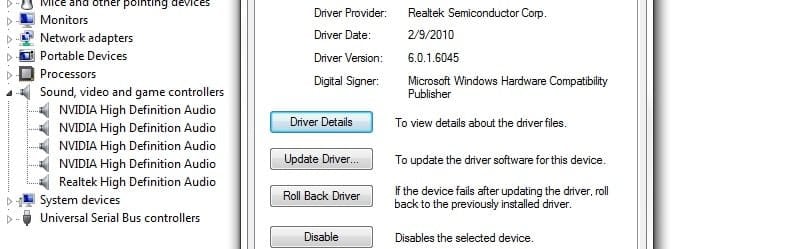
Screenshots helped. I noticed you have 5 copies of the Nvidia driver, and the realtek. I dont think that can possibly be right. I would uninstall all of them and reboot letting win 7 pick a driver to install. The extra driver may be using up resources (IRQ's) that cant be used by the other copies.

I am not sure if you should be using the realtek, or the nvidia

Let us know if you need help


Ken j
 

My Computer My Computer

At a glance

Win 8 Release candidate 8400[email protected]4 gigsNvidia 9600M
Computer Manufacturer/Model Number
HP Pavillion dv-7 1005 Tx
OS
Win 8 Release candidate 8400
CPU
[email protected]
Memory
4 gigs
Graphics Card(s)
Nvidia 9600M
Sound Card
HD built-in
Monitor(s) Displays
17" Wxga
Screen Resolution
1440x900
Cooling
none
Internet Speed
45Mb down 5Mb up
Screenshots helped. I noticed you have 5 copies of the Nvidia driver, and the realtek. I dont think that can possibly be right. I would uninstall all of them and reboot letting win 7 pick a driver to install. The extra driver may be using up resources (IRQ's) that cant be used by the other copies.

I am not sure if you should be using the realtek, or the nvidia

Let us know if you need help


Ken j

I believe the NVIDIA HD audio drivers are for HDMI connections only, and are not part of the main system... that is, I don't believe they change the functioning of internal or attached speakers/headphones.

Each of the four instances of the NVIDIA HD Audio drivers has a slightly different location when looking at its properties. Such as Location 0 (Internal High Definition Audio Bus), Location 1 (internal High....), and so on.

Note:
The 5th audio drive, Realtek HD Audio has the same location as one of the NVIDIA drivers, Location 0. I'm not sure if this matters at all...
 

My Computer My Computer

At a glance

Windows 7 Home Premium 64bit
Computer Manufacturer/Model Number
Sony Vaio VPCF115FM
OS
Windows 7 Home Premium 64bit
I believe the NVIDIA HD audio drivers are for HDMI connections only, and are not part of the main system... that is, I don't believe they change the functioning of internal or attached speakers/headphones.

Each of the four instances of the NVIDIA HD Audio drivers has a slightly different location when looking at its properties. Such as Location 0 (Internal High Definition Audio Bus), Location 1 (internal High....), and so on.

Note:
The 5th audio drive, Realtek HD Audio has the same location as one of the NVIDIA drivers, Location 0. I'm not sure if this matters at all...

Rather than uninstall, I disabled all but the realtek driver, rebooted, and found no change in behavior, functionality, or menu options.
 

My Computer My Computer

At a glance

Windows 7 Home Premium 64bit
Computer Manufacturer/Model Number
Sony Vaio VPCF115FM
OS
Windows 7 Home Premium 64bit
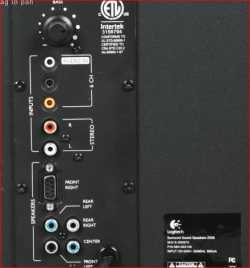
Hate to say it but you cannot get 5.1 from a single analogue connection, the only way that is possible is through a digital (optical or coax) connection; analogue requires all 3 cables (green, orange and black) to be used. Just for reference here is the back of the subwoofer for that speaker set,

z506.PNG

and assuming you are only using the green jack/cable as that is only the one jack on the laptop, the best you're going to get stereo from it. The only way you are going to get 5.1/surround from that laptop is to get speakers that use an optical connection, as the headphone/speaker jack can also be used as an optical connection (yes I read the manual for the laptop).
 

My Computer My Computer

At a glance

Win 7 Ultimate x64FX-8350 @ 4.6 GHz so farADATA XPG V1 Series Black 8GB DDR3 1600Sapphire R9 270x Dual-X
Computer type
PC/Desktop
Computer Manufacturer/Model Number
Me
OS
Win 7 Ultimate x64
CPU
FX-8350 @ 4.6 GHz so far
Motherboard
Asus M5A97 EVO
Memory
ADATA XPG V1 Series Black 8GB DDR3 1600
Graphics Card(s)
Sapphire R9 270x Dual-X
Sound Card
Xonar DGX w/ Corsair Vengence 1300
Monitor(s) Displays
Acer S232HL Abid
Screen Resolution
1920x1080
Hard Drives
120 GB OCZ Vertex 3
500 GB Seagate 7200.12
PSU
Antec Earthwatts 650W Green
Case
Antec Three Hundred
Cooling
Cooler Master 212 EVO
Keyboard
Logitech G510
Mouse
Logitech G500s
Internet Speed
35000/3000
Hate to say it but you cannot get 5.1 from a single analogue connection, the only way that is possible is through a digital (optical or coax) connection; analogue requires all 3 cables (green, orange and black) to be used. Just for reference here is the back of the subwoofer for that speaker set,

View attachment 126622

and assuming you are only using the green jack/cable as that is only the one jack on the laptop, the best you're going to get stereo from it. The only way you are going to get 5.1/surround from that laptop is to get speakers that use an optical connection, as the headphone/speaker jack can also be used as an optical connection (yes I read the manual for the laptop).


Thank you, that sucks but the speakers are still pretty darn good for the price :D.

I might invest in getting an external sound card/board if I ever feel I absolutely need the 5.1 audio (better quality + 5.1...win).

However, I am still with the original issue of why isn't my sound card/driver showing options other than just stereo, even if I cannot use 5.1 at the moment.
 

My Computer My Computer

At a glance

Windows 7 Home Premium 64bit
Computer Manufacturer/Model Number
Sony Vaio VPCF115FM
OS
Windows 7 Home Premium 64bit
Back
Top