Another "get transparent in full-glass" question

Haf

New member
Local time
10:37 PM
Messages
11
Location
Norway
Hi all, I`m new here, my first post :). I have customized my Windows 7 today and I am happy with the look of my desktop-setup so far. I have managed to get rid of the blur in the folder-frames as you can see here: Bildr.no .

Next up is how to get rid of the blur in the taskbar. Here you can see I have the blur:
Bildr.no .

I have tried many guides on this site and programs but I cant get rid of the blur in the taskbar. So if anyone have done this before and can help me with this it would be great! :)
 

My Computer My Computer

Computer Manufacturer/Model Number
ASUS (Self-build system from store)
OS
Windows 7 Home Premium, 32bit
CPU
An old Intel 775, dual-core @ 2,50hz.
Motherboard
Asus Rampage 2
Memory
4GB
Graphics Card(s)
Nvidia GTX 275 @ 890mb
Sound Card
M-Audio Audiophile FireWire
Monitor(s) Displays
1
Screen Resolution
1280x1024
Hard Drives
1 @ 500gb, 1 @ 1tb
PSU
Cooler-Master @ 750W
Case
Cooler Master HaF 932
Cooling
Cooler Master V10
Keyboard
Logitech G15
Mouse
Logitech Dark Knigh
Internet Speed
10mb ADSL
Other Info
Logitech G35 headset
Why was there blur to begin with? Do you have a program installed that customizes your desktop?
 

My Computer My Computer

Computer type
PC/Desktop
Computer Manufacturer/Model Number
Custom Asus Build
OS
Microsoft Windows 8.1 Pro 64-bit
CPU
Intel(R) Core(TM) i3-4130 CPU @ 3.40GHz
Motherboard
B85M-E
Memory
8.00 GB
Graphics Card(s)
None
Sound Card
Realtek High Definition Audio
Monitor(s) Displays
Asus 23.6" Monitor
Screen Resolution
1920 x 1080 x 32 bits (4294967296 colors) @ 60 Hz
Hard Drives
INTEL SSDSC2BW180A4
Samsung SSD 840 PRO Series
PSU
Seasonic S12II-380Bronze
Case
Lian Li
Cooling
Fan, Passive
Keyboard
Logitech K120
Mouse
Microsoft Touch Mouse
Internet Speed
4ms Ping, 19.0 Mbps Download, 19.0 Mbps Upload
Antivirus
Eset Endpoint
Browser
Internet Explorer, Chrome
Hi, thanks for reply. I don`t know, but the guide I followed says that it was only for folders and browsers. Not the taskbar. I have checked some programs here: Customization | door2windows , but I can`t get full glass in the taskbar with none of them.

I know it`s possible, but I don`t know where to look and how to do it. I did a full-systembackup with all files and systemfolders if something gets messy :).
 

My Computer My Computer

Computer Manufacturer/Model Number
ASUS (Self-build system from store)
OS
Windows 7 Home Premium, 32bit
CPU
An old Intel 775, dual-core @ 2,50hz.
Motherboard
Asus Rampage 2
Memory
4GB
Graphics Card(s)
Nvidia GTX 275 @ 890mb
Sound Card
M-Audio Audiophile FireWire
Monitor(s) Displays
1
Screen Resolution
1280x1024
Hard Drives
1 @ 500gb, 1 @ 1tb
PSU
Cooler-Master @ 750W
Case
Cooler Master HaF 932
Cooling
Cooler Master V10
Keyboard
Logitech G15
Mouse
Logitech Dark Knigh
Internet Speed
10mb ADSL
Other Info
Logitech G35 headset
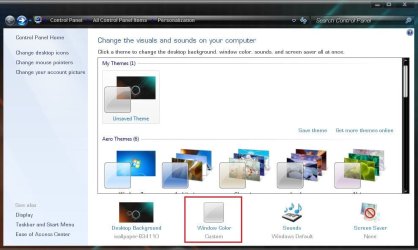
Right click on your desktop and select "personalize" . Now Click on " Window color"
1.JPG

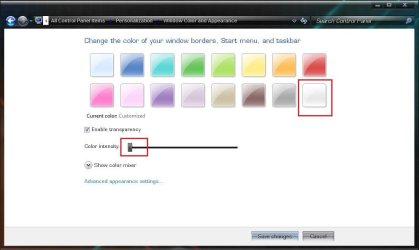
Now select the color "Frost", and slide the "color intensity" bar to the left most
2.JPG

I hope it will do what you want .
 

My Computer My Computer

Computer type
PC/Desktop
Computer Manufacturer/Model Number
Self Assembled
OS
Microsoft Windows 10 Pro Insider Preview 64-bit
CPU
Intel(R) Core(TM) i3-4130 CPU @ 3.40GHz
Motherboard
Gigabyte Technology Co., Ltd. B85M-D3H
Memory
Corsair Vengence 4GB x2 (8.00GB Dual-Channel DDR3 @ 798MHz)
Graphics Card(s)
2047MB GeForce GTS 450 (ZOTAC International)
Sound Card
Onboard (Realtek High Definition Audio)
Monitor(s) Displays
LG Flatron E2040T
Screen Resolution
1600x900
Hard Drives
Western Digital 1 TB
Seagate 500 GB
PSU
Corsair VS550
Case
Cooler Master K380
Cooling
Cooler Master Seidon 120V Plus
Keyboard
Logitech MK260r
Mouse
Logitech MK260r
Internet Speed
PMPL Broadband
Antivirus
Windows Defender + MBAM
Browser
Firefox
Other Info
Dell Studio 15" Laptop
Thanks for all suggestions. I did what you said Georg, but I still have the blur on the taskbar. Isn`t there any easy way to get rid of it and get the whole taskbar in glass and transparent? I have changed the theme with some Rainmeter stuff and you can see I still have the blur: Bildr.no .
 

My Computer My Computer

Computer Manufacturer/Model Number
ASUS (Self-build system from store)
OS
Windows 7 Home Premium, 32bit
CPU
An old Intel 775, dual-core @ 2,50hz.
Motherboard
Asus Rampage 2
Memory
4GB
Graphics Card(s)
Nvidia GTX 275 @ 890mb
Sound Card
M-Audio Audiophile FireWire
Monitor(s) Displays
1
Screen Resolution
1280x1024
Hard Drives
1 @ 500gb, 1 @ 1tb
PSU
Cooler-Master @ 750W
Case
Cooler Master HaF 932
Cooling
Cooler Master V10
Keyboard
Logitech G15
Mouse
Logitech Dark Knigh
Internet Speed
10mb ADSL
Other Info
Logitech G35 headset
Did you take a look at my post?
 

My Computer My Computer

Computer Manufacturer/Model Number
Vostro
OS
Windows 7 Ultimate (SP1)
CPU
AMD Sempron 3600+
Graphics Card(s)
ATI Radeon Xpress 1150
Screen Resolution
1200 x 800
Hard Drives
WD Scorpio Blue 500 GB
I did ie9, I found another program that can make the taskbar transparent :) I have tried all things like that. I just want to remove the blur in the taskbar where the "Computer" , "Control Panel" and so on is.

I am familiar with registry-editing for visual changes, so maybe it is a way to remove the blur by doing some registry-editing?
 

My Computer My Computer

Computer Manufacturer/Model Number
ASUS (Self-build system from store)
OS
Windows 7 Home Premium, 32bit
CPU
An old Intel 775, dual-core @ 2,50hz.
Motherboard
Asus Rampage 2
Memory
4GB
Graphics Card(s)
Nvidia GTX 275 @ 890mb
Sound Card
M-Audio Audiophile FireWire
Monitor(s) Displays
1
Screen Resolution
1280x1024
Hard Drives
1 @ 500gb, 1 @ 1tb
PSU
Cooler-Master @ 750W
Case
Cooler Master HaF 932
Cooling
Cooler Master V10
Keyboard
Logitech G15
Mouse
Logitech Dark Knigh
Internet Speed
10mb ADSL
Other Info
Logitech G35 headset

My Computer My Computer

Computer Manufacturer/Model Number
ASUS (Self-build system from store)
OS
Windows 7 Home Premium, 32bit
CPU
An old Intel 775, dual-core @ 2,50hz.
Motherboard
Asus Rampage 2
Memory
4GB
Graphics Card(s)
Nvidia GTX 275 @ 890mb
Sound Card
M-Audio Audiophile FireWire
Monitor(s) Displays
1
Screen Resolution
1280x1024
Hard Drives
1 @ 500gb, 1 @ 1tb
PSU
Cooler-Master @ 750W
Case
Cooler Master HaF 932
Cooling
Cooler Master V10
Keyboard
Logitech G15
Mouse
Logitech Dark Knigh
Internet Speed
10mb ADSL
Other Info
Logitech G35 headset
I am doing progress. I bought the WindowsBlind+SkinStudio7 programs and figured out how to edit a theme. I found a theme in WindowsBlind called Corporate by danilloOc. There I was able to tweak the transparent to the way I want it :). You can see what I did with the theme here: Bildr.no .

The wallpaper is a screenshot of the game BloodRayne2 and it is taken with Fraps by me, and edited in Photoshop CS5. But the texture in the startmeny is not my work. So now im very happy with the look i got now :). And again, thanks to all replys!
 
Last edited:

My Computer My Computer

Computer Manufacturer/Model Number
ASUS (Self-build system from store)
OS
Windows 7 Home Premium, 32bit
CPU
An old Intel 775, dual-core @ 2,50hz.
Motherboard
Asus Rampage 2
Memory
4GB
Graphics Card(s)
Nvidia GTX 275 @ 890mb
Sound Card
M-Audio Audiophile FireWire
Monitor(s) Displays
1
Screen Resolution
1280x1024
Hard Drives
1 @ 500gb, 1 @ 1tb
PSU
Cooler-Master @ 750W
Case
Cooler Master HaF 932
Cooling
Cooler Master V10
Keyboard
Logitech G15
Mouse
Logitech Dark Knigh
Internet Speed
10mb ADSL
Other Info
Logitech G35 headset
Back
Top