Full glass theme for windows 7 premium

bruklyn45

New member
Local time
12:33 AM
Messages
5
Let me start by saying hello Then let me preface my question by saying I've looked through the different forums on the subject of full glass customs...I've downloaded the suggested Uxstyle third party theme patch..Ive downloaded a full glass theme installed it...I think it was entitled (invitro) then I copied and pasted the extracted files to windows/resource/theme folder right clicked on the desktop went into the personalization menu saw the invitro theme clicked it and my screen went black...I hit the start menu button but the menu wasn't full transparent neither was any window it was just the opposite the windows were blurry and the lettering was hard to make out. What did I do wrong? I love the full glass theme look I'm running windows premium 64 bit Anyone have any solutions Thanks in advance...
 

My Computer My Computer

Computer type
PC/Desktop
OS
windows 7 home premium
Welcome to the Seven Forums

Post a link to the theme and I will look at it.

For transparent theme you need FullGlass.exe or BlackGlassEnhanced to run in the background.

Jerry
 

My Computer My Computer

Computer type
Laptop
Computer Manufacturer/Model Number
Sager NP9170
OS
Win 7 Pro x64 / Win 10 Pro
CPU
Intel(R) Core(TM) i7-3630QM CPU @ 2.40GHz
Motherboard
CLEVO P170EM
Memory
12 GB
Graphics Card(s)
(1) Intel(R) HD Graphics 4000 (2) NVIDIA GeForce GTX 675M
Sound Card
(1) Realtek High Definition Audio (2) Intel(R) Display Aud
Monitor(s) Displays
17.3
Screen Resolution
1920x1080
Hard Drives
(1) Samsung 860 EVO 500GB(OS) (1) Samsung 860 EVO 500GB(Data)
Keyboard
Backlite
Antivirus
MSE, Malwarebytes Pro
Browser
Firefox
Other Info
DESKTOP: Custom-built.
OS: Win 10 Pro x64.
CASE: Rosewill R5.
CPU: Intel I5 4670K CPU @ 3.40GHz.
CPU COOLER: Cool Master Hyper 212 EVO.
MOTHERBOARD: Asus Z87-A.
MEMORY: Kingston HyperX 2x4 GB.
GPU: Nvidia Geforce 650 TI.
PSU: Corsair TX750.
DRIVES: (1) Samsung 840 120 GB SSD (2) Western Digital blue 500 GB 7200 RPM.
Windows 7 Themes: Full glass -> V2 <-

Here is a link to a theme I guess one is as good as another. I couldn't find the In Vitro theme I was writing about. I hope this helps. I am not computer savvy by any means so I hope you would bare with me. If you could suggest a theme that would go well with my existing dark blue background that would be great. I thank you for your response to my inquiry you seem to know your way around a computer so I hope you can help. I really like that full glass look. Thanks again.
 

My Computer My Computer

Computer type
PC/Desktop
OS
windows 7 home premium
Download and run this full glass by ~phantommenace2020 on deviantART it is FullGlass.exe put it in your document folder or somewhere like that and then run it you will see a little tray icon down by your clock when it is running. Do you have transparency now?
If you want it to run on startup put a copy in C:\Users\YOUR USER NAME\AppData\Roaming\Microsoft\Windows\Start Menu\Programs\Startup folder.
AppData is hidden use step 3 of this tutorial to unhide it http://www.sevenforums.com/tutorials/56005-file-folder-hide-unhide.html

Jerry
 

My Computer My Computer

Computer type
Laptop
Computer Manufacturer/Model Number
Sager NP9170
OS
Win 7 Pro x64 / Win 10 Pro
CPU
Intel(R) Core(TM) i7-3630QM CPU @ 2.40GHz
Motherboard
CLEVO P170EM
Memory
12 GB
Graphics Card(s)
(1) Intel(R) HD Graphics 4000 (2) NVIDIA GeForce GTX 675M
Sound Card
(1) Realtek High Definition Audio (2) Intel(R) Display Aud
Monitor(s) Displays
17.3
Screen Resolution
1920x1080
Hard Drives
(1) Samsung 860 EVO 500GB(OS) (1) Samsung 860 EVO 500GB(Data)
Keyboard
Backlite
Antivirus
MSE, Malwarebytes Pro
Browser
Firefox
Other Info
DESKTOP: Custom-built.
OS: Win 10 Pro x64.
CASE: Rosewill R5.
CPU: Intel I5 4670K CPU @ 3.40GHz.
CPU COOLER: Cool Master Hyper 212 EVO.
MOTHERBOARD: Asus Z87-A.
MEMORY: Kingston HyperX 2x4 GB.
GPU: Nvidia Geforce 650 TI.
PSU: Corsair TX750.
DRIVES: (1) Samsung 840 120 GB SSD (2) Western Digital blue 500 GB 7200 RPM.
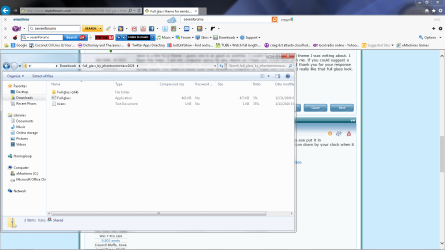
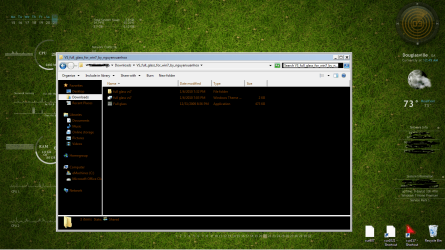
This is the file you supplied me with. I opened it and it came with an application file, a file folder, and a text file no theme folder does that matter
 

Attachments

  • screenshot2.png
    screenshot2.png
    74.7 KB · Views: 5

My Computer My Computer

Computer type
PC/Desktop
OS
windows 7 home premium

My Computer My Computer

Computer type
Laptop
Computer Manufacturer/Model Number
Sager NP9170
OS
Win 7 Pro x64 / Win 10 Pro
CPU
Intel(R) Core(TM) i7-3630QM CPU @ 2.40GHz
Motherboard
CLEVO P170EM
Memory
12 GB
Graphics Card(s)
(1) Intel(R) HD Graphics 4000 (2) NVIDIA GeForce GTX 675M
Sound Card
(1) Realtek High Definition Audio (2) Intel(R) Display Aud
Monitor(s) Displays
17.3
Screen Resolution
1920x1080
Hard Drives
(1) Samsung 860 EVO 500GB(OS) (1) Samsung 860 EVO 500GB(Data)
Keyboard
Backlite
Antivirus
MSE, Malwarebytes Pro
Browser
Firefox
Other Info
DESKTOP: Custom-built.
OS: Win 10 Pro x64.
CASE: Rosewill R5.
CPU: Intel I5 4670K CPU @ 3.40GHz.
CPU COOLER: Cool Master Hyper 212 EVO.
MOTHERBOARD: Asus Z87-A.
MEMORY: Kingston HyperX 2x4 GB.
GPU: Nvidia Geforce 650 TI.
PSU: Corsair TX750.
DRIVES: (1) Samsung 840 120 GB SSD (2) Western Digital blue 500 GB 7200 RPM.
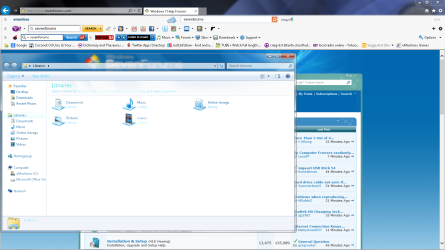
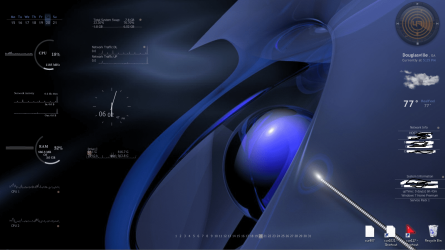
This is the result. No transparency. I copied and pasted the files in the resource theme file clicked the app file and nothing. See pics of my desktop, non transparent window and theme folder. Did I do something wrong? P.s. do you see the color distortion in the window.
 

Attachments

  • screenshot3.png
    screenshot3.png
    116.8 KB · Views: 3
  • screenshot4.png
    screenshot4.png
    354.9 KB · Views: 4
  • screenshot5.png
    screenshot5.png
    210.4 KB · Views: 3

My Computer My Computer

Computer type
PC/Desktop
OS
windows 7 home premium

My Computer My Computer

Computer type
Laptop
Computer Manufacturer/Model Number
Sager NP9170
OS
Win 7 Pro x64 / Win 10 Pro
CPU
Intel(R) Core(TM) i7-3630QM CPU @ 2.40GHz
Motherboard
CLEVO P170EM
Memory
12 GB
Graphics Card(s)
(1) Intel(R) HD Graphics 4000 (2) NVIDIA GeForce GTX 675M
Sound Card
(1) Realtek High Definition Audio (2) Intel(R) Display Aud
Monitor(s) Displays
17.3
Screen Resolution
1920x1080
Hard Drives
(1) Samsung 860 EVO 500GB(OS) (1) Samsung 860 EVO 500GB(Data)
Keyboard
Backlite
Antivirus
MSE, Malwarebytes Pro
Browser
Firefox
Other Info
DESKTOP: Custom-built.
OS: Win 10 Pro x64.
CASE: Rosewill R5.
CPU: Intel I5 4670K CPU @ 3.40GHz.
CPU COOLER: Cool Master Hyper 212 EVO.
MOTHERBOARD: Asus Z87-A.
MEMORY: Kingston HyperX 2x4 GB.
GPU: Nvidia Geforce 650 TI.
PSU: Corsair TX750.
DRIVES: (1) Samsung 840 120 GB SSD (2) Western Digital blue 500 GB 7200 RPM.
You need a theme with black backgrounds/explorer to run the transparency. A Guy
 

My Computer My Computer

Computer type
PC/Desktop
OS
Windows 10 Home x64
CPU
INTEL Core i5-750 Quad-Core 3.37GHz
Motherboard
ASUS P7P55D
Memory
HyperX Fury Black Series 8GB (2 x 4GB) 1866Mhz
Graphics Card(s)
EVGA GeForce GTX 750 Superclocked 1GB 128-Bit GDDR5
Monitor(s) Displays
LG 32MA68HY 32" IPS
Screen Resolution
1920 x 1080
Hard Drives
Samsung 840 Evo 120GB, SEAGATE 500GB Barracuda® 7200.12, SATA 3 Gb/s, 7200 RPM, 16MB cache
PSU
ANTEC TruePower New TP-550, 80 PLUS, 550W
Case
ANTEC Three Hundred Illusion
Cooling
COOLER MASTER Hyper 212 Plus, 4 x 120mm 1 x 140mm Noctua's
Internet Speed
85 + Mbps
Antivirus
Avast
Browser
Vivaldi
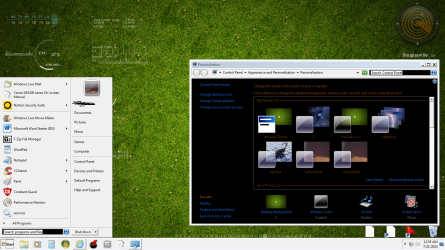
Ok, I am seriously frustrated now. I've been back and forth on this project all day and I can't seem to get it to work. You can see where it went basic on me. Look at the start menu and the window is black. The other pic is the files I copied to themes folder and look at that ugly background I don't get it. They make it seem so easy on YouTube. Am I almost there or what? Need help Thanks. Bye the way I love all the information this site offers from the large list of tutorials its very interesting I'm glad I signed up. One more thing, you can see in the personalization menu I have the full glass theme so why when I click on it everything changed but the transparency it keeps reverting back to the first theme which is the basic theme, I don't get it.
 

Attachments

  • screenshot6.png
    screenshot6.png
    579.7 KB · Views: 3
  • screenshot7.png
    screenshot7.png
    644 KB · Views: 3
  • screenshot8.jpg
    screenshot8.jpg
    310.2 KB · Views: 3
Last edited:

My Computer My Computer

Computer type
PC/Desktop
OS
windows 7 home premium
I can see from your screenshots that everything looks like it's Windows Classic theme.
I need to know do you use the Universal Theme Patcher or did you use UxStyle Core(one of the two is needed so you can enable custom third-party themes)? After you answer this question I will be able to help you further.

Jerry
 

My Computer My Computer

Computer type
Laptop
Computer Manufacturer/Model Number
Sager NP9170
OS
Win 7 Pro x64 / Win 10 Pro
CPU
Intel(R) Core(TM) i7-3630QM CPU @ 2.40GHz
Motherboard
CLEVO P170EM
Memory
12 GB
Graphics Card(s)
(1) Intel(R) HD Graphics 4000 (2) NVIDIA GeForce GTX 675M
Sound Card
(1) Realtek High Definition Audio (2) Intel(R) Display Aud
Monitor(s) Displays
17.3
Screen Resolution
1920x1080
Hard Drives
(1) Samsung 860 EVO 500GB(OS) (1) Samsung 860 EVO 500GB(Data)
Keyboard
Backlite
Antivirus
MSE, Malwarebytes Pro
Browser
Firefox
Other Info
DESKTOP: Custom-built.
OS: Win 10 Pro x64.
CASE: Rosewill R5.
CPU: Intel I5 4670K CPU @ 3.40GHz.
CPU COOLER: Cool Master Hyper 212 EVO.
MOTHERBOARD: Asus Z87-A.
MEMORY: Kingston HyperX 2x4 GB.
GPU: Nvidia Geforce 650 TI.
PSU: Corsair TX750.
DRIVES: (1) Samsung 840 120 GB SSD (2) Western Digital blue 500 GB 7200 RPM.
Back
Top