
Another W7 Update Problem Child, Won't Run Update, Won't Run Installer

flyinphill

New member
Local time
7:03 AM
Messages
27
I see by reading here and elsewhere that the Updater seems to be a common issue with W7 machines. Here is my deal:

It all started when I tried to install Quickbooks 2018 in this machine. It would not install and after much wrangling, finally resulted in an error in reference to the installer not working properly. (Sorry, I did not record exactly what it said). QB page suggested starting by checking for any updates, so I tried that. Only the Updater is not on, and will not function in any manner.

First I tried to manually search for updates through Control Panel. Manually checking for updates results in this:

Windows Update cannot currently check for updates, because the service is not running. You may need to restart the computer.


Restarting does nothing.

Next I checked the status of BITS and Installer in Services and found both on Manual. BITS would turn on, but trying to start Windows Update gives:

Windows could not start the Windows Update service on Local Computer
Error 2: The system cannot find the specified file


So I then set both BITS and Update to Auto and reboot. BITS shows as started but Update is showing as set to Auto but not started. Trying to manually restart gives the same thing, Error 2.

After many hours of chasing rabbits down holes trying to solve the Updater issue, I ended up trying to run Windows Update Standalone Installer, which I believe is the SURT file you recommend to run. Guess what, right back to the original problem; Installer won't run. I get the following message:

Installer encountered an error: 0x80080005
Server execution failed


Checking the status of Installer on Services shows it on Manual. Manual starting changes nothing. Setting to Auto and rebooting then shows it as Started, but running .exe for WUSI again gives the same 0x80080005 error.

So now I am totally lost what to do or where to go. There seem to be multiple unrelated issues happening here. I can't run the recommended SURT or any other executable because Installer won't work. I can't check for updates because Updater won't work. SFC scan shows "no integrity violations". CCleaner found nothing. And there is not a single Restore Point found when I check, even the one I just created a few hours ago is not there. So that may be yet another problem.

It seems like fixing this 0x80080005 error and getting Installer working should be my first step. I found a few posts and threads on the subject, but they were just a bit all over the place, and not very concise and clear as to what to do, and in which situation to do it. Hopefully someone on here can at least get me moving in the right direction.
 

My Computer My Computer

At a glance

W7 Pro 64 biti7 Q8402GB
Computer type
PC/Desktop
Computer Manufacturer/Model Number
Dell Precision M4500
OS
W7 Pro 64 bit
CPU
i7 Q840
Memory
2GB

My Computer My Computer

At a glance

W7 home premium 32bit/W7HP 64bit/w10 tp insid...E5300 dual core3gbNvidia Geforce 7100 Nforce 630i
Computer type
PC/Desktop
Computer Manufacturer/Model Number
medionl/Aspire 6930G/acer x55a
OS
W7 home premium 32bit/W7HP 64bit/w10 tp insider ring
CPU
E5300 dual core
Motherboard
medion MS7366
Memory
3gb
Graphics Card(s)
Nvidia Geforce 7100 Nforce 630i
Monitor(s) Displays
avixc
Internet Speed
n (isp resticted to 72)
Antivirus
mse/pands
Browser
palemoon
Other Info
Belkin Fd7050 n USB using Railink RT2870 drivers, more upto date
This didn't make any difference. Getting the same error when I try to run manual Update:

Windows Update cannot currently check for updates, because the service is not running. You may need to restart the computer.

Reset date back to Oct 1 2017, same results. Windows Update is still showing as not started in Services page.
 

My Computer My Computer

At a glance

W7 Pro 64 biti7 Q8402GB
Computer type
PC/Desktop
Computer Manufacturer/Model Number
Dell Precision M4500
OS
W7 Pro 64 bit
CPU
i7 Q840
Memory
2GB
I have also already tried:

net stop wuauserv,cryptSvc, bits, & msiserver
rename SoftwareDistribution & catroot2
net start
wuauserv,cryptSvc, bits, & msiserver


This didn't change anything.
 

My Computer My Computer

At a glance

W7 Pro 64 biti7 Q8402GB
Computer type
PC/Desktop
Computer Manufacturer/Model Number
Dell Precision M4500
OS
W7 Pro 64 bit
CPU
i7 Q840
Memory
2GB

My Computer My Computer

At a glance

W7 home premium 32bit/W7HP 64bit/w10 tp insid...E5300 dual core3gbNvidia Geforce 7100 Nforce 630i
Computer type
PC/Desktop
Computer Manufacturer/Model Number
medionl/Aspire 6930G/acer x55a
OS
W7 home premium 32bit/W7HP 64bit/w10 tp insider ring
CPU
E5300 dual core
Motherboard
medion MS7366
Memory
3gb
Graphics Card(s)
Nvidia Geforce 7100 Nforce 630i
Monitor(s) Displays
avixc
Internet Speed
n (isp resticted to 72)
Antivirus
mse/pands
Browser
palemoon
Other Info
Belkin Fd7050 n USB using Railink RT2870 drivers, more upto date
Here is the output at the end. Note that it showed the first task (1 of 6, didn't really have a chance to read what it was) as failed when it ran:


SFCFix version 3.0.0.0 by niemiro.
Start time: 2017-10-02 18:02:56.429
Microsoft Windows 7 Service Pack 1 - amd64
Not using a script file.


AutoAnalysis::


SUMMARY: No corruptions were detected.
AutoAnalysis:: directive completed successfully.


Successfully processed all directives.


Failed to generate a complete zip file. Upload aborted.


SFCFix version 3.0.0.0 by niemiro has completed.
Currently storing 0 datablocks.
Finish time: 2017-10-02 18:06:58.762
 

My Computer My Computer

At a glance

W7 Pro 64 biti7 Q8402GB
Computer type
PC/Desktop
Computer Manufacturer/Model Number
Dell Precision M4500
OS
W7 Pro 64 bit
CPU
i7 Q840
Memory
2GB

My Computer My Computer

At a glance

W7 Pro 64 biti7 Q8402GB
Computer type
PC/Desktop
Computer Manufacturer/Model Number
Dell Precision M4500
OS
W7 Pro 64 bit
CPU
i7 Q840
Memory
2GB
Have You tried Admin CMD of sfc /scannow as many as 3 times rebooting between if it finds problems ?

I fought with the problem of a "Service Registration Fixed" (NOT :mad:) every time I'd run the troubleshooter, but I couldn't install updates on a Win 8.1 Rig last Month and the only way i could fix it without losing 5 Years of programs and pics etc. was to make an up-to-date ISO, place it on the desktop, then "upgrade to the same OS"
 

My Computer My Computer

At a glance

8.1 home x64
Computer type
PC/Desktop
OS
8.1 home x64
Have You tried Admin CMD of sfc /scannow as many as 3 times rebooting between if it finds problems ?

I fought with the problem of a "Service Registration Fixed" (NOT :mad:) every time I'd run the troubleshooter, but I couldn't install updates on a Win 8.1 Rig last Month and the only way i could fix it without losing 5 Years of programs and pics etc. was to make an up-to-date ISO, place it on the desktop, then "upgrade to the same OS"

I have run sfc /scannow several time since all of this. I just ran it again twice back-to-back, and no change.
 

My Computer My Computer

At a glance

W7 Pro 64 biti7 Q8402GB
Computer type
PC/Desktop
Computer Manufacturer/Model Number
Dell Precision M4500
OS
W7 Pro 64 bit
CPU
i7 Q840
Memory
2GB
Hi FlyingPhill,

Hope you've got a good memory
Appears this all started in 2012, an update failure for a Language package, further corruption also appeared in your components hive
Then i believe the update process started to use all your resources, so you turned them Off in February 2013
IF your system specs are correct 2GB RAM is NOT enough you need at least 3GB
and from what i can find about it, it was shipped with Ultimate and would have come with more than 2GB

The CBS log files you posted jump from 2013 to 2018 - looks like WU has not been running for 5 years
There have been many security updates since then and i suspect 1 of them was the reason why QB failed
Not sure what fix's you attempted back then but i'd guess it was something to do with certain files that control windows updates licencing, which is also out of date hence the server error
you could run this tool and copy/paste the output
http://go.microsoft.com/fwlink/?LinkID=52012

BUT
Your best bet is a repair install NO loss of personal data.

Repair Install - Windows 7 Help Forums

Roy

note as you appear to be using your comp for business purposes i hope you use something like Macrium free to make images of your data externally
 
Last edited:

My Computer My Computer

At a glance

W7 home premium 32bit/W7HP 64bit/w10 tp insid...E5300 dual core3gbNvidia Geforce 7100 Nforce 630i
Computer type
PC/Desktop
Computer Manufacturer/Model Number
medionl/Aspire 6930G/acer x55a
OS
W7 home premium 32bit/W7HP 64bit/w10 tp insider ring
CPU
E5300 dual core
Motherboard
medion MS7366
Memory
3gb
Graphics Card(s)
Nvidia Geforce 7100 Nforce 630i
Monitor(s) Displays
avixc
Internet Speed
n (isp resticted to 72)
Antivirus
mse/pands
Browser
palemoon
Other Info
Belkin Fd7050 n USB using Railink RT2870 drivers, more upto date
Hi FlyingPhill,

Hope you've got a good memory
Appears this all started in 2012, an update failure for a Language package, further corruption also appeared in your components hive
Then i believe the update process started to use all your resources, so you turned them Off in February 2013
IF your system specs are correct 2GB RAM is NOT enough you need at least 3GB
and from what i can find about it, it was shipped with Ultimate and would have come with more than 2GB

The CBS log files you posted jump from 2013 to 2018 - looks like WU has not been running for 5 years
There have been many security updates since then and i suspect 1 of them was the reason why QB failed
Not sure what fix's you attempted back then but i'd guess it was something to do with certain files that control windows updates licencing, which is also out of date hence the server error
you could run this tool and copy/paste the output
http://go.microsoft.com/fwlink/?LinkID=52012

BUT
Your best bet is a repair install NO loss of personal data.

Repair Install - Windows 7 Help Forums

Roy

note as you appear to be using your comp for business purposes i hope you use something like Macrium free to make images of your data externally

This machine was purchased in 2011 when I was in engineering school at the University. It was bought to run LabVIEW for a project that was part of my senior design class, as well as to run Pro Engineer parametric CAD. After that, it was relegated to be primarily a business computer used by my wife with our tax, sales, etc info stored on it. One of my daughters has used it a few times when her laptop has been down for whatever reason. But other than that, it sits for weeks or even months at a time without even being powered on.

When all of these issues began, 2013 you are reporting, I have no idea about. I never turned anything off, but someone else could have. In fact, until this problem, I probably have not turned this machine on myself more than a dozen times since 2012 when I completed my undergraduate degree.

My memory was that the machine was purchased with W7 Pro and 2GB. The Microsoft tag under the battery says Pro, and the service tag on my Dell account also says Pro with 2GB of RAM. I will agree 100% that it needs more RAM, I already looked up purchasing 8GB for it. But it does seem to have originally come with 2GB. RAM was so expensive as an option from Dell at the time, and my budget as a college student was very limited. So I chose to get the minimum RAM with the intent of upgrading myself. That obviously never happened.

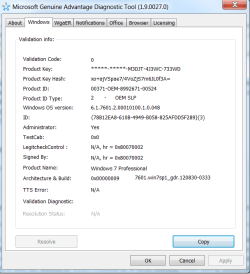
I ran the Microsoft Diagnostic tool as you asked. At the end, the "Copy" button won't do anything. Not sure what it is supposed to do, maybe output to a notepad file or something. It appears that it may be an ActiveX issue judging by the licensing tab. So I used Paint to create a screen shot of the page that displays at completion. I attached this, but if you need something else let me know. In the meanwhile I will try your repair approach tonight and see what happens.
 

Attachments

  • Microsoft.png
    Microsoft.png
    21.5 KB · Views: 38

My Computer My Computer

At a glance

W7 Pro 64 biti7 Q8402GB
Computer type
PC/Desktop
Computer Manufacturer/Model Number
Dell Precision M4500
OS
W7 Pro 64 bit
CPU
i7 Q840
Memory
2GB
Hi Phil,

the bit of the report im interested in is in another section,
can you follow this, includes the posting instructions.
Its primarily a genuine check but provides more info, I do know that comp came with Pro downgrade rights :D. I also believe this is not the problem
Windows Genuine and Activation Issue Posting Instructions - Windows 7 Help Forums


However you may want to re-install
Dell ISO W7 SP1 instructions

AS you are running with only 2GB and as long as Quick Books can run as a 32 bit program, choose that but both are available
Dell Linux Recovery Image
note the titles wrong it is for W7


This Tool can be ran on a non-Dell system provided that a Dell Service Tag is input. There seems to be no limitations on how many times a Service Tag is input:

  • 5KR9DC2 - Windows 7 Pro 64 Bit
  • 7GXLCS1 - Windows 7 Pro 32 Bit
Roy
 

My Computer My Computer

At a glance

W7 home premium 32bit/W7HP 64bit/w10 tp insid...E5300 dual core3gbNvidia Geforce 7100 Nforce 630i
Computer type
PC/Desktop
Computer Manufacturer/Model Number
medionl/Aspire 6930G/acer x55a
OS
W7 home premium 32bit/W7HP 64bit/w10 tp insider ring
CPU
E5300 dual core
Motherboard
medion MS7366
Memory
3gb
Graphics Card(s)
Nvidia Geforce 7100 Nforce 630i
Monitor(s) Displays
avixc
Internet Speed
n (isp resticted to 72)
Antivirus
mse/pands
Browser
palemoon
Other Info
Belkin Fd7050 n USB using Railink RT2870 drivers, more upto date
Diagnostic Report (1.9.0027.0):
-----------------------------------------
Windows Validation Data-->

Validation Code: 0
Cached Online Validation Code: 0x0
Windows Product Key: *****-*****-M3DJT-4J3WC-733WD
Windows Product Key Hash: xo+ajVSpae7/4VoZjS7m6JL0f3A=
Windows Product ID: 00371-OEM-8992671-00524
Windows Product ID Type: 2
Windows License Type: OEM SLP
Windows OS version: 6.1.7601.2.00010100.1.0.048
ID: {78B12EA8-610B-4949-B058-825AFDD5F289}(3)
Is Admin: Yes
TestCab: 0x0
LegitcheckControl ActiveX: N/A, hr = 0x80070002
Signed By: N/A, hr = 0x80070002
Product Name: Windows 7 Professional
Architecture: 0x00000009
Build lab: 7601.win7sp1_gdr.120830-0333
TTS Error:
Validation Diagnostic:
Resolution Status: N/A

Vista WgaER Data-->
ThreatID(s): N/A, hr = 0x80070002
Version: N/A, hr = 0x80070002

Windows XP Notifications Data-->
Cached Result: N/A, hr = 0x80070002
File Exists: No
Version: N/A, hr = 0x80070002
WgaTray.exe Signed By: N/A, hr = 0x80070002
WgaLogon.dll Signed By: N/A, hr = 0x80070002

OGA Notifications Data-->
Cached Result: N/A, hr = 0x80070002
Version: N/A, hr = 0x80070002
OGAExec.exe Signed By: N/A, hr = 0x80070002
OGAAddin.dll Signed By: N/A, hr = 0x80070002

OGA Data-->
Office Status: 109 N/A
OGA Version: N/A, 0x80070002
Signed By: N/A, hr = 0x80070002
Office Diagnostics: 025D1FF3-364-80041010_025D1FF3-229-80041010_025D1FF3-230-1_025D1FF3-517-80040154_025D1FF3-237-80040154_025D1FF3-238-2_025D1FF3-244-80070002_025D1FF3-258-3

Browser Data-->
Proxy settings: N/A
User Agent: Mozilla/4.0 (compatible; MSIE 8.0; Win32)
Default Browser: C:\Program Files (x86)\Mozilla Firefox\firefox.exe
Download signed ActiveX controls: Prompt
Download unsigned ActiveX controls: Disabled
Run ActiveX controls and plug-ins: Allowed
Initialize and script ActiveX controls not marked as safe: Disabled
Allow scripting of Internet Explorer Webbrowser control: Disabled
Active scripting: Allowed
Script ActiveX controls marked as safe for scripting: Allowed

File Scan Data-->

Other data-->
Office Details: <GenuineResults><MachineData><UGUID>{78B12EA8-610B-4949-B058-825AFDD5F289}</UGUID><Version>1.9.0027.0</Version><OS>6.1.7601.2.00010100.1.0.048</OS><Architecture>x64</Architecture><PKey>*****-*****-*****-*****-733WD</PKey><PID>00371-OEM-8992671-00524</PID><PIDType>2</PIDType><SID>S-1-5-21-1223673647-947130279-3379226297</SID><SYSTEM><Manufacturer>Dell Inc.</Manufacturer><Model>Precision M4500</Model></SYSTEM><BIOS><Manufacturer>Dell Inc.</Manufacturer><Version>A06</Version><SMBIOSVersion major="2" minor="6"/><Date>20101120000000.000000+000</Date></BIOS><HWID>1F003B07018400FE</HWID><UserLCID>0409</UserLCID><SystemLCID>0409</SystemLCID><TimeZone>Eastern Standard Time(GMT-05:00)</TimeZone><iJoin>0</iJoin><SBID><stat>3</stat><msppid></msppid><name></name><model></model></SBID><OEM><OEMID>DELL </OEMID><OEMTableID>E2 </OEMTableID></OEM><GANotification/></MachineData><Software><Office><Result>109</Result><Products/><Applications/></Office></Software></GenuineResults>

Spsys.log Content: 0x80070002

Licensing Data-->
C:\Windows\system32\slmgr.vbs(22, 1) Microsoft VBScript runtime error: ActiveX component can't create object: 'Scripting.Dictionary'

Windows Activation Technologies-->
HrOffline: 0x00000000
HrOnline: 0x00000000
HealthStatus: 0x0000000000000000
Event Time Stamp: 11:26:2017 14:18
ActiveX: Registered, Version: 7.1.7600.16395
Admin Service: Registered, Version: 7.1.7600.16395
HealthStatus Bitmask Output:


HWID Data-->
HWID Hash Current: NgAAAAEAAQABAAEAAQACAAAABQABAAEAJJQGx1M5GM6m6ep1/mmKUrjpHUUovj6RG+N6H3ZW

OEM Activation 1.0 Data-->
N/A

OEM Activation 2.0 Data-->
BIOS valid for OA 2.0: yes
Windows marker version: 0x20001
OEMID and OEMTableID Consistent: yes
BIOS Information:
ACPI Table Name OEMID Value OEMTableID Value
APIC DELL E2
FACP DELL E2
HPET DELL E2
BOOT DELL E2
MCFG A M I GMCH945.
TCPA
SLIC DELL E2
SSDT PmRef CpuPm
 

My Computer My Computer

At a glance

W7 Pro 64 biti7 Q8402GB
Computer type
PC/Desktop
Computer Manufacturer/Model Number
Dell Precision M4500
OS
W7 Pro 64 bit
CPU
i7 Q840
Memory
2GB
Hi Phil,

Bingo, from the report

Licensing Data-->
C:\Windows\system32\slmgr.vbs(22, 1) Microsoft VBScript runtime error: ActiveX component can't create object: 'Scripting.Dictionary'


1 AM here in Blighty will post a fix in the morning.

Roy

Upto you if you want to go with the re-install
 

My Computer My Computer

At a glance

W7 home premium 32bit/W7HP 64bit/w10 tp insid...E5300 dual core3gbNvidia Geforce 7100 Nforce 630i
Computer type
PC/Desktop
Computer Manufacturer/Model Number
medionl/Aspire 6930G/acer x55a
OS
W7 home premium 32bit/W7HP 64bit/w10 tp insider ring
CPU
E5300 dual core
Motherboard
medion MS7366
Memory
3gb
Graphics Card(s)
Nvidia Geforce 7100 Nforce 630i
Monitor(s) Displays
avixc
Internet Speed
n (isp resticted to 72)
Antivirus
mse/pands
Browser
palemoon
Other Info
Belkin Fd7050 n USB using Railink RT2870 drivers, more upto date
Would rather try your fix first. I don't have enough space on C: to do a repair without deleting stuff. It is an early SSD with only 60GB.

I am also going to order an 8GB kit for it tonight. Only 7 years late :)
 

My Computer My Computer

At a glance

W7 Pro 64 biti7 Q8402GB
Computer type
PC/Desktop
Computer Manufacturer/Model Number
Dell Precision M4500
OS
W7 Pro 64 bit
CPU
i7 Q840
Memory
2GB
Hi Phil,

can you follow the instructions in the screenshot,

Wont hurt to run all 3, then
REBOOT

next from run
slmgr /rilc

REBOOT

rerun the tool


Once completed navigate to
C >> WINDOWS >> System32
(then in the search box top right)
slmgr

you should get 3 entries, what are the file sizes on 2 and 3, hopefully
37.8 kb
110 kb

Quite a rare error unfortunately

Roy
 

Attachments

  • script2.PNG
    script2.PNG
    10.3 KB · Views: 1

My Computer My Computer

At a glance

W7 home premium 32bit/W7HP 64bit/w10 tp insid...E5300 dual core3gbNvidia Geforce 7100 Nforce 630i
Computer type
PC/Desktop
Computer Manufacturer/Model Number
medionl/Aspire 6930G/acer x55a
OS
W7 home premium 32bit/W7HP 64bit/w10 tp insider ring
CPU
E5300 dual core
Motherboard
medion MS7366
Memory
3gb
Graphics Card(s)
Nvidia Geforce 7100 Nforce 630i
Monitor(s) Displays
avixc
Internet Speed
n (isp resticted to 72)
Antivirus
mse/pands
Browser
palemoon
Other Info
Belkin Fd7050 n USB using Railink RT2870 drivers, more upto date
Sorry to take so long today getting back to this. It has been an absolutely wide-open day, this is my first chance to touch this problem.

Hi Phil,

can you follow the instructions in the screenshot,

Wont hurt to run all 3, then
REBOOT

1) Would not run

2) Ran successfully

3) Ran successfully


next from run
slmgr /rilc
Shows folder named "0409" with Modified date 7/14/2009

REBOOT

rerun the tool
Not clear which tool you are referencing here. I assume you mean the reinstall license script slmgr /rilc

Once completed navigate to
C >> WINDOWS >> System32
(then in the search box top right)
slmgr

you should get 3 entries, what are the file sizes on 2 and 3, hopefully
37.8 kb
110 kb
Gives 3 entries. Size for 2 and 3 are 38KB and 111KB. All 3 have 2009 dates.


Quite a rare error unfortunately

Roy
I am not clear whether this was intended to correct the Update issue or the Installer issue, but nothing has changed. I went through all of this again and nothing was different, except that Step 1 in your screenshot ran successfully this time. I will reun the Diagnostic Tool again and post the results.
 

My Computer My Computer

At a glance

W7 Pro 64 biti7 Q8402GB
Computer type
PC/Desktop
Computer Manufacturer/Model Number
Dell Precision M4500
OS
W7 Pro 64 bit
CPU
i7 Q840
Memory
2GB
Results from diagnostic tool. ActiveX still shows as a problem.


Diagnostic Report (1.9.0027.0):
-----------------------------------------
Windows Validation Data-->

Validation Code: 0
Cached Online Validation Code: 0x0
Windows Product Key: *****-*****-M3DJT-4J3WC-733WD
Windows Product Key Hash: xo+ajVSpae7/4VoZjS7m6JL0f3A=
Windows Product ID: 00371-OEM-8992671-00524
Windows Product ID Type: 2
Windows License Type: OEM SLP
Windows OS version: 6.1.7601.2.00010100.1.0.048
ID: {78B12EA8-610B-4949-B058-825AFDD5F289}(3)
Is Admin: Yes
TestCab: 0x0
LegitcheckControl ActiveX: N/A, hr = 0x80070002
Signed By: N/A, hr = 0x80070002
Product Name: Windows 7 Professional
Architecture: 0x00000009
Build lab: 7601.win7sp1_gdr.120830-0333
TTS Error:
Validation Diagnostic:
Resolution Status: N/A

Vista WgaER Data-->
ThreatID(s): N/A, hr = 0x80070002
Version: N/A, hr = 0x80070002

Windows XP Notifications Data-->
Cached Result: N/A, hr = 0x80070002
File Exists: No
Version: N/A, hr = 0x80070002
WgaTray.exe Signed By: N/A, hr = 0x80070002
WgaLogon.dll Signed By: N/A, hr = 0x80070002

OGA Notifications Data-->
Cached Result: N/A, hr = 0x80070002
Version: N/A, hr = 0x80070002
OGAExec.exe Signed By: N/A, hr = 0x80070002
OGAAddin.dll Signed By: N/A, hr = 0x80070002

OGA Data-->
Office Status: 109 N/A
OGA Version: N/A, 0x80070002
Signed By: N/A, hr = 0x80070002
Office Diagnostics: 025D1FF3-364-80041010_025D1FF3-229-80041010_025D1FF3-230-1_025D1FF3-517-80040154_025D1FF3-237-80040154_025D1FF3-238-2_025D1FF3-244-80070002_025D1FF3-258-3

Browser Data-->
Proxy settings: N/A
User Agent: Mozilla/4.0 (compatible; MSIE 8.0; Win32)
Default Browser: C:\Program Files (x86)\Mozilla Firefox\firefox.exe
Download signed ActiveX controls: Prompt
Download unsigned ActiveX controls: Disabled
Run ActiveX controls and plug-ins: Allowed
Initialize and script ActiveX controls not marked as safe: Disabled
Allow scripting of Internet Explorer Webbrowser control: Disabled
Active scripting: Allowed
Script ActiveX controls marked as safe for scripting: Allowed

File Scan Data-->

Other data-->
Office Details: <GenuineResults><MachineData><UGUID>{78B12EA8-610B-4949-B058-825AFDD5F289}</UGUID><Version>1.9.0027.0</Version><OS>6.1.7601.2.00010100.1.0.048</OS><Architecture>x64</Architecture><PKey>*****-*****-*****-*****-733WD</PKey><PID>00371-OEM-8992671-00524</PID><PIDType>2</PIDType><SID>S-1-5-21-1223673647-947130279-3379226297</SID><SYSTEM><Manufacturer>Dell Inc.</Manufacturer><Model>Precision M4500</Model></SYSTEM><BIOS><Manufacturer>Dell Inc.</Manufacturer><Version>A06</Version><SMBIOSVersion major="2" minor="6"/><Date>20101120000000.000000+000</Date></BIOS><HWID>1F003B07018400FE</HWID><UserLCID>0409</UserLCID><SystemLCID>0409</SystemLCID><TimeZone>Eastern Standard Time(GMT-05:00)</TimeZone><iJoin>0</iJoin><SBID><stat>3</stat><msppid></msppid><name></name><model></model></SBID><OEM><OEMID>DELL </OEMID><OEMTableID>E2 </OEMTableID></OEM><GANotification/></MachineData><Software><Office><Result>109</Result><Products/><Applications/></Office></Software></GenuineResults>

Spsys.log Content: 0x80070002

Licensing Data-->
C:\Windows\system32\slmgr.vbs(22, 1) Microsoft VBScript runtime error: ActiveX component can't create object: 'Scripting.Dictionary'

Windows Activation Technologies-->
HrOffline: 0x00000000
HrOnline: 0x00000000
HealthStatus: 0x0000000000000000
Event Time Stamp: 11:26:2017 14:18
ActiveX: Registered, Version: 7.1.7600.16395
Admin Service: Registered, Version: 7.1.7600.16395
HealthStatus Bitmask Output:


HWID Data-->
HWID Hash Current: NgAAAAEAAQABAAEAAQACAAAABQABAAEAJJQGx1M5GM6m6ep1/mmKUrjpHUUovj6RG+N6H3ZW

OEM Activation 1.0 Data-->
N/A

OEM Activation 2.0 Data-->
BIOS valid for OA 2.0: yes
Windows marker version: 0x20001
OEMID and OEMTableID Consistent: yes
BIOS Information:
ACPI Table Name OEMID Value OEMTableID Value
APIC DELL E2
FACP DELL E2
HPET DELL E2
BOOT DELL E2
MCFG A M I GMCH945.
TCPA
SLIC DELL E2
SSDT PmRef CpuPm
 

My Computer My Computer

At a glance

W7 Pro 64 biti7 Q8402GB
Computer type
PC/Desktop
Computer Manufacturer/Model Number
Dell Precision M4500
OS
W7 Pro 64 bit
CPU
i7 Q840
Memory
2GB
I have another machine sitting here with a perfectly operating W7 Pro OS. It is a Dell M6800 that is about 1.5 years old. Is there any way to copy the required files or folders from one machine and overwrite them in the trouble machine?
 

My Computer My Computer

At a glance

W7 Pro 64 biti7 Q8402GB
Computer type
PC/Desktop
Computer Manufacturer/Model Number
Dell Precision M4500
OS
W7 Pro 64 bit
CPU
i7 Q840
Memory
2GB
Back
Top