
FYI - I think this is an odd folder issue, not a program run issue.
TL;DR:
Booted up one day and a Folder on my System SSD drive was missing.
I found the folder on my D: backup drive (D: is just a full copy/clone of C . I copied it to the C: drive from my backup D: drive.
Some Programs in the restored folder will not run from the C: drive.
Some Programs in the restored folder will run from the D: drive (backup).
Everything else on the system is running normally.
---------------------------------------------------------------------------------------------------------------
More details on the fail to run:
Most of the programs in these folders are very simple. Drop them anywhere and they run with no "install". The simplest example is cardfile.exe from Win 3.1. (Yep Has some old info in it I still use. It worked a day before folder went missing. There are other fairly simple programs that also don't require an install but with dll's, etc in folders under this lost folder. Some of them refuse to run. But some other similar "no install" programs in folders under the lost one do run.
Failure message for the ones that won't run is
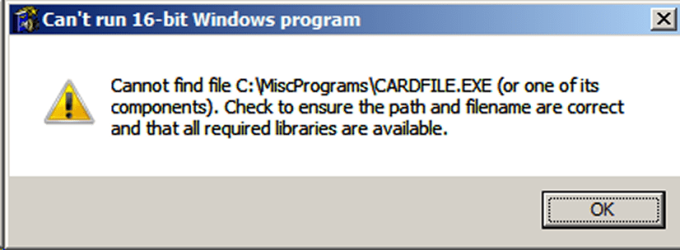
I can't determine if all the 16 bit programs in this folder fail as I don't know how to tell if the ones that do run are 16 or 32 bit.
---------------------------------------------------------------------------------------------------------------
What I've tried:
(Focusing on cardfile.exe as it's a simple .exe only program)
I ran a full CHKDSK at boot. It did find (found.000) the missing folder and all the programs are there.
As mentioned, cardfile.exe runs fine in the backup mirror folder on the D: drive.
I can't run cardfile.exe directly in the found.000 folder that has the original name.
If I copy cardfile.exe from found.000 to another existing folder on the C: drive, it works fine.
I copied the complete found.000 folder to the C: drive using the original name but cardfile.exe won't run from there
I copied the complete folder from the D: drive to the C: drive using the original name but cardfile.exe won't run from there.
I copied that cardfile.exe to a temp folder on C: and it runs fine from there.
I deleted the copied folders on C:, created a new folder with the same name as the original folder, and put cardfile.exe in but it won't run from there. (that same executable runs from a temp/test folder).
I checked permissions on the folders and files and it all looks fine to me. I have full execute, modify, read, and write privs to the folder and to cardfile.exe.
FWIW - I have not installed any Windows updates since last September when they stopped (aside from the Malicious Software Removal Tool).
Thoughts?
TL;DR:
Booted up one day and a Folder on my System SSD drive was missing.
I found the folder on my D: backup drive (D: is just a full copy/clone of C
. I copied it to the C: drive from my backup D: drive. Some Programs in the restored folder will not run from the C: drive.
Some Programs in the restored folder will run from the D: drive (backup).
Everything else on the system is running normally.
---------------------------------------------------------------------------------------------------------------
More details on the fail to run:
Most of the programs in these folders are very simple. Drop them anywhere and they run with no "install". The simplest example is cardfile.exe from Win 3.1. (Yep
Has some old info in it I still use. It worked a day before folder went missing. There are other fairly simple programs that also don't require an install but with dll's, etc in folders under this lost folder. Some of them refuse to run. But some other similar "no install" programs in folders under the lost one do run. Failure message for the ones that won't run is
I can't determine if all the 16 bit programs in this folder fail as I don't know how to tell if the ones that do run are 16 or 32 bit.
---------------------------------------------------------------------------------------------------------------
What I've tried:
(Focusing on cardfile.exe as it's a simple .exe only program)
I ran a full CHKDSK at boot. It did find (found.000) the missing folder and all the programs are there.
As mentioned, cardfile.exe runs fine in the backup mirror folder on the D: drive.
I can't run cardfile.exe directly in the found.000 folder that has the original name.
If I copy cardfile.exe from found.000 to another existing folder on the C: drive, it works fine.
I copied the complete found.000 folder to the C: drive using the original name but cardfile.exe won't run from there
I copied the complete folder from the D: drive to the C: drive using the original name but cardfile.exe won't run from there.
I copied that cardfile.exe to a temp folder on C: and it runs fine from there.
I deleted the copied folders on C:, created a new folder with the same name as the original folder, and put cardfile.exe in but it won't run from there. (that same executable runs from a temp/test folder).
I checked permissions on the folders and files and it all looks fine to me. I have full execute, modify, read, and write privs to the folder and to cardfile.exe.
FWIW - I have not installed any Windows updates since last September when they stopped (aside from the Malicious Software Removal Tool).
Thoughts?
Attachments

My Computer
At a glance
Windows 7 Ultimate 32 bit
- Computer type
- Laptop
- OS
- Windows 7 Ultimate 32 bit


