Solved Any recommendations for a good free icon editor ?

DavidE

____________
Guru
Gold Member
VIP
Local time
11:25 PM
Messages
6,330
Location
NC, USA
Any recommendations for a good free icon editor ?

I need to create a few simple icons, just a large full size "color block", nothing fancy.
I'm remotely helping someone that is visually impaired, computer illiterate, 94 years old.
I want to create a few icons for her, so i can just say "double-click the blue, red, ... icon".

I found this free editor and i think it will do what i want.
Greenfish Icon Editor Pro | Gizmo's Freeware
The program scans clean at VirusTotal.

I will run the icon editor and create the icons on my pc, and copy them to her via teamviewer.
I want a secure, reliable program - no malware/add-ons/etc for my pc.

Any suggestions for something better, why not to use this program, are much appreciated.

tyia,
David
 

My Computer My Computer

Computer type
PC/Desktop
Computer Manufacturer/Model Number
home built
OS
Multi-Boot W7_Pro_x64 W8.1_Pro_x64 W10_Pro_x64 +Linux_VMs +Chromium_VM
CPU
AMD Athlon II x4 620
Motherboard
Gigabyte GA-MA785G-UD3H
Memory
6GB GSkill DDR2 800
Graphics Card(s)
AMD 4670 GPU + AMD 4200 IGP
Sound Card
on board Realtek ALC889A
Monitor(s) Displays
RCA 40" LCD TV, Insignia 32" LCD TV, HP 15" LCD monitor
Screen Resolution
1680 x 1050
Hard Drives
OCZ Vertex 3 120GB,
Samsung F3 1TB (3),
Several others - WD, Seagate, Hitachi, ...
PSU
Corsair 500 W
Case
Rosewill mid tower
Cooling
CM 90mm rifle
Keyboard
Gyration wireless, Logitech wireless, Dell USB wired
Mouse
Gyration wireless, Logitech wireless, V7 USB wired
Internet Speed
Spectrum - 100Mbps D / 10Mbps U
Antivirus
Avast, MBAM3, EMET, WinPatrol
Browser
Pale Moon, Firefox, IE
Other Info
2 multi-boot PC's
Mainly HTPC/Office/Gen purpose (no gaming).
Trendnet USB KVM.
LG DVD burner/Blue Ray Player.
Tray system for removable SATA backup drives.

Not currently OCd, under-volted.
I use Hybrid sleep, rarely re-boot or shutdown.

Hauppauge HD-PVR, Avermedia PCIe TV Tuner, Hauppauge PCI TV Tuner.
Hi David,

I haven't personally used Greenfish Icon Editor, so I can't say much about it, I'm afraid.

However, I can recommend you a personal favourite of mine - IcoFX Portable, the portable version is free. Just another program to consider :)
 

My Computer My Computer

OS
Windows 7 x64
TheDeerDude, thank-you very much +1.

IcoFX and Greenfish both work fine for what i need.
I really like portable, didn't think of checking at PortableApps :p
This thread is solved.
 

My Computer My Computer

Computer type
PC/Desktop
Computer Manufacturer/Model Number
home built
OS
Multi-Boot W7_Pro_x64 W8.1_Pro_x64 W10_Pro_x64 +Linux_VMs +Chromium_VM
CPU
AMD Athlon II x4 620
Motherboard
Gigabyte GA-MA785G-UD3H
Memory
6GB GSkill DDR2 800
Graphics Card(s)
AMD 4670 GPU + AMD 4200 IGP
Sound Card
on board Realtek ALC889A
Monitor(s) Displays
RCA 40" LCD TV, Insignia 32" LCD TV, HP 15" LCD monitor
Screen Resolution
1680 x 1050
Hard Drives
OCZ Vertex 3 120GB,
Samsung F3 1TB (3),
Several others - WD, Seagate, Hitachi, ...
PSU
Corsair 500 W
Case
Rosewill mid tower
Cooling
CM 90mm rifle
Keyboard
Gyration wireless, Logitech wireless, Dell USB wired
Mouse
Gyration wireless, Logitech wireless, V7 USB wired
Internet Speed
Spectrum - 100Mbps D / 10Mbps U
Antivirus
Avast, MBAM3, EMET, WinPatrol
Browser
Pale Moon, Firefox, IE
Other Info
2 multi-boot PC's
Mainly HTPC/Office/Gen purpose (no gaming).
Trendnet USB KVM.
LG DVD burner/Blue Ray Player.
Tray system for removable SATA backup drives.

Not currently OCd, under-volted.
I use Hybrid sleep, rarely re-boot or shutdown.

Hauppauge HD-PVR, Avermedia PCIe TV Tuner, Hauppauge PCI TV Tuner.
If all you want to do is create some simple icons, you don't need an icon editor. All you need to do is to open any image file in Paint, save it in .BMP format, and put .ICO (rather than .BMP) as the file extension.

In fact, if you already have a .BMP file that you want to use as the icon, simply change the file extension to .ICO and you're done.

You can't do much in terms of editing when you do it this way; but it doesn't get any simpler than this.
 

My Computer My Computer

Computer type
PC/Desktop
Computer Manufacturer/Model Number
Dell
OS
Linux Mint 18.2 xfce 64-bit (VMWare host) / Windows 8.1 Pro 32-bit (VMWare guest)
CPU
Haswell
Memory
4 GB
Monitor(s) Displays
Acer 23"
Screen Resolution
1920 x 1080
Hard Drives
Two hard drives, 1TB each: One for Linux, one for my data.
Keyboard
IBM Model M
Antivirus
Sophos (Linux), Trend Micro (Windows)
Browser
Firefox, Opera
Other Info
I use Samba to share my data drive with the other computers at my house and with my guest session in VMWare Workstation Player.
If all you want to do is create some simple icons, you don't need an icon editor. All you need to do is to open any image file in Paint, save it in .BMP format, and put .ICO (rather than .BMP) as the file extension.

In fact, if you already have a .BMP file that you want to use as the icon, simply change the file extension to .ICO and you're done.

That doesn't gives an icon at all, its still just a bitmap, Paint doesn't handles icon files at all. Changing the filename doesn't makes it an icon or changes anything about the file, it's still the same thing.

Unless the OP is fine with what he already have (I'm not still sure if he's looking for a true icon really) I don't see how renaming a file can help.
 

My Computer My Computer

Computer type
Laptop
Computer Manufacturer/Model Number
Toshiba Sattelite A665-S6092
OS
Windows 7 Ultimate x64
CPU
Intel Core i7-740QM
Memory
8 GB DDR3
Graphics Card(s)
NVIDIA GeForce 330GT
Screen Resolution
1366x768
Hard Drives
Samsung 840 SSD 500GB
1TB USB3 external HD
Cooling
Coolermaster Notepal U3 notebook cooling pad
Internet Speed
3mbps ASDL
Antivirus
ClamWin 0.98.7
Browser
Opera 12.17 x86 (main), Firefox 38 (sec), IE11 (last resort)
That doesn't gives an icon at all, its still just a bitmap, Paint doesn't handles icon files at all. Changing the filename doesn't makes it an icon or changes anything about the file, it's still the same thing.

Unless the OP is fine with what he already have (I'm not still sure if he's looking for a true icon really) I don't see how renaming a file can help.

What do you mean, it doesn't give an icon at all? An icon is nothing more than a thumbnail picture on your desktop which, when clicked, runs a program. I have created many icons in this way. I'm using them (and have been for a long time) as we speak.

The user said that he wants to create 'a few simple icons, just a large full size "color block", nothing fancy'. My suggestion will probably meet his needs as described, and you can't get any simpler than this method.
 

My Computer My Computer

Computer type
PC/Desktop
Computer Manufacturer/Model Number
Dell
OS
Linux Mint 18.2 xfce 64-bit (VMWare host) / Windows 8.1 Pro 32-bit (VMWare guest)
CPU
Haswell
Memory
4 GB
Monitor(s) Displays
Acer 23"
Screen Resolution
1920 x 1080
Hard Drives
Two hard drives, 1TB each: One for Linux, one for my data.
Keyboard
IBM Model M
Antivirus
Sophos (Linux), Trend Micro (Windows)
Browser
Firefox, Opera
Other Info
I use Samba to share my data drive with the other computers at my house and with my guest session in VMWare Workstation Player.
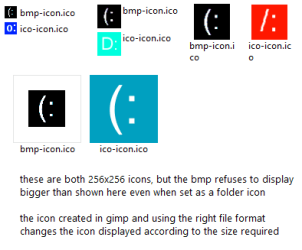
@mrjimphelps this is just a speculation on my part, but I think the renamed .bmp does not get converted into an .ico file, it just gets treated as one. Yes, it works just fine - I have done this myself on Windows Vista (and just now on 7), but it's more of a hack than proper way of doing it. It's convenient, but in my experience some viewers refuse to display it, most likely because it isn't the right file format. Saving it as a bitmap also reduces the colour range to be used, but then again the OP didn't ask for anything fancy

Also, inside a normal icon file there are several icons - each for a specific size, you can see this by extracting the ZIP I've attached into an empty folder, and changing the folder views - the bmp won't change, whereas the proper icon's icon will change as necessary, depending on the size.

Everyone probably knows this, but I really wanted to share it, because I find it so awesome
 

Attachments

  • icons.zip
    icons.zip
    5.3 KB · Views: 2
  • icons-bmp-ico.png
    icons-bmp-ico.png
    4.9 KB · Views: 28

My Computer My Computer

OS
Windows 7 x64
TheDeerDude: Thanks for that information. Yes, I understand and agree that a .BMP is not a true .ICO file. But the user wanted something simple, so I gave him my "quick and dirty" method. If he wants nice-looking icons, then he needs to do a more "proper" procedure than the one I have detailed.

As for me, I try to do things in the simplest way whenever I can; this keeps life less complicated and stressful.
 

My Computer My Computer

Computer type
PC/Desktop
Computer Manufacturer/Model Number
Dell
OS
Linux Mint 18.2 xfce 64-bit (VMWare host) / Windows 8.1 Pro 32-bit (VMWare guest)
CPU
Haswell
Memory
4 GB
Monitor(s) Displays
Acer 23"
Screen Resolution
1920 x 1080
Hard Drives
Two hard drives, 1TB each: One for Linux, one for my data.
Keyboard
IBM Model M
Antivirus
Sophos (Linux), Trend Micro (Windows)
Browser
Firefox, Opera
Other Info
I use Samba to share my data drive with the other computers at my house and with my guest session in VMWare Workstation Player.
Back
Top