Recommendations for a stock price 'gadget' sought

GRoston

Member
Power User
VIP
Local time
9:44 PM
Messages
382
All,


I am a Windows 7 user and am resisting, as much as possible, the switch to Windows 10. One feature of Windows 7 that I enjoy is gadgets (and I only use very few). One that I use is the Fidelity Market Monitor Desktop Gadget and it has worked great for more than a decade.


Until about 10 days ago when it simply stopped showing any data. After a few calls, I learned that it is no longer supported. Ugh.


Anyway, I am now looking for a super simple program to show the current stock prices of about 18 stocks, mutual funds, etc. No, I do not actively invest/day trade, I just like to know what the current asset prices are. So, if you could recommend something, please do! Thanks.
 

My Computer My Computer

At a glance

Windows 7 x64 ProCore i7 860 @ 3.8 GHz16 GB F3-12800CL7D (DDR3 1600 7-7-7-24)Sapphire Vapor-X 100283VXL Radeon HD 5770
Computer type
PC/Desktop
OS
Windows 7 x64 Pro
CPU
Core i7 860 @ 3.8 GHz
Motherboard
MSI P55-GD80
Memory
16 GB F3-12800CL7D (DDR3 1600 7-7-7-24)
Graphics Card(s)
Sapphire Vapor-X 100283VXL Radeon HD 5770
Monitor(s) Displays
NEC LCD3090WQXi-BK

My Computer My Computer

At a glance

Win 10 x64, Linux Lite, Win 7 x64, BlackArch,...
Computer type
PC/Desktop
Computer Manufacturer/Model Number
HP Desktop & Compaq Laptop
OS
Win 10 x64, Linux Lite, Win 7 x64, BlackArch, & Kali
Hard Drives
Samsung 850 Pro 256Gb,
Hitachi HDD 1Tb,
Crucial MX SSD 250Gb
Segate 3Tb USB 3.0 Ext. Backup HDD
Internet Speed
150Mbps dn, 20Mbps up
Antivirus
Avast Free, Malwarebytes Anti-Exploit & Anti-Ransomware
Browser
Firefox, Chrome, Opera, & VPN
Thanks but...
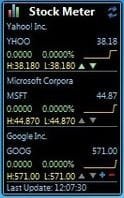
1) This seems to be limited to a total of six securities and if displays a whole lot more than just the price
2) Just tried installing it, but it showed no data. Are you using it?
 

My Computer My Computer

At a glance

Windows 7 x64 ProCore i7 860 @ 3.8 GHz16 GB F3-12800CL7D (DDR3 1600 7-7-7-24)Sapphire Vapor-X 100283VXL Radeon HD 5770
Computer type
PC/Desktop
OS
Windows 7 x64 Pro
CPU
Core i7 860 @ 3.8 GHz
Motherboard
MSI P55-GD80
Memory
16 GB F3-12800CL7D (DDR3 1600 7-7-7-24)
Graphics Card(s)
Sapphire Vapor-X 100283VXL Radeon HD 5770
Monitor(s) Displays
NEC LCD3090WQXi-BK
GRoston

No I'm not using it. I'm on Windows 10 X64 Home. I simply located a replacement for your defunct program. I'm dual booting Win7x64 Home premium & Win10x64 Home!

Have you perused the options/choices from their website? Apparently not. I read the entire website if/when I download a program or app that I am not familiar with. I would do that now but I'm not in Win7.

From their website
How To Install Windows 7 Gadgets

You may have to uninstall and reinstall to access options!

Pertinent part
5. Adjust and configure the settings of the gadget When the gadget is installing there may be some options that you need to change. These are usually given as choices so just choose the ones that will best suit your needs. Once you have configured these settings, the gadget will continue installing and when it has finished you can then enjoy the features of your selected Windows 7 gadget!
 
Last edited:

My Computer My Computer

At a glance

Win 10 x64, Linux Lite, Win 7 x64, BlackArch,...
Computer type
PC/Desktop
Computer Manufacturer/Model Number
HP Desktop & Compaq Laptop
OS
Win 10 x64, Linux Lite, Win 7 x64, BlackArch, & Kali
Hard Drives
Samsung 850 Pro 256Gb,
Hitachi HDD 1Tb,
Crucial MX SSD 250Gb
Segate 3Tb USB 3.0 Ext. Backup HDD
Internet Speed
150Mbps dn, 20Mbps up
Antivirus
Avast Free, Malwarebytes Anti-Exploit & Anti-Ransomware
Browser
Firefox, Chrome, Opera, & VPN
Back
Top