Any way to get rid of window border transition?

dipal

New member
Local time
7:28 AM
Messages
2
This is what I mean :

cvQEX.png


I have seen the tool to allow 100% transparency which would I guess solve this problem. However, I am using the aero theme without the transparency turned on and can't use the tool mentioned above.

Your help is appreciated.

edit: What purpose do you think this serves by the way? Just curious to what the designers were thinking (not saying this in a bad way)
 
Last edited:

My Computer My Computer

At a glance

Windows 7 32 bit
OS
Windows 7 32 bit

My Computer My Computer

At a glance

64-bit Windows 11 Pro for WorkstationsIntel i7-8700K OC'd to 5 GHz64 GB (4x16GB) G.SKILL TridentZ RGB DDR4 3600...ASUS ROG-STRIX-GTX1080TI-O11G-GAMING
Computer type
PC/Desktop
Computer Manufacturer/Model Number
Self built custom
OS
64-bit Windows 11 Pro for Workstations
CPU
Intel i7-8700K OC'd to 5 GHz
Motherboard
ASUS ROG Maximus XI Formula Z390
Memory
64 GB (4x16GB) G.SKILL TridentZ RGB DDR4 3600 MHz
Graphics Card(s)
ASUS ROG-STRIX-GTX1080TI-O11G-GAMING
Sound Card
Integrated
Monitor(s) Displays
2 x Samsung Odyssey G7 27"
Screen Resolution
2560x1440
Hard Drives
1TB Samsung 990 PRO M.2,
4TB Samsung 990 PRO PRO M.2,
TerraMaster F8 SSD Plus NAS
PSU
Seasonic Prime Titanium 850W
Case
Thermaltake Core P3
Cooling
Corsair Hydro H115i
Keyboard
Logitech wireless K800
Mouse
Logitech MX Master 4
Internet Speed
2 Gb/s Download and 100 Mb/s Upload
Antivirus
Malwarebyte Anti-Malware Premium
Browser
Google Chrome
Other Info
Logitech Z625 speaker system,
Logitech BRIO 4K Pro webcam,
HP Color LaserJet Pro MFP M477fdn,
APC SMART-UPS RT 1000 XL - SURT1000XLI,
Galaxy S23 Plus phone
Welcome to the Seven Forums
If you are using the default aero theme I can change that for you. Using Windows Style Builder.
If you are using a custom theme you will need to ask the theme maker. It's not cool to change someone else work.
&
This will be making a custom theme so you will need to do 1 of these 2 ways of Enabling custom themes for it to work.
Enabling Custom Themes - Windows 7
Or
Theme - How to Apply Custom Themes
All I need from you would be a name to call the custom theme and I can post it here for you. Let me know if you would like me to do it.
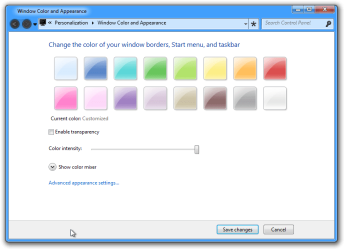
Here is a screenshot of it.
Jerry
Window Color and Appearance2.png
 

My Computer My Computer

At a glance

Win 7 Pro x64 / Win 10 ProIntel(R) Core(TM) i7-3630QM CPU @ 2.40GHz12 GB(1) Intel(R) HD Graphics 4000 (2) NVIDIA GeFo...
Computer type
Laptop
Computer Manufacturer/Model Number
Sager NP9170
OS
Win 7 Pro x64 / Win 10 Pro
CPU
Intel(R) Core(TM) i7-3630QM CPU @ 2.40GHz
Motherboard
CLEVO P170EM
Memory
12 GB
Graphics Card(s)
(1) Intel(R) HD Graphics 4000 (2) NVIDIA GeForce GTX 675M
Sound Card
(1) Realtek High Definition Audio (2) Intel(R) Display Aud
Monitor(s) Displays
17.3
Screen Resolution
1920x1080
Hard Drives
(1) Samsung 860 EVO 500GB(OS) (1) Samsung 860 EVO 500GB(Data)
Keyboard
Backlite
Antivirus
MSE, Malwarebytes Pro
Browser
Firefox
Other Info
DESKTOP: Custom-built.
OS: Win 10 Pro x64.
CASE: Rosewill R5.
CPU: Intel I5 4670K CPU @ 3.40GHz.
CPU COOLER: Cool Master Hyper 212 EVO.
MOTHERBOARD: Asus Z87-A.
MEMORY: Kingston HyperX 2x4 GB.
GPU: Nvidia Geforce 650 TI.
PSU: Corsair TX750.
DRIVES: (1) Samsung 840 120 GB SSD (2) Western Digital blue 500 GB 7200 RPM.
Thanks for that info guys. I am going to ask the author of the skin for permission and will pass it on here if he says yes. Otherwise I guess I learnt something here and will just bear with it for a while.
 

My Computer My Computer

At a glance

Windows 7 32 bit
OS
Windows 7 32 bit

My Computer My Computer

At a glance

Windows 7 Pro 64 / 7 Pro 64 / 7 Home Prem 64Core: 2 Duo T9300 / i7 870 / 2 Duo P8700
Computer Manufacturer/Model Number
Lenovo / Me / Me
OS
Windows 7 Pro 64 / 7 Pro 64 / 7 Home Prem 64
CPU
Core: 2 Duo T9300 / i7 870 / 2 Duo P8700
Back
Top