
You are using an out of date browser. It may not display this or other websites correctly.
You should upgrade or use an alternative browser.
You should upgrade or use an alternative browser.
Any Way to Zoom Magnify With Mouse?
- Thread starter Colmart
- Start date
seavixen32
New member
You can if your mouse has the functionality to do what you want.
Computer Mouse, Wireless Mouse, Bluetooth Mouse | Microsoft Hardware
This application looks pretty nifty though: http://www.magictoolbox.com/magiczoomplus/
Computer Mouse, Wireless Mouse, Bluetooth Mouse | Microsoft Hardware
This application looks pretty nifty though: http://www.magictoolbox.com/magiczoomplus/
My Computer
At a glance
Windows 7 Ultimate SP1 64-BitIntel Core i7 870 @ 2.93GHz8Gb Dual-Channel DDR3 @ 664MHznVidia GeForce GTX 460 1024MB dedicated RAM
- Computer Manufacturer/Model Number
- HP Pavilion Elite 495UK
- OS
- Windows 7 Ultimate SP1 64-Bit
- CPU
- Intel Core i7 870 @ 2.93GHz
- Motherboard
- MSI 2A9C (CPU1)
- Memory
- 8Gb Dual-Channel DDR3 @ 664MHz
- Graphics Card(s)
- nVidia GeForce GTX 460 1024MB dedicated RAM
- Sound Card
- Realtek HD Audio
- Monitor(s) Displays
- HP2310i
- Screen Resolution
- 1920 x 1080
- Hard Drives
- 1x1954GB Hitachi HDS22020ALA 330 (RAID), 1x1954GB Hitachi External for backup and storage
- PSU
- 460W
- Case
- HP Elite
- Cooling
- Air cooled
- Keyboard
- Logitech K750 solar-powered keyboard
- Mouse
- Logitech Wireless M180 mouse
- Internet Speed
- 2Mb
- Other Info
- Pure Avanti Flow Internet Radio with iPod Dock, 64Gb iPod, HP USB Speakers, Sony MDR-V500 Headphones, Sony Vaio F-Series Laptop
You can if your mouse has the functionality to do what you want.
Computer Mouse, Wireless Mouse, Bluetooth Mouse | Microsoft Hardware
This application looks pretty nifty though: http://www.magictoolbox.com/magiczoomplus/
I have logitech anywhere mouse. How can I zoom in and zoom out without going on the magnify icon (and without touching the keyboard)? Thanks
My Computer
At a glance
w7x64
- OS
- w7x64
Hold the Ctrl key and use the mouse wheel.
it doesn't zoom in and out the magnify. Ctrl+scroll it's a browser function.
My Computer
At a glance
w7x64
- OS
- w7x64

You should be able to change the button assignments of the mouse in its control panel, just select an appropriate button (inc. wheel) for the function you want. Note that changes take place immediately.
My Computer
At a glance
Windows 8.1 Pro RTM x64Intel Core-i5-3570K 4-core @ 3.4GHz (Ivy Brid...4 x 4GB DDR3-1600 Corsair Vengeance CMZ8GX3M2...MSI GeForce GTX770 Gaming OC 2GB
- Computer type
- PC/Desktop
- Computer Manufacturer/Model Number
- Dwarf Dwf/11/2012 r09/2013
- OS
- Windows 8.1 Pro RTM x64
- CPU
- Intel Core-i5-3570K 4-core @ 3.4GHz (Ivy Bridge) (OC 4.4GHz)
- Motherboard
- ASRock Z77 Extreme4-M
- Memory
- 4 x 4GB DDR3-1600 Corsair Vengeance CMZ8GX3M2A1600C9B (16GB)
- Graphics Card(s)
- MSI GeForce GTX770 Gaming OC 2GB
- Sound Card
- Realtek High Definition on board solution (ALC 898)
- Monitor(s) Displays
- ViewSonic VA1912w Widescreen (VGA)
- Screen Resolution
- 1440x900
- Hard Drives
- OCZ Agility 3 SSD 120GB SATA III x2 (RAID 0)
Samsung HD501LJ 500GB SATA II x2
Hitachi HDS721010CLA332 1TB SATA II
Iomega 1.5TB Ext USB 2.0
WD 2.0TB Ext USB 3.0
- PSU
- XFX Pro Series 850W Semi-Modular
- Case
- Gigabyte IF233
- Cooling
- 1 x 120mm Front Inlet 1 x 120mm Rear Exhaust
- Keyboard
- Microsoft Comfort Curve Keyboard 3000 (USB)
- Mouse
- Microsoft Comfort Mouse 3000 for Business (USB)
- Internet Speed
- NetGear DG834Gv3 ADSL Modem/Router (Ethernet) ~4.0 Mb/s (O2)
- Antivirus
- Avast! 8.0.1497
- Browser
- IE 11
- Other Info
- Optical Drive: HL-DT-ST BD-RE BH10LS30 SATA Bluray
Lexmark S305 Printer/Scanner/Copier (USB)
WEI Score: 8.1/8.1/8.5/8.5/8.25
Asus Eee PC 1011PX Netbook (Windows 7 x86 Starter)

If you haven't found the help you need, here are some 'work-arounds' using the Magnifier and your system settings:
To Magnify Entire Page: Start, Search pane, and type: magnifier. When it comes up click the plus (+) sign. The entire page will magnify. OR go to: Control Panel, All Control Panel Items, Ease of Access Center, Make Your Computer Easier to Use, Start Magnifier.
16. Magnifier – To Magnify a Certain Portion of the Screen - go to Start, Search pane, and type: magnifier. Click the program at the top. The Magnifier can be set to Docked Mode which places a re-sizable window at the top of the screen that follows the cursor. (To read more about Magnifier go to Start, click "Help & Support" on the right hand side, type in "magnifier.") Magnifier is actually located at: Start, All Programs, Accessories, Ease of Access, Magnifier.
To Magnify Entire Page: Start, Search pane, and type: magnifier. When it comes up click the plus (+) sign. The entire page will magnify. OR go to: Control Panel, All Control Panel Items, Ease of Access Center, Make Your Computer Easier to Use, Start Magnifier.
16. Magnifier – To Magnify a Certain Portion of the Screen - go to Start, Search pane, and type: magnifier. Click the program at the top. The Magnifier can be set to Docked Mode which places a re-sizable window at the top of the screen that follows the cursor. (To read more about Magnifier go to Start, click "Help & Support" on the right hand side, type in "magnifier.") Magnifier is actually located at: Start, All Programs, Accessories, Ease of Access, Magnifier.
My Computer
At a glance
Vista 64 bit and 32 bit (SP2)Intel(R) Core(TM)2 Duo Processor T9400 (2.53 GHz4GB DDR2 System Memory (2 Dimm)512 MB NVIDIA GeForce 9600M GT
- Computer Manufacturer/Model Number
- HP Pavillion dv5t (generation 1)
- OS
- Vista 64 bit and 32 bit (SP2)
- CPU
- Intel(R) Core(TM)2 Duo Processor T9400 (2.53 GHz
- Memory
- 4GB DDR2 System Memory (2 Dimm)
- Graphics Card(s)
- 512 MB NVIDIA GeForce 9600M GT
- Monitor(s) Displays
- 15.4" diagonal WSXGA+ High-Definition HP BrightView Widescre
- Screen Resolution
- 1680 x 1050
- Hard Drives
- 320GB 5400RPM SATA Hard Drive with HP ProtectSmart Hard Drive Protection
- Keyboard
- Built-in HP
- Mouse
- Built in - Synaptics TouchPad V6.5 on PS/2 Port
- Internet Speed
- Max
- Other Info
- ~ Intel Next-Gen Wireless-N Mini-card w/Bluetooth ~ Blu-Ray ROM DVD+/-R/RW ~ Integ. HDTV Hybrid Tuner ~ 12 Cell Battery ~ MS Office (Home Premium) 2007 ~

Did you install a Logitech driver for this particular Logitech model?
If you have this driver installed, then go to the mouse properties in control panel, select logitech specific settings and assign zoom function to the wheel.
You may have to uncheck the Microsoft Office settings in the mouse control panel.
If you have this driver installed, then go to the mouse properties in control panel, select logitech specific settings and assign zoom function to the wheel.
You may have to uncheck the Microsoft Office settings in the mouse control panel.
My Computer
At a glance
MS Windows 7 Ultimate 64-bit SP1i5-2410M 2.3GHz (2.9GHz Turbo-Boost) Sandy Br...4GB+4GB Samsung DDR3 PC3-10700 (1333 MHz)Video Intel(R) HD Graphics Family, 1696MB ava...
- Computer Manufacturer/Model Number
- Toshiba Satellite P775-S7232
- OS
- MS Windows 7 Ultimate 64-bit SP1
- CPU
- i5-2410M 2.3GHz (2.9GHz Turbo-Boost) Sandy Bridge 32nm
- Motherboard
- Toshiba PHRAA ver. PSBY1U-00F003
- Memory
- 4GB+4GB Samsung DDR3 PC3-10700 (1333 MHz)
- Graphics Card(s)
- Video Intel(R) HD Graphics Family, 1696MB available memory
- Sound Card
- Realtek High Definition Audio version=6.0.1.6323
- Monitor(s) Displays
- 17.3 " Trubrite TFT LCD, LED Backlit
- Screen Resolution
- 1600x900 32 bit, Native support for 720P content
- Hard Drives
- TOSHIBA MK6476GSXN
580.614 [GB] partitioned C: 80GB and D: 500GB with hidden recovery partitons.
Spare bay for 2nd HDD but no SATA connector :-(
- PSU
- Toshiba AC/DC Adapter
- Case
- Notebook
- Cooling
- Built-in Fan
- Keyboard
- Premium Raised Tile keyboard
- Mouse
- Logitech M215 wireless mouse
- Internet Speed
- Not fast enough
- Other Info
- Built-in Harman Kardon speakers with Dolby Advanced Audio, Waves MaxxAudio® 3. HDMI, 1xUSB3+3xUSB2 ports, WebCam, Battery life 4hrs 11mins, 4GB Readyboost SDHC card, WD My Book Essential Ext HDDs 2 TB, 2x1TB, My Passport SE 1TB and WDTV 1st Gen for Multimedia playing on a Sony Wega 32" LCD.
Recent addition to my toys are Asus Transformer Pad TF300T with 32GB onboard sd card + 32GB microsd card.

If you haven't found the help you need, here are some 'work-arounds' using the Magnifier and your system settings:
To Magnify Entire Page: Start, Search pane, and type: magnifier. When it comes up click the plus (+) sign. The entire page will magnify. OR go to: Control Panel, All Control Panel Items, Ease of Access Center, Make Your Computer Easier to Use, Start Magnifier.
16. Magnifier – To Magnify a Certain Portion of the Screen - go to Start, Search pane, and type: magnifier. Click the program at the top. The Magnifier can be set to Docked Mode which places a re-sizable window at the top of the screen that follows the cursor. (To read more about Magnifier go to Start, click "Help & Support" on the right hand side, type in "magnifier.") Magnifier is actually located at: Start, All Programs, Accessories, Ease of Access, Magnifier.
to enable the magnifier, just press windows key and +
My Computer
At a glance
Microsoft Windows 7 Home Premium 64-bit 7600IIx4 amd athelon 635 processor2x2gbati radeon HD 5450
- Computer Manufacturer/Model Number
- Hewlett packard/p6512uk
- OS
- Microsoft Windows 7 Home Premium 64-bit 7600
- CPU
- IIx4 amd athelon 635 processor
- Motherboard
- FOXCONN 2AA9
- Memory
- 2x2gb
- Graphics Card(s)
- ati radeon HD 5450
- Sound Card
- (1) Realtek High Definition Audio (2) AMD High Definition
- Monitor(s) Displays
- samsung lcd tv 32"
- Screen Resolution
- 1360x 768
- Hard Drives
- (1) WDC WD10 01FAES-60Z2A0 SATA Disk Device (2) Maxtor OneTouch USB Device (3) ST310003 33AS USB Device (4) WD My Book 1111 USB Device
- PSU
- ?
- Cooling
- air!
- Keyboard
- wireless hp
- Mouse
- wireless Hp,optical
- Internet Speed
- 1.10mb/s
- Antivirus
- MSE
- Browser
- Firefox

- Local time
- 4:13 AM
- Messages
- 50,634
Hold the Cntrl key and scroll mouse.
There is only one which works for Win7 with one key and mouse:
Hold the Cntrl key and scroll mouse.
Open magnifier tool and try ctrl+scrol. It doesn't work. The short cuts for magnifier zoom is win (+/-) Make items on the screen appear bigger (Magnifier) I use full screen mode

My Computer
At a glance
w7x64
- OS
- w7x64
@Dwarf @rroad thanks mates, now I try your tip and report how it comes up
Tried. Can't do that. ty anyway
My Computer
At a glance
w7x64
- OS
- w7x64
to change the shortcut keys for magnifier search for it in start menu ,when it appears then right click it and select properties. and enter the keys of your choice in the shortcut window.although it will make it ctrl and alt then the key of choice by default.
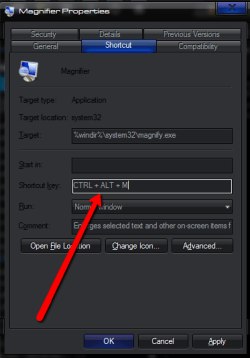
i wouldnt change them though as you lose the shortcut keys to close it ,ie win and -.
also when the magnifier is open and in lens mode then pressing the win key and + zooms it, keep pressing + for more zoom
i wouldnt change them though as you lose the shortcut keys to close it ,ie win and -.
also when the magnifier is open and in lens mode then pressing the win key and + zooms it, keep pressing + for more zoom
My Computer
At a glance
Microsoft Windows 7 Home Premium 64-bit 7600IIx4 amd athelon 635 processor2x2gbati radeon HD 5450
- Computer Manufacturer/Model Number
- Hewlett packard/p6512uk
- OS
- Microsoft Windows 7 Home Premium 64-bit 7600
- CPU
- IIx4 amd athelon 635 processor
- Motherboard
- FOXCONN 2AA9
- Memory
- 2x2gb
- Graphics Card(s)
- ati radeon HD 5450
- Sound Card
- (1) Realtek High Definition Audio (2) AMD High Definition
- Monitor(s) Displays
- samsung lcd tv 32"
- Screen Resolution
- 1360x 768
- Hard Drives
- (1) WDC WD10 01FAES-60Z2A0 SATA Disk Device (2) Maxtor OneTouch USB Device (3) ST310003 33AS USB Device (4) WD My Book 1111 USB Device
- PSU
- ?
- Cooling
- air!
- Keyboard
- wireless hp
- Mouse
- wireless Hp,optical
- Internet Speed
- 1.10mb/s
- Antivirus
- MSE
- Browser
- Firefox
to change the shortcut keys for magnifier search for it in start menu ,when it appears then right click it and select properties. and enter the keys of your choice in the shortcut window.although it will make it ctrl and alt then the key of choice by default.
View attachment 177032
i wouldnt change them though as you lose the shortcut keys to close it ,ie win and -.
also when the magnifier is open and in lens mode then pressing the win key and + zooms it, keep pressing + for more zoom
thanks for your tip. But. I don't even know how to fill it. There is only 1 space to fill. I want to set it in order to Zoom +/- = Ctrl + (scroll up/down). What have I to write in there? Thanks
My Computer
At a glance
w7x64
- OS
- w7x64
like i said i wouldnt change it ,
out of interest why do you want to change it.
out of interest why do you want to change it.
My Computer
At a glance
Microsoft Windows 7 Home Premium 64-bit 7600IIx4 amd athelon 635 processor2x2gbati radeon HD 5450
- Computer Manufacturer/Model Number
- Hewlett packard/p6512uk
- OS
- Microsoft Windows 7 Home Premium 64-bit 7600
- CPU
- IIx4 amd athelon 635 processor
- Motherboard
- FOXCONN 2AA9
- Memory
- 2x2gb
- Graphics Card(s)
- ati radeon HD 5450
- Sound Card
- (1) Realtek High Definition Audio (2) AMD High Definition
- Monitor(s) Displays
- samsung lcd tv 32"
- Screen Resolution
- 1360x 768
- Hard Drives
- (1) WDC WD10 01FAES-60Z2A0 SATA Disk Device (2) Maxtor OneTouch USB Device (3) ST310003 33AS USB Device (4) WD My Book 1111 USB Device
- PSU
- ?
- Cooling
- air!
- Keyboard
- wireless hp
- Mouse
- wireless Hp,optical
- Internet Speed
- 1.10mb/s
- Antivirus
- MSE
- Browser
- Firefox
like i said i wouldnt change it ,
out of interest why do you want to change it.
I respect your opinion, but I would change it in order to improve my own user experience and personal workflow. If you know how to change and want to share it I would be really grateful. Thanks
My Computer
At a glance
w7x64
- OS
- w7x64
Similar threads


- Replies
- 6
- Views
- 24K


- Replies
- 4
- Views
- 3K
- Replies
- 0
- Views
- 567