Any way to access .CDD files?

Gwaihir

Member
Member
VIP
Local time
1:34 AM
Messages
135
I have a number of CDD drawing files originally created using Claris Draw running under XP. I'd like to find a way of either opening them and taking screenshots or converting them to JPEG or PDF. I don't need to edit them, just get them into a more universal format for viewing.

I've been considering installing XP Mode as I'm running W7 Professional. That would allow me to install Claris Draw as I still have copies of the original six floppies it came on. However that seems quite a lot of trouble to go to for just a few files if there's a simple conversion utility available.

Any ideas and/or suggestions would be very welcome.

- - - Updated - - -

Looks like I've hit a brick wall with this. As far as I can see it's no longer possible to install XP Mode as I can't find it anywhere on Micro$oft's site and it says that all support for Windows 7 has ended. That's all support - not just no further updates.

Maybe that's why I've had 49 views but no responses.

As it happens I'm not even sure getting a virtual version of XP running would have helped because on further reflection I think the files might have been created on a machine running NT, so I don't know if Claris Draw would have installed under XP.
 

My Computer My Computer

Computer type
PC/Desktop
Computer Manufacturer/Model Number
Home build
OS
Windows 7 Professional 64-bit SP1
CPU
Pentium Core i5-2500 3.3GHz
Motherboard
Gigabyte P61-USB3-B3
Memory
2 x 4GB DDR3 1333MHz
Graphics Card(s)
Asus GT440 1GB GDDR5
Sound Card
Realtek integrated sound
Monitor(s) Displays
LG L1942PE
Screen Resolution
1280 x 1024 @ 60Hz
Hard Drives
2 x 1TB Western Digital WD10EARS, 1 x 1TB Seagate ST1000DM010
PSU
EVGA 450BR
Case
Novatech Panther ATX
Cooling
Sharkoon Silent Eagle 1000 120mm in case rear extracting
Keyboard
Logitech K120

My Computers My Computers

System One System Two

I have a number of CDD drawing files originally created using Claris Draw....
I found this thread....

....I am working in Win XP and Win 7 PCs and am trying to help my son salvage several years worth of his work done in Claris Draw 1.0; I can perfectly open and re-save his completed projects in Inkscape.....
Import Claris Draw 1.0 and its Libraries - InkscapeForum.com

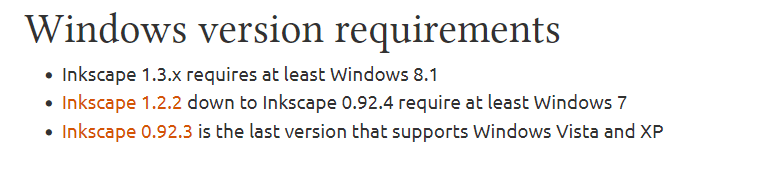
So maybe Inkscape is your answer. If so, you'll need version 1.2.2 or earlier for Win7....


image.png

Draw Freely | Inkscape
 

My Computers My Computers

System One System Two

  • Computer type
    Laptop
    Computer Manufacturer/Model Number
    Toshiba satellite C650D
    OS
    Windows 7 Home Premium x64
    CPU
    AMD V120
    Memory
    4GB
    Internet Speed
    150 Mbps
    Antivirus
    MSE
    Browser
    IE11, Edge, Firefox
    Other Info
    I also have W7 Pro on my System Two, and several W7 Hyper-V VMs. My other machines run Windows 10/11. Their specs are in my Ten Forums & Eleven Forum profiles.
  • Computer type
    Laptop
    System Manufacturer/Model Number
    Lenovo Thinkpad T430
    OS
    Windows 7 Pro x64
    CPU
    Intel i5-3320M
    Memory
    8 GB
    Hard Drives
    250GB Samsung SSD 860 EVO
    Antivirus
    MSE
Thanks for the replies.

townsb

Yes, I did an extensive web search and found the page you've linked to, amongst others. There are a number of different applications that use the .CDD extension but all with different formats.

Bree

I tried downloading Inkscape 1.2.2 and it installed OK but it can't open the Claris .CDD files, unfortunately. As .cdd didn't appear in the file type list I tried using All Files and browsing to one of the Claris files. It just reported it couldn't open the file.

It was worth the try. Inkscape looks as if it could be a handy vector graphics editor so I'll probably keep it and have a play with it.
 

My Computer My Computer

Computer type
PC/Desktop
Computer Manufacturer/Model Number
Home build
OS
Windows 7 Professional 64-bit SP1
CPU
Pentium Core i5-2500 3.3GHz
Motherboard
Gigabyte P61-USB3-B3
Memory
2 x 4GB DDR3 1333MHz
Graphics Card(s)
Asus GT440 1GB GDDR5
Sound Card
Realtek integrated sound
Monitor(s) Displays
LG L1942PE
Screen Resolution
1280 x 1024 @ 60Hz
Hard Drives
2 x 1TB Western Digital WD10EARS, 1 x 1TB Seagate ST1000DM010
PSU
EVGA 450BR
Case
Novatech Panther ATX
Cooling
Sharkoon Silent Eagle 1000 120mm in case rear extracting
Keyboard
Logitech K120
The ones on my list are specifically listed for files created by your program (compared to other programs creating the same file type). Did you try any of them? Since I don't know anything about your program I can't help you further.
 

My Computers My Computers

System One System Two

To be accurate the programs in that list are only stated to be ones that use the .CDD file extension but as I said earlier that does not mean the files they create have any similarities to the ones created by Claris Draw which is a vector-based drawing editor. The only program in that list that could guarantee to open the files is Claris Draw itself which won't install on Windows 7 or 10. None of the other Programs appear to be vector drawing editors and I really don't want to try installing any or all of them on the unlikely chance one might work.
 

My Computer My Computer

Computer type
PC/Desktop
Computer Manufacturer/Model Number
Home build
OS
Windows 7 Professional 64-bit SP1
CPU
Pentium Core i5-2500 3.3GHz
Motherboard
Gigabyte P61-USB3-B3
Memory
2 x 4GB DDR3 1333MHz
Graphics Card(s)
Asus GT440 1GB GDDR5
Sound Card
Realtek integrated sound
Monitor(s) Displays
LG L1942PE
Screen Resolution
1280 x 1024 @ 60Hz
Hard Drives
2 x 1TB Western Digital WD10EARS, 1 x 1TB Seagate ST1000DM010
PSU
EVGA 450BR
Case
Novatech Panther ATX
Cooling
Sharkoon Silent Eagle 1000 120mm in case rear extracting
Keyboard
Logitech K120
I don't understand why you don't want to install a free program to see if it will open up your files. If you are worried about corrupting them create copies and open up the copies. According to the macdraw wiki libreoffice has the capability to open up macdraw/clarice draw documents. MacDraw - Wikipedia
 
Last edited:

My Computers My Computers

System One System Two

I'm not worried about corrupting them as they're all backed up in multiple locations. The reason I don't want to go through that list installing programs is that I don't want the Windows registry any more cluttered and fragmented than it already is. Uninstalling stuff always leaves a bunch of orphan keys, although I usually use Ccleaner to get rid of as many as possible. Also, as I said, when I went through the list and brought up details of the programs it was clear that most if not all, with the exception of Claris Draw itself, are not vector drawing editors or even drawing editors at all.

However you, sir, are a star!! I have tried installing Libre Office. This is able to open the files and I can save them as PDFs. It reports some of them are corrupted and can't be repaired but at least it can open most of them. It doesn't always decode them perfectly but I can correct that before re-saving so it's not a major issue.

I've been using Open Office (now Apache Office) for many years so if I find Libre Office is a suitable, or superior, replacement I'll keep it and uninstall the Apache version.

Many thanks for your assistance.
 

My Computer My Computer

Computer type
PC/Desktop
Computer Manufacturer/Model Number
Home build
OS
Windows 7 Professional 64-bit SP1
CPU
Pentium Core i5-2500 3.3GHz
Motherboard
Gigabyte P61-USB3-B3
Memory
2 x 4GB DDR3 1333MHz
Graphics Card(s)
Asus GT440 1GB GDDR5
Sound Card
Realtek integrated sound
Monitor(s) Displays
LG L1942PE
Screen Resolution
1280 x 1024 @ 60Hz
Hard Drives
2 x 1TB Western Digital WD10EARS, 1 x 1TB Seagate ST1000DM010
PSU
EVGA 450BR
Case
Novatech Panther ATX
Cooling
Sharkoon Silent Eagle 1000 120mm in case rear extracting
Keyboard
Logitech K120
I'm glad that it worked out. BTW registry cleaners aren't necessary. They haven't been proven to help with performance and might harm the registry which could result in stability issues.
 

My Computers My Computers

System One System Two

Looks like I spoke too soon. It's rejecting around half of my files as damaged, which I don't believe, and not decoding the others at all well. Objects out of position, horizontal and vertical lines no longer horizontal or vertical. They are going to need major re-working amounting to almost a complete re-draw. Hours of work. I'll probably try to salvage as many as I can - it'll give me something to do during the long winter evenings - then de-install Libre Office. The drawing editor is so different from Apache that it's a major learning curve.

Rather a disappointment. I guess I'll just have to keep searching.
 

My Computer My Computer

Computer type
PC/Desktop
Computer Manufacturer/Model Number
Home build
OS
Windows 7 Professional 64-bit SP1
CPU
Pentium Core i5-2500 3.3GHz
Motherboard
Gigabyte P61-USB3-B3
Memory
2 x 4GB DDR3 1333MHz
Graphics Card(s)
Asus GT440 1GB GDDR5
Sound Card
Realtek integrated sound
Monitor(s) Displays
LG L1942PE
Screen Resolution
1280 x 1024 @ 60Hz
Hard Drives
2 x 1TB Western Digital WD10EARS, 1 x 1TB Seagate ST1000DM010
PSU
EVGA 450BR
Case
Novatech Panther ATX
Cooling
Sharkoon Silent Eagle 1000 120mm in case rear extracting
Keyboard
Logitech K120
Back
Top