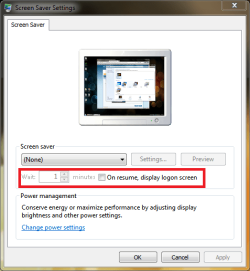
Anyone get winexit.scr to work in Win7?

dockster

New member
Member
Local time
2:00 PM
Messages
63
Trying to get an idle-timed auto log out. In Win XP, was able to use Winexit.scr. however, can't get it to work in Win7. has anybody had any luck?

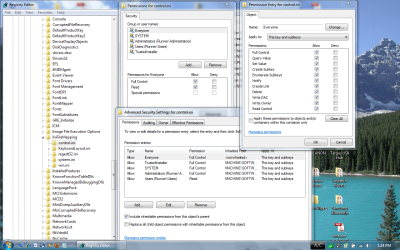
I tried editing the applicable registry settings as indicated here: Logoff Screen Saver Does Not Function in Windows NT


Please see my permissions screenshot below.

Why wont this work?

Tried this on WIn7 Ultimate and Home Premium, both 64 bit versions.
 

Attachments
  • Capture.PNG
    Capture.PNG
    160.3 KB · Views: 759

My Computer My Computer

At a glance

Windows 7AMD Turion X2 RM-72 2.10 GHz Dual-Core Mobile...4GBATI Radeon HD 3200 Graphics RS780M
Computer Manufacturer/Model Number
Hewlett Packard dv4-1222nr
OS
Windows 7
CPU
AMD Turion X2 RM-72 2.10 GHz Dual-Core Mobile Processor
Memory
4GB
Graphics Card(s)
ATI Radeon HD 3200 Graphics RS780M
Monitor(s) Displays
14.1" LCD
Hard Drives
250GB (5400RPM)
Internet Speed
3.0 MBPS (down) / 1.0MBPS (up)
Why do you need a special screensaver for something built in?
(You could also create a scheduled task to do the samething.)
 

Attachments

  • Untitled.png
    Untitled.png
    20.9 KB · Views: 128

My Computer My Computer

At a glance

Windows 10 Pro (x64)Intel Core i7-3930K (3.2GHz - 4.5GHz)4x Samsung 4GB PC3-12800 DDR3 (16GB 1600MHz)Nvidia Geforce GTX 690
Computer type
PC/Desktop
Computer Manufacturer/Model Number
Alienware Aurora ALX R4
OS
Windows 10 Pro (x64)
CPU
Intel Core i7-3930K (3.2GHz - 4.5GHz)
Motherboard
Alienware Aurora-R4 x79
Memory
4x Samsung 4GB PC3-12800 DDR3 (16GB 1600MHz)
Graphics Card(s)
Nvidia Geforce GTX 690
Sound Card
SteelSeries Siberia Elite
Monitor(s) Displays
Dell UltraSharp U3011
Screen Resolution
2560x1600
Hard Drives
Samsung 850 Pro 256 GB, Seagate 1TB Desktop Hybrid HDD, 2x Western Digital 4TB Green HDD
PSU
875W Some Dell PSU <.<
Case
Alienware Aurora ALX
Cooling
Custom Liquid Cooling (EK CPU & GPU blocks) dual EK 480RAD
Keyboard
Logitech G710+ Mechanical
Mouse
Logitech G700s
Internet Speed
Verizon Fios (50 mbps average)
Other Info
Server: Intel NUC D54250WYK: i5-4250U, 16GB, 256 GB mSATA, Windows Server 2012 R2
This only "locks" the user's workstation and doesn't actually log the user out. Winexit allowed me to:

1) Log out the user entirely.
2) Displayed a message to the uesr.
3) Allowed me to set a countdown in seconds...like 30 seconds, etc.

These three items is what I'm looking for. Haven't found a solution. shutdown.exe /l doesn't work with -t -c flags. And setting that to the idle trigger in task scheduler -- I can't get idle trigger to work in task scheduler.

I'm looking for some help I guess in getting the idle trigger to work. Then I'd just set two tasks, one that displays a message @ 15 minutes, and one that logs the user out at 17 minutes using the shutdown.exe /l.
 

My Computer My Computer

At a glance

Windows 7AMD Turion X2 RM-72 2.10 GHz Dual-Core Mobile...4GBATI Radeon HD 3200 Graphics RS780M
Computer Manufacturer/Model Number
Hewlett Packard dv4-1222nr
OS
Windows 7
CPU
AMD Turion X2 RM-72 2.10 GHz Dual-Core Mobile Processor
Memory
4GB
Graphics Card(s)
ATI Radeon HD 3200 Graphics RS780M
Monitor(s) Displays
14.1" LCD
Hard Drives
250GB (5400RPM)
Internet Speed
3.0 MBPS (down) / 1.0MBPS (up)
this taken from How can I: Auto log user off after xx minutes? Shutdown.exe doesn't work with -l -t -c (why not!)

In order for non-administrators to be able to use WINEXIT, you must add Set Value and Create Subkey permissions for the group Everyone on the following registry key:
HKEY_Local_Machine\Software\Microsoft\Windows NT\CurrentVersion\IniFileMappings\Control.ini
To do this, use the following steps:

NOTE: You must be logged on with administrative rights to make these changes.

1. Start Registry Editor (Regedt32.exe).
2. Open the following key [by right-clicking control.ini]:
HKEY_Local_Machine\Software\Microsoft\Windows NT\CurrentVersion\IniFileMappings\Control.ini
3. click Permissions.
4. In the Name box, click or add Everyone, and then click the ADVANCED box for special permissions.
5. Click to select the Set Value and Create Subkey check boxes.
6. Click OK, and then click OK.
7. Quit Registry Editor, and then restart the computer.
http://support.microsoft.com/default.aspx/kb/156677


I have personally confirmed this to work on a windows 7 32bit htpc...lovin it :)
now to figure out how to change the message in the logoff box...
 
Last edited:

My Computer My Computer

At a glance

windows 7 32bitamd quad phenom x4 2.4g2gbradeon hd3870
Computer Manufacturer/Model Number
custom
OS
windows 7 32bit
CPU
amd quad phenom x4 2.4g
Motherboard
asus
Memory
2gb
Graphics Card(s)
radeon hd3870
Sound Card
onboard
Monitor(s) Displays
dual flat 19"
Hard Drives
250g ide
PSU
generic psu
Case
raidmax sagitta
Cooling
fans
In case someone else searches, please see the solution below:
Those instructions are not quite correct for Windows 7-64bit (Enterprise)
2. Open the following key [by right-clicking control.ini]:
HKEY_Local_Machine\Software\Microsoft\Windows NT\CurrentVersion\IniFileMappings\Control.ini

Here is the correct key for which you need to change permissions:
HKEY_Local_Machine\Software\Wow6432Node\Microsoft\Windows NT\CurrentVersion\IniFileMappings\Control.ini

The rest of the instructions are fine.

I've just done it, and it got rid of the the "Error encountered while creating registry key." problem.
 

My Computer My Computer

At a glance

Windows 7AMD Turion X2 RM-72 2.10 GHz Dual-Core Mobile...4GBATI Radeon HD 3200 Graphics RS780M
Computer Manufacturer/Model Number
Hewlett Packard dv4-1222nr
OS
Windows 7
CPU
AMD Turion X2 RM-72 2.10 GHz Dual-Core Mobile Processor
Memory
4GB
Graphics Card(s)
ATI Radeon HD 3200 Graphics RS780M
Monitor(s) Displays
14.1" LCD
Hard Drives
250GB (5400RPM)
Internet Speed
3.0 MBPS (down) / 1.0MBPS (up)
What worked here

1) Copied:
WinExit.scr
WinExit.hlp
to
C:\Windows\System32.
You have to have local admin rights to do this.
2) Change Registry as posted above:
HKLM\Software\Microsoft\Windows NT\CurrentVersion\IniFileMappings\Control.ini
3) Reboot
4) Login, change your screensaver to LogOff Screen Saver and configure settings.
5) Copy:
C:\Users\<YourProfile>\AppData\Local\VirtualStore\Windows\Control.ini
to
C:\Windows
You have to have local admin rights to do this.
Contents of my control.ini file is:
[Screen Saver.Logoff]
ForceLogoff=1
CountDownTimer=180
DialogMessage=No user activity is being detected. Preparing to log off the
user. ANY UNSAVED WORK WILL BE LOST !!
This seems to apply to all users who have winexit as their screen saver.
Best of Luck
 

My Computer My Computer

At a glance

Win 7 UltimateIntel Core 2 Duo4GBmobo
Computer Manufacturer/Model Number
Dell Optiplex 780
OS
Win 7 Ultimate
CPU
Intel Core 2 Duo
Motherboard
Dell
Memory
4GB
Graphics Card(s)
mobo
Sound Card
mobo
Monitor(s) Displays
Dell 22"
Hard Drives
160GB
PSU
builtin
Case
USFF
Cooling
builtin
I know the last time the poster above posted, it was deleted. Mods, please don't delete. I tried it, its actually a good program and is freeware.
 

My Computer My Computer

At a glance

Windows 7AMD Turion X2 RM-72 2.10 GHz Dual-Core Mobile...4GBATI Radeon HD 3200 Graphics RS780M
Computer Manufacturer/Model Number
Hewlett Packard dv4-1222nr
OS
Windows 7
CPU
AMD Turion X2 RM-72 2.10 GHz Dual-Core Mobile Processor
Memory
4GB
Graphics Card(s)
ATI Radeon HD 3200 Graphics RS780M
Monitor(s) Displays
14.1" LCD
Hard Drives
250GB (5400RPM)
Internet Speed
3.0 MBPS (down) / 1.0MBPS (up)
Thanks for the thumbs up. I do a lot of this stuff for work (scripts, utilities, weird workarounds) and I like to share my work!
 

My Computer My Computer

At a glance

Windows 7
OS
Windows 7
For those that find this page, as I did, years later :) You can use the following Powershell to automate the Registry Permissions necessary to make Winexit work under Windows 7x64 and Server 2008 R2 x64

Code:
# WINEXIT.SCR NECESSARY ACLS
$WinExitAcl = Get-Acl "HKLM:\SOFTWARE\Wow6432Node\Microsoft\Windows NT\CurrentVersion\IniFileMapping\control.ini"
$WinExitAcl
$rule = New-Object System.Security.AccessControl.RegistryAccessRule("Users","SetValue, CreateSubKey","ContainerInherit, ObjectInherit","None","Allow")
$WinExitAcl.AddAccessRule($rule)
Set-Acl "HKLM:\SOFTWARE\Wow6432Node\Microsoft\Windows NT\CurrentVersion\IniFileMapping\control.ini" $WinExitAcl
 

My Computer My Computer

At a glance

Windows 7 Ultimate x32 and x64, Windows Serve...
OS
Windows 7 Ultimate x32 and x64, Windows Server 2008 R2
Back
Top