
Solved Anyone Seen This Before? Not sure what to search for to solve this!

jkozlovsky55

New member
Local time
3:44 PM
Messages
5
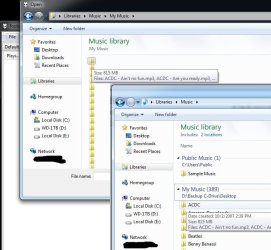
Attached image explains what is occurring. This happens in ALL programs, web sites, etc. Even when uploading the image just now on this site I was unable to see any file info (left side of image, only folder icons, no names show). I just had to move it to a location by itself on the desktop so I knew which item it was I was uploading. Viewing folders normally in windows is well... normal (right side of image, folder icons show their names as they should). Using Run or Libraries, etc works as intended, it is just when I am trying to open a file from within a program it does this. Example given is in a music player called Foobar. Again, the program is irrelevant, it does it even in windows controlled programs. Makes it incredibly difficult to locate files you want to open or upload for virtually any purpose. Lost for words on how to put this into a search topic to find help so I just decided to post a picture... if anyone has a solution or even a "term" for this anomaly, I'd love to hear it.
 

Attachments
  • wtf_browse_only.jpg
    wtf_browse_only.jpg
    58.4 KB · Views: 1
Last edited:

My Computer My Computer

At a glance

Win7 Pro x64
Computer type
PC/Desktop
OS
Win7 Pro x64
Still haven't been able to find anything associated with this issue on the webs. Surely someone has seen this before. Also if this is related at all, checking for updates automatically in programs rarely works. I almost always have to manually go to the website and install the new updated executable. Non-executable updates seem to work fine though (most windows updates, definition updates for ad-aware anti-virus, etc).
 

My Computer My Computer

At a glance

Win7 Pro x64
Computer type
PC/Desktop
OS
Win7 Pro x64
Hello Jkozlovsky, and welcome to Seven Forums.

I'm not sure what may be causing this, but you could see if doing a system restore using a restore point dated before this started may be able to undo and fix it.
 

My Computer My Computer

At a glance

64-bit Windows 11 Pro for WorkstationsIntel i7-8700K OC'd to 5 GHz64 GB (4x16GB) G.SKILL TridentZ RGB DDR4 3600...ASUS ROG-STRIX-GTX1080TI-O11G-GAMING
Computer type
PC/Desktop
Computer Manufacturer/Model Number
Self built custom
OS
64-bit Windows 11 Pro for Workstations
CPU
Intel i7-8700K OC'd to 5 GHz
Motherboard
ASUS ROG Maximus XI Formula Z390
Memory
64 GB (4x16GB) G.SKILL TridentZ RGB DDR4 3600 MHz
Graphics Card(s)
ASUS ROG-STRIX-GTX1080TI-O11G-GAMING
Sound Card
Integrated
Monitor(s) Displays
2 x Samsung Odyssey G7 27"
Screen Resolution
2560x1440
Hard Drives
1TB Samsung 990 PRO M.2,
4TB Samsung 990 PRO PRO M.2,
TerraMaster F8 SSD Plus NAS
PSU
Seasonic Prime Titanium 850W
Case
Thermaltake Core P3
Cooling
Corsair Hydro H115i
Keyboard
Logitech wireless K800
Mouse
Logitech MX Master 4
Internet Speed
2 Gb/s Download and 100 Mb/s Upload
Antivirus
Malwarebyte Anti-Malware Premium
Browser
Google Chrome
Other Info
Logitech Z625 speaker system,
Logitech BRIO 4K Pro webcam,
HP Color LaserJet Pro MFP M477fdn,
APC SMART-UPS RT 1000 XL - SURT1000XLI,
Galaxy S23 Plus phone
Last time it worked that I am certain of was before SP1 was installed after doing a fairly routine reformat and fresh install. However, I doubt that is the direct culprit. I fear registry corruption, but am unsure how to check and correct it. Obviously I'm trying to avoid having to reformat AGAIN for something this silly, though I may have to in order to fix it completely. Just wish I knew what the underlying problem was. All of my desktop, documents, etc link to their location on my large storage drive as to not clutter up my primary SSD that windows itself is installed on. If these paths somehow are getting jumbled when another program tries to seek them out, that would make sense, but it is doing it in all directories, not just ones on the other drive making me think it is something different. Besides, I have used this method for years. It lets you do a format of the primary drive without losing your saved documents, etc. Sometimes re-establishing the paths is a pain since windows quick transfer doesn't seem to know how to handle it. I'm rambling and it is late. Thanks for the quick response none the less.
TL;DR Still haven't figured it out.
 

My Computer My Computer

At a glance

Win7 Pro x64
Computer type
PC/Desktop
OS
Win7 Pro x64

My Computer My Computer

At a glance

Win 7 Home Premium SP1 32 bitAMD Athlon 64 X2 5000B4.00 GB Dual-Channel DDR2 @ 370MHz (6-6-6-18)Acer E181H (1366x768@60Hz) 64MB GeForce 6150 ...
Computer type
PC/Desktop
Computer Manufacturer/Model Number
Dell optiplex 740
OS
Win 7 Home Premium SP1 32 bit
CPU
AMD Athlon 64 X2 5000B
Motherboard
Dell Inc. 0YP696 (Socket M2 )
Memory
4.00 GB Dual-Channel DDR2 @ 370MHz (6-6-6-18)
Graphics Card(s)
Acer E181H (1366x768@60Hz) 64MB GeForce 6150 LE (Dell)
Sound Card
SigmaTel High Definition Audio CODEC
Monitor(s) Displays
Acer E181H (1366x768@60Hz) 64MB GeForce 6150 LE (Dell)
Hard Drives
699GB Seagate ST375064 0NS SCSI Disk Device (ATA)
Case
Mini tower
Internet Speed
Ping 36 ms, Download 57.71 mbps , Upload 11.79mbps
Antivirus
Free Avast. Pro paid Mbam , Free Sas
Browser
Palemoon .
Ran it 4 times, first time it found 14 problems, fixed 2, the times after that it found the remaining 12 and failed to repair any of them. Attached the sfcdetail.txt if you can make any sense of it.
 

Attachments

Last edited:

My Computer My Computer

At a glance

Win7 Pro x64
Computer type
PC/Desktop
OS
Win7 Pro x64

My Computer My Computer

At a glance

Windows 10 ProAMD Ryzen 5 2400G Processor with Radeon RX Ve...G.SKILL Ripjaws V Series 16GB (2 x 8GB) 288-P...2047MB NVIDIA GeForce GTX 1060 6GB (EVGA)
Computer type
PC/Desktop
Computer Manufacturer/Model Number
Custom Built
OS
Windows 10 Pro
CPU
AMD Ryzen 5 2400G Processor with Radeon RX Vega 11 Graphics
Motherboard
ASRock X470 Master SLI/AC AM4 AMD Promontory X470 SATA 6Gb/s
Memory
G.SKILL Ripjaws V Series 16GB (2 x 8GB) 288-Pin DDR4 SDRAM D
Graphics Card(s)
2047MB NVIDIA GeForce GTX 1060 6GB (EVGA)
Sound Card
Motherboard Built in
Monitor(s) Displays
Acer R240HY bidx 23.8-Inch IPS HDMI DVI VGA (1920 x 1080) Wi
Screen Resolution
1920 x 1080
Hard Drives
1TB Sandisk SSD PLUS (Main drive)
500 GB Seagate 7200 RPM (Games)
500 GB Western Digital 7200 RPM (Virtual Machines)
PSU
CORSAIR TX Series TX650M 650W 80+ Gold Modular Power Supply
Case
CORSAIR CARBIDE SPEC-02 Mid-Tower Gaming Case, Red LED Fan
Cooling
220mm, two 120mm, and four 60mm fans
Keyboard
Wired Dell keyboard
Mouse
Wireless Logitech mouse
Internet Speed
250mb down, 30mb up
Antivirus
Panda Cloud Antivirus
Browser
Chrome-ish x64
Other Info
Your awesome for reading this.
Yeah, there are to many important system files listed in your SFC log that couldn't be repaired.

I would recommend to do a clean install, but this time do not move your user folders or user profile to another location. Instead you could use libraries. Some programs will give you an option to select where to install it.


My Computer My Computer

At a glance

64-bit Windows 11 Pro for WorkstationsIntel i7-8700K OC'd to 5 GHz64 GB (4x16GB) G.SKILL TridentZ RGB DDR4 3600...ASUS ROG-STRIX-GTX1080TI-O11G-GAMING
Computer type
PC/Desktop
Computer Manufacturer/Model Number
Self built custom
OS
64-bit Windows 11 Pro for Workstations
CPU
Intel i7-8700K OC'd to 5 GHz
Motherboard
ASUS ROG Maximus XI Formula Z390
Memory
64 GB (4x16GB) G.SKILL TridentZ RGB DDR4 3600 MHz
Graphics Card(s)
ASUS ROG-STRIX-GTX1080TI-O11G-GAMING
Sound Card
Integrated
Monitor(s) Displays
2 x Samsung Odyssey G7 27"
Screen Resolution
2560x1440
Hard Drives
1TB Samsung 990 PRO M.2,
4TB Samsung 990 PRO PRO M.2,
TerraMaster F8 SSD Plus NAS
PSU
Seasonic Prime Titanium 850W
Case
Thermaltake Core P3
Cooling
Corsair Hydro H115i
Keyboard
Logitech wireless K800
Mouse
Logitech MX Master 4
Internet Speed
2 Gb/s Download and 100 Mb/s Upload
Antivirus
Malwarebyte Anti-Malware Premium
Browser
Google Chrome
Other Info
Logitech Z625 speaker system,
Logitech BRIO 4K Pro webcam,
HP Color LaserJet Pro MFP M477fdn,
APC SMART-UPS RT 1000 XL - SURT1000XLI,
Galaxy S23 Plus phone
Yes, that is how I have it done. Guess I will end up doing a clean install if a repair from disc doesn't help. Just wish I knew what caused it so it doesn't happen again. Guess I will have to pay more attention to the exact moment it occurs if it does occur in the future, thanks for the help everyone.
 

My Computer My Computer

At a glance

Win7 Pro x64
Computer type
PC/Desktop
OS
Win7 Pro x64

My Computer My Computer

At a glance

Win 7 Home Premium SP1 32 bitAMD Athlon 64 X2 5000B4.00 GB Dual-Channel DDR2 @ 370MHz (6-6-6-18)Acer E181H (1366x768@60Hz) 64MB GeForce 6150 ...
Computer type
PC/Desktop
Computer Manufacturer/Model Number
Dell optiplex 740
OS
Win 7 Home Premium SP1 32 bit
CPU
AMD Athlon 64 X2 5000B
Motherboard
Dell Inc. 0YP696 (Socket M2 )
Memory
4.00 GB Dual-Channel DDR2 @ 370MHz (6-6-6-18)
Graphics Card(s)
Acer E181H (1366x768@60Hz) 64MB GeForce 6150 LE (Dell)
Sound Card
SigmaTel High Definition Audio CODEC
Monitor(s) Displays
Acer E181H (1366x768@60Hz) 64MB GeForce 6150 LE (Dell)
Hard Drives
699GB Seagate ST375064 0NS SCSI Disk Device (ATA)
Case
Mini tower
Internet Speed
Ping 36 ms, Download 57.71 mbps , Upload 11.79mbps
Antivirus
Free Avast. Pro paid Mbam , Free Sas
Browser
Palemoon .
Back
Top