
devildog93
Banned
Prior to doing a repair install, I never used to see 2 WiFi adapter options.
I used to have only one Local Area Connection, and one Wireless Connection.
Did the repair install and noticed my Task Manager had 3 networks it was watching.
1 Local Area, and 2 WiFi networks.
So I went to my Network and Sharing Center, and checked the adapters and noticed this:
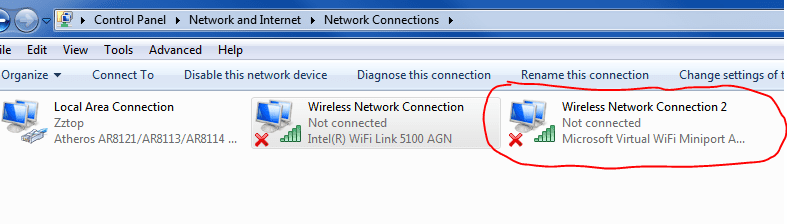
Disabled the Wireless adapter and the second (WiFi 9 MS wan mini-port) disappears:
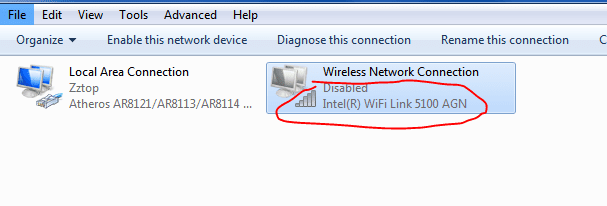
Then I go to Task Manager and I only have one network under Network tab, the Local, wired connection.
It doesn't seem like an issue to be concerned about, just prior to the repair install, I only ever had the one wireless adapter, and one wireless monitor in Task Manager, whether it was enabled or not.
Any reason for this. I have been noticing strange things like this since the repair.
Is this WAN mini-port thing new or something?
:devil 93
93
I used to have only one Local Area Connection, and one Wireless Connection.
Did the repair install and noticed my Task Manager had 3 networks it was watching.
1 Local Area, and 2 WiFi networks.
So I went to my Network and Sharing Center, and checked the adapters and noticed this:
Disabled the Wireless adapter and the second (WiFi 9 MS wan mini-port) disappears:
Then I go to Task Manager and I only have one network under Network tab, the Local, wired connection.
It doesn't seem like an issue to be concerned about, just prior to the repair install, I only ever had the one wireless adapter, and one wireless monitor in Task Manager, whether it was enabled or not.
Any reason for this. I have been noticing strange things like this since the repair.
Is this WAN mini-port thing new or something?
:devil
93My Computer
- Computer Manufacturer/Model Number
- Laptop Acer Aspire 6930
- OS
- Windows 7 Professional
- CPU
- Intel Core2 Duo CPU T6400 @ 2.00GHz
- Memory
- 3 GB
- Graphics Card(s)
- lowly Intel Express Chipset WHOPPING 64 mb dedicated.LOL
- Monitor(s) Displays
- 26" RCA and 40" Haier, and laptop 17" screen
- Screen Resolution
- 26":1366X768 40":1920X1080 Laptop Screen: 1366X768
- Hard Drives
- Onboard HDD 300 GB/
Seagate 1TB External HDD/
Verbatim 500 GB External HDD/
Firelite 160 GB USB HDD
- Keyboard
- Microsoft Intellitype Wireless Multimedia Keyboard 1.1
- Mouse
- Microsoft Wireless Optical Mouse 2000
- Other Info
- Currently using Telus DSL. I currently have a 3.0 connection, but on wait list for 15.0 connection.


