
Solved AOMEI Backupper

ian50

New member
Guru
VIP
Local time
8:55 AM
Messages
206
I wonder if this issue is me being dumb or it is actually real now.

I've been using Macrium7 (and the Windows Backup imaging utility) for reliable image backups. Obviously I prefer Macrium7 Reflect Free because it is faster and the image file can be mounted to recover individual files or folders; also, Windows 7 imaging is persistently reported as unreliable. I have used the utility available in Macrium7 and the Windows program to make a bootable DVD for image recovery off an external HDD - these boot CD's have been tested and work ok, finding the image file for recovery off a USB-connected HDD.

So I thought in an idle moment (not too many of them) I would add belts to the braces and also install AOMEI Backupper. Earlier I had tried OneKey but jettisoned it in favour of the Macrium Recovery route. I also use both MiniTool and AOMEI Partition Manager without issue. The AOMEI Partition Manager has a utility for generating a bootable DVD (the freeware version of MiniTool has removed that) to allow for partition manipulation off the HDD, as it should. Tested and works ok.

So AOMEI Backupper came with a pedigree I thought was pretty good, and as a belt 'n brace addition seemed to be a good idea. So I installed it and actually made a full image on to an external HDD, then mounted the image to test individual files and found the dismount utility. So far, so good. Image file size about the same as that of Macrium7 and all looked simple enough.

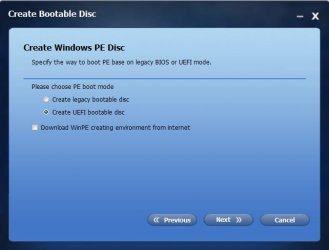
Then I tried to generate the critical bootable DVD to allow recovery of the image onto the main HDD (the entire point of a full image). Won't boot, won't boot ... either legacy or UEFI form, won't boot ...

The AOMEI FAQ does not hold that issue so it is of no help. I'm using Win7 and I see the AOMEI boot DVD uses Win10 WinPE environment to make the bootable DVD. Is that the problem, I wonder ? AOMEI Partition Manager bootable DVD was generated from an earlier version of that program with a more flexible WinPE choice, I think.

If so, there is a facility for pointing to a WinPE environment to use in generating the bootable DVD. If that's an answer, which WinPE file should I use ? Perhaps the Macrium7 one, or the AOMEI Partition one ?
 

My Computer

Computer type
Laptop
Computer Manufacturer/Model Number
HP 250 G7
OS
Windows 7 Pro x64
CPU
Intel i5-8265U
Motherboard
Intel Coffee Lake
Memory
8gb
Graphics Card(s)
Intel Iris Plus 655
Sound Card
Realtek HDA
Monitor(s) Displays
Generic
Screen Resolution
1366 x 768
Hard Drives
Crucial P5 NVMe 1Tb internal
WD's 4Tb, 3Tb, 2 x 2Tb external
Mouse
Logi wireless
Internet Speed
45 Mbps
Antivirus
AVG
Browser
Firefox 88, Pale Moon 29, Brave 129
Other Info
Combination of i5-8265U with Crucial P5 achieves Crystal Bench scores > 5000

Iris Plus GPU (Whiskey Lake) driver from BioStar

HP 250 G7 is a budget machine
Hi ian50,

Welcome to SevenForums.

Try using an older version of AOMEI, I use 2.2 and it works. Latest versions are quirky attempting to create boot media. If you have access to a Win7x64 computer, use that to create the media.

If you wish, I can attach an ISO of AOMEI boot media and you can burn that to disk or usb.
Use ImgBurn to burn ISO to DVD, Rufus to burn ISO to USB. Copy & paste will not work.

What options did you choose when creating bootable media?
Unless you're familiar with Linux, choose Win PE.
Next screen, don't use UEFI (recommended), won't boot. Why, not sure, added to my to do research list!
Choose Create the bootable disk based on legacy boot mode.
This option will should work on DVD and USB, your choice. USB will boot faster than DVD.

Nic
 

My Computer

Computer type
PC/Desktop
Computer Manufacturer/Model Number
HP Desktop & Compaq Laptop
OS
Win 10 x64, Linux Lite, Win 7 x64, BlackArch, & Kali
Hard Drives
Samsung 850 Pro 256Gb,
Hitachi HDD 1Tb,
Crucial MX SSD 250Gb
Segate 3Tb USB 3.0 Ext. Backup HDD
Internet Speed
150Mbps dn, 20Mbps up
Antivirus
Avast Free, Malwarebytes Anti-Exploit & Anti-Ransomware
Browser
Firefox, Chrome, Opera, & VPN
Thanks for the reply :)

> "Try using an older version of AOMEI, I use 2.2 and it works. Latest versions are quirky attempting to create boot media. If you have access to a Win7x64 computer, use that to create the media."

I had hoped an earlier version would indeed work (MS has been busy trying to squelch Win7 for Win10 in the last year. Most hardware and software suppliers seem to have agreed). From the link you kindly supplied, I tried a number of older versions from 2.2 to 4.0.3. Same result - won't boot. AOMEI Partition generates a working boot disk, as does Macrium7 and Windows Backup, but not AOMEI Backup. I'm using my Win7 Pro x64 machine.

>"If you wish, I can attach an ISO of AOMEI boot media and you can burn that to disk or usb.
Use ImgBurn to burn ISO to DVD, Rufus to burn ISO to USB. Copy & paste will not work"

Thank you for the offer but I much prefer to find out *why* I cannot generate a reliable boot disk. I do know how to burn ISO's, of course (only a "junior" on this particular forum).

>"What options did you choose when creating bootable media?
Unless you're familiar with Linux, choose Win PE."

I am familiar enough with Linux although for this installation I prefer WinPE. In any case, I tried both - no success.

>"Next screen, don't use UEFI (recommended), won't boot. Why, not sure, added to my to do research list!
Choose Create the bootable disk based on legacy boot mode."

Win7 won't boot in UEFI mode if legacy mode is disabled and Secure Boot is on. So although one can generate a boot disk in UEFI, if those two conditions are not first reversed, Win7 won't boot. This forum contains many very useful tutorials about this - very informative and practical. Again in any case, neither mode worked here.

I'll keep trying. There is the ability to generate a boot disk with AOMEI Partition so I wonder if I can "graft" the Backupper program onto that. Or generate a standard generic boot disk and install AOMEI Backer on the external disk and run it from there to restore.
 

My Computer

Computer type
Laptop
Computer Manufacturer/Model Number
HP 250 G7
OS
Windows 7 Pro x64
CPU
Intel i5-8265U
Motherboard
Intel Coffee Lake
Memory
8gb
Graphics Card(s)
Intel Iris Plus 655
Sound Card
Realtek HDA
Monitor(s) Displays
Generic
Screen Resolution
1366 x 768
Hard Drives
Crucial P5 NVMe 1Tb internal
WD's 4Tb, 3Tb, 2 x 2Tb external
Mouse
Logi wireless
Internet Speed
45 Mbps
Antivirus
AVG
Browser
Firefox 88, Pale Moon 29, Brave 129
Other Info
Combination of i5-8265U with Crucial P5 achieves Crystal Bench scores > 5000

Iris Plus GPU (Whiskey Lake) driver from BioStar

HP 250 G7 is a budget machine
Which version of the WinPE may not matter on a bootable "rescue" disc or flash drive. Your not running your OS (Win 7) when you boot from the rescue disc. I use Macrium and notice I have an option on boot of the UEFI or Not. Considering the HP PC you list in your My System Specs I would assume its not a UEFI BIOS.

I don't know about AOMEI but it looks like you need non UEFI bootable media.
 

My Computer

Computer type
PC/Desktop
Computer Manufacturer/Model Number
My Own Build
OS
Windows 10 64 bit
CPU
Intel i7 6700K
Motherboard
ASUS ROG Maximus VIII Hero
Memory
16GB Corsair Dominator
Graphics Card(s)
Intel CPU Graphics
Sound Card
RealTek
Monitor(s) Displays
27" Dell S2719dgf
Screen Resolution
2560X1440
Hard Drives
1 TB Samsung 850 EVO SSD for Win 10 Pro
500GB Samsung 850 EVO SSD for Win 10 Insider
2 TB drive for backup
PSU
EVGA Supernova 750G2
Case
BeQuiet Silent Base 600
Cooling
Deepcool Captain 120EX
Keyboard
Microsoft Wireless 2000
Mouse
Microsoft wireless
Internet Speed
100 MB/sec (Cable)
Antivirus
Microsoft Defender and Malwarebytes
Browser
Edge/Firefox
Other Info
Cakewalk (Sonar) by BandLab and Studio One 4.1 Pro recording studio software. MOTU 896Mk3 Hybrid recording interface, Frontier Tranzport wireless control unit, Behringer X-Touch Control Surface.
Five USB connected optical drives for CD Audio production using Nero BurningROM
fireberd, OP stated trying both UEFI and legacy choices for boot media, neither works.

Try posting your issue on AOMEI forum directly. If they are unaware of your issue, they need to be. Might have a workaround for you in the meantime.

Nic
 

My Computer

Computer type
PC/Desktop
Computer Manufacturer/Model Number
HP Desktop & Compaq Laptop
OS
Win 10 x64, Linux Lite, Win 7 x64, BlackArch, & Kali
Hard Drives
Samsung 850 Pro 256Gb,
Hitachi HDD 1Tb,
Crucial MX SSD 250Gb
Segate 3Tb USB 3.0 Ext. Backup HDD
Internet Speed
150Mbps dn, 20Mbps up
Antivirus
Avast Free, Malwarebytes Anti-Exploit & Anti-Ransomware
Browser
Firefox, Chrome, Opera, & VPN
I had this problem several years back. Get a small USB drive (Aomei only formats 4 GB.) Use the Linux option since the only thing you will end up with is the Aomei interface. No need for WinPE. Set your BIOS to boot to USB before Windows.
 

My Computer

Computer type
Laptop
Computer Manufacturer/Model Number
Dell Precision 15 7550 Workstation
OS
Windows 10 22H2 Pro
CPU
Intel(R) Xeon W-10885M
Motherboard
Dell
Memory
2x 32 GB DDR4 ECC memory (128 GB max)
Graphics Card(s)
Intel onboard GPU 1080p - Quadro RTX 5000 Max-Q GPU 4K
Hard Drives
500 GB Corsair T500 main M2 SSD
1 TB Intel storage M2 SSD (6 TB max)
Mouse
Logitech MX-25 Bluetooth
Internet Speed
slow
Antivirus
MS
Browser
Pale Moon 33.3.x x64 AVX2 build
If you make an Aomei partititon assistant media, it should automatically pick up and include Aomei Backupper in the boot media.

Now you have installed backupper, try making another Aomei part assist media, and see if Backupper is included.
 

My Computers

System One System Two

  • Computer type
    PC/Desktop
    OS
    7 X64
    CPU
    i5 8400
    Motherboard
    gigabyte b365m ds3h
    Memory
    2x8gb 3200mhz
    Hard Drives
    various
    PSU
    pure power 11 400w cm
    Case
    Coolermaster
    Cooling
    cryorig m9i
  • Computer type
    PC/Desktop
    OS
    7x64
    CPU
    g5400
    Motherboard
    ga b365m ds3h
    Memory
    8gb ddr4 2400
    PSU
    xfx pro 450w
Thanks for all your suggestions.
SIW2 - I tried that. The "make bootable media" utility in AOMEI Partition then hangs at about 80% completion on writing the DVD and needs quite brutal manual intervention to turn it off. I note that this utility (Standard Edition 7.0) uses Win8.1 as the WinPE enviroment, whereas the more recent editions of BackUpper use Win10.

My tentative conclusion so far ? AOMEI Backup is not reliable. Macrium7 is. I'm sure other people have found differently but I cannot rely on it.
 

My Computer

Computer type
Laptop
Computer Manufacturer/Model Number
HP 250 G7
OS
Windows 7 Pro x64
CPU
Intel i5-8265U
Motherboard
Intel Coffee Lake
Memory
8gb
Graphics Card(s)
Intel Iris Plus 655
Sound Card
Realtek HDA
Monitor(s) Displays
Generic
Screen Resolution
1366 x 768
Hard Drives
Crucial P5 NVMe 1Tb internal
WD's 4Tb, 3Tb, 2 x 2Tb external
Mouse
Logi wireless
Internet Speed
45 Mbps
Antivirus
AVG
Browser
Firefox 88, Pale Moon 29, Brave 129
Other Info
Combination of i5-8265U with Crucial P5 achieves Crystal Bench scores > 5000

Iris Plus GPU (Whiskey Lake) driver from BioStar

HP 250 G7 is a budget machine
Backupper is very reliable.. Not sure what it is about your system that is causing difficulty creating the media.

I have advanced boot media with lots of tools - including Aomei here:

My win7 64 bit boot media
17514x64-v5.iso

My win 7 32 bit boot media
A23x86.iso

If you need win10x64 boot media for any reason
16299x64-v2.iso
 

My Computers

System One System Two

  • Computer type
    PC/Desktop
    OS
    7 X64
    CPU
    i5 8400
    Motherboard
    gigabyte b365m ds3h
    Memory
    2x8gb 3200mhz
    Hard Drives
    various
    PSU
    pure power 11 400w cm
    Case
    Coolermaster
    Cooling
    cryorig m9i
  • Computer type
    PC/Desktop
    OS
    7x64
    CPU
    g5400
    Motherboard
    ga b365m ds3h
    Memory
    8gb ddr4 2400
    PSU
    xfx pro 450w
SIW2

Again, thank you for the help. As I'd noted, other people may find AOMEI Backer reliable. My hard experience here is that Macrium7 is best.

I've looked at your proffered ISO boot file, dl'ed it, burnt it to disc and tested it. Works fine. So what is the difference between the ISO's generated on my machine and yours ? As I thought, the files bootmgr.efi and bootx64.efi are missing from my ISO's generated in AOMEI but present both in your ISO and my generated AOMEI partition and Macrium7 boot discs.

Bluntly, it may be that the 1st AOMEI Backer version I tried (most recent), which offered only a WinPE Win10 environment has left registry entries which I cannot identify, to prevent completion of bootable discs other than on Win10 systems. I really hope this is not so, but if someone with a Win7 Pro x64 system can generate a bootable disc with the current version of AOMEI Backer this would confirm that something else is the problem here.

As it stands, I have a 2nd machine running Win7 Pro x64 with both Macrium7 and AOMEI Partition on it, but not AOMEI Backer yet. I'll ensure a Restore Point and a Macrium7 image on it, then try AOMEI v2.2 and see what we will see (as Schulz said :))
 

My Computer

Computer type
Laptop
Computer Manufacturer/Model Number
HP 250 G7
OS
Windows 7 Pro x64
CPU
Intel i5-8265U
Motherboard
Intel Coffee Lake
Memory
8gb
Graphics Card(s)
Intel Iris Plus 655
Sound Card
Realtek HDA
Monitor(s) Displays
Generic
Screen Resolution
1366 x 768
Hard Drives
Crucial P5 NVMe 1Tb internal
WD's 4Tb, 3Tb, 2 x 2Tb external
Mouse
Logi wireless
Internet Speed
45 Mbps
Antivirus
AVG
Browser
Firefox 88, Pale Moon 29, Brave 129
Other Info
Combination of i5-8265U with Crucial P5 achieves Crystal Bench scores > 5000

Iris Plus GPU (Whiskey Lake) driver from BioStar

HP 250 G7 is a budget machine
Bluntly, it may be that the 1st AOMEI Backer version I tried (most recent), which offered only a WinPE Win10 environment has left registry entries which I cannot identify,

No. the win10 pe is downloaded. It should offer to either create winpe from your current system ( using winre.wim on your hard drive) OR download win 10 pe.

If it can't find winre.wim on your hard drive, then you won't get the dotted first options - you would then have to download the win10 pe.

aomei-winpe.jpg

There is some thing up with your system, probably minor that seems to be interfering with copying/creating the boot media.

Win7 Pro x64 system can generate a bootable disc with the current version of AOMEI Backer this would confirm that something else is the problem here.

Works fine for me using Backupper 4.1
 

My Computers

System One System Two

  • Computer type
    PC/Desktop
    OS
    7 X64
    CPU
    i5 8400
    Motherboard
    gigabyte b365m ds3h
    Memory
    2x8gb 3200mhz
    Hard Drives
    various
    PSU
    pure power 11 400w cm
    Case
    Coolermaster
    Cooling
    cryorig m9i
  • Computer type
    PC/Desktop
    OS
    7x64
    CPU
    g5400
    Motherboard
    ga b365m ds3h
    Memory
    8gb ddr4 2400
    PSU
    xfx pro 450w
Hi All,
Greets,
ian50 : Sir,

1.I feel one should go through these two links at least once :
(a)https://www.aomeitech.com/pe-builder.html
(b)https://web.archive.org/web/20171231124315/https://www.aomeitech.com/pebuilder/help/
( The second link is provided by ''Internet Archive: WayBack Machine". The official page is down. It is slow to load. Actually, both pages are slow to load. So, be patient ! )

2.In these conditions :
Making a rescue iso will be better than a rescue cd !
Use Official AOMEI PE Buidler. (above Links )
Download the Win 10 PE and make the rescue iso instead of using the running OS PE.

Thanks & Regards. ...
 

My Computer

Computer type
Laptop
Computer Manufacturer/Model Number
hp compaq presario c795VU notebook pc
OS
Windows 7 Ultimate x32 With Sp1 + Vista Ultimate x32 with Sp1 & Sp2 !!
CPU
Intel Mobile Core 2 Duo T5750 @ 2.00GHz Merom 65nm Technolog
Motherboard
Hewlett-Packard 30D9 (CPU)
Memory
2.00GB Dual-Channel DDR2 @ 332MHz (5-5-5-15)
Graphics Card(s)
Mobile Intel(R) 965 Express Chipset Family
Sound Card
High Definition Audio Device
Monitor(s) Displays
LP154WX4-TLCB on Mobile Intel 965 Express Chipset Family
Screen Resolution
1280x800 @ 60Hz
Hard Drives
149GB Western Digital WDC WD1600BEVS-60VAT0 ATA Device (SATA)
Keyboard
Standard 101/102-Key or Microsoft Natural PS/2 Key + HP QLB
Mouse
ALPS pointing device
Antivirus
Kaspersky AV 2017(Win 7) & AVG AntiVirus Free 2016 (VISTA)
Browser
google chrome
Thanks SIW2

Your ISO works ok as a boot on both my Win7 Pro x64 HP250 machines. Both machines have the UEFI set with Legacy enabled and Secure Boot disabled.

I can generate boot CD's on both machines with AOMEI Partition and Macrium7 - but not AOMEI Backer. Just won't add the bootx64.efi files on either machine.

So if I am to persist with the "belt and braces" framework, I'll just have to use the boot ISO you kindly provided. So, thanks again. Sort of solved, I guess
 

My Computer

Computer type
Laptop
Computer Manufacturer/Model Number
HP 250 G7
OS
Windows 7 Pro x64
CPU
Intel i5-8265U
Motherboard
Intel Coffee Lake
Memory
8gb
Graphics Card(s)
Intel Iris Plus 655
Sound Card
Realtek HDA
Monitor(s) Displays
Generic
Screen Resolution
1366 x 768
Hard Drives
Crucial P5 NVMe 1Tb internal
WD's 4Tb, 3Tb, 2 x 2Tb external
Mouse
Logi wireless
Internet Speed
45 Mbps
Antivirus
AVG
Browser
Firefox 88, Pale Moon 29, Brave 129
Other Info
Combination of i5-8265U with Crucial P5 achieves Crystal Bench scores > 5000

Iris Plus GPU (Whiskey Lake) driver from BioStar

HP 250 G7 is a budget machine
Vineet Garg

Thank you for your suggestion, but as I've noted to you, I did indeed try those links - much earlier in fact.

Link a) is completely in Mandarin. I'm sure it's useful information but I cannot read it at all

Link b) [on Wayback as of now] I tried this tool (SWI2 also used it, I think) much earlier. The CD it generated when booted completely scrambled my HDD. I had to use the Macrium7 image to recover, losing nearly a week's cumulative data and work. I hadn't much wanted to add this comment here but this is in a direct response to the suggestion.

At this point, AOEMI Backer is not useful for me, I think. Others may well find the opposite.
 

My Computer

Computer type
Laptop
Computer Manufacturer/Model Number
HP 250 G7
OS
Windows 7 Pro x64
CPU
Intel i5-8265U
Motherboard
Intel Coffee Lake
Memory
8gb
Graphics Card(s)
Intel Iris Plus 655
Sound Card
Realtek HDA
Monitor(s) Displays
Generic
Screen Resolution
1366 x 768
Hard Drives
Crucial P5 NVMe 1Tb internal
WD's 4Tb, 3Tb, 2 x 2Tb external
Mouse
Logi wireless
Internet Speed
45 Mbps
Antivirus
AVG
Browser
Firefox 88, Pale Moon 29, Brave 129
Other Info
Combination of i5-8265U with Crucial P5 achieves Crystal Bench scores > 5000

Iris Plus GPU (Whiskey Lake) driver from BioStar

HP 250 G7 is a budget machine
Sir,
1.
Link a) is completely in Mandarin. I'm sure it's useful information but I cannot read it at all

The link is doing fine for me ! Ok, again WayBack ( May 2, 2018 ): AOMEI PE Builder|Create Windows PE bootable disk, USB or CD/DVD, with AOMEI PE Builder
(But the PE builder here , is as old as DEC 2017)

2. I tried this tool (SWI2 also used it, I think) much earlier. The CD it generated when booted completely scrambled my HDD. I had to use the Macrium7 image to recover, losing nearly a week's cumulative data and work

(a) Make the rescue iso & not the rescue CD ! ( Adjusting between Legacy BIOS & UEFI is often a problem without RUFUS, in-built cd burning software may be a problem & try to make an iso without added softwares/bloatware )
(b) Download win 10 PE & not use the one of running OS.

Thanks & Regards. ...
 

My Computer

Computer type
Laptop
Computer Manufacturer/Model Number
hp compaq presario c795VU notebook pc
OS
Windows 7 Ultimate x32 With Sp1 + Vista Ultimate x32 with Sp1 & Sp2 !!
CPU
Intel Mobile Core 2 Duo T5750 @ 2.00GHz Merom 65nm Technolog
Motherboard
Hewlett-Packard 30D9 (CPU)
Memory
2.00GB Dual-Channel DDR2 @ 332MHz (5-5-5-15)
Graphics Card(s)
Mobile Intel(R) 965 Express Chipset Family
Sound Card
High Definition Audio Device
Monitor(s) Displays
LP154WX4-TLCB on Mobile Intel 965 Express Chipset Family
Screen Resolution
1280x800 @ 60Hz
Hard Drives
149GB Western Digital WDC WD1600BEVS-60VAT0 ATA Device (SATA)
Keyboard
Standard 101/102-Key or Microsoft Natural PS/2 Key + HP QLB
Mouse
ALPS pointing device
Antivirus
Kaspersky AV 2017(Win 7) & AVG AntiVirus Free 2016 (VISTA)
Browser
google chrome
Vineet Garg

Thank you for your time. I'm sure you mean well.

Of course I've tried generating the ISO and then burning it to CD. It either won't boot or scrambles the HDD.

Using Win10 PE has resulted in an unbootable HDD which I've scrambles to recover from.

AOMEI just isn't worth all the hassle for me.

Good luck.
 

My Computer

Computer type
Laptop
Computer Manufacturer/Model Number
HP 250 G7
OS
Windows 7 Pro x64
CPU
Intel i5-8265U
Motherboard
Intel Coffee Lake
Memory
8gb
Graphics Card(s)
Intel Iris Plus 655
Sound Card
Realtek HDA
Monitor(s) Displays
Generic
Screen Resolution
1366 x 768
Hard Drives
Crucial P5 NVMe 1Tb internal
WD's 4Tb, 3Tb, 2 x 2Tb external
Mouse
Logi wireless
Internet Speed
45 Mbps
Antivirus
AVG
Browser
Firefox 88, Pale Moon 29, Brave 129
Other Info
Combination of i5-8265U with Crucial P5 achieves Crystal Bench scores > 5000

Iris Plus GPU (Whiskey Lake) driver from BioStar

HP 250 G7 is a budget machine
ian50 : Sir, thanks for sharing all the info.( It helped me ) We had a nice time together !

Thanks & Regards. ...
 

My Computer

Computer type
Laptop
Computer Manufacturer/Model Number
hp compaq presario c795VU notebook pc
OS
Windows 7 Ultimate x32 With Sp1 + Vista Ultimate x32 with Sp1 & Sp2 !!
CPU
Intel Mobile Core 2 Duo T5750 @ 2.00GHz Merom 65nm Technolog
Motherboard
Hewlett-Packard 30D9 (CPU)
Memory
2.00GB Dual-Channel DDR2 @ 332MHz (5-5-5-15)
Graphics Card(s)
Mobile Intel(R) 965 Express Chipset Family
Sound Card
High Definition Audio Device
Monitor(s) Displays
LP154WX4-TLCB on Mobile Intel 965 Express Chipset Family
Screen Resolution
1280x800 @ 60Hz
Hard Drives
149GB Western Digital WDC WD1600BEVS-60VAT0 ATA Device (SATA)
Keyboard
Standard 101/102-Key or Microsoft Natural PS/2 Key + HP QLB
Mouse
ALPS pointing device
Antivirus
Kaspersky AV 2017(Win 7) & AVG AntiVirus Free 2016 (VISTA)
Browser
google chrome
To clear up the confusion:

1. There is a product called Aomei Backupper. It has an built-in module to create winpe from the files on your hard drive. Sometimes your Windows bcd recovery sequence is broken. ( That is not the fault of Backupper - it has nothing to with creating the Windows bcd recovery sequence).If that is the case, Backupper cannot get the files it needs from your hard drive, and offers to download win 10 winpe to use instead.

It works perfectly on my system.

2. There is a product called Aomei Partition Assistant. It has an built-in module to create winpe from the files on your hard drive. Sometimes your Windows bcd recovery sequence is broken. ( That is not the fault of Partition Assistant - it has nothing to with creating the Windows bcd recovery sequence).If that is the case, Partition Assistant cannot get the files it needs from your hard drive, and offers to download win 10 winpe to use instead.

It works perfectly on my system.


3. There is an entirely different and separate product called Aomei pebuilder. The purpose of that is to create winpe with some extra functions ( Windows explorer for example.) Aomei pebuilder can create it from your hard drive - but only if it a fresh operating system without updates.It won't work properly if you try to create it on an updated system. It is only useful in limited circumstances so I don't recommend it for most people.

4. My own winpe isos are none of the above. I build them myself by hand.
 
Last edited:

My Computers

System One System Two

  • Computer type
    PC/Desktop
    OS
    7 X64
    CPU
    i5 8400
    Motherboard
    gigabyte b365m ds3h
    Memory
    2x8gb 3200mhz
    Hard Drives
    various
    PSU
    pure power 11 400w cm
    Case
    Coolermaster
    Cooling
    cryorig m9i
  • Computer type
    PC/Desktop
    OS
    7x64
    CPU
    g5400
    Motherboard
    ga b365m ds3h
    Memory
    8gb ddr4 2400
    PSU
    xfx pro 450w
Pe building is a specailist activity and building winpe such as mine takes along time to learn. If anybody interested, I can explain how to make a basic one yourself. A basic knowledge is useful:

For example, if you have a basic Aomei Backupper winpe, or a basic Macrium winpe, you can add a couple of extra programs and a simple menu to access them.

It is also possible to add WOW 32 bit capability to 64 bit winpe - but that is complicated to explain.
 

My Computers

System One System Two

  • Computer type
    PC/Desktop
    OS
    7 X64
    CPU
    i5 8400
    Motherboard
    gigabyte b365m ds3h
    Memory
    2x8gb 3200mhz
    Hard Drives
    various
    PSU
    pure power 11 400w cm
    Case
    Coolermaster
    Cooling
    cryorig m9i
  • Computer type
    PC/Desktop
    OS
    7x64
    CPU
    g5400
    Motherboard
    ga b365m ds3h
    Memory
    8gb ddr4 2400
    PSU
    xfx pro 450w
Hi SIW2,

If anybody interested, I can explain how to make a basic one yourself.

I would be very interested please SIW2.

Thanks in advance.
 

My Computer

Computer type
Laptop
Computer Manufacturer/Model Number
Fujitsu LIFEBOOK
OS
Win 7 HP SP1 64-bit Vista HB SP2 32-bit Linux Mint 18.3
CPU
Intel(R) Pentium(R) CPU P6200 @ 2.13GHz
Motherboard
FUJITSU FJNBB06
Memory
4.00 GB
Graphics Card(s)
Intel(R) Graphics Media Accelerator HD
Sound Card
[1] Realtek High Definition Audio [2] Intel(R) Display Audio
Screen Resolution
1366 x 768 x 32 bits (4294967296 colors) @ 59 Hz
Hard Drives
TOSHIBA MK5076GSX
Antivirus
AVG FREE
Back
Top