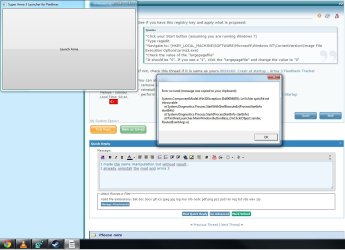
application will not launch

Frogger

New member
Local time
12:14 PM
Messages
4
hello
I am French but I need help real connoisseurs ..
I play on a server altislife arma 3 a using a launcher.
Recently he refuses to run. I click to launch it and have a message directly "has stop working" ..
Report of the event viewer ..
I already do a sfc / scanow and stresses that could not be repaired some file.
 

Attachments

My Computer

Computer type
PC/Desktop
OS
windows 7 home premium 64bits SP1
CPU
i5 3570K
Motherboard
MSI B75MA e33
Memory
8gb
Graphics Card(s)
gt640 MSI
Antivirus
avast
Browser
google chrome
See if you have this registry key and apply what is proposed:
*Click your Start button (assuming you are running Windows 7)
*Type regedit
*Navigate to: [HKEY_LOCAL_MACHINE\SOFTWARE\Microsoft\Windows NT\CurrentVersion\Image File Execution Options\arma3.exe]
*Check the value of the "largepagefile"
*It should be "0". If you see a "1", click the "largepagefile" and change the value to "0"

If not, check this thread if it is same as yours 0024149: Crash at startup - Arma 3 Feedback Tracker

You can also try:
- remove all mods
- reinstall
- perform a clean startup http://www.sevenforums.com/tutorial...ation-conflicts-performing-clean-startup.html
 

My Computer

Computer type
PC/Desktop
Computer Manufacturer/Model Number
Custom Build
OS
Windows 7 Ultimate x64 SP1
CPU
AMD Phenom 2 1090T
Motherboard
Gigabyte GA-890FXA-UD5
Memory
2x8GB Kingston HyperX Fury Black 1600Mhz Unganged
Graphics Card(s)
MSI GTX 970 Gaming 4G
Sound Card
Realtek On-Board HD 7.1 Audio / Logitech G35
Monitor(s) Displays
3xAcer GD245HQ
Screen Resolution
1920x1080
Hard Drives
Samsung 850 Pro 512GB SSD - OS /
WD Caviar Black SATA 3 - 1 TBx2 - Dynamic RAID 0 /
WD Caviar Green SATA 2 - 640GBx2 - Dynamic RAID 0 /
WD Caviar Green SATA 2 - 640GB - Internal Backup /
Seagate Barracude SATA 3 - 3TB - External Backup/ Sync
PSU
HighPower 1000W
Case
Cooler Master HAF 932
Cooling
Noctua NH-D14
Keyboard
Logitech G19
Mouse
Logitech G500
Internet Speed
100/4 Mbit Cable (100GB quota)
Antivirus
ZoneAlarm Extreme Security / MBAM Pro / MBAE Free / SAS Free
Browser
IE 11 - Firefox - Chrome
Other Info
Logitech F710/ G27/ G940/ Z5500 // TrackIR 5 // Nvidia 3D Surround Vision
I made the same manipulation but without result..
I already uninstall the mod and arma 3
 

Attachments

  • launcher.jpg
    launcher.jpg
    114.2 KB · Views: 1

My Computer

Computer type
PC/Desktop
OS
windows 7 home premium 64bits SP1
CPU
i5 3570K
Motherboard
MSI B75MA e33
Memory
8gb
Graphics Card(s)
gt640 MSI
Antivirus
avast
Browser
google chrome
Try restarting PC, also bookmark that link I gave and check often.
 

My Computer

Computer type
PC/Desktop
Computer Manufacturer/Model Number
Custom Build
OS
Windows 7 Ultimate x64 SP1
CPU
AMD Phenom 2 1090T
Motherboard
Gigabyte GA-890FXA-UD5
Memory
2x8GB Kingston HyperX Fury Black 1600Mhz Unganged
Graphics Card(s)
MSI GTX 970 Gaming 4G
Sound Card
Realtek On-Board HD 7.1 Audio / Logitech G35
Monitor(s) Displays
3xAcer GD245HQ
Screen Resolution
1920x1080
Hard Drives
Samsung 850 Pro 512GB SSD - OS /
WD Caviar Black SATA 3 - 1 TBx2 - Dynamic RAID 0 /
WD Caviar Green SATA 2 - 640GBx2 - Dynamic RAID 0 /
WD Caviar Green SATA 2 - 640GB - Internal Backup /
Seagate Barracude SATA 3 - 3TB - External Backup/ Sync
PSU
HighPower 1000W
Case
Cooler Master HAF 932
Cooling
Noctua NH-D14
Keyboard
Logitech G19
Mouse
Logitech G500
Internet Speed
100/4 Mbit Cable (100GB quota)
Antivirus
ZoneAlarm Extreme Security / MBAM Pro / MBAE Free / SAS Free
Browser
IE 11 - Firefox - Chrome
Other Info
Logitech F710/ G27/ G940/ Z5500 // TrackIR 5 // Nvidia 3D Surround Vision
It is done. Unfortunately, the problem persists ..
I have carefully read the topic on arma 3, it solved the problem of the launcher but not me .. my arma 3 launches without problem if I run by steam
 

My Computer

Computer type
PC/Desktop
OS
windows 7 home premium 64bits SP1
CPU
i5 3570K
Motherboard
MSI B75MA e33
Memory
8gb
Graphics Card(s)
gt640 MSI
Antivirus
avast
Browser
google chrome
Steam games are supposed to be run while steam is running, as far as I know only exceptions are usually MMOs. Of course maybe Arma 3 is different.

Try running Steam but use the desktop shortcut (the one that fails). See if that helps.
 

My Computer

Computer type
PC/Desktop
Computer Manufacturer/Model Number
Custom Build
OS
Windows 7 Ultimate x64 SP1
CPU
AMD Phenom 2 1090T
Motherboard
Gigabyte GA-890FXA-UD5
Memory
2x8GB Kingston HyperX Fury Black 1600Mhz Unganged
Graphics Card(s)
MSI GTX 970 Gaming 4G
Sound Card
Realtek On-Board HD 7.1 Audio / Logitech G35
Monitor(s) Displays
3xAcer GD245HQ
Screen Resolution
1920x1080
Hard Drives
Samsung 850 Pro 512GB SSD - OS /
WD Caviar Black SATA 3 - 1 TBx2 - Dynamic RAID 0 /
WD Caviar Green SATA 2 - 640GBx2 - Dynamic RAID 0 /
WD Caviar Green SATA 2 - 640GB - Internal Backup /
Seagate Barracude SATA 3 - 3TB - External Backup/ Sync
PSU
HighPower 1000W
Case
Cooler Master HAF 932
Cooling
Noctua NH-D14
Keyboard
Logitech G19
Mouse
Logitech G500
Internet Speed
100/4 Mbit Cable (100GB quota)
Antivirus
ZoneAlarm Extreme Security / MBAM Pro / MBAE Free / SAS Free
Browser
IE 11 - Firefox - Chrome
Other Info
Logitech F710/ G27/ G940/ Z5500 // TrackIR 5 // Nvidia 3D Surround Vision
I did some research because it does not advance otherwise !
The error code gives an 0x0000b727 kernelbase.dll ... I have replaced the problem without success remains the same ...
 

My Computer

Computer type
PC/Desktop
OS
windows 7 home premium 64bits SP1
CPU
i5 3570K
Motherboard
MSI B75MA e33
Memory
8gb
Graphics Card(s)
gt640 MSI
Antivirus
avast
Browser
google chrome
Back
Top