Applying Multiple Regedits At Once

miketurn1234

New member
Member
Local time
1:01 PM
Messages
84
Hello Everyone,

With the many tweaks needed for Windows 7 I find that I have many regedits to run (files that end in .reg that apply edits to the registry). On top of having quite a few of them, with each reg file you run, Windows shows a popup message warning about applying items to the registry.

My question is does anyone know of a way to run multiple regedit files all at once to avoid the process of having to run each one individually, and also avoiding each popup warning.

Thank You
 

My Computer My Computer

At a glance

Windows 7 Professional
Computer type
PC/Desktop
OS
Windows 7 Professional
Combined

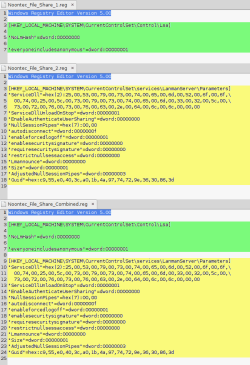
You could combine the contents of multiple reg files into one.

If you open a couple of them in a text editor, you should see that they have a common section (at the top) and the registry key data.
Simply copy the registry key data from the reg files into one file.

Back up your Registry, or better yet create a backup HDD image, before using the new file.

Reg Files Combined.png

 
Last edited:

My Computer My Computer

At a glance

W7 Ultimate SP1, LM19.2 MATE, W10 Home 1703, ...AMD Phenom II x6 1100T, 3.3 GHz12GB DDR3 1333 G-Skill (4GB x 2), G-Skill (2G...NVIDIA GeForce GTX 660
Computer type
PC/Desktop
Computer Manufacturer/Model Number
n/a
OS
W7 Ultimate SP1, LM19.2 MATE, W10 Home 1703, W10 Pro 1703 VM, #All 64 bit
CPU
AMD Phenom II x6 1100T, 3.3 GHz
Motherboard
ASUS M4A88T-M/USB3 (AM3)
Memory
12GB DDR3 1333 G-Skill (4GB x 2), G-Skill (2GB x 2)
Graphics Card(s)
NVIDIA GeForce GTX 660
Sound Card
Realtek?
Monitor(s) Displays
Samsung S23B350
Screen Resolution
1920x1080
Hard Drives
WD Green 2TB (SATA), WD Green 3TB (SATA), WD Blue 4TB (SATA), WD Blue 6TB (SATA)
PSU
Cooler Master
Case
Antec GX300 Tower
Cooling
3x Antec TRICOOL 120mm Fans
Mouse
Wired Optical
Internet Speed
DSL
Antivirus
Avast
Browser
Pale Moon (64 bit)
Other Info
2018-12-27 Upgraded HDDs
2015-12-10 Upgraded case, graphics card, storage
2015-08-15 Upgraded motherboard & RAM
2015-07-15 Upgraded LM17.1 to LM17.2
Have you tried regedit -s <filename> ?
 

My Computer My Computer

At a glance

Windows 7 Home Premium 64
Computer type
Laptop
OS
Windows 7 Home Premium 64
Hey Guys,

Thank you for the responses.

lehnerus2000
I figured there would be some way to combine the text into one file, but I was not sure of the exact procedure. I thought maybe there would need to be something between each regedit.
Thank you for providing the visual, I will give this a try.

passmorel
I looked up the command you recommended, are you referring to running the regedit "silently"?
No I have not tried this, I was not aware of the command, but if I had to run each one individually by typing, it would probably be quicker to click "yes" in the popup warnings. Unless I am misinterpreting your answer? If I am please let me know.

Thank You guys again, if you two have anymore information to share regarding my question, or if any others have anything else they would like to add, please let me know.
 

My Computer My Computer

At a glance

Windows 7 Professional
Computer type
PC/Desktop
OS
Windows 7 Professional
...
With the many tweaks needed for Windows 7 ...
I'm curious. What many tweaks are needed? I haven't tweaked anything in the registry on my Win 7 machines and they run fine.
 

My Computer My Computer

At a glance

W10 Pro desktop, W11 laptop, W11 Pro tablet (...3.7Ghz 8700K i7, i7-11800H, i7-1065G716G desktop, 16G laptop, 4G tabletAMD Radeon RX580, RTX 3060, Intel Iris Plus
Computer type
PC/Desktop
Computer Manufacturer/Model Number
Home Built desktop, Dell G15 5511 Gaming laptop,MS Surface Pro 7 tablet
OS
W10 Pro desktop, W11 laptop, W11 Pro tablet (all 64-bit)
CPU
3.7Ghz 8700K i7, i7-11800H, i7-1065G7
Motherboard
ASUS TUF Z370-Pro Gaming in desktop
Memory
16G desktop, 16G laptop, 4G tablet
Graphics Card(s)
AMD Radeon RX580, RTX 3060, Intel Iris Plus
Sound Card
High Definition Audio (Built-in to mobo)
Monitor(s) Displays
Samsung U32J59 32" (2x), 15.6", 12"
Screen Resolution
3840x2160, 3840x2160, 1920x1080, 2160x1440
Hard Drives
500G SSD for OS; 2T, 10T & 15T HDDs for Data on Desktop, 1TB SSD laptop, 128G SSD tablet.
PSU
Corsair CX 750M
Case
Antec 100
Cooling
CM 212+
Keyboard
IBM Model M - used continuously since 1986
Mouse
Microsoft Pro IntelliMouse
Internet Speed
400M down 8M up
Antivirus
Windows Defender
Browser
FireFox
Other Info
Built my first computer (8Mhz 8088cpu, 640K RAM, 20MB HDD, 2 360K floppy drives) in 1985 and have been building them for myself, relatives and friends ever since.
OK. So if you are doing this once, you can combine all the .reg files into a single file. As long as each section starts with the [Hive] and then the relevant keys & values that will be OK. Not sure if you need a blank line between each [Hive] set, but suspect not.
If you want to enter the same settings on a regular basis then you can put multiple regedit commands into a .cmd file and run that.
 

My Computer My Computer

At a glance

Windows 7 Home Premium 64
Computer type
Laptop
OS
Windows 7 Home Premium 64
Open a dos box in the folder with the reg files and type

for %f in (*.reg) do regedit.exe -s "%f"

or the hard way in this case

forfiles /M *.reg /C "cmd /c regedit.exe -s @path"

Depending on the reg files you need admin rights to do this.

Cheers
 

My Computer My Computer

At a glance

win7
OS
win7
Thank you guys for all the responses, I will try some of these methods out to see what I like / works best.
 

My Computer My Computer

At a glance

Windows 7 Professional
Computer type
PC/Desktop
OS
Windows 7 Professional
Back
Top