Are Anti-Viruses A Total Waste Of Time?

Can the OP get honest opinions here (or in most any other forum) for both sides of this discussion? It would be reputation suicide for a forum member to say "Sure, it is okay to be online without an AV tool installed."
Yes, he can. I can for instance see no harm done to OP's own reputation here although he quite clearly states he don't want to use AV and sees no point in using them.

It is an opinion which he as everyone else is entitled to have.
I hope that you are correct, but I fear that you are not.
 

My Computer My Computer

At a glance

W7 Pro SP1 64biti78GBIntel HD Graphics
Computer type
Laptop
Computer Manufacturer/Model Number
Employer provided Dell Latitude
OS
W7 Pro SP1 64bit
CPU
i7
Memory
8GB
Graphics Card(s)
Intel HD Graphics
Hard Drives
crappy SSD
Antivirus
Employer mandated Symantec Endpoint Protection
Browser
Pale Moon 64bit, IE11 64bit & Chrome 64bit
BomberAF,

Since we are all entitled to our opinions, IMO, a computer without an AntiVirus is like throwing a magnet into a bucket of nails. Is this comparison graphicaly undertandable?

images
 

My Computer My Computer

At a glance

Windows 7 Home Premium
Computer type
PC/Desktop
Computer Manufacturer/Model Number
An ol' eMachines
OS
Windows 7 Home Premium
Internet Speed
Fine for me...I'm retired!
When my friends have an infected computer and they tell me that they did not manually ok the installation of any file, I would like to believe them. Toward that end, I've spent hours attempting to get a virtual machine infected by visiting websites known to be infected. I must not be able to construct a good magnet. I've never gotten the VM infected (at least not that MSE, WDO and ESET could detect after a session of trying to get infected).

Feel free to PM me about how to build a better magnet.
 

My Computer My Computer

At a glance

W7 Pro SP1 64biti78GBIntel HD Graphics
Computer type
Laptop
Computer Manufacturer/Model Number
Employer provided Dell Latitude
OS
W7 Pro SP1 64bit
CPU
i7
Memory
8GB
Graphics Card(s)
Intel HD Graphics
Hard Drives
crappy SSD
Antivirus
Employer mandated Symantec Endpoint Protection
Browser
Pale Moon 64bit, IE11 64bit & Chrome 64bit
As ridiculous as it sounds, my threat level increased clearly after my two nieces (13 & 14) got from their mother a permission to join Facebook around last Christmas. One of the conditions in joining FB was that they do not only befriend their mother, my sister but also me as the "family IT geek". My sister asked then if I would try to keep an eye on them, every now and then check if I can detect something not so kosher.

I try to check for instance every link they share on FB, or links shared bu their friends appearing in their walls. Trying to be a good uncle I do not criticize them about their interests, not even when they like some odd Justin Bieber stuff ;). The girls are learning, the number of incidents is decreasing; in the beginning they both had some known FB exploits and bad links, nowadays only on rare occasions.

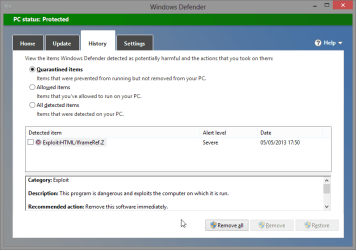
About a month ago one of the FB friends of the girls had shared once again one of these "Like this and you get 1,000 new friends" links which when clicked did seemingly nothing else than opened an FB page but at the same moment my AV warned me about a threat.

2013-05-05_100059.png

Checking the pop-up blocker revealed that the link had tried to open an adult XXX site in a new window.

For me this kind of thing, even if it had happened only once in my whole computing history, is a clear sign never to surf without protection. Doing it without protection would be foolish, as far as I can see.

Kari
 

My Computer My Computer

At a glance

Windows 10 Pro x64 EN-GB1.6 GHz Intel Core i7-720QM Processor6 GBATI Mobility Radeon HD 5850 Graphics
Computer type
Laptop
Computer Manufacturer/Model Number
HP ENVY 17-1150eg
OS
Windows 10 Pro x64 EN-GB
CPU
1.6 GHz Intel Core i7-720QM Processor
Memory
6 GB
Graphics Card(s)
ATI Mobility Radeon HD 5850 Graphics
Sound Card
Beats sound system with integrated subwoofer
Monitor(s) Displays
17" laptop display, 22" LED and 32" Full HD TV through HDMI
Screen Resolution
1600*900 (1), 1920*1080 (2&3)
Hard Drives
Internal: 2 x 500 GB SATA Hard Disk Drive 7200 rpm
External: 2TB for backups, 3TB USB3 network drive for media
Cooling
As Envy runs a bit warm, I have it on a Cooler Master pad
Keyboard
Logitech diNovo Media Desktop Laser (bluetooth)
Mouse
Logitech Performance Mouse MX
Internet Speed
50/10 Mbps VDSL
Antivirus
Windows Defender 4.3.9431.0
Browser
Maxthon 3.5.2., IE11
Facebook itself is evil, It makes more and more kids rely on the Net for friends instead of making real live friends like we used to do before the Net. One never knows who is really on the other end of your FB chat? It is a tool used by pedophiles and has also caused many people to lose their jobs. If you are looking for a job just remember- whatever you put on the Net stays on the Net just like that Vegas saying.:)
 

My Computer My Computer

At a glance

Win 10 Pro 64Intel Core i7 960 @3.20 GHz24.0 GB DDR3EVGA GTX 750Ti
Computer type
PC/Desktop
Computer Manufacturer/Model Number
Custom Build
OS
Win 10 Pro 64
CPU
Intel Core i7 960 @3.20 GHz
Motherboard
MSI MS7522
Memory
24.0 GB DDR3
Graphics Card(s)
EVGA GTX 750Ti
Monitor(s) Displays
LG E2341 23 Inch
Screen Resolution
1920x1080
Hard Drives
1TB Western Dgital 1002FAEX-00Y9A0
1TB Hitachi HDS721010CLA322
PSU
700 Watt
Case
Haf 912
Cooling
Fans
Keyboard
Logitech MK710
Mouse
Logitech M705
Internet Speed
Cable
Antivirus
AIS 2015 .10.0.2225
Browser
Firefox 49
Other Info
MalwareBytes Anti-Rootkit utility
As ridiculous as it sounds, my threat level increased clearly after my two nieces (13 & 14) got from their mother a permission to join Facebook around last Christmas. One of the conditions in joining FB was that they do not only befriend their mother, my sister but also me as the "family IT geek". .........
Wait until they learn that they can exclude certain friends from seeing certain posts :-(

Like you discovered, the iFrame code would have taken people to a website that they probably did not wish to visit... but not an infection per se. It is listed as severe because the websites that the iFrame loads will often try other exploits. But you still would have to agree to the installation of the malware.

A question that I cannot find the answer to:
Are there true drive-by infections* that can be detected/prevented by AV tools?

*No user interactions - just visit the website either directly or via an iFrame.

It is probably best for most users to put up with using an AV tool and hold on to the slim hope that it can prevent a true drive-by infection via heuristics.
 

My Computer My Computer

At a glance

W7 Pro SP1 64biti78GBIntel HD Graphics
Computer type
Laptop
Computer Manufacturer/Model Number
Employer provided Dell Latitude
OS
W7 Pro SP1 64bit
CPU
i7
Memory
8GB
Graphics Card(s)
Intel HD Graphics
Hard Drives
crappy SSD
Antivirus
Employer mandated Symantec Endpoint Protection
Browser
Pale Moon 64bit, IE11 64bit & Chrome 64bit
I have always been an advocate of not only using anti viruses but paid for anti viruses. For many years i have spent my hard earned cash paying for an AV so I don't get any nasty software on my computer that will cause my machine to not work correctly or steal my money.

As of today I have decided to remove my paid for Kaspersky before the subscription is up and not even replace it with a free one such as MS security Essentials. The reason I have decided to take this action, is because the only piece of software that has caused me any real problems with my computer performance, or cost me money is my AV.

I have had periods before where I have used a free AV such as MS Essentials, and I have found no difference what so ever in the rate at which I get or don't get infected. I have also noticed that the only software that ever has any affect on performance is the AV. I have therefore come to realize that the AV itself is the virus that is either costing me money, slowing my machine down or doing both.

What are your opinions on the matter, do you share my opinion that ALL AV's are a waste of time, resources and money?

I used all the Anti-virus I can think of, after awhile I decided to get rid of all of them. The reason is because it slows down your computer speed . The only one I recommend would be malwarebytes. Such an amazing protector . Now I know many others have different opinions when it comes to virus protectors but I would suggest for most people to get malwarebytes. I have had this laptop for 2 years now , and still functioning as when I first got it.
 

My Computer My Computer

At a glance

Windows 8.1 64 bitWindows 8.1 64-bit4096 MB RAMMicrosoft Basic Display Adapter
Computer type
Laptop
Computer Manufacturer/Model Number
Acer Aspire M5100
OS
Windows 8.1 64 bit
CPU
Windows 8.1 64-bit
Motherboard
Toshiba L745D
Memory
4096 MB RAM
Graphics Card(s)
Microsoft Basic Display Adapter
Sound Card
High Definition Audio Device
Monitor(s) Displays
1366x768
Screen Resolution
1366x768
Keyboard
Logitech Keyboard K800
Antivirus
MalwareBytes
Browser
Google Chrome
~~~
I used all the Anti-virus I can think of, after awhile I decided to get rid of all of them. The reason is because it slows down your computer speed . The only one I recommend would be malwarebytes. Such an amazing protector . Now I know many others have different opinions when it comes to virus protectors but I would suggest for most people to get malwarebytes. I have had this laptop for 2 years now , and still functioning as when I first got it.
Are you talking about the paid version of Malwarebytes Anti-Malware?

Windows 8 has MS's anti-virus product built-in. Have you disabled it?
 

My Computer My Computer

At a glance

W7 Pro SP1 64biti78GBIntel HD Graphics
Computer type
Laptop
Computer Manufacturer/Model Number
Employer provided Dell Latitude
OS
W7 Pro SP1 64bit
CPU
i7
Memory
8GB
Graphics Card(s)
Intel HD Graphics
Hard Drives
crappy SSD
Antivirus
Employer mandated Symantec Endpoint Protection
Browser
Pale Moon 64bit, IE11 64bit & Chrome 64bit
I have always been an advocate of not only using anti viruses but paid for anti viruses. For many years i have spent my hard earned cash paying for an AV so I don't get any nasty software on my computer that will cause my machine to not work correctly or steal my money.

As of today I have decided to remove my paid for Kaspersky before the subscription is up and not even replace it with a free one such as MS security Essentials. The reason I have decided to take this action, is because the only piece of software that has caused me any real problems with my computer performance, or cost me money is my AV.

I have had periods before where I have used a free AV such as MS Essentials, and I have found no difference what so ever in the rate at which I get or don't get infected. I have also noticed that the only software that ever has any affect on performance is the AV. I have therefore come to realize that the AV itself is the virus that is either costing me money, slowing my machine down or doing both.

What are your opinions on the matter, do you share my opinion that ALL AV's are a waste of time, resources and money?

I used all the Anti-virus I can think of, after awhile I decided to get rid of all of them. The reason is because it slows down your computer speed . The only one I recommend would be malwarebytes. Such an amazing protector . Now I know many others have different opinions when it comes to virus protectors but I would suggest for most people to get malwarebytes. I have had this laptop for 2 years now , and still functioning as when I first got it.

MBAM is not a virus protector such as Kaspersky, Avast...etc. It is basically to be used in conjunction with an AV. It on the same level as Superantispyware, Spybot S&D..etc. AV's are not a waste of time or resources.
 

My Computer My Computer

At a glance

Win 10 Pro 64Intel Core i7 960 @3.20 GHz24.0 GB DDR3EVGA GTX 750Ti
Computer type
PC/Desktop
Computer Manufacturer/Model Number
Custom Build
OS
Win 10 Pro 64
CPU
Intel Core i7 960 @3.20 GHz
Motherboard
MSI MS7522
Memory
24.0 GB DDR3
Graphics Card(s)
EVGA GTX 750Ti
Monitor(s) Displays
LG E2341 23 Inch
Screen Resolution
1920x1080
Hard Drives
1TB Western Dgital 1002FAEX-00Y9A0
1TB Hitachi HDS721010CLA322
PSU
700 Watt
Case
Haf 912
Cooling
Fans
Keyboard
Logitech MK710
Mouse
Logitech M705
Internet Speed
Cable
Antivirus
AIS 2015 .10.0.2225
Browser
Firefox 49
Other Info
MalwareBytes Anti-Rootkit utility
~~~
I used all the Anti-virus I can think of, after awhile I decided to get rid of all of them. The reason is because it slows down your computer speed . The only one I recommend would be malwarebytes. Such an amazing protector . Now I know many others have different opinions when it comes to virus protectors but I would suggest for most people to get malwarebytes. I have had this laptop for 2 years now , and still functioning as when I first got it.
Are you talking about the paid version of Malwarebytes Anti-Malware?

Windows 8 has MS's anti-virus product built-in. Have you disabled it?

Not paid but trial, still does the job though. I have not disabled the MS Anti-virus.
 

My Computer My Computer

At a glance

Windows 8.1 64 bitWindows 8.1 64-bit4096 MB RAMMicrosoft Basic Display Adapter
Computer type
Laptop
Computer Manufacturer/Model Number
Acer Aspire M5100
OS
Windows 8.1 64 bit
CPU
Windows 8.1 64-bit
Motherboard
Toshiba L745D
Memory
4096 MB RAM
Graphics Card(s)
Microsoft Basic Display Adapter
Sound Card
High Definition Audio Device
Monitor(s) Displays
1366x768
Screen Resolution
1366x768
Keyboard
Logitech Keyboard K800
Antivirus
MalwareBytes
Browser
Google Chrome
Could someone please provide some credible links and / or results to show how and how much for instance MSE slows down a Windows computer?
 

My Computer My Computer

At a glance

Windows 10 Pro x64 EN-GB1.6 GHz Intel Core i7-720QM Processor6 GBATI Mobility Radeon HD 5850 Graphics
Computer type
Laptop
Computer Manufacturer/Model Number
HP ENVY 17-1150eg
OS
Windows 10 Pro x64 EN-GB
CPU
1.6 GHz Intel Core i7-720QM Processor
Memory
6 GB
Graphics Card(s)
ATI Mobility Radeon HD 5850 Graphics
Sound Card
Beats sound system with integrated subwoofer
Monitor(s) Displays
17" laptop display, 22" LED and 32" Full HD TV through HDMI
Screen Resolution
1600*900 (1), 1920*1080 (2&3)
Hard Drives
Internal: 2 x 500 GB SATA Hard Disk Drive 7200 rpm
External: 2TB for backups, 3TB USB3 network drive for media
Cooling
As Envy runs a bit warm, I have it on a Cooler Master pad
Keyboard
Logitech diNovo Media Desktop Laser (bluetooth)
Mouse
Logitech Performance Mouse MX
Internet Speed
50/10 Mbps VDSL
Antivirus
Windows Defender 4.3.9431.0
Browser
Maxthon 3.5.2., IE11
Could someone please provide some credible links and / or results to show how and how much for instance MSE slows down a Windows computer?

I don't think it does man.
 

My Computer My Computer

At a glance

Windows 8.1 64 bitWindows 8.1 64-bit4096 MB RAMMicrosoft Basic Display Adapter
Computer type
Laptop
Computer Manufacturer/Model Number
Acer Aspire M5100
OS
Windows 8.1 64 bit
CPU
Windows 8.1 64-bit
Motherboard
Toshiba L745D
Memory
4096 MB RAM
Graphics Card(s)
Microsoft Basic Display Adapter
Sound Card
High Definition Audio Device
Monitor(s) Displays
1366x768
Screen Resolution
1366x768
Keyboard
Logitech Keyboard K800
Antivirus
MalwareBytes
Browser
Google Chrome
I was referring to those posts in this thread arguing that as all AV slows down your PC, the cons overweight pros. As I have not noticed any slow down I would like to see some proof.
 

My Computer My Computer

At a glance

Windows 10 Pro x64 EN-GB1.6 GHz Intel Core i7-720QM Processor6 GBATI Mobility Radeon HD 5850 Graphics
Computer type
Laptop
Computer Manufacturer/Model Number
HP ENVY 17-1150eg
OS
Windows 10 Pro x64 EN-GB
CPU
1.6 GHz Intel Core i7-720QM Processor
Memory
6 GB
Graphics Card(s)
ATI Mobility Radeon HD 5850 Graphics
Sound Card
Beats sound system with integrated subwoofer
Monitor(s) Displays
17" laptop display, 22" LED and 32" Full HD TV through HDMI
Screen Resolution
1600*900 (1), 1920*1080 (2&3)
Hard Drives
Internal: 2 x 500 GB SATA Hard Disk Drive 7200 rpm
External: 2TB for backups, 3TB USB3 network drive for media
Cooling
As Envy runs a bit warm, I have it on a Cooler Master pad
Keyboard
Logitech diNovo Media Desktop Laser (bluetooth)
Mouse
Logitech Performance Mouse MX
Internet Speed
50/10 Mbps VDSL
Antivirus
Windows Defender 4.3.9431.0
Browser
Maxthon 3.5.2., IE11
I use MSE, Trend Housecalls and common sense to keep bugs and stuff off my computer. Because of my surfing patterns and email setup my system stays pretty clean. I think AV is important, but a good defense and common sense is just as important.

I have a very low tolerance for viruses, bots etc. If I get something and I can't remove it in 48-72 hours, I reformat and re-install. That's happened twice in the seven years I've owned this laptop.
 

My Computer My Computer

At a glance

Windows 7 Home Premium (x64) Service Pack 1 (...1.80ghz T7100 Intel Core2 Duo4gbMobile Intel 965 Express Chipset Family [Disp...
Computer type
Laptop
Computer Manufacturer/Model Number
MSI Notebook PR600 Ver 1.000
OS
Windows 7 Home Premium (x64) Service Pack 1 (build 7601)
CPU
1.80ghz T7100 Intel Core2 Duo
Motherboard
MS-1637 Ver 1.000
Memory
4gb
Graphics Card(s)
Mobile Intel 965 Express Chipset Family [Display adapter]
Hard Drives
WD 120gb generic
Antivirus
Common Sense
Browser
Firefox Portable
Could someone please provide some credible links and / or results to show how and how much for instance MSE slows down a Windows computer?
There was this link from a few weeks ago:
Speed Up PC Performance by Replacing Microsoft's Built-In Antivirus
The chart seems to indicate a difference of 5 (arbitrary units?) between no av tool installed and MSE... or maybe I'm reading it wrong. I don't notice a slowdown, but each computer setup is different. It would be nice if the OP would detail the slow down witnessed.
 

My Computer My Computer

At a glance

W7 Pro SP1 64biti78GBIntel HD Graphics
Computer type
Laptop
Computer Manufacturer/Model Number
Employer provided Dell Latitude
OS
W7 Pro SP1 64bit
CPU
i7
Memory
8GB
Graphics Card(s)
Intel HD Graphics
Hard Drives
crappy SSD
Antivirus
Employer mandated Symantec Endpoint Protection
Browser
Pale Moon 64bit, IE11 64bit & Chrome 64bit
I use MSE, Trend Housecalls and common sense to keep bugs and stuff off my computer. Because of my surfing patterns and email setup my system stays pretty clean. I think AV is important, but a good defense and common sense is just as important.

I have a very low tolerance for viruses, bots etc. If I get something and I can't remove it in 48-72 hours, I reformat and re-install. That's happened twice in the seven years I've owned this laptop.
Your story (as told) actually adds to one of the points that the OP was making:
If you still get infected, then why have an AV tool installed?

Of course - this assumes that there are negatives to having an av tool installed.
The OP claims a performance hit - even with MSE
(but the OP won't revisit using MSE at it lowest settings)

The OP correctly asserts that AV tools can hamper the removal of an infection.
(A minor issue - in my mind.)

False positives was an issue that I raised along with the general principle of:
If you don't use the software, uninstall it.

For those that have not read the entire thread - I'll repeat the I suggest people use MSE.
 

My Computer My Computer

At a glance

W7 Pro SP1 64biti78GBIntel HD Graphics
Computer type
Laptop
Computer Manufacturer/Model Number
Employer provided Dell Latitude
OS
W7 Pro SP1 64bit
CPU
i7
Memory
8GB
Graphics Card(s)
Intel HD Graphics
Hard Drives
crappy SSD
Antivirus
Employer mandated Symantec Endpoint Protection
Browser
Pale Moon 64bit, IE11 64bit & Chrome 64bit
"I used to run Avirafree version, but when I went over to the Win 8 preview (CP, I think it was) I decided to give their 'new, improved' Windows Defender a shot. So far, I've been happy with it. It runs in tandem with MalwareBytes Pro (and no, they don't clash, they work well together).

Really, the only issue I've had is that MalwareBytes Pro is sometimes too ready to block a site/program.

I run the latest version of MSE and MalwareBytes trial on the Win 7 machine, with similarly satisfactory results."


And...


"While doing one of my IT courses, we set an XP Pro (no SP) machine up without any security and connected it to the internet, as an experiment. Didn't do anything with it, just hooked it up and opened IE6. It was hit within minutes, and crippled into unusability within an hour. We re-imaged it, installed SP3 and an AV program and did the same thing. It was still clean at the end of the week. But I'm constantly amazed by the number of machines I see with either no protection, or it's so hopelessly out-of-date that it's useless, or, worst of all, it's not even turned on. And yet who's the first to cop the blame when they get a 'nasty'? Yep, Microsoft."


Quotes from a couple of my posts on the same subject on EightForums.


Wenda.
 

My Computer My Computer

At a glance

Windows 7 Ultimate SP1 32-bit; Windows 7 Home...Intel T6500 Core 2 Duo@2Ghz.3GB DDR2Intel 4500MHD
Computer type
Laptop
Computer Manufacturer/Model Number
Acer AS5735
OS
Windows 7 Ultimate SP1 32-bit; Windows 7 Home Premium 64-bit (VM).
CPU
Intel T6500 Core 2 Duo@2Ghz.
Motherboard
Acer
Memory
3GB DDR2
Graphics Card(s)
Intel 4500MHD
Sound Card
Realtek onboard
Monitor(s) Displays
Built-in, no touch
Screen Resolution
1366x768
Hard Drives
250GB SATA in two equal partitions.
PSU
Stock
Case
Laptop
Cooling
Stock
Keyboard
Full 101-key
Mouse
USB cordless IR
Antivirus
MSE
Browser
IE9, Firefox.
Other Info
A top little machine that hasn't let me down once since the day I removed it from its packaging over four years ago. It's done everything I could want, and more, all without a single issue. 10/10, Acer!!
Back
Top